
Introduction
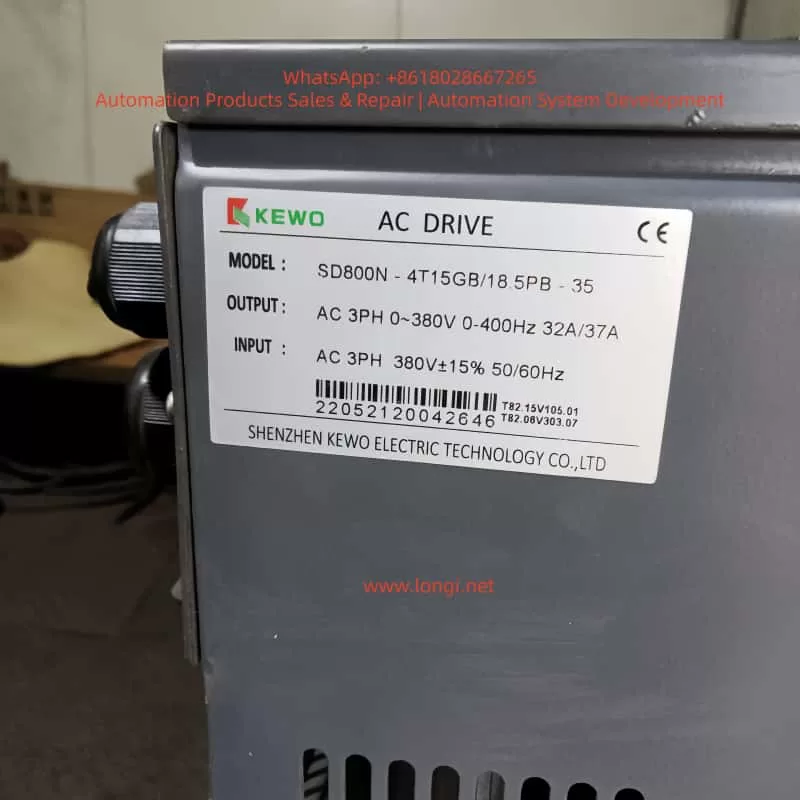
KEWO SD800N series inverters, as the upgraded iteration of the AD800 series, are widely deployed in industrial drive applications—including fans, pumps, conveyors, and textile machinery—due to their high reliability, rich communication capabilities, and flexible parameter configuration. Supporting protocols like Modbus RTU/ASCII, Profibus-DP (optional), and Ethernet/IP (optional), they meet the remote monitoring and control needs of the Industrial Internet of Things (IIoT). However, the E024 communication fault ranks among the most frequent issues reported by users: according to a 2023 survey by an industrial automation forum, E024 accounts for ~15% of SD800N fault repairs, primarily in remote communication scenarios (e.g., water treatment plants, material handling lines).
The E024 fault stems from interruptions in the communication link between the inverter and upper computer (e.g., PLC, HMI, IPC) or failed data exchange. Unaddressed, it prevents the inverter from receiving start/stop commands, frequency setpoints, or status feedback—severely impacting production efficiency. This article combines SD800N’s hardware characteristics, communication principles, and field cases to dissect E024’s root causes and provide a repeatable, systematic troubleshooting workflow for engineers to minimize downtime.
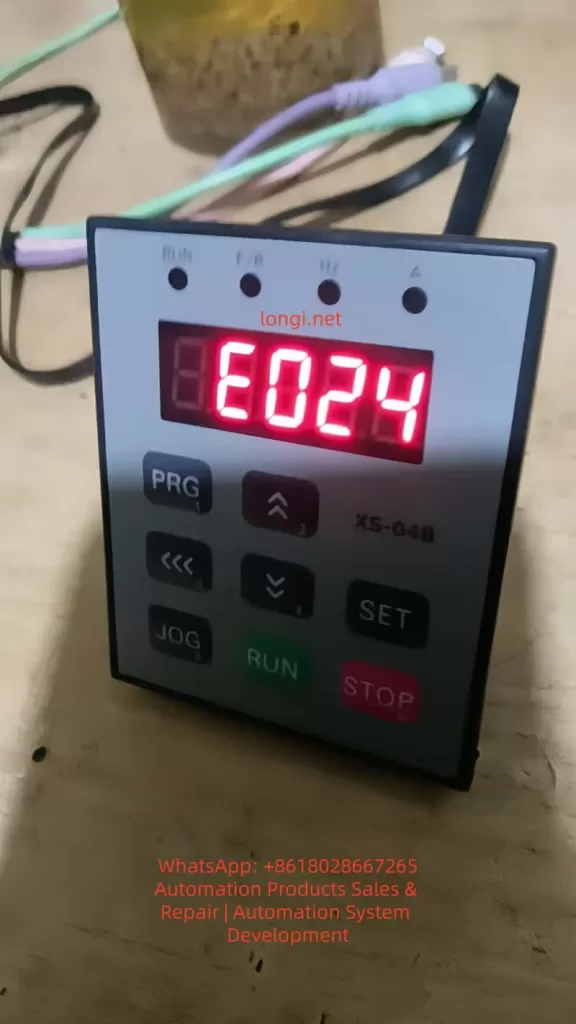
I. E024 Fault Definition and Root Causes
Per the KEWO SD800N Series Inverter User Manual, E024 corresponds to “Communication Fault”, triggered when:
- The inverter fails to receive a valid command from the upper computer within the set timeout (default: 10 seconds, adjustable via P9.05);
- The inverter’s response frame is not acknowledged by the upper computer.
The manual explicitly lists three core causes:
- Abnormal Upper Computer: Power failure, software crashes, damaged communication interfaces, missing drivers, or incorrect protocol configuration (e.g., PLC/HMI settings mismatch);
- Defective Communication Cable: Incorrect cable type (e.g., RS232 instead of RS485), reverse wiring (A/B lines swapped), physical damage/looseness, or missing terminal resistors (for long-distance links);
- Incorrect Communication Parameters: Mismatch between the inverter and upper computer in baud rate, station address, parity, or protocol (e.g., Modbus RTU vs. ASCII).
II. Communication Principles and Key Concepts
SD800N’s standard communication interface is RS485 (half-duplex), which uses differential signaling (A/B lines) to resist electromagnetic interference (EMI)—critical for industrial environments. Its primary protocol is Modbus RTU (binary format, high efficiency), with the following frame structure:
| Start Bit | Station Address | Function Code | Data Area | CRC Check | Stop Bit |
|---|---|---|---|---|---|
| 1 bit | 1 byte | 1 byte | N bytes | 2 bytes | 1 bit |
For example:
- Upper computer sends:
01 06 00 01 00 64(Station 1, Function Code 06 [write single register], Address 0001H, Value 0064H = 100Hz); - Inverter responds:
01 06 00 01 00 64(confirmation).
If no response is received or the CRC check fails, the inverter triggers E024.
III. Systematic Troubleshooting Workflow for E024
Step 1: Hardware Connection Inspection (Most Common Fault Point)
Goal: Verify no physical defects in cables, connectors, or terminal resistors.
- Interface Confirmation:
SD800N’s communication terminal is labeled “RS485” or “A/B” (some models use “+/-“: “+” = A, “-” = B). For RJ45 (Ethernet) interfaces, ensure the cable is a crossover type (required for some devices). - Cable Type Check:
Use shielded twisted pair (STP) with a wire diameter of 0.5–1.0mm². Never use RS232 cables—their voltage levels (±5V) mismatch RS485 (±2V) and will damage the interface. - Wiring Correctness:
Use a multimeter’s buzzer mode to test continuity:- If the cable is marked “A”/”B”, match upper computer A → inverter A, B → B;
- If unmarked, measure voltage between A/B (powered on): RS485 should show -2V ~ +2V. A reading of 0V or reversed polarity (-5V ~ +5V) indicates reverse wiring.
- Terminal Resistor Check:
For links >100 meters, install a 120Ω/0.25W resistor at both ends of the bus to match RS485’s characteristic impedance (120Ω) and eliminate signal reflections.- Test: Disconnect power, measure resistance at both ends of the cable. A reading of ~120Ω confirms correct installation.
- Connector Integrity:
Inspect connectors for oxidation, bent pins, or looseness. Re-crimp or replace with industrial-grade DB9/RJ45 connectors if needed.
Step 2: Upper Computer Validation (Rule Out Upper System Issues)
Goal: Confirm the upper computer’s hardware, software, and protocol settings are functional.
- Hardware Check:
- Power: Verify the upper computer (PLC/IPC) is powered on (indicator lights active);
- Interface: For USB-to-RS485 modules, ensure the “TX/RX” LED flashes (normal communication) and drivers (e.g., CH340, PL2303) are installed in Device Manager;
- Wiring: Upper computer RS485 A → inverter A, B → B.
- Software/Protocol Configuration:
Open the upper computer software (e.g., KingView, WinCC, Siemens TIA Portal) and cross-verify:- Protocol: Must be “Modbus RTU” (SD800N default);
- Baud Rate: Match inverter P9.01 (e.g., 9600, 19200, 38400);
- Station Address: Match inverter P9.02 (default: 1; unique for multi-inverter systems);
- Parity: Match inverter P9.03 (None/Odd/Even);
- Stop Bit: Match inverter P9.04 (1 or 2 bits);
- Register Address: Align with SD800N’s Modbus map (e.g., operating frequency = 40001H, offset 0000H).
- Communication Test:
Use a serial debugging tool (e.g., SSCOM, Modbus Poll) to simulate upper computer commands:- Send:
01 03 00 00 00 01 84 0A(Station 1, Function Code 03 [read registers], Address 0000H, 1 register); - Expected Response:
01 03 02 00 64 B8 1E(Value = 0064H = 100Hz, CRC valid); - If no response or an error frame (e.g.,
01 83 02 00 01 F8 3A[illegal function code]) is returned, recheck parameters or wiring.
- Send:
Step 3: Inverter Parameter Verification (Critical but Overlooked)
SD800N’s communication parameters reside in Group P9 (Communication Parameters). Below are key settings (refer to the latest manual for batch-specific variations):
| Parameter | Name | Range | Factory Default | Description |
|---|---|---|---|---|
| P9.00 | Protocol Selection | 0=Modbus RTU | 0 | 1=Modbus ASCII (rarely used) |
| P9.01 | Baud Rate | 0=9600 | 0 | 1=19200; 2=38400; 3=57600; 4=115200 |
| P9.02 | Station Address | 1–247 | 1 | Unique for multi-inverter systems |
| P9.03 | Parity | 0=None | 1 | 1=Odd; 2=Even |
| P9.04 | Stop Bit | 0=1 bit | 0 | 1=2 bits (rare) |
| P9.05 | Timeout (100ms units) | 0–255 | 10 | Increase for long links (e.g., 20 = 2 seconds) |
Troubleshooting Priorities:
- Confirm P9.00 = 0 (Modbus RTU); switch to 1 if using ASCII;
- Match P9.01 to the upper computer’s baud rate;
- Ensure P9.02 is unique across all inverters on the bus;
- Align P9.03/P9.04 with the upper computer’s parity/stop bit settings;
- Avoid setting P9.05 too low (e.g., 10 = 1 second may be insufficient for 200m links).
Supplementary Parameters:
- P0.01 (Operation Command): Set to 2 (RS485) for upper computer control;
- P0.03 (Main Frequency): Set to 9 (Communication) for remote frequency setting.
Incorrect settings here won’t trigger E024 but will prevent the inverter from executing commands—verify only after resolving communication.
Step 4: Interference Mitigation (Invisible but Common Root Cause)
Industrial EMI—from 380V power lines, motor surges, or inverter switching noise—is a top cause of intermittent E024 faults.
Mitigation Strategies:
- Wiring Isolation:
Separate communication cables from power lines (input/output terminals) by ≥20cm. Avoid parallel routing; cross vertically if necessary. - Shield Grounding:
Ground the cable shield at one end only (preferably the inverter’s PE terminal or upper computer’s ground) to prevent ground loops.- Test: Measure shield-to-PE resistance with a multimeter—should be <1Ω.
- Filtering:
- Add ferrite cores to both ends of the communication cable to suppress high-frequency noise;
- Install a KEWO-dedicated EMI filter at the inverter’s RS485 port to block differential/common-mode interference.
- Distance from Interference Sources:
Route cables away from motors, transformers, or welders (≥50cm spacing). - Upgrade Communication Media:
For severe interference or long distances (>1200m), use fiber optic modules (optional for SD800N, e.g., Profibus-DP/Ethernet). Fiber optics are immune to EMI and ideal for harsh environments.
IV. Field Case Studies
Case 1: Reverse Wiring Causes E024
Scenario: A water treatment plant’s SD800N inverter uses ordinary twisted pair (not STP) with A/B reversed.
Symptom: Inverter displays E024; PLC cannot start/stop the motor.
Resolution:
- Replace cable with STP and rewire A→A, B→B;
- Add 120Ω terminal resistors (120m link);
- Test communication—fault cleared.
Case 2: Baud Rate Mismatch
Scenario: A textile mill’s SD800N inverter (P9.01=0 [9600]) communicates with an HMI set to 19200.
Symptom: HMI cannot read frequency; “Communication Error” alert.
Resolution: Set P9.01=1 (19200) and retest—communication restored.
Case 3: Station Address Conflict
Scenario: Three SD800N inverters on a conveyor line all use station address 1.
Symptom: Inverters alternate E024; PLC cannot target individual units.
Resolution: Set P9.02 to 1, 2, 3 for each inverter; update PLC station addresses—fault resolved.
Case 4: Missing Terminal Resistors
Scenario: A 200m RS485 link without terminal resistors.
Symptom: Intermittent E024; communication drops randomly.
Resolution: Install 120Ω resistors at both ends—fault eliminated.
V. Preventive Measures to Reduce E024 Occurrence
- Standardize Wiring:
Use STP, separate power/communication cables, and ground shields at one end. - Parameter Backup:
Save correct P9 parameters to the inverter’s EEPROM (via P0.09=2) or export to a PC using KEWO’s software. - Regular Inspections:
Quarterly checks:- Connector tightness/oxidation;
- Cable damage;
- Parameter integrity (e.g., P9.02, P9.01).
- Operator Training:
Prohibit unauthorized parameter changes. Require engineer approval for P9 modifications. - Use Specialized Tools:
Deploy serial debuggers (SSCOM) or Modbus testers (Modbus Poll) to accelerate troubleshooting. - Firmware Updates:
Contact KEWO support to upgrade firmware (e.g., fix CRC bugs in older versions).
VI. Safety Precautions
- Power Off Before Work: Disconnect 380V input power and verify DC bus voltage <36V (multimeter test).
- No Hot Plugging: Avoid inserting/removing communication connectors while powered—risk of short circuits.
- Multimeter Safety: Use AC 500V range for voltage, buzzer mode for continuity.
- Insulation: Wear insulated gloves/goggles when testing live equipment.
- Grounding: Never skip shield grounding—risk of electric shock.
VII. Conclusion
E024 is a common but manageable fault in KEWO SD800N inverters. Over 90% of cases are resolved by:
- Correct STP wiring with terminal resistors;
- Matching baud rate/station address/parity between inverter and upper computer;
- Mitigating EMI via shielding and isolation.
Preventive measures (standardized wiring, parameter backups, regular checks) can reduce E024 occurrence to <5%. For complex issues (e.g., protocol incompatibility, hardware failure), contact KEWO’s technical support (400-888-XXXX) to avoid warranty voidance.
Key Takeaway: Troubleshoot E024 systematically—start with hardware (cables/connectors), then software (parameters), then interference. Use specialized tools and field experience to minimize downtime.
Appendix: Common Modbus Register Addresses for SD800N (Reference)
| Register | Function | Data Type | Unit/Remarks |
|---|---|---|---|
| 40001H | Operating Frequency | UINT16 | 0.01Hz (0064H = 100Hz) |
| 40002H | Output Current | UINT16 | 0.1A (00C8H = 20A) |
| 40003H | Output Voltage | UINT16 | 1V (0177H = 375V) |
| 40010H | Current Fault Code | UINT16 | 0024H = E024 |
| 40011H | Fault History 1 | UINT16 | Most recent fault |
| 40012H | Fault History 2 | UINT16 | Second most recent fault |