Posted on

ABB EL3010-C / Uras26 Gas Analyzer Calibration Failure Analysis: From Abnormal SO₂ Concentration to “Raw Values Cannot Be Sampled”

In industrial flue gas monitoring, process gas analysis, environmental emission control, and chemical process measurement, the ABB EL3000 / EL3010-C gas analyzer is a widely used online analytical instrument. When configured with a Uras26 infrared analyzer module, it can measure infrared-active gases such as SO₂, CO₂, CO, NO, CH₄, and other process components. Because this type of analyzer involves optical detection, sample cells, temperature compensation, pressure compensation, EEPROM data sets, internal calibration cells, and external span gas calibration logic, a calibration failure should never be judged from one parameter alone.

A typical case involves an ABB EL3010-C gas analyzer that failed during SO₂ calibration. Two phenomena appeared at the same time. First, in ABB Optima TCT software, the Calibration Cell 1 parameter showed an apparently abnormal SO₂ concentration component, approximately 0.3134 ppm. Second, when manual zero calibration was performed from the analyzer front panel, the analyzer displayed the following error:

ERROR
Calibration canceled!
Raw values cannot be sampled!
SO2

Many technicians may see the first symptom and immediately conclude that the SO₂ calibration cell concentration is wrong, or that the EEPROM data is corrupted. However, from a troubleshooting perspective, the second message is more important. It means the analyzer cannot acquire a valid raw signal from the SO₂ channel during calibration. Therefore, this problem should not be treated simply as a wrong concentration value in the TCT configuration. The correct diagnostic sequence should be: verify whether the raw signal is valid, check detector status, confirm gas flow and calibration conditions, verify pressure and temperature compensation, and only then investigate whether the configuration data or EEPROM data set is corrupted.
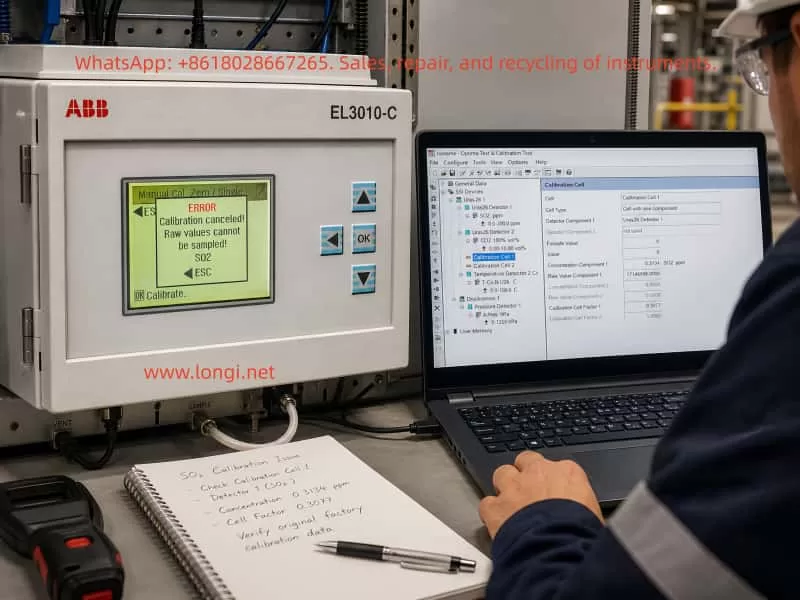
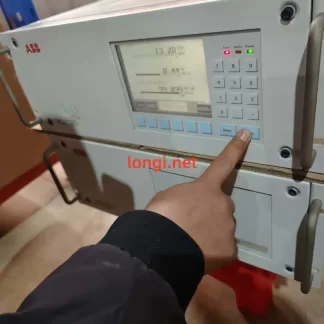
ABB EL3010-C gas analyzer showing an SO2 calibration error while a laptop displays Optima TCT software with Calibration Cell 1 settings and SO2 diagnostic data.

1. Basic Working Logic of ABB EL3010-C and the Uras26 Module

The ABB EL3010-C belongs to the ABB EL3000 / Advance Optima family of gas analyzers. Depending on configuration, the system may include a Uras26 infrared analyzer module, pressure sensor, temperature compensation unit, sample gas handling components, I/O modules, and a system controller.

The Uras26 is a nondispersive infrared gas analyzer module. Its basic principle is that infrared light passes through a sample gas cell. Different gas molecules absorb infrared energy at specific wavelengths. The detector receives the remaining light intensity, and this detector signal changes according to gas concentration. The analyzer then applies linearization, temperature compensation, pressure compensation, cross-sensitivity correction, and other algorithms to convert the raw detector signal into a displayed concentration value.

For service work, three types of data must be clearly distinguished.

The first type is the raw value, meaning the original detector signal or internal raw count. It is not ppm, not vol%, and not the final gas concentration. It is the basic signal used by the analyzer for calculation.

The second type is the measured value, meaning the calculated gas concentration after internal processing, such as SO₂ ppm or CO₂ vol%.

The third type is configuration and calibration data, including detector configuration, gas component settings, measurement ranges, calibration cell parameters, calibration factors, compensation parameters, and linearization data. These values are usually stored in the module EEPROM or related memory.

When the analyzer reports “Raw values cannot be sampled,” the message directly points to the first type of data. The SO₂ channel cannot provide a valid raw value for the calibration algorithm. At this stage, even if a calibration cell concentration value looks suspicious in TCT, it should not immediately be treated as the root cause.

2. The Role of Optima TCT: Not a Simple Routine Calibration Tool

ABB Optima TCT stands for Test & Calibration Tool. It connects to ABB Advance Optima analyzer modules and can read data sets from the module EEPROM. It can also save, archive, configure, test, and write data sets back to the module. In the TCT tree structure, a technician may see items such as General Data, Uras26 Detector, SO₂ component, measurement range, temperature detector, pressure detector, and Calibration Cell.

In field service, TCT is useful mainly for the following tasks:

  1. Reading and saving the original EEPROM configuration data;
  2. Checking the relationship between detectors, components, ranges, and calibration cells;
  3. Checking raw values, component values, and status codes;
  4. Checking pressure and temperature compensation values;
  5. Testing pumps, valves, module communication, and detector status;
  6. Restoring or correcting configuration data after confirming the correct data source;
  7. Comparing data set changes before and after calibration.

However, TCT should not be understood as the tool that must be used for daily zero and span calibration. In normal maintenance, routine zero calibration and span calibration are usually performed from the analyzer front panel, through the automatic calibration sequence, or through a plant control system. TCT is more suitable for engineering configuration, deeper diagnostics, data backup, and data recovery.

Therefore, when a customer asks, “How do you configure such gas analyzers?” the accurate answer is:

Routine zero and span calibration should normally be performed from the analyzer menu. TCT is mainly used to read, back up, inspect, and restore configuration data. When calibration from the analyzer menu fails, when parameters appear corrupted, or when module configuration is suspicious, TCT is then used to analyze EEPROM data sets and module status.

3. Calibration Cell Concentration Is Not the Same as External Span Gas Concentration

In this case, the TCT screen showed Calibration Cell 1 configured approximately as follows:

  • Cell Type: Cell with one component;
  • Detector Component 1: Uras26 Detector 1;
  • Component: SO₂ ppm;
  • Concentration Component 1: approximately 0.3134 SO₂ ppm;
  • Raw Value Component 1: approximately 1714596;
  • Calibration Cell Factor 1: approximately 0.3077.

Since the SO₂ measuring range was 0–200 ppm, many technicians would consider 0.3134 ppm unreasonable. From practical experience, this value does look suspicious for a 0–200 ppm SO₂ range. However, one point must be emphasized: the Calibration Cell concentration component is not the same as the external SO₂ span gas concentration, and it is not the live SO₂ reading.

An internal calibration cell is usually an internal optical reference, such as a reference gas cell or an equivalent absorption element inserted into the infrared optical path. It simulates a known absorption effect so that the analyzer can check or correct drift. Its parameters must match the exact analyzer, exact detector, exact calibration cell certificate, and original factory data. A technician should never simply replace this value with 50 ppm, 100 ppm, or any other span gas concentration just because the value looks wrong.

If the goal is to calibrate SO₂ using an external standard gas cylinder, the correct target is the analyzer’s zero/span calibration menu, not manual modification of the Calibration Cell concentration in TCT.

Therefore, the 0.3134 ppm value in Calibration Cell 1 should be treated as a suspicious parameter, but not as a confirmed fault by itself. The technician must first confirm:

  • Whether this analyzer physically has an internal calibration cell installed;
  • Whether Calibration Cell 1 really belongs to SO₂;
  • Whether Calibration Cell 2 belongs to another detector or component;
  • What the original factory equivalent concentration of the cell should be;
  • Whether the calibration cell factor was modified;
  • Whether the current data set truly belongs to this analyzer;
  • Whether someone previously wrote another analyzer’s data set into this module.

Without this information, EEPROM data should not be modified.
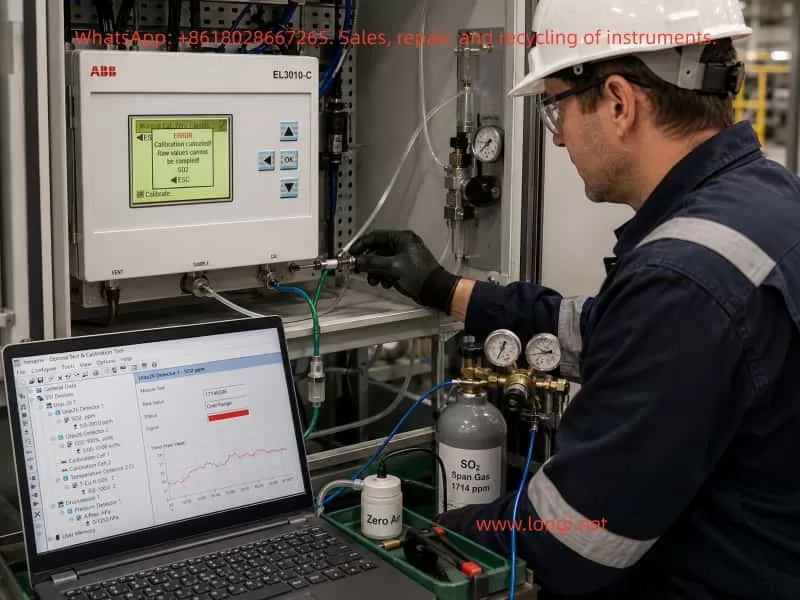
Technician troubleshooting an ABB EL3010-C Uras26 gas analyzer with SO2 zero and span gas connections while Optima TCT shows raw value and overrange status.

4. “Raw Values Cannot Be Sampled” Is the Core Diagnostic Clue

The analyzer front panel displayed:

Calibration canceled!
Raw values cannot be sampled!
SO2

This message is more diagnostically important than the concentration component shown in TCT. It means that during SO₂ calibration, the analyzer attempted to acquire the SO₂ raw signal, but the sampling failed or the sampled value was invalid. As a result, the calibration was canceled.

This type of error usually comes from several main categories.

4.1 Sample Gas Flow Problems

During calibration, zero gas or span gas must actually enter the analyzer sample cell. If the gas does not enter the analyzer, or if the flow is unstable, the analyzer cannot acquire a stable raw value.

Common causes include:

  • Zero gas not opened;
  • Abnormal outlet pressure from the gas cylinder regulator;
  • Too low gas flow;
  • Inlet pressure too high or too low;
  • Blocked sample filter;
  • Blocked exhaust outlet;
  • Internal sample pump not working;
  • Solenoid valve not switching to the correct gas path;
  • Tubing connected incorrectly;
  • Condensate inside the sample cell;
  • Sample gas path blocked by sulfate deposits, dust, or corrosion products.

Online SO₂ analyzers are especially vulnerable to acidic condensate and dust contamination. If the sample conditioning system fails, moisture, acid mist, sulfur compounds, and particles may enter the sample cell. Mild contamination may cause drift, while severe contamination may attenuate the optical path or block the gas path.

4.2 Abnormal Raw Signal from Uras26 Detector 1

If SO₂ is assigned to Uras26 Detector 1, failure to sample raw values may indicate a problem in the detector signal chain.

Typical symptoms include:

  • Raw value is zero or extremely low;
  • Raw value remains frozen;
  • Raw value exceeds the ADC range;
  • Raw value fluctuates violently;
  • Detector status code is abnormal;
  • Analyzer shows overrange, underrange, invalid value, or alarm indication;
  • Calibration cannot reach a stable condition.

Possible causes include infrared source aging, infrared source failure, chopper malfunction, detector aging, preamplifier failure, ADC acquisition fault, loose signal connection, module power problem, or severe contamination of the sample cell.

4.3 Optical System Contamination or Attenuation

The Uras26 measurement depends on a stable infrared optical path. If the source, mirror, window, sample cell, or detector optical path is contaminated, the detector signal will be reduced or distorted. In SO₂ applications, optical contamination is relatively common, especially when sample conditioning is poor. Moisture, acid mist, dust, and reaction products can deposit on optical windows.

If optical attenuation becomes severe, the analyzer may still display some value in measurement mode, but during calibration it may fail to satisfy the required stability, intensity range, or algorithm conditions. The result can be “Raw values cannot be sampled.”

4.4 Temperature or Pressure Compensation Problems

Infrared gas absorption is affected by temperature and pressure. In an EL3010-C / Uras26 configuration, temperature and pressure compensation are often present. In the TCT tree, this may appear as items such as T-Con U26 C and A.Pres hPa. If temperature or pressure measurements are invalid, the final SO₂ calculation may also become invalid, and calibration may be blocked.

The following points should be checked:

  • Whether the pressure value is reasonable, such as close to atmospheric pressure or within the expected process range;
  • Whether the temperature value is reasonable;
  • Whether the pressure sensor has an alarm;
  • Whether the temperature compensation status is normal;
  • Whether the compensation items are configured correctly;
  • Whether the pressure or temperature value is used in the current SO₂ range calculation.

If the pressure sensor is open-circuit, short-circuit, out of range, or incorrectly configured, the analyzer may be unable to calculate a valid SO₂ value.

4.5 Configuration Data or EEPROM Data Set Problems

If hardware and gas flow are normal, but TCT shows logical inconsistencies between detector, component, measurement range, and calibration cell configuration, the EEPROM data set may have been modified incorrectly or corrupted.

Common situations include:

  • A technician wrote another analyzer’s data set into this module;
  • A CPU board or memory device was replaced but the correct data set was not restored;
  • Calibration cell settings were modified incorrectly in the full version of TCT;
  • Detector 1 / Detector 2 assignment does not match SO₂ / CO₂ component assignment;
  • Measurement range is missing;
  • Correction function points to a non-existent component;
  • Calibration cell points to the wrong detector;
  • Data set is incompatible with the actual module type;
  • EEPROM memory is unstable.

However, EEPROM failure should not be the first assumption. It should be investigated only after gas flow, detector raw value, pressure, temperature, and optical condition have been checked.

5. Correct Troubleshooting Sequence: Do Not Modify Parameters First

The worst response to this type of problem is to directly modify the concentration component in TCT and write it back to EEPROM. This may destroy recoverable original data and turn a calibration problem into a serious configuration problem.

A safer diagnostic process is as follows.

Step 1: Fully Back Up the Current Data Set

After connecting TCT, read the module data and save it immediately. The saved file extension depends on the module type. Analyzer module files are commonly saved as a format such as .d04. The automatic backup copy generated by TCT should also be preserved.

At minimum, save two files:

  • Original file before testing;
  • File after zero calibration or after the error occurs.

If it is necessary to determine whether a parameter “changed by itself,” the conclusion must be based on a comparison of before-and-after data files, not memory or screenshots alone.

Step 2: Do Not Write to EEPROM

Before the fault is confirmed, do not execute Send Module Data and do not write any modified data back to the analyzer module. This is especially important for Calibration Cell, Detector, Component, Range, and Correction Function settings.

Step 3: Use Module Test View to Check Real Status

The Module Test View in TCT is the most important diagnostic screen in this case. The following values should be checked:

  • Uras26 Detector 1 raw value;
  • Uras26 Detector 1 status;
  • SO₂ component measured value;
  • SO₂ percentage of range;
  • SO₂ status code;
  • Active correction functions;
  • Pressure value;
  • Temperature value;
  • Pump and valve test status.

If the SO₂ raw value is missing, frozen, overrange, or has an abnormal status, the problem already exists before calibration. In that case, there is no point focusing only on calibration cell concentration.

Step 4: Confirm Zero Gas and Flow

Before performing zero calibration, confirm that the zero gas source is correct. SO₂ zero calibration is usually performed with high-purity nitrogen or suitable zero gas. Clean air may be acceptable in some applications, but only if it meets the analyzer and process requirements.

The following field checks are necessary:

  • Whether zero gas is connected to the correct inlet;
  • Whether flow rate meets analyzer requirements;
  • Whether the outlet is open;
  • Whether the internal pump is operating;
  • Whether solenoid valves are switching correctly;
  • Whether the sample conditioning system is dry and clean;
  • Whether there is condensate or blockage.

If the gas path is not open, the analyzer cannot sample a stable raw value.

Step 5: Observe Whether SO₂ Is Valid in Measurement Mode

Before repeating calibration, check whether SO₂ is displayed normally in measurement mode. If SO₂ is already invalid, unstable, overrange, or constantly negative in measurement mode, the problem is not the calibration operation itself. The detection chain already has an issue.

The symptoms can be interpreted as follows:

  • SO₂ value is stable in measurement mode, but calibration fails: likely calibration condition, stability judgment, or configuration problem;
  • SO₂ value is unstable: likely gas flow fluctuation, optical source problem, or detector issue;
  • SO₂ value is overrange: possible wrong gas concentration, optical contamination, configuration error, or real contamination;
  • SO₂ value is invalid: prioritize raw value, ADC, pressure, and temperature compensation checks;
  • SO₂ value remains frozen: possible signal chain freeze or data update failure.

Step 6: Check Pressure and Temperature Compensation

Verify whether pressure and temperature values are within reasonable ranges. If pressure or temperature is abnormal, correct the compensation signal first. Otherwise, even a healthy SO₂ detector may produce invalid calculated concentration.

Step 7: Only Then Investigate Calibration Cell Configuration

Only after raw value, gas flow, pressure, temperature, and SO₂ measurement stability are confirmed should Calibration Cell 1 and Calibration Cell 2 be investigated.

At that point, check:

  • Whether Calibration Cell 1 should be assigned to SO₂;
  • Whether Calibration Cell 2 should be assigned to CO₂;
  • Whether Cell Type is correct;
  • Whether Detector Component 1 / 2 are correct;
  • Whether Concentration Component matches original factory data;
  • Whether Calibration Cell Factor is reasonable;
  • Whether an original backup data set is available for recovery.

Without an original certificate or backup, calibration cell parameters should not be reconstructed by guesswork.

6. How to Judge Whether EEPROM or Memory Is Faulty

When a parameter appears to change unexpectedly, technicians often suspect EEPROM failure. This is possible, but evidence is required.

A real EEPROM or memory data problem usually shows symptoms such as:

  1. Parameters are lost after power cycling;
  2. The same data reads differently each time;
  3. Serial number, module type, detector configuration, or range configuration becomes abnormal;
  4. Different screens show contradictory component, range, or detector logic;
  5. TCT reports errors such as data not compatible, unknown index, invalid subindex, or module data incorrect;
  6. Before-and-after file comparison shows irregular changes in non-calibration configuration fields;
  7. Write verification fails;
  8. The analyzer randomly reports configuration errors or module identification errors.

If only zero correction, drift, raw reference, or offset-related values change after zero calibration, that may be part of the normal calibration process and does not prove EEPROM failure.

The correct method is data comparison:

  1. Read the module data with TCT and save it as before_zero;
  2. Take screenshots of Calibration Cell 1, Calibration Cell 2, SO₂ component, range, and Module Test View;
  3. Perform zero calibration from the analyzer front panel;
  4. Re-read the module data from the module, instead of opening the old file;
  5. Save it as after_zero;
  6. Compare the two files and screenshots.

If changes are mainly limited to zero, drift, calibration result, or correction values, they may be normal or calibration-related. If nominal Calibration Cell concentration, Detector assignment, Range definition, Component name, or similar configuration fields change without reason, then corrupted data or memory instability becomes much more likely.

7. Relationship Between External Gas Calibration and Internal Calibration Cell

For a 0–200 ppm SO₂ measuring range, reliable calibration is usually based on external standard gas. A typical procedure is:

  1. Introduce zero gas;
  2. Wait until SO₂ measured value and raw value are stable;
  3. Perform zero calibration;
  4. Introduce certified SO₂ span gas;
  5. Wait until the reading is stable;
  6. Perform span calibration or end-point calibration;
  7. Recheck zero gas;
  8. Recheck span gas;
  9. Record calibration deviations before and after adjustment.

The span gas concentration should be selected according to the range. For a 0–200 ppm range, a span gas around 50% to 90% of full scale is commonly used, such as 100 ppm, 150 ppm, or 160 ppm, depending on site rules, analyzer instructions, and metrology requirements.

The internal calibration cell is usually used for drift checking, internal verification, or certain automatic calibration functions. It should not be treated as a complete substitute for external standard gas, especially after repair, optical contamination, detector replacement, suspected data corruption, or long-term drift.

8. Reasonable Fault Chain in This Case

Based on the observed symptoms, the more reasonable fault chain is:

The SO₂ channel cannot provide a valid raw value during calibration
→ The front-panel zero calibration is canceled
→ Calibration Cell 1 or related values in TCT appear abnormal
→ The field technician assumes the Calibration Cell 1 concentration is wrong
→ The actual root cause may be SO₂ raw signal acquisition, gas flow, optical condition, pressure/temperature compensation, or data set consistency.

Therefore, the most important next step is not to modify the 0.3134 ppm value. The priority is to obtain the SO₂ raw value and status code from Module Test View. Without this information, it is impossible to determine whether the root cause is gas path failure, detector failure, optical contamination, pressure/temperature compensation failure, or EEPROM data corruption.

9. Service Conclusion and Recommended Handling

When an ABB EL3010-C / Uras26 gas analyzer reports “Calibration canceled! Raw values cannot be sampled! SO2,” the following principles should be followed.

First, back up data before making any change.
The data set read by TCT is the basis for recovery and comparison. Any write-back action must be performed only after confirming that the data is correct.

Second, check raw value before checking concentration.
The SO₂ displayed concentration is a calculated result. The raw value is the foundation of whether calibration can proceed.

Third, check gas flow before suspecting the circuit board.
Whether zero gas actually enters the analyzer, whether flow is stable, whether the sample cell is blocked, and whether valves and pumps are working are often overlooked but critical.

Fourth, check pressure and temperature compensation before judging the SO₂ algorithm.
Abnormal pressure and temperature values can directly affect gas concentration calculation and calibration validity.

Fifth, do not modify Calibration Cell parameters casually.
The internal calibration cell concentration is not the external span gas concentration. It must be confirmed using the original certificate, backup file, or factory data.

Sixth, EEPROM failure must be proven.
Memory or EEPROM should be strongly suspected only when parameters read inconsistently, configuration fields change without reason, data is lost after power cycling, incompatible data messages appear, or module identification becomes abnormal.

10. Summary

For an ABB EL3010-C / Uras26 gas analyzer, calibration problems should not be judged only by one concentration value or one TCT parameter. An abnormal SO₂ concentration component under Calibration Cell 1 is worth investigating, but the front-panel message “Raw values cannot be sampled! SO2” is the more direct and important diagnostic clue. It means the SO₂ channel cannot provide a valid original signal during calibration, so the calibration algorithm cannot continue.

The correct troubleshooting strategy is to examine SO₂ raw value, detector status, gas flow, optical condition, pressure and temperature compensation, and configuration data consistency step by step. TCT should be used as a diagnostic and backup tool, not as an entry point for blind parameter modification. Only after hardware, gas path, raw signal, and compensation values are confirmed should Calibration Cell configuration be corrected, and only with reliable original data.

For high-precision gas analyzers, the most dangerous service action is not a temporary calibration failure. The real danger is writing new EEPROM data without backup or evidence. The proper method is to save the original data first, then use Module Test View to identify why the SO₂ raw value cannot be sampled. This approach prevents a diagnosable calibration fault from becoming a much more complicated configuration corruption problem.
Posted on

Analysis of the Reasons Why ABB EL3020 Infrared Analyzer Cannot Enter Manual Zero/Span Calibration and Engineering Solutions

I. Problem Background and On-site Phenomena

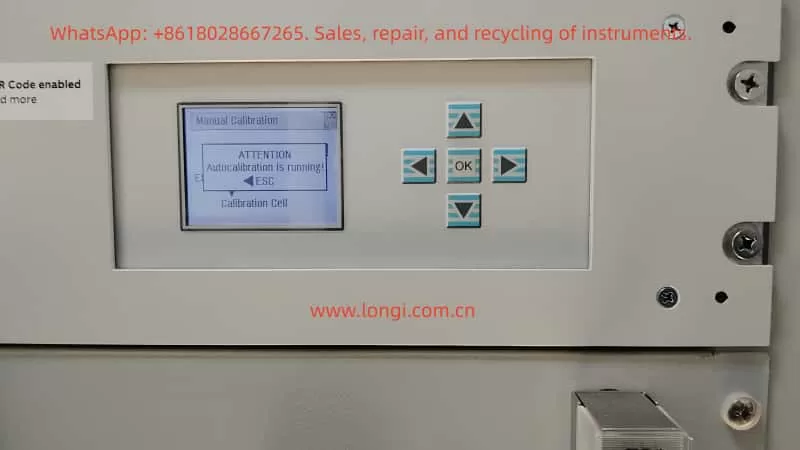
ABB EL3020 infrared gas analyzers are widely used in industrial flue gas analysis, process gas monitoring, and environmental online monitoring systems for the continuous measurement of gases such as CO, CO₂, SO₂, and NOx. They feature both automatic and manual calibration functions. During on-site operation and maintenance, it is common to encounter a situation where, despite having introduced zero gas and span calibration gas in preparation for manual calibration, when accessing the “Manual Calibration” menu, the instrument interface displays the message “ATTENTION: Autocalibration is running!”. At this point, the zero and span calibration menus cannot be accessed, and the buttons cannot be used to select calibration items. The instrument appears to be “stuck” on the calibration interface, leading customers to mistakenly assume it is a system crash, panel failure, or software anomaly. In reality, this is due to the normal operation of the EL3020’s internal calibration logic.

 Autocalibration is running
EL3020

II. Overview of the EL3020 Calibration System

The EL3020 belongs to the ABB EasyLine/EL3000 series, and its calibration modes are divided into two categories: automatic calibration and manual calibration, with the system design following an exclusion principle.

1. Automatic Calibration

  • Characteristics: It can be executed periodically at set times (e.g., once a day or once a week), triggered by external signals (such as from a PLC, digital input (DI), or Modbus), or initiated automatically after power-on. It automatically completes zero and span calibrations and controls the switching of calibration gases using solenoid valves.
  • Purpose: To ensure the long-term stable operation of the analyzer without human intervention, preventing measurement errors caused by optical drift and environmental changes.

2. Manual Calibration

  • Usage: It is used for initial installation and commissioning, after replacing components such as the optical module, for calibration gas comparison, post-repair calibration, and abnormal correction.
  • Operation: It is carried out by engineers on-site and requires human confirmation of zero gas, span gas, and stabilization time, among other factors.

3. Exclusion Principle

During automatic calibration, the manual calibration function is forcibly locked by the system to prevent the simultaneous writing of calibration parameters by automatic and manual processes, interference with the calibration process by human actions, and measurement inaccuracies caused by parameter confusion.

III. Meaning of the “Autocalibration is running” Status

When the EL3020 displays “Autocalibration is running”, it does not necessarily mean that the device is actively switching solenoid valves to introduce calibration gases. Instead, it indicates that the system’s automatic calibration process is in an incomplete state, which may result from the following situations:

1. Automatic Calibration is Actually in Progress

For example, when the instrument has just been powered on, when it has reached the scheduled time for automatic calibration, or when an external PLC has just triggered a calibration signal. At this time, the instrument is undergoing processes such as gas circuit switching, sensor stabilization, zero-point collection, span collection, data calculation, and storage. Manual calibration is locked until these processes are completed.

2. Automatic Calibration was Interrupted, and the Status was Not Reset (Most Common)

During the calibration process, sudden power outages, insufficient calibration gas pressure, gas circuit blockages or leaks, abnormal optical module signals, premature termination by operators, or abnormal external control signals can cause the automatic calibration process to be incomplete. As a result, the system’s “calibration status bit” remains in the “running” state, and the menu is locked.

3. The Preconditions for Automatic Calibration Are Not Met for an Extended Period

If the sensor signal remains unstable for a long time, the temperature or light intensity does not reach the stability threshold, the zero gas or span gas concentration is not within a reasonable range, or the flow rate is abnormal, the automatic calibration process will continue to wait for these conditions to be met, and the status will remain “running”.

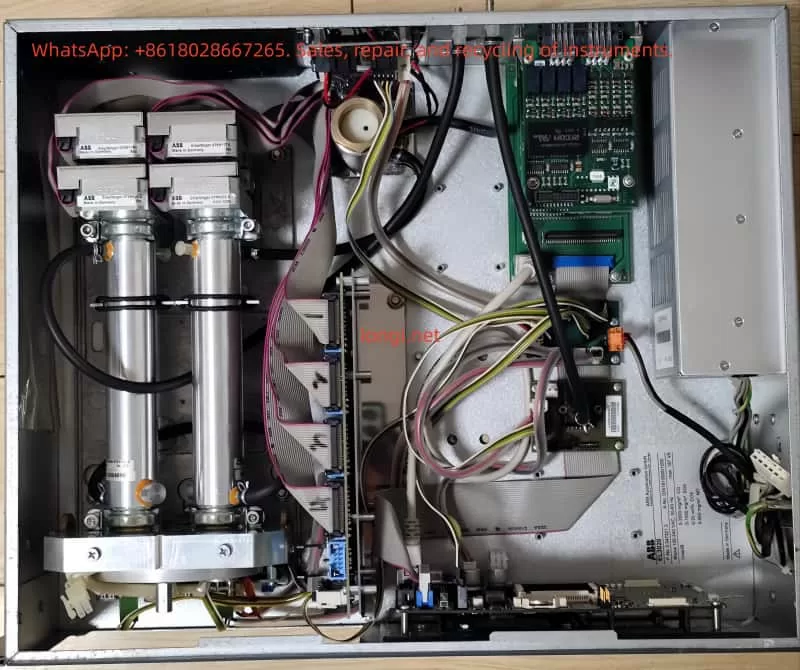
Physical internal structure diagram of EL3020

IV. System Design Reasons

From the perspective of analyzer system safety, it is a reasonable design to lock manual calibration when automatic calibration is not completed. Writing parameters during automatic calibration while manual writing occurs can lead to EEPROM data conflicts. Forcing a span calibration before zero-point collection is completed can cause serious proportional errors. An incomplete automatic calibration indicates that the current parameters have unknown credibility. Forcibly opening the manual entry point can easily result in “the more adjustments, the more errors” situations. Therefore, the EL3020 adopts a “status lock” mechanism, and manual calibration will always be unavailable as long as the automatic calibration status is not cleared.

V. On-site Solutions

Engineering handling should follow the principle of “from software to hardware, from simple to complex”.

✅ Solution 1: Wait for the Automatic Calibration to Complete (Preferred)
When the device has just been powered on or an automatic calibration has just been triggered, ensure a normal supply of zero gas and span gas, and maintain stable flow, pressure, and temperature. Observe whether the status ends on its own. After the automatic calibration process is fully completed, the system will automatically release the manual calibration menu. This solution is suitable for newly commissioned instruments, normal periodic calibrations, and warm-up stages.

✅ Solution 2: Attempt to Abort the Automatic Calibration in the Menu
Some EL3000 series models support options such as “Abort Calibration” or “Stop Auto Calibration”. If such options are available in the menu, you can try to terminate the automatic process to make the system exit the “running” state. This solution is suitable for situations where the automatic calibration is obviously stuck, there is a history of human triggering, and you do not want to restart the device.

✅ Solution 3: Power Off and Restart (Most Common and Effective)
If the automatic calibration status cannot end on its own, stop the measurement, turn off the gas supply, and power off the instrument for at least 30 seconds. Then, power it back on, wait for the system to fully start up, and do not trigger the automatic calibration. Directly access the manual calibration menu. This solution is suitable for situations where the automatic calibration is abnormally interrupted, the menu is permanently locked, or the status is clearly abnormal.

✅ Solution 4: Eliminate the Root Cause of the Inability to Complete Automatic Calibration
If the device repeatedly enters the “Autocalibration is running” state and cannot end, you need to investigate the root cause. Focus on checking whether the zero gas is truly zero, whether the span gas concentration is correct, whether the gas circuit is blocked, whether the solenoid valves are functioning, whether the flow rate is stable, whether the sensor signal is within a reasonable range, and whether there are external signals continuously triggering calibration. Otherwise, even after a restart, the device may enter automatic calibration again and get stuck.

VI. Engineering Experience Summary

In the EL3020 and the entire EL3000 series, the inability to enter manual calibration is almost never due to a broken panel and rarely a true software fault. In most cases, it is caused by the “automatic calibration status not being cleared”. The handling logic is not about “how to access it” but rather figuring out why the system believes that automatic calibration has not ended, why automatic calibration cannot be completed normally, and how to make the automatic process end correctly or be reset.

VII. Summary

Currently, the instrument is in the automatic calibration state. According to ABB’s design logic, the system will forcibly lock the manual zero and span calibration menus until the automatic calibration is completed. This is not a fault but a protection mechanism. You need to first allow the automatic calibration to complete or clear the automatic calibration status through a restart before performing manual calibration.

VIII. Conclusion

The “Autocalibration is running” message on the EL3020 reflects the instrument’s internal calibration status management mechanism. Correctly understanding it helps engineering personnel quickly determine the nature of the problem, avoid盲目 (blindly) disassembling the instrument or mistakenly assuming damage to the main board, improve on-site fault handling efficiency, and reduce the secondary risks caused by misoperations. The key to solving the problem lies in understanding “why the automatic calibration has not ended”.

Posted on

In-Depth Analysis and Maintenance Guide for ABB EL3020 “Amplification Drift Exceeds Half Range” Warning


1. Introduction

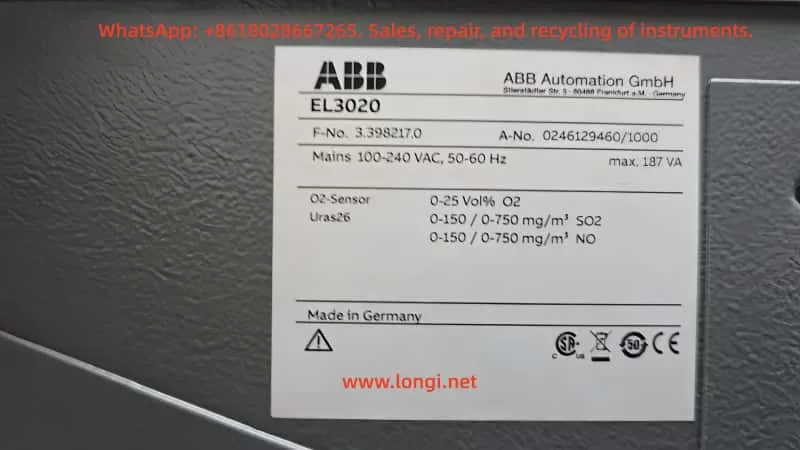
The ABB EL3020 gas analyzer is widely used in industrial flue gas monitoring, combustion optimization, and emission control systems. Known for its accuracy and stability, it is often configured with O₂ sensors and Uras26 infrared modules to measure multiple gas components.
However, during long-term operation, users may encounter the following warning:

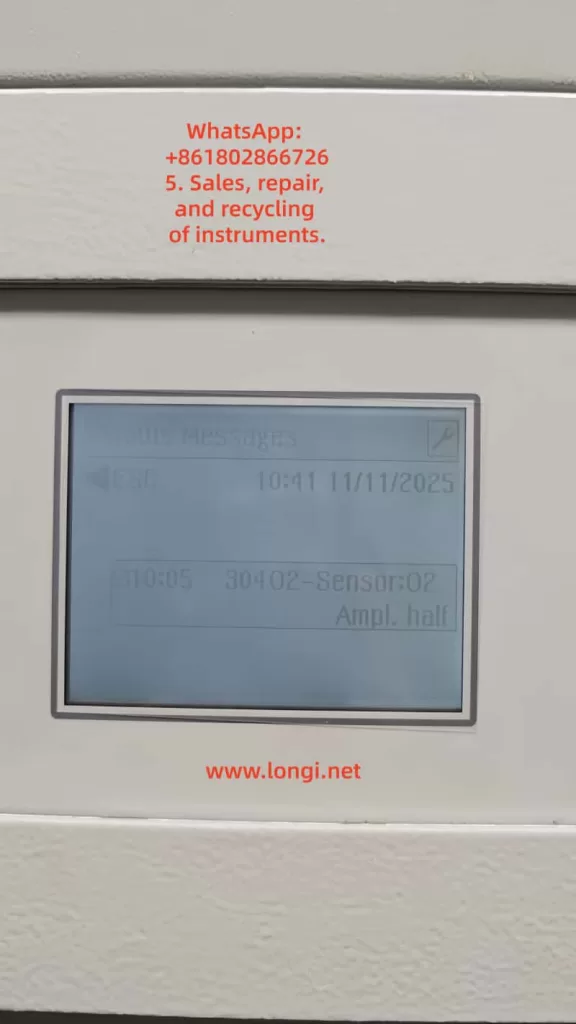
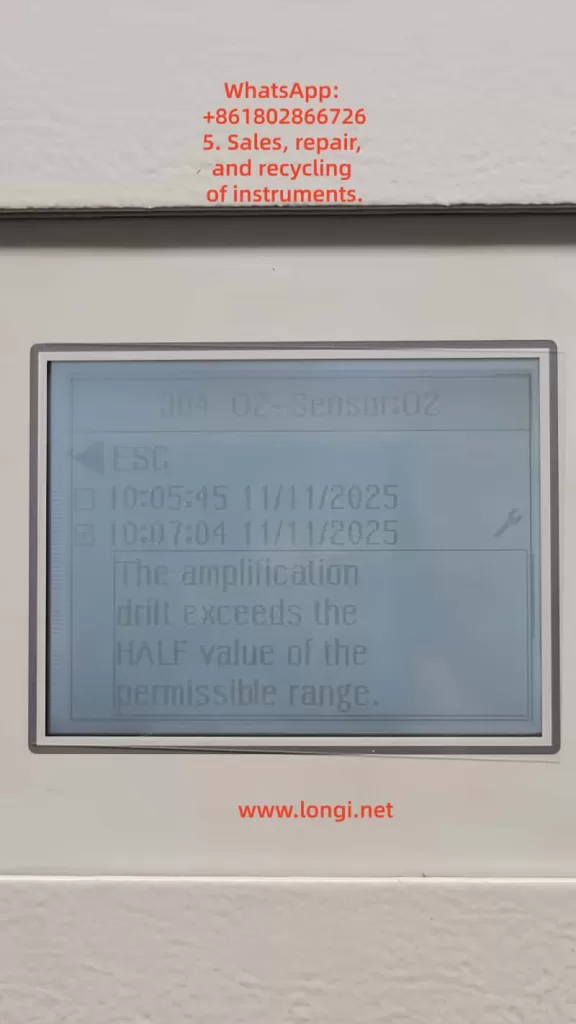
30402 – Sensor:02 – Ampl. half
The amplification drift exceeds the HALF value of the permissible range.

This is a typical amplifier drift alarm, indicating that the signal amplification circuit or the sensor itself is drifting beyond the acceptable range. If not addressed promptly, it can degrade measurement accuracy or cause system lockout.
This article provides a comprehensive, technically detailed explanation and solution strategy, including principle analysis, fault causes, diagnostic procedures, corrective actions, and preventive maintenance.


2. System Architecture and Signal Amplification Principle

2.1 System Components

An EL3020 analyzer typically consists of:

  • Main Control Unit: Handles signal acquisition, amplification, computation, and display.
  • Sensor Unit: Includes O₂ electrochemical or paramagnetic sensors.
  • Amplifier and Signal Conditioning Board: Amplifies microvolt/millivolt signals to standard voltage levels.
  • Power Supply Module: Provides stable ±15V and +5V power.
  • Communication and Display Interface: Connects to DCS/PLC systems.

2.2 Amplification Mechanism

The O₂ sensor outputs a very weak signal (in microvolts or millivolts). The EL3020 uses precision instrumentation amplifiers (e.g., AD620 or OPA227 series) for multiple-stage amplification and temperature compensation.
During startup, the system records a zero reference signal and continuously monitors the amplifier gain.
If the gain drift exceeds half of the permissible range, it triggers the “Ampl. half” alarm.


3. Meaning and Logic of Alarm Code 30402

3.1 Definition

Alarm CodeDescriptionSeverityRecommended Action
30402 – Sensor:02 Ampl. halfAmplifier drift exceeds half of the permissible range for Sensor 02Warning (non-fatal)Inspect sensor, recalibrate, or replace amplifier board

3.2 Trigger Logic

The internal diagnostic continuously compares:

  • Current amplification factor (A_meas)
  • Reference amplification factor at calibration (A_ref)
  • Maximum permissible drift (ΔA_max)

If the condition below is met:
[
|A_{meas} – A_{ref}| > 0.5 \times \Delta A_{max}
]
then the “Ampl. half” warning is triggered.
If it further exceeds 100%, the system raises a “Ampl. full” error, freezing measurement output.


4. Root Cause Analysis

Based on field experience, the “Ampl. half” alarm on ABB EL3020 usually results from one or more of the following issues:

4.1 Sensor Aging or Contamination

  • Electrode degradation in electrochemical/paramagnetic O₂ sensors after prolonged use.
  • Gas contamination (SO₂, particulates) or membrane aging causing unstable output.

4.2 Amplifier Drift or Component Aging

  • Operating in high-temperature environments (>45°C) causes thermal drift in operational amplifiers, resistors, or capacitors.
  • Electrolytic capacitors degrade over time, shifting the amplifier’s DC bias.

4.3 Power Supply or Grounding Faults

  • Excessive power ripple (>50 mV) on ±15V supply.
  • Grounding resistance too high, introducing common-mode noise.
  • Aging voltage regulators (7815/7915).

4.4 Calibration Data Deviation

  • Outdated zero/span calibration values cause A_ref deviation.
  • EEPROM corruption or unexpected software reset.

4.5 Environmental and Gas Conditions

  • High humidity (>80% RH) causes condensation inside electronics.
  • Acidic or wet sample gas damages sensor stability.

5. Step-by-Step Troubleshooting Procedure

Step 1: Confirm Alarm Status

  • Navigate to Status → Messages → 30402 Sensor:02.
  • If both “Ampl. half” and “Ampl. full” appear → Stop measurement immediately.
  • If only “Ampl. half” → Continue monitoring while preparing for maintenance.

Step 2: Check Signal Trends

  • Go to Service → Sensor Diagnostics → Amplifier Value.
  • Observe drift tendency; continuous or increasing drift indicates amplifier instability.

Step 3: Measure Amplifier Output

  • Disconnect the sensor input and measure amplifier output voltage.
  • If voltage drifts >5 mV/min, amplifier board is defective.

Step 4: Recalibrate Analyzer

  1. Perform Zero Calibration (use pure N₂ or zero gas).
  2. Perform Span Calibration (use standard 8% O₂/N₂ calibration gas).
  3. Restart analyzer and confirm if alarm disappears.

Step 5: Check Power Supply and Grounding

  • Verify ±15V voltage ripple with an oscilloscope (<30 mV ideal).
  • Ensure grounding resistance <1 Ω.
  • Add ferrite cores or RC filters on signal lines if noise persists.

Step 6: Replace Defective Components

If alarm persists:

  • Replace the O₂ sensor module.
  • If no improvement, replace the amplifier board or main control unit.

6. Case Study

Background

A chemical plant used ABB EL3020 for O₂ and SO₂ monitoring in boiler exhaust. After three years, “30402 Ampl. half” warnings became frequent.

On-Site Diagnosis

  • O₂ sensor output showed unstable fluctuations.
  • Amplifier IC temperature reached 52°C.
  • Power supply ripple measured 85 mV (excessive).

Actions Taken

  1. Replaced aged capacitors on the power board.
  2. Recalibrated O₂ zero and span points.
  3. Installed cooling fan near amplifier section.
  4. Cleaned sensor chamber from dust and moisture.

Result

System stabilized; amplifier drift returned to normal. No alarms after six months of operation.


7. Preventive Maintenance Recommendations

TaskIntervalDescription
Zero/Span CalibrationEvery 3 monthsUse certified calibration gases
Sensor CleaningEvery 6 monthsRemove dust and moisture; inspect O-rings
Power CheckEvery 6 monthsVerify ±15V ripple <30 mV
Cooling InspectionAnnuallyClean air ducts and ensure adequate ventilation
Amplifier VerificationEvery 2 yearsTest amplifier stability; replace if necessary

Additional recommendations:

  • Record Ampl drift trend logs regularly.
  • Backup configuration files via ELCom/RS232 interface.
  • Avoid prolonged operation in humid or dusty environments.

8. Technical Summary

  1. Alarm Nature: Amplifier drift beyond calibration threshold, reflecting instability in the signal chain.
  2. Root Causes: Sensor aging, power instability, amplifier temperature drift, or calibration loss.
  3. Solution Process: Diagnose systematically—Calibrate → Inspect → Replace → Verify.
  4. Preventive Focus: Regular calibration, stable power, and environmental control.
  5. Key Takeaways:
    • Repeated “Ampl. half” indicates upcoming failure—prepare spares.
    • “Ampl. full” demands immediate shutdown and inspection.

9. Conclusion

The “Amplification drift exceeds half range” warning may appear minor, but it signals a deeper issue in signal stability, thermal management, and calibration integrity within ABB EL3020 analyzers.
For high-precision instruments like these, preventive maintenance is far more effective than corrective repair.
By implementing systematic calibration, routine inspections, and component lifecycle management, operators can ensure long-term accuracy, reliability, and compliance with environmental standards.

Ultimately, maintaining signal stability is not only about the analyzer’s performance—it safeguards the entire process control chain that depends on its data.

Posted on

Practical Guide to ABB EL3020 Gas Analyzer: Negative CO Readings and Zero/Span Calibration

1. Introduction

In industrial emission monitoring, combustion control, and process analysis, gas analyzers play a critical role in ensuring safety, efficiency, and compliance with environmental standards. The ABB EL3020 is a widely used multi-component gas analyzer based on infrared optical measurement principles. It is designed to continuously monitor gases such as CO, CO₂, NO, and SO₂ in various industrial applications.

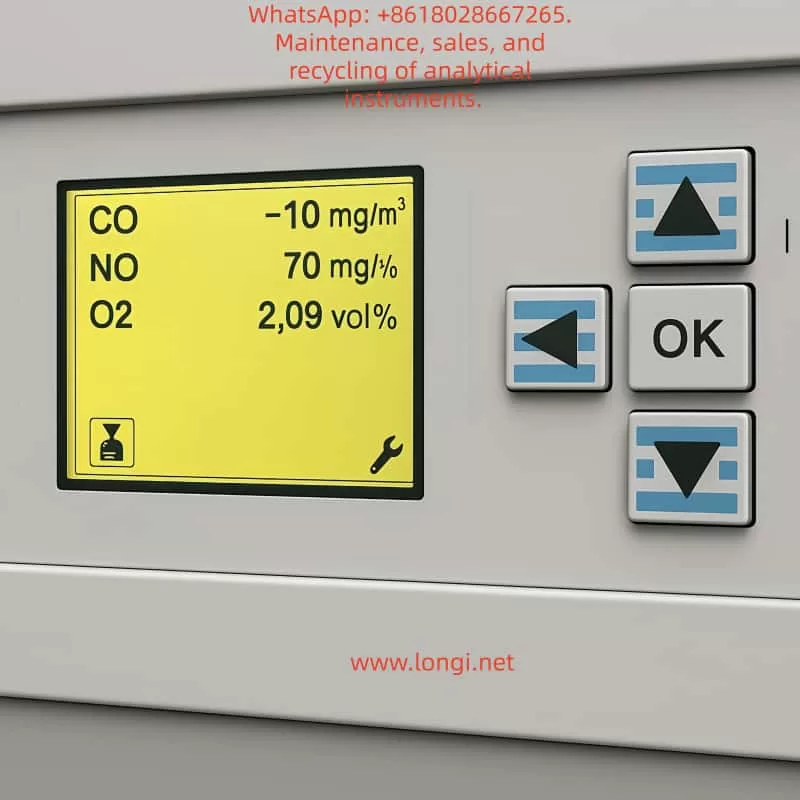
However, during long-term operation, users may sometimes encounter abnormal readings, the most common of which is negative CO concentration values. Such readings do not imply the physical existence of “negative carbon monoxide,” but instead reflect calibration drift, background interference, or hardware-related issues.

This article provides a detailed explanation of the EL3020’s measurement principle, analyzes the possible causes of negative CO readings, and presents practical zero calibration and span calibration procedures. The aim is to help engineers and operators quickly identify the root cause, restore measurement accuracy, and ensure stable operation of the analyzer.


EL3120

2. Operating Principle of ABB EL3020

2.1 Infrared Absorption Principle

The EL3020 operates on the principle of non-dispersive infrared absorption (NDIR).

  • Each gas molecule has a unique absorption band in the infrared spectrum.
  • When an infrared beam passes through a sample gas containing CO, the CO molecules absorb energy at specific wavelengths.
  • The detector measures the reduction in light intensity, which is directly proportional to the gas concentration.
  • By comparing the reference and measurement channels, the analyzer calculates the gas concentration.

2.2 Zero and Span Definitions

  • Zero Point: The output signal when no target gas is present (pure zero gas condition). Ideally, the instrument should display 0 ppm.
  • Span Point: The output when a known concentration of calibration gas is introduced. Span calibration adjusts the slope factor to ensure linear accuracy.

CO shows a negative value

3. Causes of Negative CO Readings

3.1 Zero Drift

Over time, detector electronics and optical components may drift due to temperature variations and aging. If the zero point is not recalibrated, the baseline may shift below zero, producing negative values.

3.2 Background Interference

If the sampled gas contains almost no CO while the instrument’s baseline is incorrectly set too high, the computed result may fall below zero. Excess oxygen, water vapor, or other gases can also disturb the optical path.

3.3 Optical Contamination or Aging

Dust, condensation, or weakened infrared sources reduce the signal strength at the detector, leading to baseline shifts.

3.4 Hardware or Circuit Faults

Faults in the analog acquisition board, A/D converters, or signal amplifiers can also cause abnormal negative readings. If only the CO channel is affected while NO and O₂ are stable, the issue likely lies in the CO detection unit.


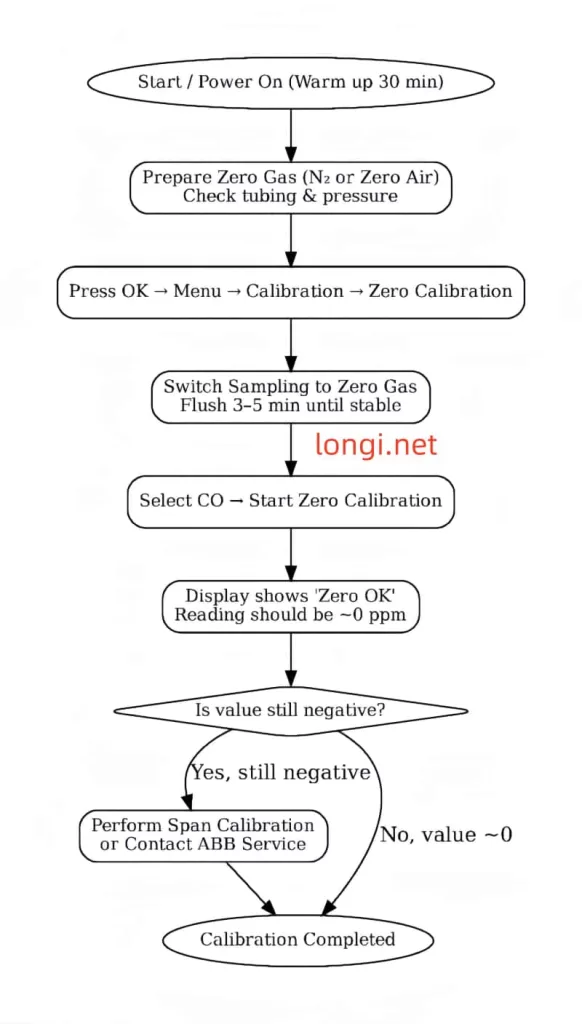
4. Zero Calibration Procedure

Zero calibration eliminates baseline drift and resets the analyzer output to zero under clean gas conditions.

4.1 Preparation

  1. Use high-purity nitrogen (99.999%) or certified zero air as the zero gas.
  2. Verify gas purity and set regulator output pressure to ~2 bar.
  3. Check sample lines for leakage or condensation.
  4. Power on the analyzer for at least 30 minutes to stabilize.

4.2 Step-by-Step Process

  1. On the panel, navigate: OK → Menu → Calibration → Zero Calibration.
  2. Select the CO channel.
  3. Switch the sample inlet to zero gas and flush for 3–5 minutes until stable.
  4. Execute Start Zero Calibration.
  5. After completion, the CO value should display close to 0 ppm (±2 ppm acceptable).

4.3 Evaluation

  • If “Zero OK” appears and the reading stabilizes, calibration is successful.
  • If negative values persist, further action such as span calibration or hardware inspection may be required.

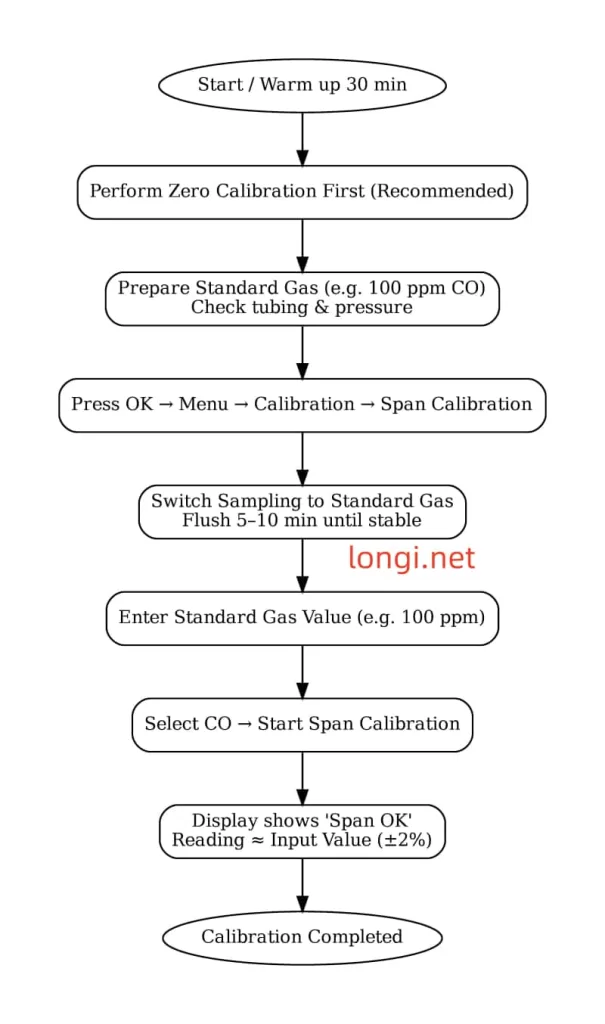
5. Span Calibration Procedure

Span calibration corrects the proportionality factor (slope) to align measured values with certified standard gas concentrations.

5.1 Preparation

  1. Use certified CO span gas, preferably at 60–90% of the measurement range (e.g., 100 ppm CO in N₂).
  2. Check cylinder, pressure regulator, and tubing for leaks.
  3. Perform zero calibration before span calibration for best results.

5.2 Step-by-Step Process

  1. On the panel, navigate: OK → Menu → Calibration → Span Calibration.
  2. Select the CO channel.
  3. Switch the sample inlet to the standard gas and flush for 5–10 minutes until stable.
  4. Enter the certified gas concentration (e.g., 100 ppm).
  5. Execute Start Span Calibration.
  6. The analyzer adjusts the slope factor and confirms with Span OK.

5.3 Evaluation

  • If the analyzer output matches the certified value (within ±2%), span calibration is successful.
  • Large deviations indicate optical degradation or electronic faults that may require service intervention.

6. Maintenance and Troubleshooting Recommendations

  1. Regular Calibration
    • Perform zero calibration monthly and span calibration every 1–3 months.
  2. Optical Cleaning
    • Inspect and clean optical windows and gas cells regularly. Prevent dust and moisture accumulation.
  3. Sample Line Maintenance
    • Avoid condensation and leaks in tubing. Use filters and dryers where necessary.
  4. Validation with Reference Gas
    • Periodically validate with independent standard gas to ensure accuracy.
  5. Hardware Inspection
    • If calibration fails, check the infrared source, detectors, and analog boards. Replace if necessary.

7. Case Study: Negative CO Reading Restored by Calibration

In a steel plant, operators observed the EL3020 CO channel consistently showing -5 ppm.

  1. Zero calibration with nitrogen reduced the offset, but the value remained at -3 ppm.
  2. A span calibration using 100 ppm CO gas showed the analyzer reading 95 ppm.
  3. After span adjustment, the zero point stabilized near 0 ppm and span response matched 100 ppm.

The issue was traced to slope drift in the CO channel, which was successfully corrected through calibration without requiring hardware replacement.


8. Conclusion

The ABB EL3020 is a reliable and accurate gas analyzer for continuous industrial monitoring. Negative CO readings are typically not measurement of “negative concentration” but symptoms of baseline drift or span factor deviation. Proper and regular zero calibration and span calibration are essential to maintain measurement accuracy.

For persistent negative values that cannot be corrected through calibration, optical contamination, component aging, or hardware malfunction should be considered. Timely maintenance and service support are key to ensuring the long-term stability of the analyzer.

By following standardized calibration procedures and maintenance practices, operators can keep the EL3020 functioning accurately and extend its service life in demanding industrial environments.


Posted on

ABB EL3020 (Uras26) CO₂ Analyzer: Calibration Principles, Common Failures, and On-site Troubleshooting

1. Introduction

The ABB EL3020 (equipped with the Uras26 infrared module) is a high-precision, multi-component gas analyzer widely used in chemical, metallurgy, power, and environmental sectors for continuous CO₂, CO, CH₄, and other gas measurements.
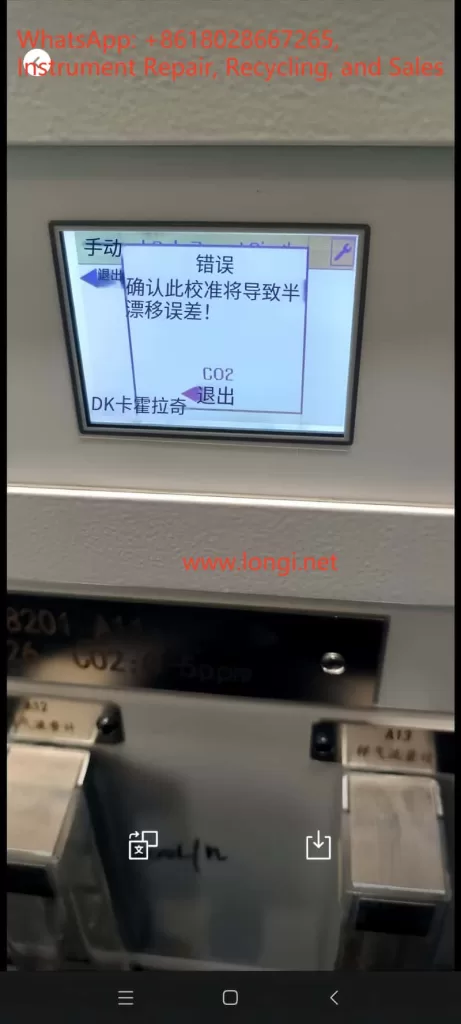
To ensure measurement accuracy and long-term stability, Zero Point Calibration and Span Calibration must be performed regularly. However, during field calibration, engineers often encounter “Calibration Rejected,” “Half Span Shift,” or complete lockout after a failed attempt, preventing further calibration and impacting operation.

This article explains the calibration principle, common causes of failure, error phenomena, troubleshooting steps, and recovery methods. It is based on real field cases, providing engineers with actionable, field-ready solutions.


2. Calibration Principles of the EL3020 (Uras26)

2.1 Zero Point Calibration

The purpose of zero point calibration is to eliminate background interference signals from the optical system and sensors when no target gas is present, aligning the measurement curve to zero.

  • Condition: Introduce zero gas without the target component (e.g., high-purity nitrogen or zero air).
  • Requirement: Gas purity must be adequate (CO₂ < 0.1 ppm for a 0–5 ppm range), the sampling path fully flushed, and readings stable.

2.2 Span Calibration

Span calibration adjusts the analyzer’s sensitivity near the full scale so that the measured value matches the standard gas concentration.

  • Condition: Introduce certified calibration gas with a known concentration (e.g., 3 ppm CO₂).
  • Requirement: Gas concentration must be accurate and stable, and match the value configured in the analyzer.

2.3 Calibration Protection Mechanism

To prevent operator errors from causing measurement drift:

  • If the current reading deviates too far from the expected zero/span value, the analyzer will display a “Span Shift” or “Half Span Error” warning.
  • In some firmware versions, a failed calibration triggers an automatic calibration lock, requiring reset/unlock before retrying.

3. Common Calibration Issues and Root Causes

3.1 “Half Span Error” Warning

Causes:

  1. Incorrect calibration gas concentration (zero gas contains CO₂ or span gas concentration mismatch).
  2. Residual sample gas in the line or insufficient flushing time.
  3. Abnormal flow rate (too low/high or unstable).
  4. Analyzer not stabilized (insufficient warm-up or optical drift).

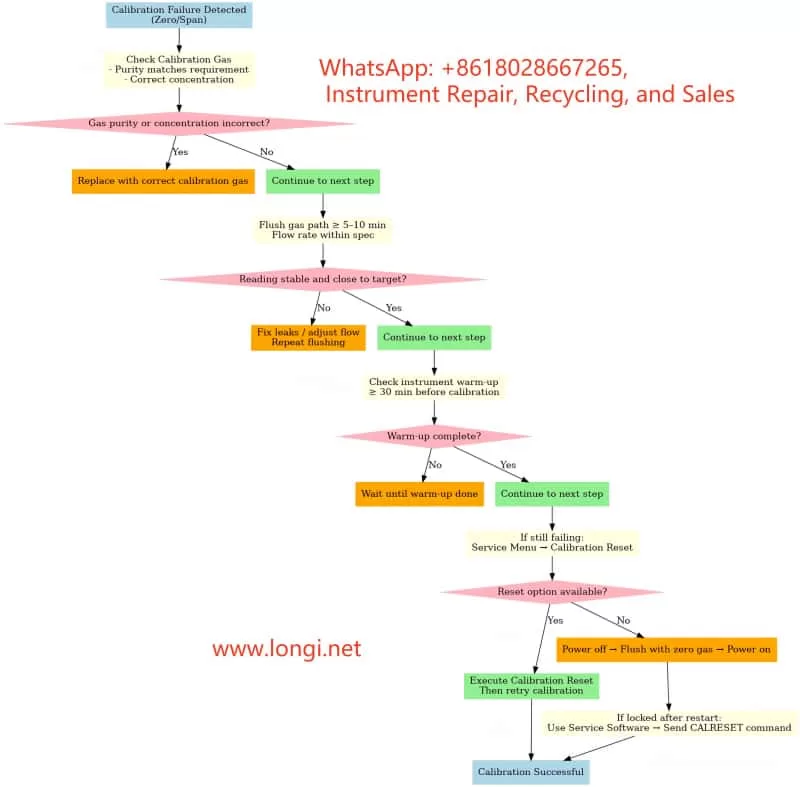
Recommendations:

  • Verify calibration gas concentration and label match.
  • Flush for ≥5–10 minutes before calibration.
  • Adjust flow rate to recommended value (e.g., 60 L/h).
  • Warm up for ≥30 minutes before calibration.

3.2 Zero Calibration Rejection

Causes:

  • Current reading outside acceptable zero range (e.g., <0.1 ppm for a 0–5 ppm range).
  • Calibration lock active after a failed attempt.
  • Menu access restricted (requires service password).

Recommendations:

  1. Confirm zero gas purity (CO₂ < 0.1 ppm).
  2. Extend flushing until reading stabilizes.
  3. Check service menu for Calibration Reset option.
  4. If locked, perform unlock/reset before retrying.

3.3 Lockout After One Failed Calibration

Causes:

  • Firmware protection: Logs the failure and blocks further calibration until cleared.
  • Data integrity protection: Prevents repeated incorrect calibrations from accumulating drift.

Unlock Methods:

  • Menu Reset: Service → Calibration Reset.
  • Power cycle + Zero gas flush.
  • Factory Calibration Restore (use with caution – overwrites all current calibration data).
  • Serial Command Unlock via ABB EL3020 Service Tool (CALRESET command).

4. Field Troubleshooting and Operating Steps

4.1 Pre-Calibration Checklist

  1. Gas Verification
    • Confirm gas label matches instrument settings.
    • Use ≥99.999% high-purity nitrogen or equivalent zero gas.
  2. Flow and Gas Path
    • Check flowmeter reading matches recommended spec.
    • Inspect for leaks and verify valve positions.
  3. Warm-up and Stability
    • Warm up for 30–60 minutes.
    • Flush for 5–10 minutes after switching gases.

4.2 Calibration Execution

  1. Press the wrench icon on the right-hand side of the display to enter Maintenance Menu.
  2. Select Manual Calibration.
  3. Choose Zero Point or Span depending on the operation.
  4. Wait for the reading to stabilize before pressing OK.
  5. Verify reading changes after calibration completes.

4.3 After Calibration Failure

  1. Verify gas source → Flush → Retry.
  2. If still failing → Service Menu → Calibration Reset.
  3. If no reset option → Power cycle with zero gas flushing.
  4. If lock persists → Use service software via serial port to send CALRESET.

5. Case Study: CO₂ Zero Point Calibration Failure

Scenario:

  • Instrument: ABB EL3020 (0–5 ppm CO₂ range).
  • Zero gas: 99.999% high-purity nitrogen.
  • Flow rate: 60 L/h.
  • Issue: Zero point calibration triggers “Half Span Error,” lockout after failure.

Investigation:

  1. Gas purity verified.
  2. Found flushing time was only 2 minutes – insufficient for stability.
  3. Extended flushing to 10 minutes → Reading dropped from 0.35 ppm to 0.05 ppm.
  4. Performed Calibration Reset → Zero point calibration succeeded.

Takeaway:

  • Insufficient flushing time is a common cause.
  • First step after failure: reset/unlock before retry.

6. Button & Icon Functions

  • Left Icon (Envelope/File)
    Data logging and viewing functions. Opens historical records and calibration logs.
  • Right Icon (Wrench)
    Maintenance and calibration access: zero point, span calibration, gas path test, sensor status.

7. Preventive Maintenance Tips

  1. Regularly verify calibration gas purity to avoid contamination.
  2. Flush sampling lines thoroughly before calibration.
  3. Perform zero and span calibration according to manufacturer’s recommended cycle.
  4. Train operators to follow correct calibration procedures to minimize errors.

8. Conclusion

The ABB EL3020 (Uras26) offers stable, reliable high-precision gas analysis when paired with proper gas path management and calibration. Understanding the calibration principle, protection mechanism, and common failure modes enables operators to troubleshoot effectively and reduce downtime.
When calibration fails or lockout occurs, follow the outlined troubleshooting steps—starting from gas source and flow checks to warm-up, flushing, and finally reset/unlock procedures—to quickly restore normal operation.


Posted on

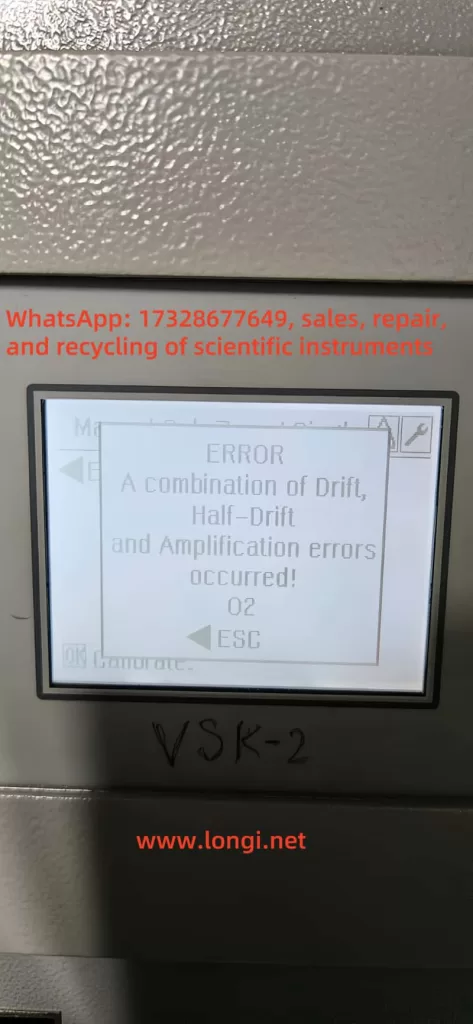
In-Depth Fault Analysis: Understanding “Drift + Half-Drift + Amplification” Combined Errors in ABB Continuous Gas Analyzers and How to Resolve Them

1. Overview and Error Description

During operation of ABB’s AO2000 series continuous gas analyzers (such as Fidas24, Magnos, etc.), the following error message may be displayed:

ERROR  
A combination of Drift,  
Half‑Drift and Amplification errors occurred!  
02 → ESC

This message indicates that the analyzer has simultaneously detected three types of offset-related faults: Drift, Half-Drift, and Amplification errors. When these faults are combined, the system flags a critical failure (error code 507/02), potentially halting analysis and rejecting calibration until the issue is resolved.


EL3020 ERROR

2. Explanation of Each Error

  • Drift Error: Occurs when the signal offset exceeds acceptable thresholds, indicating a deviation of the baseline from its expected value.
  • Half-Drift: Triggered when the drift exceeds 50% of the allowed range — considered a warning-level error.
  • Amplification Error: Involves abnormal gain changes where the signal is either over-amplified or under-amplified, making measurement inaccurate.

A combined error suggests the presence of multiple overlapping issues, usually triggering a safety lock to prevent invalid measurements or faulty gas composition reports.


3. Root Causes of Combined Error

To understand the fault comprehensively, we must examine it from the sensor behavior, calibration process, and environmental conditions:

a) Sensor Aging or Degradation

Infrared, paramagnetic, or thermal conductivity sensors may suffer from aging, leading to unstable offsets and signal gain. Optical sources, sample cells, and pre-amplifiers may degrade over time and trigger drift.

b) Environmental or Sampling Issues

Contaminated sampling lines (moisture, oil mist, or particulate matter) can distort calibration by affecting gas composition. Humidity and temperature fluctuations also contribute to drift and amplification failures.

c) Calibration Gas or Flow Irregularities

Inconsistent span or zero gas flow, or expired gas bottles, can lead to calibration errors. When calibration fails multiple times, the analyzer may flag this combined drift/amplification condition.


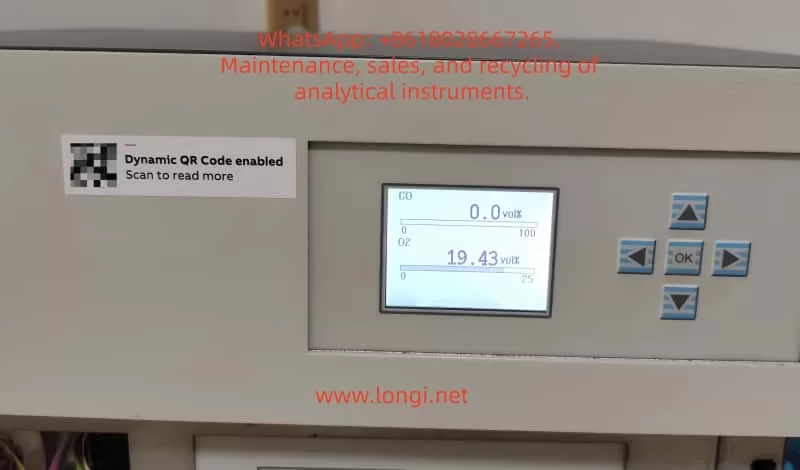
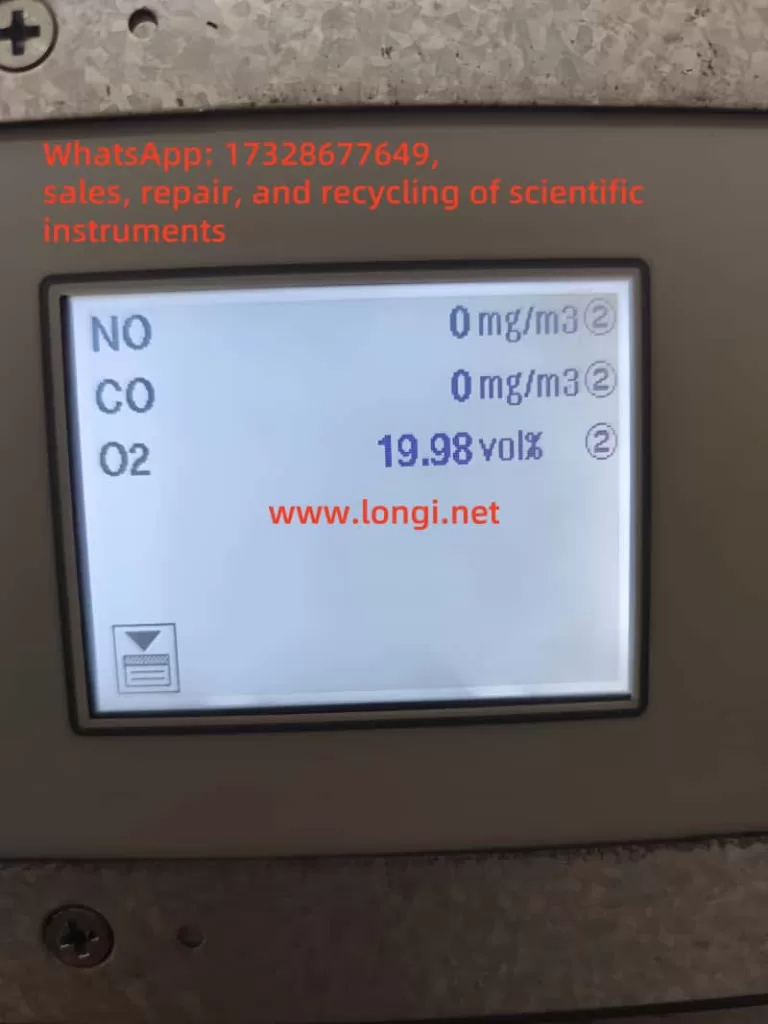
Normal display status of EL3020

4. Fault Classification and Corrective Actions

Fault TypeManifestationRecommended Action
Drift / Half-DriftBaseline deviation or slow measurement responseCheck drift logs and compare to tolerance
Amplification ErrorGain factor changes sharply from historical levelsEvaluate sensor electronics or pre-amp
Combined Error 507Calibration fails; analyzer halts measurementTrigger manual calibration and inspect logs
Environmental ImpactErrors repeat in humid/contaminated environmentsClean lines, dry filters, verify sample gas

5. Step-by-Step Troubleshooting Guide

Step 1: View Diagnostic Readings

Access the analyzer menu and retrieve drift, gain, and error logs. Compare with baseline values and specifications.

Step 2: Inspect and Clean Sampling System

  • Replace or clean sample tubing, filters, or water traps.
  • Verify that the calibration gas is flowing correctly and meets purity specifications.

Step 3: Perform Manual Calibration

Access maintenance mode and carry out a full zero/span calibration. If the system fails again:

  • Check whether the instrument is actually drawing calibration gas.
  • Monitor flowmeter readings and solenoid valve actuation.

Step 4: Component-Level Inspection

  • Replace sensors, detector modules, or signal pre-amplifiers if values are unstable.
  • Check power supply stability and internal electronics.
  • Reboot analyzer after hardware check.

Step 5: Validate with Monitoring

After repairs, allow the instrument to stabilize and log drift values over 24 hours. Ensure both zero and span values hold within specification.


6. Preventive Maintenance Recommendations

  1. Daily Drift Monitoring: Log drift rates at least once per shift.
  2. Monthly or Quarterly Calibration: Use certified calibration gas bottles with verified expiration dates.
  3. Gas Path Dryness: Keep the system moisture-free using desiccants or active dryers.
  4. Sensor Lifecycle Tracking: Monitor installation date and replace sensors per manufacturer’s suggested intervals.
  5. Firmware and Software Updates: Regularly update analyzer software to address known error conditions and optimize calibration routines.

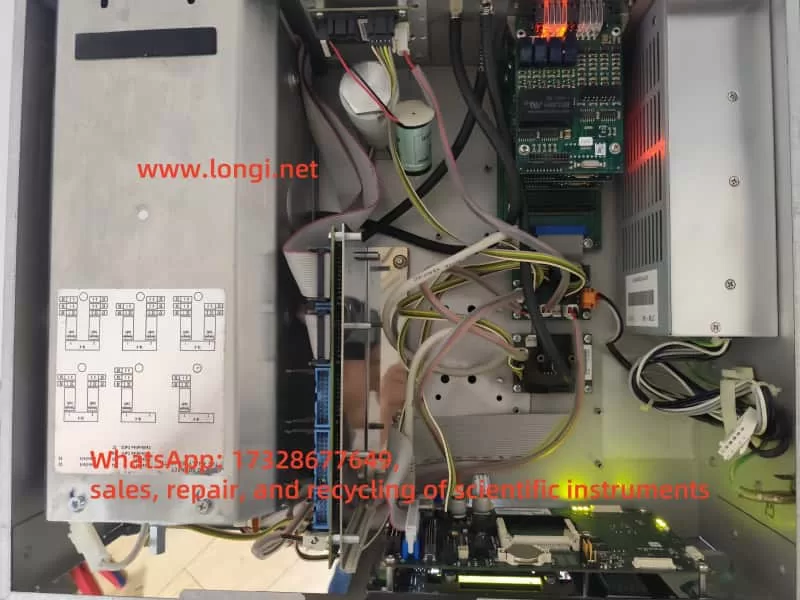
Internal structure diagram of EL3020

7. Case Study Example

A gas analyzer running for 6+ months triggered a combined 507 error. Drift values reached 180%, amplification deviation was excessive, and span calibration repeatedly failed. After inspection, the calibration gas flow had dropped significantly, and condensation was found in the sampling line.

Corrective action included replacing the filter, drying the line, and restoring gas flow. After performing a fresh zero/span calibration, the analyzer resumed normal operation.

This case confirms that calibration integrity and sample system hygiene are crucial for reliable performance.


8. Conclusion

  • Fault nature: This combined error involves overlapping sensor baseline drift, amplification gain deviation, and calibration failure.
  • Resolution:
    1. Review diagnostic metrics.
    2. Clean sampling path.
    3. Recalibrate manually.
    4. Replace modules if needed.
    5. Reboot and test.
    6. Establish a preventive maintenance protocol.
    7. Log and trend drift data periodically.

By maintaining proper calibration procedures, monitoring drift trends, and proactively replacing aging components, operators can avoid 507/02 combined faults and ensure high availability and accuracy from ABB EL3020 or AO2000 gas analyzers.


Note: This article assumes the presence of standard modules such as Uras26, Magnos206, or Fidas24. Detailed troubleshooting should be tailored to your specific analyzer configuration and environmental conditions.


Posted on

User Guide for ABB EL3020 Continuous Gas Analyzer

Key Takeaways

  • Powerful Functionality: The ABB EL3020 is a high-precision continuous gas analyzer supporting multiple modules (e.g., Uras26, Magnos206) for industrial gas monitoring.
  • Wide Applications: Primarily used in non-hazardous environments for measuring flammable gases, suitable for industrial process control and environmental monitoring.
  • Operational Caution: Must be operated by qualified personnel, adhering to strict safety and installation requirements to prevent leaks or equipment damage.
  • Maintenance and Troubleshooting: Regular calibration and seal integrity checks are critical; fault codes provide clear diagnostics for timely resolution.
  • User-Friendly Design: Features an intuitive display interface and multiple connectivity options, supporting remote configuration and data logging.

This guide, based on the ABB EL3020 user manual, aims to assist users in understanding its features, usage, precautions, and maintenance procedures.


ABB EL3020

Features and Capabilities

The ABB EL3020 is a continuous gas analyzer designed for industrial applications, capable of accurately measuring the concentration of individual components in gases or vapors. Part of the ABB EasyLine series, it combines advanced technology with user-friendly design, making it suitable for various industrial settings.

Key Features

  • Versatile Analyzer Modules: Supports Uras26 (infrared), Magnos206 (oxygen), Caldos27 (thermal conductivity), Limas23 (ultraviolet), and ZO23 (zirconia) modules, enabling measurement of gases like CO, CO₂, CH₄, and O₂.
  • Robust Design: Housed in a 19-inch rack-mounted enclosure with IP20 protection, weighing 7-15 kg, ideal for indoor industrial environments.
  • Flexible Connectivity: Supports 100-240 V AC power, digital I/O, analog outputs, Modbus, Profibus, and Ethernet interfaces for seamless system integration and remote operation.
  • Calibration Options: Offers automatic and manual calibration using nitrogen, air, or span gases, configurable via the device or software (e.g., ECT).
  • Intuitive Interface: Displays gas component names, measured values, and units in measurement mode; menu mode provides configuration and maintenance functions with password protection and a 5-minute timeout.
  • Data Communication: Connects to computers via Ethernet using TCT-light and ECT software for configuration, calibration, and data logging, supporting Modbus TCP/IP protocol.

Applications and Usage Precautions

Applications

The ABB EL3020 is designed for measuring flammable gases in non-hazardous environments, with applications including:

  • Industrial Process Control: Monitors gas concentrations in production processes to ensure stability.
  • Environmental Monitoring: Measures industrial emissions to comply with regulatory standards.
  • Energy Sector: Used in power plants for gas analysis to enhance efficiency and safety.
  • Chemical Industry: Monitors gas components in chemical reactions to ensure safety and quality.

The device is suitable for indoor environments below 2000 meters altitude, with flammable gas concentrations not exceeding 15 vol.% CH₄ or C1 equivalents. It is not suitable for ignitable gas/air or gas/oxygen mixtures or corrosive gases without proper preprocessing.

Usage Precautions

To ensure safety and performance, adhere to the following precautions:

  • Personnel Requirements: Only qualified personnel familiar with similar equipment should operate or maintain the device.
  • Safety Compliance: Follow national electrical and gas-handling safety regulations, ensure proper grounding, and avoid using damaged or transport-stressed equipment.
  • Installation Environment: Install in a stable, well-ventilated location away from extreme temperatures, dust, and vibrations. For flammable gas measurements, ensure adequate air circulation (minimum 3 cm clearance), and if installed in a closed cabinet, provide at least one air change per hour.
  • Gas Handling: Use stainless steel or PTFE gas lines, avoid opening combustion gas paths, and regularly check seal integrity to prevent leaks that could cause fires or explosions. Limit combustion gas flow (e.g., max 10 l/h H₂ or 25 l/h H₂/He mixture) and install a shut-off valve in the gas supply line.
  • Environmental Protection: Protect the device from mechanical damage or UV radiation, especially the display window.
  • Usage Restrictions: The oxygen sensor and integrated gas feed option must not be used for flammable gas measurements.

ABB EL3020

Detailed Usage Steps and Methods

Preparation

Before installing the EL3020, ensure:

  • Thorough review of the manual to understand application and safety requirements.
  • Preparation of necessary materials, such as gas lines, fittings, and power cables.
  • Verification that the installation site meets environmental requirements (stable, ventilated, no extreme temperatures).

Unpacking and Installation

  • Unpacking: Due to the device’s weight (7-15 kg), two people are recommended for unpacking.
  • Gas Connections: Use PTFE sealing tape to connect sample, process, and test gas lines, ensuring a tight seal.
  • Installation: Secure the 19-inch enclosure in a cabinet or rack using appropriate mounting rails.

Connections

  • Gas Lines: Connect sample, process, and test gas lines, ensuring cleanliness and secure sealing. Install a micro-porous filter and flowmeter for protection if needed.
  • Electrical Connections: Connect power (100-240 V AC), digital I/O, analog outputs, and communication interfaces (Modbus, Profibus, Ethernet) as per the manual’s wiring diagrams.

Startup

  1. Power On: Connect and turn on the power supply.
  2. Purging: Purge the sample gas path with an inert gas (e.g., nitrogen) for at least 20 seconds (100 l/h) or 1 hour (200 l/h) to clear residual gases.
  3. Warm-Up: Allow 0.5-2 hours for warm-up, depending on the analyzer module.
  4. Introduce Sample Gas: After warm-up, introduce the sample gas.
  5. Configuration and Calibration: Verify configuration settings and perform calibration if necessary, using test gases (e.g., nitrogen) to adjust zero and span points.

Operation

  • Measurement Mode: The display shows gas component names, measured values, and units for routine monitoring.
  • Menu Mode: Access configuration, calibration, or maintenance functions via the menu, requiring a password. The system auto-exits after 5 minutes of inactivity.
  • Calibration Methods: Perform automatic calibration (using preset test gases) or manual calibration (via menu or ECT software to adjust setpoints).
  • Data Logging: Use TCT-light or ECT software via Ethernet for data recording, compliant with QAL3 requirements.
  • Remote Monitoring: Integrate with monitoring systems via Modbus TCP/IP protocol.

Routine Maintenance and Fault Code Meanings

Routine Maintenance

To ensure long-term performance, conduct regular maintenance:

  • Seal Integrity Checks: Use pressure tests or leak detectors to regularly verify the integrity of sample and combustion gas paths, ensuring a leak rate < 1×10⁻⁴ hPa l/s for combustion gas and < 2×10⁻⁴ hPa l/s for sample gas.
  • Calibration: Perform automatic or manual calibration as needed, using specific test gases (e.g., nitrogen) to adjust setpoints and ensure measurement accuracy.
  • Visual Inspection: Regularly check for wear, damage, or contamination, particularly in gas lines, fittings, and the display.
  • Software Updates: Periodically update ECT and other software to ensure compatibility and functionality.

Fault Codes

The EL3020 provides status messages (codes 110 to 803), categorized as follows:

  • A: Failure
  • W: Maintenance Request
  • F: Maintenance Mode
  • S: Overall Status

Common fault codes and their handling methods are listed below:

CodeCategoryMeaningHandling Method
110A S aInstrument is bootingNo action required, informational
122A S aIO module defectiveReplace IO module
250A S aAnalyzer not foundCheck connectors and cables
301A S aMeasured value exceeds A/D converter rangeCheck sample gas concentration and connectors, contact service if needed
322A S aFlame is outCheck gas supply and heater plug (for flame-based modules)
412F S aIgnition failedManually restart via menu, check process gases

Maintenance Procedures

  • Identify Fault: Access fault codes via the menu.
  • Troubleshooting: Follow the manual’s instructions for each fault code. For example:
    • Code 322 (Flame Out): Check combustion gas supply and heater plug.
    • Code 250 (Analyzer Not Found): Inspect cables and connectors.
  • Contact Service: If the issue persists, contact ABB Service; avoid attempting repairs beyond your qualifications.

Conclusion

The ABB EL3020 Continuous Gas Analyzer is a robust and versatile tool for industrial gas monitoring, offering high precision and flexibility across various applications. By following the usage steps, precautions, and maintenance procedures outlined in this guide, users can ensure safe operation and sustained performance. Regular calibration, seal integrity checks, and prompt resolution of fault codes are essential for maintaining measurement accuracy and safety.