1. Fault Background and Initial Symptom
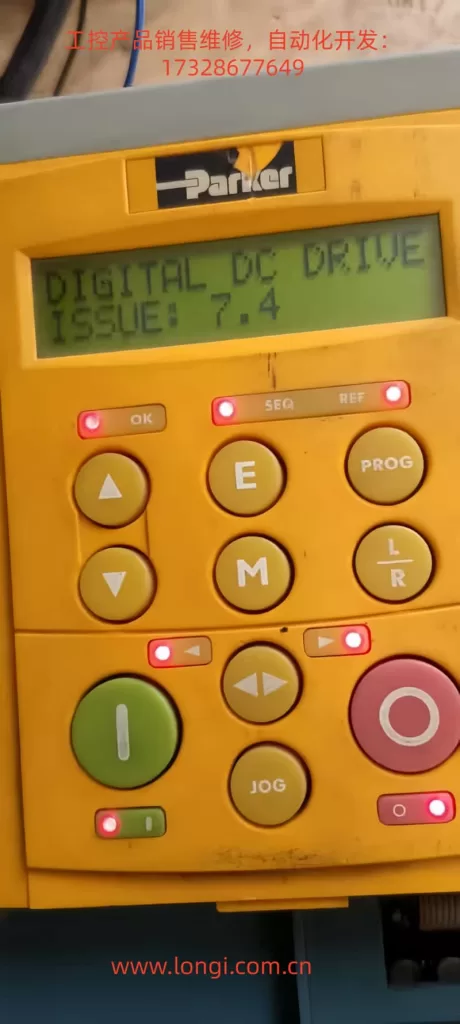
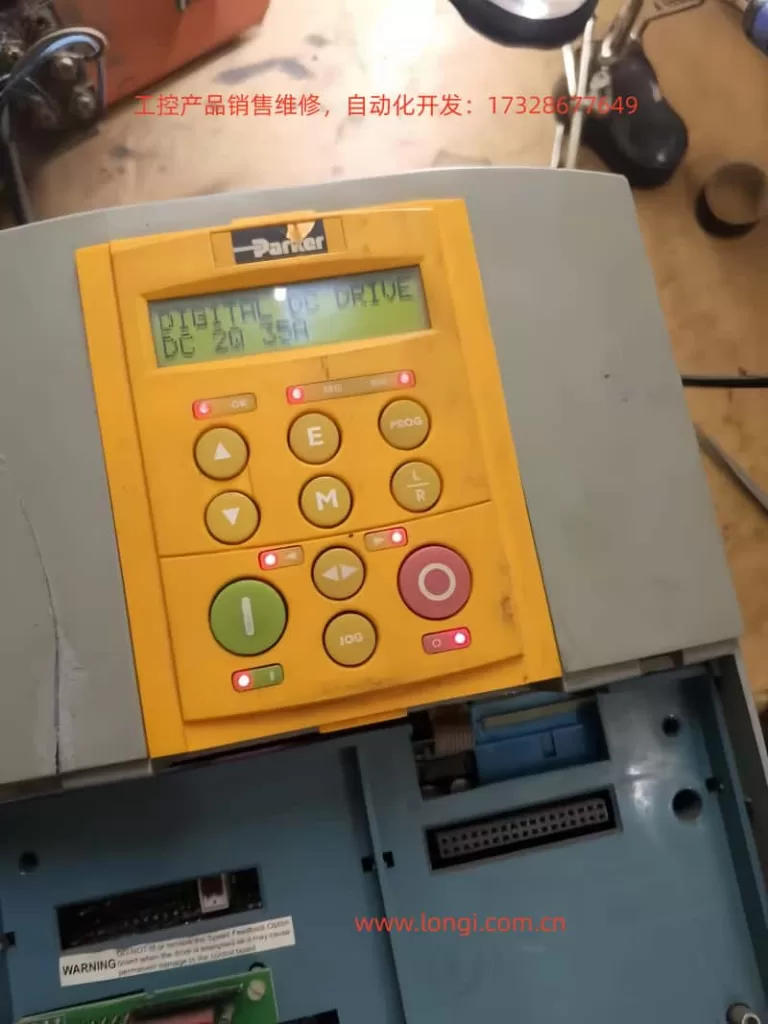
The Parker 590P / Eurotherm 590 series DC drive is widely used in industrial DC motor speed control systems. Unlike a simple DC power controller, the 590P has a relatively complex internal power and detection structure. It has an independent auxiliary control supply, a three-phase mains input, a thyristor firing circuit, phase synchronization detection, phase-loss detection, power-board coding identification, and multiple status feedback signals sent to the CPU control board.
In this case, the observed fault was very typical but also easy to misjudge:
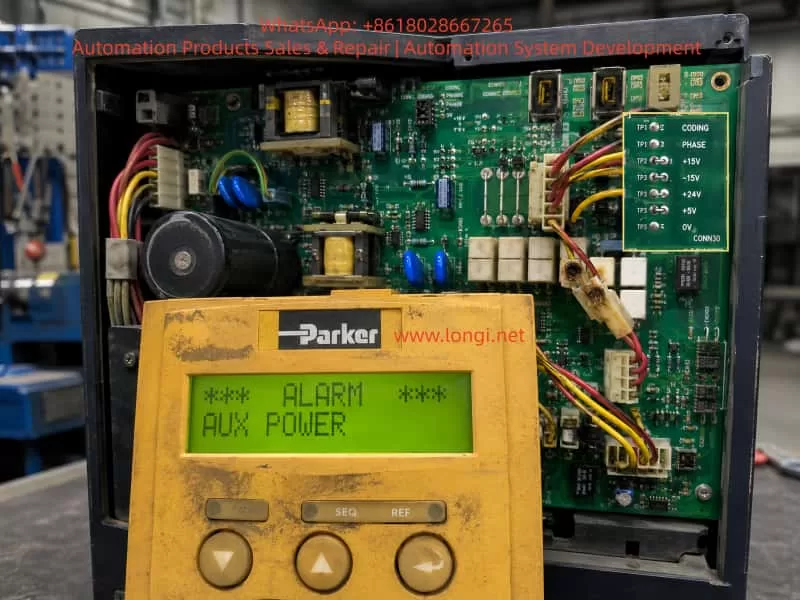
The drive powered up normally. The keypad display was normal. However, once a run/start command was issued, the drive immediately tripped with an AUX POWER alarm.
At first glance, this alarm seems to point directly to an auxiliary power supply problem. A common assumption would be that the internal switching power supply is unstable, or that one of the secondary outputs such as +5 V, +24 V, +15 V, or -15 V collapses when the drive is enabled. The CPU control board was replaced first, but the fault remained unchanged. This proved that the fault was not caused by the CPU board itself. The diagnosis therefore had to move toward the power/drive board, auxiliary supply detection circuit, three-phase mains detection circuit, CODING signal, PHASE signal, and the signals exchanged between the power board and the CPU board.
The important lesson from this case is that AUX POWER on a 590P must not be interpreted only as “the low-voltage switching power supply has failed.” In the Parker 590 series, this alarm can also be triggered by abnormal three-phase mains detection or abnormal coding/synchronization signals.
2. Two Different Power Concepts in the 590P
To understand this fault correctly, two power systems inside the drive must be clearly separated.
The first is the single-phase auxiliary supply. The 590P normally has a separate auxiliary supply input, often 110 V or 220 V AC depending on configuration. This auxiliary input powers the internal switching power supply. The switching supply then generates the low-voltage rails used by the electronics, such as:
- +5 V for logic and CPU-related circuits;
- +24 V for relays, I/O, fan, and auxiliary control functions;
- +15 V for analog circuits;
- -15 V for analog circuits.
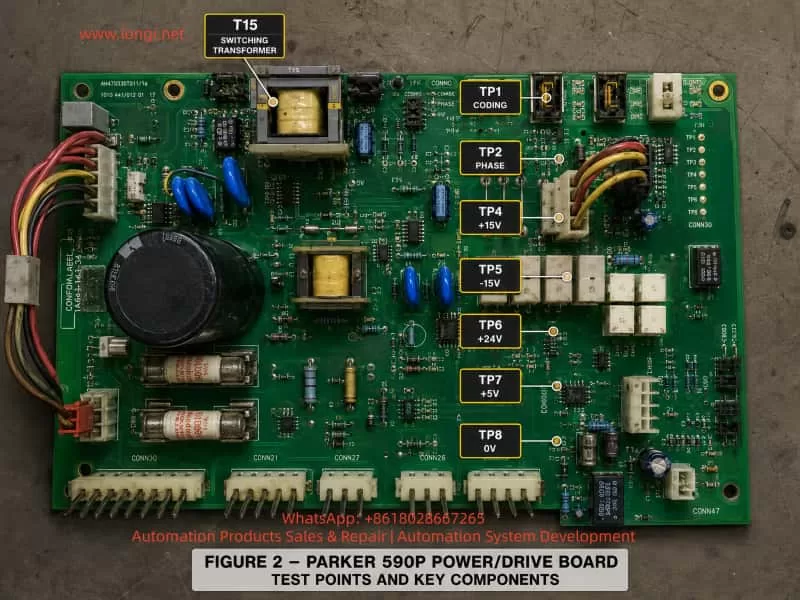
These voltages can be measured on the power board test points:
- TP7: +5 V
- TP6: +24 V
- TP4: +15 V
- TP5: -15 V
- TP8: 0 V reference
The second is the three-phase mains input, typically L1/L2/L3. This is not only the main power source for the thyristor bridge and DC armature output. It is also used by the control system to generate synchronization information. A DC thyristor drive must know the phase position of the AC supply in order to fire the SCRs at the correct angle. If the phase detection is wrong, missing, unstable, or inconsistent with the expected coding signal, the drive cannot safely run.
Therefore, the three-phase input participates in:
- phase synchronization;
- phase-loss detection;
- phase sequence tracking;
- mains voltage range recognition;
- SCR firing reference generation;
- power-board / stack coding validation.
This is why an AUX POWER fault can still occur even when +5 V, +24 V, +15 V, and -15 V are all present and stable.
3. Why the Low-Voltage Switching Power Supply Was Not the Main Fault in This Case
The initial suspicion was reasonable: if the drive powers up normally but trips immediately after the start command, the auxiliary switching power supply could be weak under load. On older industrial drives, this is common. Aging electrolytic capacitors, a weak UC2844 supply capacitor, poor secondary rectifiers, high ESR output capacitors, or bad solder joints around the switching transformer can all cause a supply to look normal at no load but collapse when the drive is enabled.
The 590P board in this case used a UC2844 PWM controller and a switching transformer, marked T15. Its secondary side generated the low-voltage rails. If T15’s secondary output were weak, one would expect to see one or more of the following:
- +5 V dipping below about 4.7 V during start;
- +24 V falling significantly under load;
- +15 V or -15 V becoming unstable;
- UC2844 entering undervoltage lockout or hiccup mode;
- all secondary voltages pulsing or dropping simultaneously;
- excessive ripple on the electrolytic capacitors near T15.
However, measurements were made at the test points for +15 V, -15 V, +24 V, and +5 V before and after the start command. No obvious voltage change was observed with a multimeter. Although a multimeter may miss very narrow transient dips, the later comparison with a known good power/drive board strongly shifted the diagnosis away from the switching supply itself.
The conclusion was that the basic auxiliary low-voltage supply was probably healthy. The original AUX POWER alarm was more likely caused by the detection and coding section associated with three-phase mains recognition and synchronization.
4. The Real Importance of the CODING Circuit
The 590 series manual describes the coding circuit as being located on the power board. It is not merely a simple fixed resistor identification circuit. It is associated with the generation of synchronization signals for the main processor and the thyristor stack. It also participates in phase-loss detection and automatic phase-sequence tracking.
This is the key point in this case.
The CODING circuit performs several possible functions:
- Hardware identification
The CPU board must know what type of power board, voltage range, stack configuration, and hardware version it is connected to. - Power stack / thyristor synchronization support
The CPU requires correct timing information before it can fire the SCRs. - Three-phase mains supervision
If the three-phase input is missing, if one phase is lost, or if the phase detection chain is abnormal, the CPU may receive an invalid coding or phase signal. - Fault classification
Depending on how the signal fails, the drive may report different alarms, such as SEQ PRE READY, coding-related faults, or AUX POWER.
The 590C documentation also lists two important fault codes:
- 0xF003: pre-ready fault / coding not present;
- 0xFF03: auxiliary power fault, with the recommended action to check the auxiliary supply or the three-phase mains input.
This directly matches the field behavior in this case. When the CODING line was manually grounded, the drive displayed SEQ PRE READY, proving that the CPU actively reads this coding signal. But the original fault was AUX POWER, which indicates that the CODING line was not simply absent. Instead, the CPU was likely receiving an abnormal or unstable combination of coding, phase, or mains-status information during the start sequence.
5. Key Test Result: Good Board vs Faulty Board
The most important diagnostic breakthrough came from comparing the faulty power/drive board with a known good board.
On the good board:
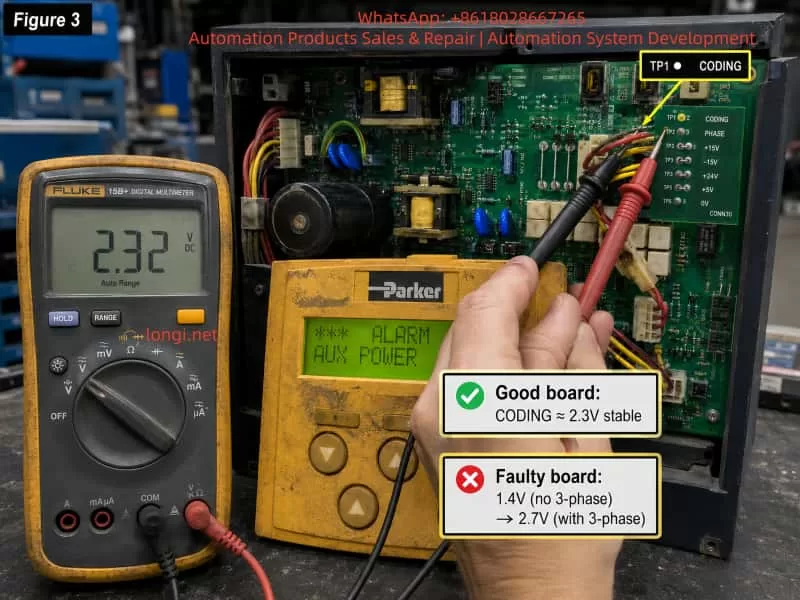
- Without three-phase 380 V mains applied, TP1 CODING was about 2.3 V DC.
- With three-phase 380 V mains applied, TP1 CODING remained about 2.3 V DC, with only a slight change.
On the faulty board:
- Without three-phase mains, TP1 CODING was about 1.4 V DC.
- With three-phase mains applied but before starting, TP1 CODING rose to about 2.7 V DC.
This comparison is extremely important.
It shows that on a healthy board, TP1 CODING should be a relatively stable identification voltage. It may be related to the coding/synchronization system, but it should not be strongly pulled up or down by the presence of three-phase mains.
On the faulty board, the CODING voltage was already abnormal without three-phase input. It was too low at 1.4 V. When the three-phase supply was applied, it shifted too high to 2.7 V. This means the CODING node was being incorrectly affected by the three-phase detection circuit, PHASE detection circuit, transistor network, op-amp circuit, leakage path, or board contamination.
The fault was therefore not simply “no coding.” If CODING were completely missing, the drive would more likely report a 0xF003 / SEQ PRE READY type fault. Instead, the faulty board produced a wrong or unstable coding condition, which the CPU interpreted as an auxiliary power / mains input abnormality.
6. Why Grounding CODING Caused SEQ PRE READY
During testing, the CODING signal was grounded. The drive then displayed SEQ PRE READY.
This result is logical.
Grounding CODING forces the CPU to see an invalid hardware/coding state. The CPU no longer sees a valid power board identity or coding supply. As a result, it stops at the pre-ready stage and reports a coding-related fault.
This proves several things:
- CODING is definitely read by the CPU board.
- CODING is not an ordinary digital alarm line.
- CODING cannot be grounded, shorted, or bypassed as a repair method.
- The normal CODING voltage range is meaningful to the CPU.
- An incorrect CODING level can change the alarm category.
In simple terms:
- CODING completely invalid or missing → SEQ PRE READY / 0xF003 type fault.
- CODING present but abnormal in relation to mains/phase detection → AUX POWER / 0xFF03 type fault.
This explains why forcing CODING low did not reproduce the original AUX POWER alarm. It created a different, more fundamental pre-ready fault.
7. The Three Transistors Connected to CODING
Another important observation was that the CODING line was connected to three transistors on the power/drive board. When two of them were removed, the CODING voltage rose to around 4.5 V. When all were removed, the voltage became around 0.5 V.
This proves that these transistors are not unrelated components. They are part of the CODING voltage-generation network.
Such a transistor network may be used for:
- weighted analog coding;
- hardware version identification;
- power stack identification;
- voltage class coding;
- phase/mains status gating;
- fault-state encoding;
- switching resistor branches into or out of the CODING node.
If one transistor develops leakage, if a base resistor drifts, if a collector-emitter path becomes partially conductive, or if contamination creates a leakage path across the board, the CODING voltage can shift significantly. Because the normal voltage is only around 2.3 V, even a few hundred millivolts of offset may be enough to confuse the CPU.
In this case, the faulty board’s CODING voltage changed from 1.4 V to 2.7 V depending on three-phase mains presence. That is too large to be considered normal. The three-transistor CODING network is therefore one of the first areas to inspect and repair.
The correct repair approach is not to remove transistors and test whether the drive runs. Instead, restore the original circuit and compare each transistor’s base, collector, and emitter voltages against the good board.
8. The Role of LM324 Near the CODING Circuit
The board also has an LM324 near the CODING and PHASE test points. LM324 is a quad operational amplifier commonly used in industrial analog circuits. In this kind of drive board, it may be used for:
- buffering analog coding voltage;
- filtering phase detection signals;
- generating weighted voltage levels;
- conditioning mains detection signals;
- summing or comparing several status inputs;
- driving transistor networks.
If the LM324 has input leakage, output offset, damaged output stage, poor supply, or defective feedback components, it can easily shift the CODING voltage.
The LM324 should be checked carefully by comparing the good board and the faulty board. Important pins include:
- Pin 4: positive supply;
- Pin 11: negative supply or ground, depending on circuit design;
- Pins 1, 7, 8, and 14: op-amp outputs.
The practical method is to measure these pins on both boards under the same conditions:
- auxiliary supply only;
- auxiliary supply plus three-phase mains;
- start command applied;
- alarm present.
If one LM324 output on the faulty board changes abnormally with the three-phase mains while the corresponding output on the good board remains stable, that op-amp channel or its surrounding resistor/capacitor network should be investigated.
9. PHASE Signal Must Be Checked Together With CODING
TP2 PHASE should not be ignored. Unlike CODING, which appears as a DC identification voltage, PHASE may be a shaped synchronization signal or a logic signal related to three-phase mains detection. A multimeter may not reveal much about it. An oscilloscope is the correct instrument.
A healthy PHASE signal should be stable when the three-phase mains is present. It should not disappear, jitter heavily, or collapse during the start command.
If TP1 CODING is abnormal and TP2 PHASE is also abnormal, the fault may lie upstream in the three-phase detection chain rather than in the CODING transistor network alone.
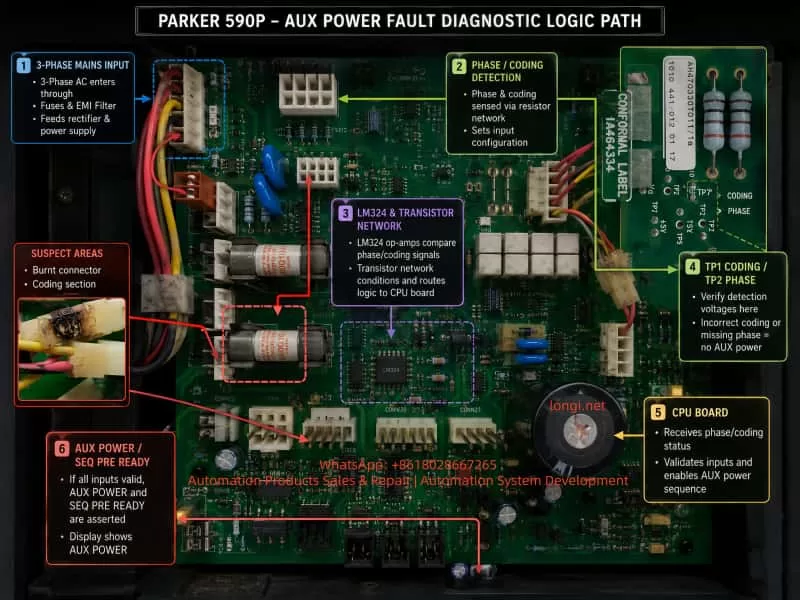
The three-phase detection chain may include:
- L1/L2/L3 mains input;
- contactor input and output;
- sampling wires;
- burnt or oxidized connectors;
- high-value power resistors;
- 47 nF Y2 capacitors;
- optocouplers or isolation modules such as Schurter IF-0321-G;
- LM393 comparator;
- LM324 signal conditioning circuit;
- transistor coding network;
- TP1 CODING and TP2 PHASE;
- CPU board input circuits.
Because the drive is a thyristor DC drive, phase synchronization is essential. If the CPU cannot trust the phase signal, it will not allow normal running.
10. The Burnt Connector and Contamination Problem
Several photos showed burnt or darkened connectors and wiring near the three-phase sampling/coding area. This is not a cosmetic issue.
A carbonized connector can cause:
- high resistance contact;
- intermittent signal loss;
- leakage between adjacent pins;
- unstable three-phase sampling;
- abnormal analog coding voltage;
- false phase-loss detection;
- false AUX POWER alarm.
This is especially serious around high-impedance analog nodes such as CODING. A +24 V relay circuit may tolerate some dirt or contact resistance, but a 2.3 V analog coding node may be disturbed by very small leakage currents.
Any burnt connector in this part of the board should be replaced, not merely cleaned. The PCB surface should be thoroughly cleaned. If the board material is carbonized, the carbonized area should be scraped away and insulated. The terminals and wire crimps should also be replaced or re-crimped if they show heat damage.
11. Why Phase Sequence Alone Is Not the Main Suspect
It is correct that a DC thyristor drive must consider phase sequence and phase synchronization. However, the manual indicates that the coding circuit provides automatic phase-sequence tracking. This means that a simple L1/L2/L3 sequence reversal may not necessarily cause this exact alarm.
More likely causes include:
- one phase not being detected;
- one sampling resistor open or drifting;
- one optocoupler channel weak;
- one isolation module output abnormal;
- PHASE signal missing;
- CODING signal being pulled by the phase detection circuit;
- contactor output unstable;
- sampling connector burnt or intermittent;
- board contamination causing leakage;
- CPU receiving invalid coding voltage.
Swapping two phases can be used as a diagnostic comparison, but if the fault remains unchanged, the focus should return to phase detection and coding signal conditioning, not merely phase order.
12. Recommended Diagnostic Procedure
For a Parker 590P that powers up normally but trips with AUX POWER when started, the following sequence is recommended.
Step 1: Verify the low-voltage auxiliary rails
Use TP8 as the 0 V reference and measure:
- TP7 +5 V;
- TP6 +24 V;
- TP4 +15 V;
- TP5 -15 V.
Check these values:
- with auxiliary supply only;
- with three-phase mains applied;
- during start command;
- after the alarm.
If these voltages remain stable, the low-voltage switching supply is not the main suspect.
Step 2: Measure TP1 CODING
Compare the value with a known good board if possible.
In this case:
- good board: about 2.3 V with or without three-phase mains;
- faulty board: 1.4 V without three-phase mains and 2.7 V with three-phase mains.
This confirms an abnormal CODING circuit.
Step 3: Measure TP2 PHASE with an oscilloscope
A multimeter may not be enough. Confirm whether the PHASE signal is present, stable, and consistent when three-phase mains is applied and during the start command.
Step 4: Compare the CODING transistor network
With power off and capacitors discharged, compare the good and faulty boards:
- TP1 to 0 V resistance;
- TP1 to +5 V resistance;
- TP1 to +15 V resistance;
- TP1 to -15 V resistance;
- TP1 to TP2 PHASE resistance;
- TP1 to each transistor pin.
Any major deviation points to leakage or incorrect loading.
Step 5: Replace suspect CODING transistors and inspect resistors
If the CODING voltage is abnormal, the three transistors connected to CODING should be tested or replaced. Their base resistors, collector resistors, emitter resistors, small signal diodes, and filter capacitors should also be inspected.
Step 6: Check LM324 and surrounding components
Compare LM324 output pins on the good and faulty boards. Replace LM324 if one channel output is offset or reacts abnormally to three-phase input.
Step 7: Inspect three-phase sampling and isolation components
Check:
- high-value sampling resistors;
- 47 nF Y2 capacitors;
- Schurter IF-0321-G modules;
- optocouplers;
- LM393 comparator;
- solder joints;
- burnt plugs;
- wiring harness.
Step 8: Repair all burnt connectors and contamination
Do not leave carbonized connectors in the circuit. Replace damaged plugs, clean the PCB, repair solder joints, and ensure there is no leakage between signal traces.
13. Final Technical Conclusion
This case shows that the AUX POWER alarm on a Parker 590P DC drive can be misleading if interpreted too narrowly. Although the term suggests an auxiliary power supply fault, the actual detection logic also involves three-phase mains input, coding signal, phase synchronization, and power-board identification.
In this case, the low-voltage auxiliary outputs +5 V, +24 V, +15 V, and -15 V were stable before and after the start command. Therefore, the UC2844 switching power supply and T15 transformer section were not the main fault.
The decisive clue was TP1 CODING. On a good board, TP1 CODING remained approximately 2.3 V whether the three-phase 380 V supply was applied or not. On the faulty board, TP1 was approximately 1.4 V without three-phase supply and 2.7 V with three-phase supply. This proves that the faulty board’s CODING node was being abnormally pulled by the three-phase detection or coding network.
The most probable fault area is therefore:
- CODING transistor network;
- LM324 signal conditioning circuit;
- TP1 surrounding resistors and capacitors;
- PHASE / three-phase detection coupling path;
- burnt sampling connectors;
- isolation components such as IF-0321-G or optocouplers;
- LM393 phase/mains comparator circuit;
- PCB contamination or leakage.
The correct repair strategy is to restore the CODING voltage to a stable value close to the good board’s 2.3 V and ensure that TP2 PHASE remains valid during start. Once the CPU receives a valid coding voltage and reliable phase/mains detection signals, the AUX POWER alarm should no longer appear.
The key diagnostic principle is simple:
Do not treat AUX POWER only as a low-voltage power supply fault. On a 590P DC drive, always check the CODING and PHASE detection chain together with the auxiliary power rails.