
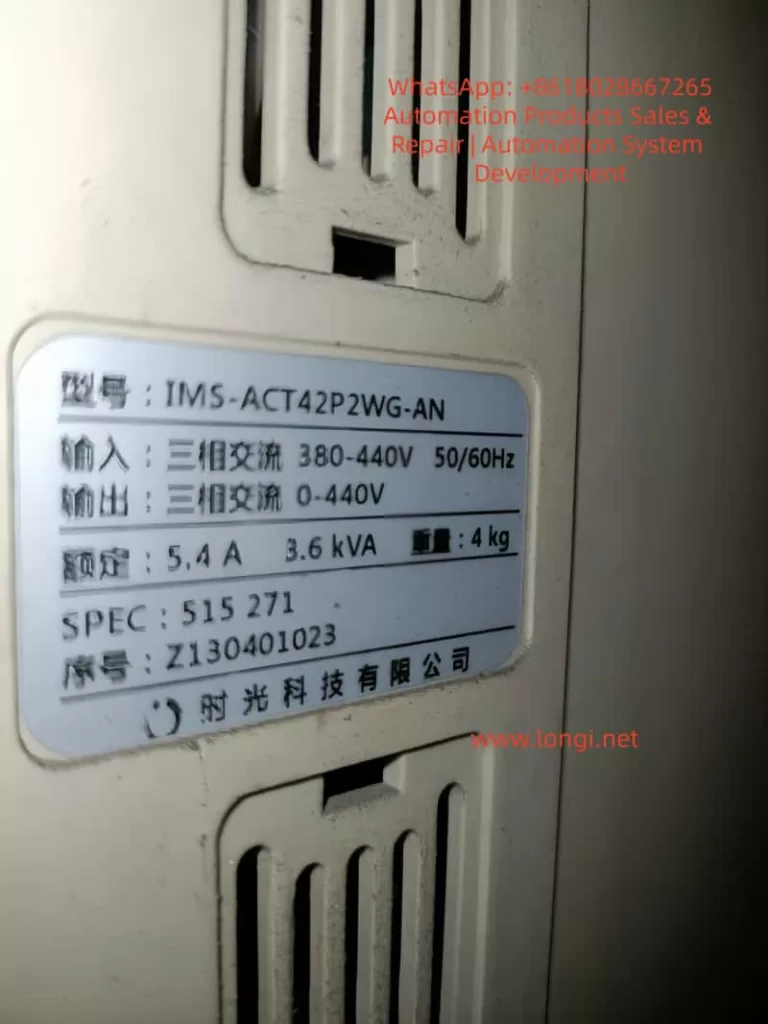
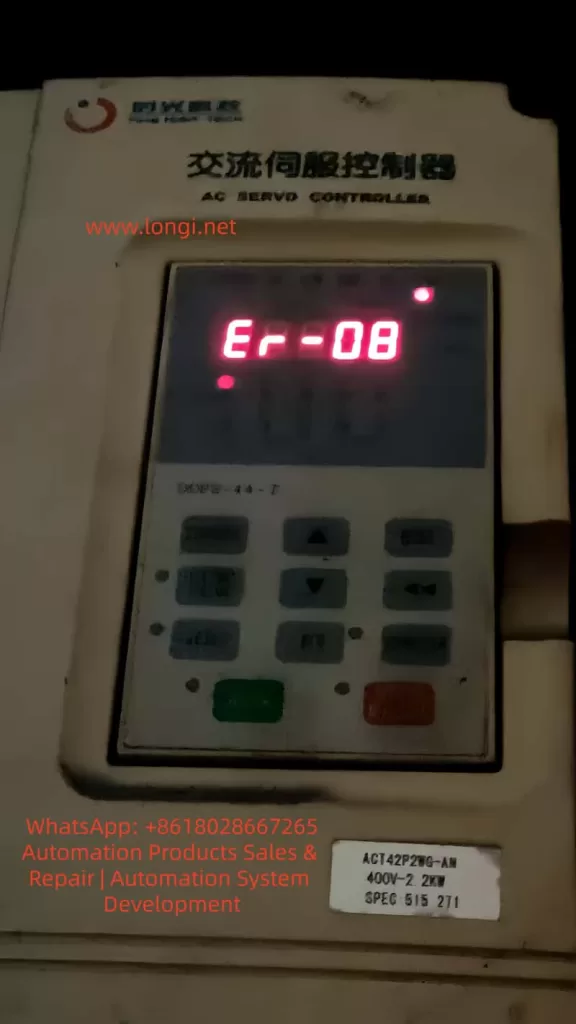
The Er-08 alarm on the IMS-A series servo controller from Shiguang Technology is not a typical hardware protection fault such as overcurrent, overvoltage, undervoltage, or overheating. Instead, it is mainly related to internal parameter storage, QMCL program execution, CPU operation, and RAM memory retention.
According to the IMS-A series controller documentation, Er-08 indicates a QMCL language error or parameter initialization abnormality caused by CPU interference. Common causes include severe input power interference, corrupted parameter areas, abnormal QMCL programs, insufficient RAM backup battery voltage, or internal communication abnormalities.
Unlike ordinary frequency inverters, the IMS-A controller uses digital vector control combined with QMCL motion control programming. Therefore, the controller operation depends not only on electrical hardware but also on internally stored parameters and motion programs. Once these data become corrupted or lost, the controller may fail to initialize properly and trigger Er-08.
1. Understanding the Meaning of Er-08
The IMS-A series is designed for high-performance control of AC induction motors using PG-based vector control. The controller integrates speed control, position control, torque control, programmable I/O, communication functions, and QMCL motion logic inside the controller itself.
Because of this architecture, Er-08 is fundamentally different from ordinary drive alarms.
This alarm usually means one of the following:
- The CPU detected abnormal QMCL program execution
- RAM parameter data became corrupted
- Internal parameters were unexpectedly initialized
- The controller experienced severe electrical interference
- The RAM backup battery voltage became insufficient
- The QMCL motion program was lost or damaged
In practical applications, Er-08 commonly appears in these situations:
- Equipment remained powered off for a long period
- The machine was stored for years before reuse
- The control cabinet contains heavy electrical noise
- Nearby contactors or braking systems generate interference
- Parameters were modified but not properly saved
- The controller lost RAM retention power
- The control board suffered moisture or dust contamination
2. Why the RAM Backup Battery Is Important
The IMS-A controller stores part of its parameters and QMCL programs inside RAM memory. RAM requires continuous backup power to preserve data after shutdown.
The controller uses an onboard backup battery for this purpose.
If the battery voltage becomes low, the RAM contents may partially or completely disappear during power-off periods. When the controller powers on again, the CPU may detect invalid parameter data or corrupted QMCL instructions and generate Er-08.
The IMS-A manual specifically mentions that the RAM backup battery must maintain sufficient voltage. Long-term storage without periodic power-up may cause parameter and QMCL data loss.
This is extremely important in real maintenance work.
Many technicians repeatedly power-cycle the controller after Er-08 appears, but the alarm remains because the issue is no longer temporary interference. The internal data itself may already be corrupted.
Replacing the battery alone does not automatically restore lost parameters or QMCL programs. The original data may still need to be rewritten manually.
Older machines, second-hand equipment, spare stock units, and machines stored for years are especially vulnerable to this issue.
3. Difference Between Er-08 and Normal Hardware Faults
Typical servo or inverter faults usually point to specific hardware problems:
- Overcurrent
- Overvoltage
- Undervoltage
- IGBT module overheating
- Encoder disconnection
- Motor overload
- Cooling fan failure
Er-08 is different.
It mainly points to software-level or memory-level abnormalities rather than direct power hardware failure.
This means the motor, encoder, power module, and braking resistor may still be physically normal while the controller itself cannot correctly execute internal logic.
However, this does not mean hardware inspection should be ignored.
Electrical noise, grounding problems, unstable control power supplies, moisture contamination, and control board deterioration can all indirectly trigger parameter corruption and CPU instability.
Therefore, Er-08 troubleshooting must combine both software and hardware inspection.
4. First Troubleshooting Step: Check Power Supply and Electrical Noise
One major cause of Er-08 is severe electrical interference entering through the input power line.
The first step should always be verifying the incoming power quality.
Check the following carefully:
- Three-phase input voltage balance
- Loose input terminals
- Burned contactor contacts
- Voltage fluctuation during startup
- Sudden voltage dips
- Grounding quality
- Cabinet interference sources
Particular attention should be paid to:
- Large contactors
- Welding machines
- Solenoid valves
- Brake units
- Large motors
- Frequent switching loads
Poor grounding can allow common-mode noise to enter the control board and CPU circuitry.
Encoder cables, communication lines, and motor power cables should not run together in parallel for long distances.
If Er-08 appears randomly during machine operation rather than immediately after startup, electrical interference becomes highly suspect.
5. Second Troubleshooting Step: Inspect the RAM Backup Battery
For older or long-stored equipment, the RAM battery must be inspected immediately.
Important inspection points include:
- Battery voltage level
- Corrosion around battery terminals
- Loose solder joints
- Oxidized connectors
- Signs of leakage or swelling
If the battery voltage is low, parameter retention becomes unreliable.
Even if the controller temporarily starts normally, the parameters may disappear again after shutdown.
After battery replacement, the following items must still be verified:
- System parameters
- Motor parameters
- Encoder settings
- I/O assignments
- QMCL programs
- Motion control logic
Battery replacement alone does not guarantee recovery.
6. Third Troubleshooting Step: Verify Controller Parameters
After Er-08 occurs, parameters may revert to defaults or become partially corrupted.
The technician must compare the current settings against original machine records.
Critical parameters include:
- Motor rated voltage
- Rated current
- Encoder pulse count
- Speed loop settings
- Position loop settings
- Torque limits
- Acceleration and deceleration settings
- I/O terminal assignments
- Communication settings
- QMCL execution parameters
Machines using position control, synchronization, tension control, lifting systems, or indexing systems are especially sensitive to parameter corruption.
Improper parameters may cause:
- Wrong motor direction
- Brake release failure
- Limit switch malfunction
- Mechanical collisions
- Servo instability
The machine should never be restarted aggressively before confirming parameter correctness.
7. Fourth Troubleshooting Step: Inspect the QMCL Program
The IMS-A controller uses QMCL programming for motion logic execution.
If the QMCL program becomes corrupted, missing, or incompatible with the hardware configuration, Er-08 may appear continuously.
Possible QMCL-related causes include:
- Program corruption
- Incomplete writing process
- Incorrect parameter addressing
- Invalid jump instructions
- Program storage failure
- Wrong hardware type configuration
- PG configuration mismatch
- Incorrect I/O definitions
If the machine previously operated normally for years and suddenly developed Er-08 after long storage or power interruption, the original program itself is usually not defective. Instead, the stored data may have been lost or damaged.
In such cases, restoring the original backup program is often necessary.
Without a backup, repair becomes significantly more difficult because the QMCL program may contain custom machine logic specific to the application.
8. Recommended Repair Procedure for Er-08
A proper troubleshooting sequence is extremely important.
Step 1: Power Down Safely
Disconnect main power and wait until the DC bus fully discharges.
Step 2: Inspect Input Power
Measure three-phase voltage and confirm stable power quality.
Step 3: Eliminate Electrical Noise
Check grounding, shielding, cabinet layout, and interference sources.
Step 4: Attempt Alarm Reset
Clear the alarm only after ensuring all run commands are removed.
Step 5: Verify Parameters
Compare all important parameters with original records.
Step 6: Inspect Backup Battery
Measure battery voltage and replace if necessary.
Step 7: Restore Parameters
Rewrite original motor and control parameters.
Step 8: Restore QMCL Program
Reload the original motion control program if required.
Step 9: Perform No-Load Testing
Check motor direction, encoder feedback, and brake control.
Step 10: Perform Full Load Testing
Gradually restore full machine operation while monitoring stability.
9. Common Mistakes During Er-08 Repair
Repeated Power Cycling
If RAM data is already corrupted, repeated restarting will not solve the issue.
Ignoring the Backup Battery
Low battery voltage is one of the most common root causes.
Treating Er-08 as a Power Module Failure
Er-08 does not directly indicate IGBT damage.
Restarting Without Parameter Verification
Incorrect parameters may cause dangerous machine movement.
Ignoring QMCL Programs
Many technicians only understand inverter parameters and overlook motion logic programs.
10. Verification After Repair
Successful repair means more than simply clearing the alarm.
The following conditions should be verified:
- No Er-08 alarm during startup
- Parameters remain stable after power cycling
- QMCL programs execute correctly
- Encoder feedback operates normally
- Motor direction is correct
- Brake control functions properly
- Limit switches respond correctly
- No abnormal vibration or noise
- Long-term operation remains stable
11. Preventive Measures
To reduce the risk of future Er-08 faults:
- Periodically power up long-stored equipment
- Replace aging RAM batteries proactively
- Maintain clean and dry control cabinets
- Separate encoder cables from motor cables
- Use proper cable shielding and grounding
- Install surge suppression for inductive loads
- Maintain backups of parameters and QMCL programs
- Reduce electrical interference inside the cabinet
For older machines, maintaining complete backups is extremely important. Losing a custom QMCL program may lead to extended downtime and difficult recovery.
12. Conclusion
The Er-08 alarm on the IMS-A series servo controller is fundamentally related to QMCL program execution, parameter initialization abnormalities, CPU interference, and RAM memory retention problems.
Unlike standard hardware protection alarms, Er-08 mainly involves the controller’s internal software and storage system.
Effective troubleshooting requires systematic inspection of:
- Input power quality
- Electrical interference
- Grounding
- RAM backup battery condition
- Parameter integrity
- QMCL program integrity
- Control board condition
In many cases, especially on older or long-stored equipment, low backup battery voltage and corrupted RAM data are the primary root causes.
Maintaining stable electrical environments, proper grounding, regular maintenance, and reliable backups of parameters and QMCL programs are the most effective long-term strategies for preventing recurring Er-08 faults.