
I. Introduction
In the field of industrial automation, the BOTTEN A900 series general vector control inverters are widely used in applications such as fans, water pumps, conveyors, and machine tools due to their high reliability and precise vector control performance. However, as one of the most common inverter faults, ERR06 (Overcurrent during Constant Speed Operation) often poses a significant challenge for maintenance personnel. It not only causes equipment downtime but also risks damaging the motor or the inverter’s power modules.
This article combines the technical manual of the BOTTEN A900, actual maintenance case studies, and industry experience to systematically analyze the ERR06 fault from four dimensions: fault definition, root cause analysis, troubleshooting process, and solutions. It serves as a practical “fault troubleshooting manual” for maintenance engineers and technical personnel.
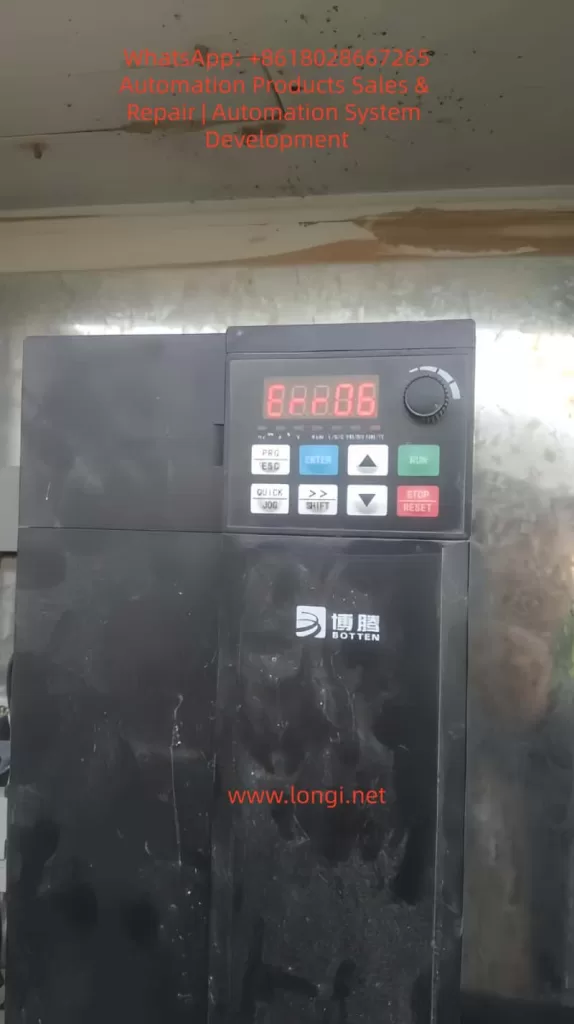
II. Definition and Trigger Mechanism of ERR06 Fault
According to the User Manual for BOTTEN A900 Series General Vector Control Inverters, ERR06 corresponds to the fault name “Overcurrent during Constant Speed Operation.” The trigger conditions are defined as follows:
When the inverter is in the constant speed operation phase (i.e., the output frequency is stable at the set value without acceleration or deceleration), if the output current exceeds 1.5 times the rated current (the specific threshold can be adjusted via parameters) and persists for more than 1 second (default setting), the overcurrent protection is triggered. The inverter immediately stops output and displays ERR06.
It is crucial to note the core difference between ERR06 and “Overcurrent during Acceleration (ERR04)” or “Overcurrent during Deceleration (ERR05)”: The fault occurs during the “constant speed phase,” not the dynamic adjustment phase. This implies that the root cause is more likely related to sudden load changes, parameter errors, or external circuit issues rather than the dynamics of acceleration or deceleration.
III. Core Cause Analysis of ERR06 Fault
Based on the “Fault Alarm and Countermeasures” table in the manual and practical maintenance experience, the causes of ERR06 can be categorized into five major types, ranked by frequency of occurrence:
1. Grounding/Short Circuit in Inverter Output Circuit (Approx. 40%)
The output circuit is the “energy transmission channel” between the inverter and the motor. If the cable, terminal blocks, or motor windings experience ground short circuits (e.g., cable insulation damage, motor windings touching the casing) or phase-to-phase short circuits (e.g., cable cores sticking together), the output current will surge, triggering overcurrent protection.
- Common Scenarios: Cables chewed by rodents, insulation wear at wall penetrations, loose terminal blocks causing poor contact, or motor windings shorted due to moisture.
- Technical Principle: During a short circuit, the loop resistance approaches zero. According to Ohm’s Law (I=U/R), the current instantly spikes to several times the rated value, far exceeding the inverter’s overcurrent threshold.
2. Incorrect Motor Parameter Settings (Approx. 30%)
The vector control of the BOTTEN A900 relies on accurate motor parameters (e.g., rated power, rated voltage, rated current, number of pole pairs, rotor resistance). If these parameters do not match the motor nameplate, the inverter’s torque calculation becomes inaccurate, leading to abnormal increases in motor current.
- Common Errors:
- Rated current set too low (e.g., motor actual rated current is 37A, but set to 32A).
- Incorrect number of pole pairs (e.g., a 2-pole motor set to 4-pole, causing synchronous speed calculation errors).
- Failure to perform “Motor Parameter Identification” (Vector control requires identification to obtain precise motor parameters; otherwise, control accuracy degrades).
- Technical Principle: In vector control, the inverter calculates torque current and excitation current based on motor parameters. If parameters are wrong, excitation current becomes insufficient, forcing the motor to increase stator current to maintain torque, eventually triggering overcurrent.
3. Low Input Voltage or Phase Loss (Approx. 15%)
The DC bus voltage of the inverter (approximately 1.35 times the input voltage; e.g., 537V DC for 380V AC input) is the foundation of the output voltage. If the input voltage drops below 85% of the rated value (e.g., 380V input dropping below 320V), the DC bus voltage becomes insufficient. The inverter cannot output enough voltage to maintain constant speed operation, causing the motor to draw more current to overcome the load, triggering overcurrent.
- Common Scenarios: Grid voltage fluctuations (e.g., voltage sags during factory peak hours), excessively long input cables (high line loss), or phase loss (e.g., blown fuses).
4. Sudden Load Addition During Operation (Approx. 10%)
If the load suddenly increases during the constant speed phase (e.g., conveyor jamming, pump impeller blockage, fan dust accumulation) beyond the motor’s rated load capacity, the motor current will rise sharply. The inverter’s overcurrent protection will respond quickly, triggering ERR06.
- Common Scenarios:
- Mechanical load jamming (e.g., damaged bearings, poor gear meshing).
- Sudden process load changes (e.g., pressure surge during injection molding machine clamping).
- Foreign objects stuck in the load (e.g., debris caught in a conveyor belt).
5. Undersized Inverter Selection (Approx. 5%)
If the inverter’s rated power is less than the motor power (e.g., a 15KW inverter driving an 18.5KW motor) or its overload capacity is insufficient (e.g., the load requires 1.5x overload, but the inverter only supports 1.2x), the constant speed current may exceed the inverter’s limit, triggering overcurrent.
- Common Misconception: Assuming “an inverter with slightly lower power than the motor is sufficient,” ignoring the load’s overload requirements (e.g., starting overload for fans and pumps).
IV. Step-by-Step Troubleshooting Process for ERR06 Fault
For ERR06 faults, it is recommended to follow the principle of “external first, internal later; easy first, difficult later.” The specific steps are as follows:
Step 1: Check External Circuits (Input/Output/Motor)
Objective: Eliminate short circuits, grounding, or voltage anomalies in external circuits.
- Operation 1: Measure Input Voltage
Use a multimeter to measure the voltage at the inverter input terminals (R/S/T). Confirm it is within 380V ± 15% (i.e., 323V–437V) and check for phase loss (voltage difference between phases ≤ 5%). If voltage is low, check the grid line or install a voltage stabilizer; if phase loss occurs, replace fuses or repair lines. - Operation 2: Inspect Output Cables and Motor
- Use a megger (insulation resistance tester) to measure the insulation resistance of output cables (U/V/W). The requirement is ≥1MΩ (values below this indicate cable insulation damage).
- Open the motor terminal box and measure winding resistance (U-V, V-W, W-U). It should be balanced across three phases (difference ≤ 2%) with no grounding (resistance between windings and casing ≥1MΩ).
- Check if cable terminal screws are loose (tighten with a screwdriver to avoid poor contact).
Step 2: Verify Motor Parameter Settings
Objective: Ensure inverter motor parameters match the nameplate.
- Operation 1: Enter Parameter Setting Interface
Press the PRG key on the inverter panel to enter the “Function Parameter Group” menu. Select the P1 Group (Motor Parameter Group) (Refer to the manual’s “Function Code Organization”: P0~PF are basic functions, P1 is for motor parameters). - Operation 2: Modify Parameters
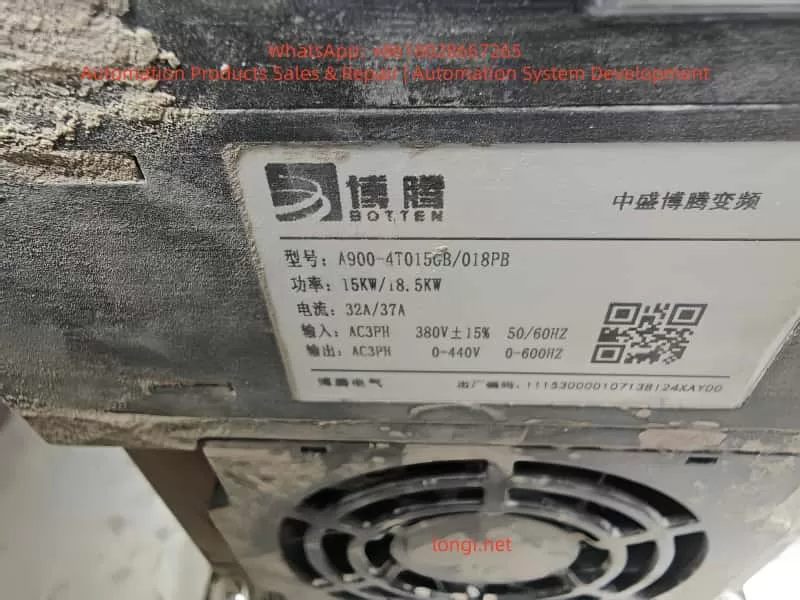
Refer to the motor nameplate and modify the following key parameters (using BOTTEN A900-4T015GB as an example):Parameter No.Parameter NameMotor Nameplate (18.5KW)Setting ValueP1-01Motor Rated Power18.5KW18.5P1-02Motor Rated Voltage380V380P1-03Motor Rated Current37A37P1-04Motor Rated Frequency50Hz50P1-05Motor Pole Pairs2 (4-pole motor)2 - Operation 3: Motor Parameter Identification (Critical)
The BOTTEN A900 supports automatic motor parameter identification (requires motor to be unloaded). Procedure:- Press PRG to enter P1 group, select P1-06 (Parameter Identification Selection), and set to “1” (Start Identification).
- Press ENTER to confirm. The inverter will automatically output low-frequency voltage to measure motor resistance, inductance, etc.
- After identification, P1 parameters update automatically. Save them by pressing ENTER.
Step 3: Inspect Load and Mechanical System
Objective: Eliminate sudden load changes or mechanical failures.
- Operation 1: Observe Load Operation
Start the inverter and observe the load (e.g., fan, pump):- Check for abnormal noise (e.g., “buzzing” from damaged bearings, “grinding” from jamming).
- Check for vibration (e.g., conveyor belt jumping due to insufficient tension).
- Check for overheating (e.g., motor casing temperature exceeding 80°C, measured with an infrared thermometer).
- Operation 2: Test Load Torque
Use a clamp meter to measure the actual motor current and compare it with the inverter display (if the difference exceeds 10%, the inverter’s current detection may be faulty).
If the actual current exceeds the motor’s rated current (e.g., 37A motor running at 45A), the load exceeds the rating. Adjust the load (e.g., clean pump debris, adjust conveyor tension).
Step 4: Check Inverter Internal Hardware
Objective: Eliminate internal inverter faults (e.g., IGBT module damage, current sensor failure).
- Operation 1: Check DC Bus Voltage
Disconnect power and wait 5 minutes (to discharge DC bus capacitors). Open the inverter cover and measure the DC bus terminals (P/N) with a multimeter. The normal value should be around 537V (for 380V input). If voltage is too low, the rectifier bridge or capacitors may be faulty. - Operation 2: Check IGBT Modules
Use a multimeter’s diode test mode to measure the forward voltage drop between IGBT module terminals (U/V/W) and P/N terminals (normal: 0.3–0.7V). If the drop is 0 or infinite for any phase, the IGBT module is damaged (requires replacement). - Operation 3: Check Current Sensors
Current sensors (e.g., Hall sensors) detect output current. If loose or damaged, they cause detection errors. Verify via replacement method (swap with a same-model sensor; if the fault disappears, the original sensor is faulty).
Step 5: Optimize Parameter Settings (For Vector Control)
If all above checks reveal no issues, review vector control parameters to prevent overcurrent due to improper settings:
- Torque Boost (P0-10): If set too high, it causes excessive current at low frequencies and potentially during constant speed. Adjust based on load type (5–10% for constant torque, 0–5% for variable torque).
- V/F Curve (P0-11): Select a curve matching the load (e.g., “Variable Torque” for fans/pumps, “Constant Torque” for conveyors).
- Overcurrent Protection Threshold (P0-12): If the load requires short-term overload (e.g., 1.2x rated current), the threshold can be slightly increased (but must not exceed the inverter’s max current, e.g., 37A for BOTTEN A900-4T015GB).
V. Case Studies of ERR06 Fault Solutions
Case 1: Overcurrent Caused by Output Cable Insulation Damage
Scenario: A BOTTEN A900-4T015GB inverter driving a 15KW water pump in a chemical plant frequently triggered ERR06.
Troubleshooting:
- Measured input voltage (385V, normal).
- Used a megger to test output cables; U-phase insulation resistance was only 0.2MΩ (far below 1MΩ).
- Inspected the cable and found insulation chewed by rodents at a wall penetration, causing the core to contact the wall (ground short).
Solution: Replaced the damaged cable, insulated the wall penetration with tape, and re-measured insulation resistance (≥5MΩ). The fault was resolved.
Case 2: Overcurrent Caused by Incorrect Motor Parameters
Scenario: A BOTTEN A900-4T018PB inverter driving an 18.5KW motor in a machinery factory triggered ERR06 one minute after starting constant speed operation.
Troubleshooting:
- Checked external circuits (cables, motor) – all normal.
- Verified motor parameters and found P1-03 (Rated Current) was set to 32A (actual motor rated current was 37A).
- Reset P1-03 to 37A and performed motor parameter identification.
Solution: After parameter modification, the inverter display showed stable current at 35A (near rated value), and the fault did not recur.
Case 3: Overcurrent Caused by Sudden Load Addition
Scenario: A conveyor system with a BOTTEN A900 inverter frequently triggered ERR06 when transporting heavy objects.
Troubleshooting:
- Measured input voltage (375V, normal).
- Checked motor parameters (correct).
- Observed the load and found a damaged conveyor roller bearing causing jamming and a sudden increase in load torque.
Solution: Replaced the bearing and adjusted conveyor belt tension. The fault was resolved.
VI. Preventive Measures for ERR06 Fault
To prevent ERR06 recurrence, implement routine maintenance and preventive checks:
- Regular External Circuit Inspection: Monthly megger tests for output cable insulation (≥1MΩ) and tightening of terminal screws.
- Calibrate Motor Parameters: After replacing the motor or inverter, reset motor parameters and perform identification.
- Monitor Input Voltage: Install voltage monitoring devices to alarm when voltage drops below 323V.
- Maintain Load Equipment: Regularly clean dust from fans/pumps and check conveyor tension and bearing condition.
- Proper Sizing: Select inverters based on load type (constant/variable torque) and overload requirements (e.g., for an 18.5KW motor, choose an 18.5KW or larger inverter with 1.2x/60s overload capacity).
VII. Conclusion
While the ERR06 fault on the BOTTEN A900 inverter is common, it can be quickly located and resolved by following a “external first, internal later; easy first, difficult later” troubleshooting process, combined with parameter verification, load inspection, and hardware testing. The key takeaways are:
- Prioritize external circuit inspection (accounts for over 40% of faults).
- Ensure motor parameter accuracy (core of vector control).
- Monitor load changes (sudden load addition is a major cause of constant speed overcurrent).
For maintenance personnel, mastering troubleshooting techniques is essential, but understanding the inverter’s control principles (e.g., vector control torque calculation, overcurrent protection mechanisms) is crucial to prevent faults from recurring. This article aims to provide practical reference for industrial inverter maintenance, enhancing equipment reliability.
Appendix: BOTTEN A900 ERR06 Fault Troubleshooting Quick Reference Table
| Step | Inspection Item | Normal Standard | Abnormal Action |
|---|---|---|---|
| 1 | Input Voltage | 380V ± 15% (323–437V) | Check grid / Install stabilizer |
| 2 | Output Cable Insulation | ≥1MΩ | Replace cable / Insulate |
| 3 | Motor Winding Resistance | Balanced (diff ≤2%) | Repair / Replace motor |
| 4 | Motor Parameters (P1 Group) | Match nameplate | Modify params + Identification |
| 5 | Load Current | ≤ Motor Rated Current | Adjust load / Clean debris |
| 6 | DC Bus Voltage | ~537V (380V input) | Check rectifier / Capacitors |