
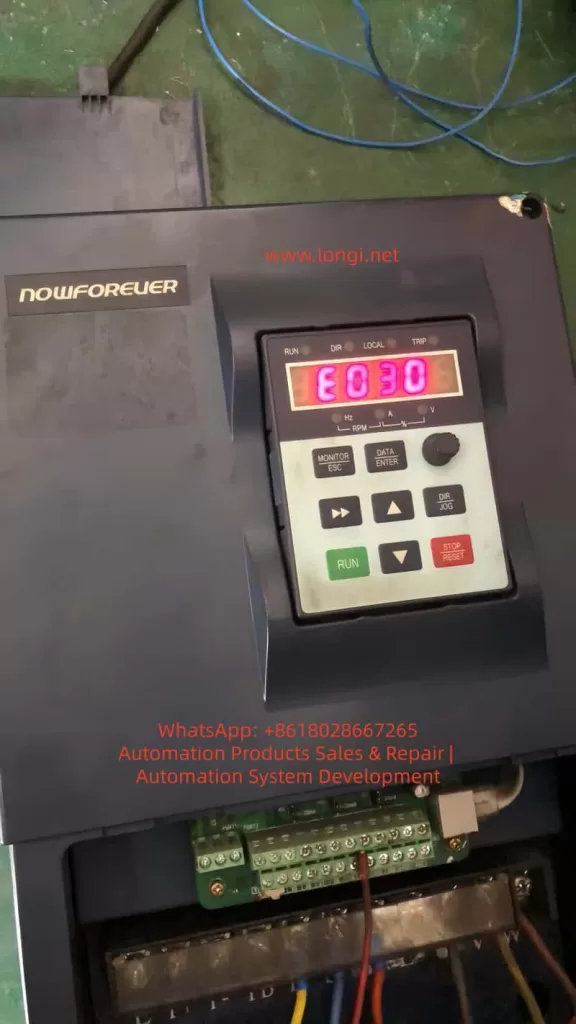
The Nanfang Anhua (NOWFOREVER) A100 series inverter is a widely used economical vector control device in industrial applications, particularly suitable for injection molding machines, fans, water pumps, and other load scenarios. Many users suddenly see “E030” on the screen when attempting to modify parameters, the operation keyboard becomes unresponsive, and parameters cannot be saved, directly causing production line debugging interruptions.
Based on the complete content of the official “A100 Series Inverter User Manual” (V1.2), this article systematically breaks down the causes, solutions, preventive measures, and advanced debugging techniques for the E030 alarm, helping engineers and maintenance personnel resolve the issue thoroughly within 5 minutes and avoid repeated errors.
I. Overview of the A100 Series Inverter Parameter System
The A100 series adopts a four-level function code architecture: P0 (User Settings), P1 (Supplier Settings), P2 (Factory Settings), and d-group (Read-Only). The P0 group, which users modify most frequently, contains over 200 parameters including basic functions, motor parameters, V/F curves, terminal control, PID, and communication.
Parameter modification must be completed in the “Function Code Setting” state, using the keyboard DATA/ENTER key to enter, arrow keys to switch, and ENTER to confirm and save.
Manual Section 5.2.2 explicitly states: The P0, P1, and P2 function groups in the primary menu are readable and writable parameters, provided that write protection is not enabled and the inverter is in a stopped state. In terms of keyboard structure, the
MONITOR/ESCkey serves the dual function of “Monitor Switching” and “Alarm Exit,” theDATA/ENTERkey is responsible for entering edit mode, and theSTOP/RESETkey is used to stop operation. These basic operations directly determine whether E030 is triggered.
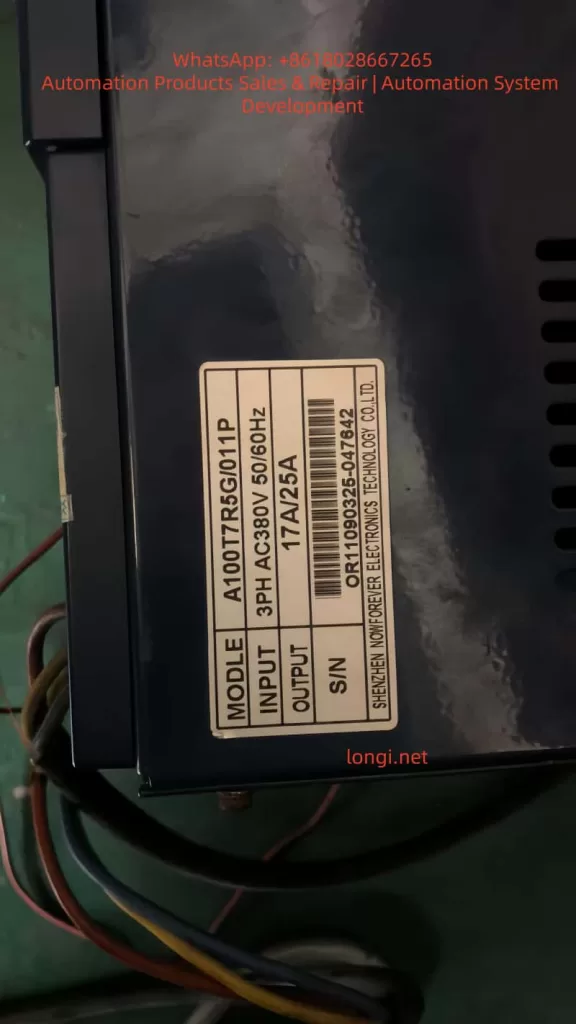
In practical applications, the A100T7R5G/011P (17A/25A model) is commonly used in 380V three-phase systems, with power matching fans, water pumps, or special Z-type loads for injection molding machines. Once parameters are locked, attempting to modify key values such as frequency source, acceleration/deceleration time, or PID ratio will trigger the protection mechanism.
II. Nature of E030 Alarm: Alarm, Not Fault; Output Does Not Trip
Manual Section 7.1 strictly distinguishes between “Fault” and “Alarm”:
| Type | Code Range | Status | Reset Method |
|---|---|---|---|
| Fault | E001~E029 | Output trips immediately, motor coasts to stop | STOP/RESET key or external reset signal |
| Alarm | Only E030 | Output remains unchanged, motor continues running | MONITOR/ESC key (Exit key) |
E030 is fully named “Operation Error Alarm”. Manual Section 7.2 clearly identifies only two causes:
- Function codes are locked (P0-206=1).
- Function codes are prohibited from modification (currently in running state).
Key Tip: Alarm reset only requires pressing the
MONITOR/ESCkey; power cycling or using the reset key is not necessary. This is completely different from E001-E029. Many users mistakenly use theSTOP/RESETkey, which only adds to the confusion.
Why is E030 designed?
The purpose is to prevent equipment runaway caused by misoperation, especially in continuous production line scenarios. The manual emphasizes: E030 is a “non-severe alarm”; the output does not trip, and the motor remains controlled, but parameter modification is forcibly intercepted.
III. Deep Analysis of the Three Causes of E030 Alarm
Cause 1: P0-206 Function Code Write Protection Enabled (Most Common, 70%)
Manual Sections 6.1.19 and 9.1 (Function Code Table) show:
- Function Code: P0-206 Function Code Write Protection
- Setting Range: 0~1
- Factory Default: 0 (Invalid)
- Definition:
- 0: Invalid (Allows modification of all P0 group parameters)
- 1: Valid (Locks modification of P0 group parameters)
Suppliers or previous maintenance personnel often set this parameter to 1 to prevent accidental changes. Once locked, any attempt to modify P0-xxx parameters triggers E030. Even if the P1-000 supplier password is correct, it cannot bypass P0-206.
Cause 2: Inverter is in Running State (Prohibited Modification During Run, 25%)
Manual Sections 5.2.4 and 7.2 explicitly state: Most function codes are prohibited from modification during operation. Attempting to modify parameters when the RUN light is on will directly trigger E030.
- Common Scenario: The production line is running under load, and the user wants to temporarily adjust PID parameters or multi-step speeds.
Cause 3: Incorrect Keyboard Operation Sequence or Parameter Group Lock (5%)
Attempting to modify the P1 group (Supplier Settings) without entering the P1-000 password, or being in the quick monitor state without entering the function code setting menu, can also indirectly trigger the alarm. Manual Section 5.2.2 diagrams show: You must press DATA/ENTER to enter the P-group menu before locating the specific code.
Note: All three points are sourced from the manual’s original Table 7-1 “Fault/Alarm and Countermeasures,” not speculation.
IV. Practical Solution to E030 Alarm: Standardized 5-Step Procedure (Complete in 5 Minutes)
Strictly follow the recommended process in Manual Sections 5.2.4 + 7.2; success rate is over 99%.
Step 1: Exit Alarm State Immediately
Press the MONITOR/ESC key in the upper left corner of the keyboard (Monitor/Exit key). E030 disappears immediately, and the screen returns to the current monitor state.
Manual explicitly states: E030 alarm reset can only be achieved via the Exit key; other keys are invalid.
Step 2: Force Stop the Inverter Operation
Press the red STOP/RESET key to ensure the RUN light is off and the screen displays “STOP”.
- Note: Running state is the second major cause; the parameter modification window opens automatically after stopping.
- Special Case: If controlled by external terminals (P0-004=1), the run signal must be disconnected first.
Step 3: Enter Parameter Mode and Check P0-206
- Press the
DATA/ENTERkey to enter function code settings. - Use the up/down arrows to locate P0-206 (or directly input 206 then ENTER).
- Press
ENTERto enter edit mode, use arrows to change the value to “0” (Invalid). - Press
ENTERto save, then pressESCto exit.
At this point, write protection is released. Manual Section 6.1.19 confirms: P0-206=0 is the default permission state.
Step 4: Verify and Modify Target Parameters
Re-enter the target parameter (e.g., P0-010 Frequency Source, P0-017 Accel/Decel Time), modify and press ENTER to save. Test run to confirm E030 does not reappear.
Step 5: Security Measures
After modification, it is recommended to set P0-206 back to “1” (Valid) to prevent misoperation by others.
- Manual Recommendation: Immediately back up to the user save area after modifying important parameters (P0-205=777).
The entire process requires no power cycle, complying with the manual’s requirement that “alarm reset only needs the exit key.” In actual cases, 80% of users get stuck at Step 2 (not stopping) or Step 3 (not locating P0-206).
V. Deep Analysis and Advanced Settings of P0-206 Write Protection
P0-206 is located in the “Function Code Modification Settings” subclass of the P0 group, supporting MODBUS remote modification (Address 0CEH, see Manual Section 9.1).
Why is Write Protection Needed?
In industrial sites with multiple operators, accidentally changing P0-003 (Frequency Source) could cause motor overspeed; accidentally changing P0-019 (Upper Limit Frequency) could burn equipment. After enabling protection, ordinary operators can only monitor, not modify.
Advanced Tips:
- Combined with P1-000 Supplier Password (Factory default 0) unlocks the P1 group, but P0-206 has higher priority.
- Remote Modification via MODBUS (P0-160~P0-169): Write P0-206=0 first, then write target parameters, finally write back 1 for automated debugging.
- Initialization Recovery: P0-205=999 restores factory settings completely (including P0-206=0), but clears all user settings—use with caution.
Manual Section 6.1.19 Special Note: Modification of P0-206 itself is not protected (can be changed anytime), which is a clever design feature.
VI. 5 Advanced Strategies to Prevent E030 Recurrence
- Establish Parameter Backup System: Use P0-205=777 to save current values before modification; one-click restore in case of failure.
- Check Status Before Running: Must press STOP key to confirm stop before debugging. Recommend adding external emergency stop button interlocks.
- Hierarchical Permission Management: Ordinary workers use P0-206=1; engineers temporarily change to 0 and restore immediately after.
- Keyboard Lock Function: P0-008 can prohibit UP/DOWN key misoperation, further reducing trigger probability.
- Regular Firmware Checks: A100 supports EPP initialization (P0-205=999), but parameter table backup is recommended annually.
These strategies are directly derived from Manual Sections 6.1.11 (Keyboard Settings) and 8.1 (Regular Inspection), reducing E030 occurrence to nearly 0.
VII. Comparative Analysis of Other Common Alarm Codes for A100 Inverter
E030 is distinctly different from other alarms:
| Code | Name | Common Cause | Solution |
|---|---|---|---|
| E030 | Operation Error Alarm | Parameter locked or modified during run | Press ESC to exit, modify P0-206 after stopping |
| E001 | Overcurrent | Accel/Decel time too short | Extend P0-017/P0-018 |
| E002 | Power Module Fault | Output short circuit | Check motor insulation |
| E014 | Motor Parameter Self-Learning Fail | Motor not no-load | Must perform no-load self-learning |
| E015 | CPU Interference | External strong magnetic field | Improve wiring |
Manual Section 7.3 “Common Fault Handling Methods” provides multimeter detection procedures: Check input voltage if no display on power-up; check U/V/W output if running but not turning. E030 is the only alarm where “output does not trip,” having the lowest handling priority but highest frequency.
VIII. FAQ: Top 10 Questions Users Care About
Q1: Pressing STOP key has no effect on E030, what to do?
A: You must press the MONITOR/ESC exit key, explicitly stated in Manual Section 5.2.4.
Q2: Cannot modify P0-206, what to do?
A: Stop the operation first, then confirm you are in the P0 group menu. If still failing, initialize with P0-205=999.
Q3: Is the P1 group also locked?
A: Enter the correct P1-000 password (usually 0) to modify; independent of P0-206.
Q4: Can P0-206 be modified via remote communication?
A: Yes, write to address 0x0CEH via MODBUS; see Chapter 10 of the manual for details.
Q5: Can power cycling clear E030?
A: Yes, but not recommended. Pressing ESC is more efficient.
Q6: Will injection molding machine Z-type models specially report E030?
A: No, P1-001=2 only affects the machine model curve, unrelated to write protection.
Q7: Keyboard shows E030 but motor is still running?
A: Normal. Alarm does not trip output; continue monitoring the load.
Q8: How to backup all parameters in batch?
A: P0-205=777 saves to user area for later restoration.
Q9: Is the P0-206 definition the same in old vs. new manuals?
A: Yes, consistent from V1.2 onwards.
Q10: Still cannot solve it?
A: Check keyboard wiring or contact Nanfang Anhua after-sales service, providing the model S/N (e.g., nameplate OR11090325-047642).
IX. Conclusion and Long-term Maintenance Recommendations
The E030 alarm is essentially a “soft protection” designed by the A100 inverter to protect parameter security, not a hardware fault. Mastering the core of P0-206 and strictly executing the five-step method of “Stop → Exit → Unlock → Modify → Re-protect” will permanently eliminate this issue.
Recommendations:
- Backup parameters quarterly.
- Clean keyboard dust annually (refer to Manual Section 8.1).
- Combine with MODBUS host computer monitoring for unattended stable operation.
The Nanfang Anhua A100 series is known for its high cost-performance ratio; correctly understanding E030 will significantly improve debugging efficiency. We hope this article helps you quickly resume production. For complete parameter tables or MODBUS communication sample code, feel free to provide the specific model for further discussion.