
Introduction
In the realm of industrial automation, variable frequency drives (VFDs) like the Siemens SINAMICS G120C series play a pivotal role in controlling motor speed, torque, and efficiency across applications such as conveyors, pumps, fans, and machine tools. These compact, robust drives are designed for seamless integration into PROFIBUS, PROFINET, or other fieldbus systems, offering high performance with power ratings from 0.55 kW to 132 kW. However, like any sophisticated electronic system, they are susceptible to faults that can disrupt operations.
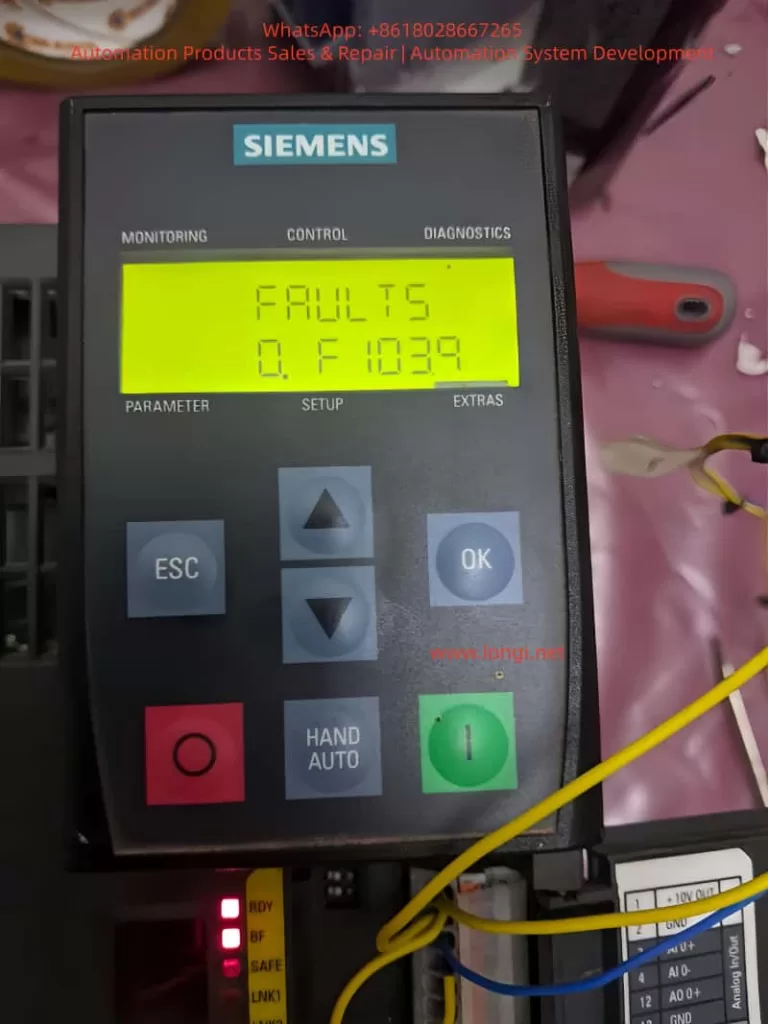
One common yet critical error encountered in SINAMICS G120C drives is the F01039 fault code, often displayed as “F1039” on the Basic Operator Panel (BOP-2). This fault pertains to issues with writing parameter backup files to the non-volatile memory (NVM), which is essential for persisting drive configurations across power cycles. Ignoring or improperly addressing this fault can lead to repeated parameter losses, necessitating frequent recommissioning and potentially causing downtime in production environments.
This article provides a detailed, technical exploration of the F01039 fault in Siemens SINAMICS G120C drives. We will cover its description, underlying causes, diagnostic procedures, step-by-step remedies, preventive strategies, and real-world case studies. By understanding and resolving this fault, engineers and technicians can enhance drive reliability, minimize operational interruptions, and optimize system performance. Key terms such as “Siemens G120C F01039 fault,” “SINAMICS drive parameter backup error,” and “G120C troubleshooting” will be integrated to aid in search engine optimization (SEO), ensuring this guide reaches those facing similar issues.
The information draws from official Siemens documentation, including the SINAMICS G120C List Manual and Operating Instructions, as well as practical insights from industry forums and support resources. Let’s delve into the technical specifics.
Understanding the F01039 Fault Code
Fault Classification and Behavior
The F01039 fault is classified under the message class “Hardware/software error (1)” in the SINAMICS G120C diagnostic system. It indicates a failure in writing to at least one parameter backup file in the drive’s non-volatile memory. The reaction to this fault can vary based on configuration: NONE (no immediate stop), OFF1 (controlled stop with ramp-down), OFF2 (immediate pulse disable), or OFF3 (rapid stop). Acknowledgment is required IMMEDIATELY, meaning the fault must be cleared promptly to resume operations.
In practical terms, when F01039 triggers, the drive may continue running temporarily but will fail to save changes to parameters, leading to loss of custom settings upon power cycling. This is particularly problematic in applications requiring persistent configurations, such as vector control modes or safety-integrated functions.
Parameter Backup Mechanism in SINAMICS G120C
To grasp why this fault occurs, it’s essential to understand the parameter backup process in SINAMICS drives. Parameters are stored in RAM during runtime and must be copied to ROM (non-volatile memory) for persistence. This is typically initiated via commands like p0971 (Save parameters) or through commissioning tools like STARTER or Startdrive.
Backup files are stored in the /USER/SINAMICS/DATA/ directory on the NVM, which could be the internal EEPROM of the Control Unit (CU) or an external memory card (MMC/SD card up to 2 GB). File types include:
- PSxxxyyy.***: Parameter sets for drive objects.
- CAxxxyyy.***: Configuration archives.
- CCxxxyyy.***: Consistency checks.
Each drive object requires approximately 80 KB of free space for backups. The fault value, accessible via parameter r0949 (interpreted in hexadecimal), provides granular diagnostics in the format dcba, where:
- a (yyy): File type (000 = consistency backup, 001-062 = drive object number, 099 = PROFIBUS backup).
- b (xxx): Save trigger (000 = p0971=1, 010 = p0971=10, etc.).
- c and d: Internal Siemens codes for troubleshooting.
For instance, r0949 = 0x00010001 might indicate a consistency backup failure triggered by p0971=1.
Impact on Drive Operations
In a G120C setup, this fault can manifest during commissioning, parameter changes, or firmware updates. If unresolved, it may cascade into related alarms like A01039 (indicating a read failure from backups) or prevent safety functions from activating properly, as seen in integrated safety manuals. In high-availability systems, such as those in wastewater treatment or conveyor lines, this could result in unscheduled stops, affecting productivity and potentially leading to mechanical wear.
Root Causes of F01039 Fault
The F01039 fault stems from impediments in the write operation to NVM. Based on Siemens diagnostics and user reports, the primary causes include:
1. File Attribute Restrictions
Parameter files may have the “read-only” attribute set, preventing overwrites. This can occur due to manual edits via tools like STARTER or corrupted file systems. In multi-user environments, accidental attribute changes during backups can trigger this.
2. Insufficient Free Memory Space
Each drive object needs ~80 KB free in NVM. Accumulation of logs, multiple backups, or large project files can exhaust space. For G120C drives with optional memory cards, improper formatting (e.g., not FAT32) exacerbates this.
3. Defective Non-Volatile Memory
Hardware failures in the CU’s EEPROM or memory card are common culprits. Causes include electrical surges, thermal stress (G120C operates up to 55°C ambient), or wear from frequent writes. User forums report cases where drives in harsh environments (e.g., dusty factories) fail after 2-3 years.
4. Software and Configuration Mismatches
Firmware bugs in older versions (e.g., pre-V4.7 SP10) or incompatible project downloads from STARTER can cause write failures. Topology mismatches during parameter loading (e.g., wrong drive object type) are flagged in r0949.
5. Power Cycle and Timing Issues
Interrupting power during saves or rapid cycling can corrupt files. In automated systems with frequent restarts, this is a recurring issue.
6. External Factors
Memory cards from non-Siemens vendors may lack compatibility, leading to errors. Write protection switches on SD cards or virus-infected commissioning PCs can also interfere.
Understanding these causes is crucial for targeted troubleshooting, as misdiagnosis can lead to unnecessary hardware replacements.
Diagnostic Procedures for F01039
Accurate diagnosis begins with accessing drive diagnostics. Follow these steps for Siemens G120C F01039 fault troubleshooting:
Step 1: Initial Fault Acknowledgment
- Use the BOP-2 or Intelligent Operator Panel (IOP) to view the fault: Press OK to enter diagnostics mode, navigate to “FAULTS,” and note the code.
- Acknowledge via digital input, PROFIsafe, or panel button. If it persists post-power cycle, proceed to deeper analysis.
Step 2: Reading Fault Parameters
- Access r0949 via BOP-2 (MENU > DIAGNOSTICS > FAULT MEMORY) or STARTER (online mode: Parameters > r0949).
- Interpret hexadecimal value: For example, if r0949 = 0x01000000, a=000 (consistency backup), b=010 (p0971=10 trigger).
- Check r0947 (fault code list), r0948 (timestamp), and p0952 (fault count) for context.
Step 3: Memory Inspection
- If using a memory card, safely eject (p9400=2, then remove after LED confirmation).
- Insert into a PC and check /USER/SINAMICS/DATA/ for file attributes (right-click > Properties > Read-only). Measure free space using file explorer.
- For internal NVM, use STARTER to view memory usage via “Drive Navigator > Memory Card.”
Step 4: Hardware Checks
- Verify CU LEDs: RDY (ready), BF (bus fault), SAFE (safety). Flashing RDY might indicate memory issues.
- Test for environmental factors: Measure ambient temperature, check for dust on vents, and inspect wiring for EMC issues.
Step 5: Advanced Tools
- Use Trace function in STARTER to monitor parameter writes.
- If PROFIsafe is enabled, check for communication errors affecting backups.
These steps typically pinpoint the cause within 15-30 minutes, reducing downtime.
Step-by-Step Remedies for F01039
Once diagnosed, apply these remedies systematically. Always power off the drive before hardware interventions.
Remedy 1: Correct File Attributes
- Connect via STARTER: Go online, access file system, select PSxxxyyy.*** files, and uncheck “read-only.”
- Alternatively, remove memory card, edit on PC, and reinsert.
- Save parameters: Set p0971=1 (RAM to ROM) and confirm.
Remedy 2: Free Up Memory Space
- Delete unnecessary files: In STARTER, navigate to /USER/SINAMICS/DATA/ and remove old backups or logs.
- If space is critically low, perform factory reset (p0970=1) to clear NVM, then recommission.
- Ensure at least 80 KB per object: Use p8400 to check total space.
Remedy 3: Reload and Resave Project
- In STARTER, reload the project file (.acx), then execute “Copy RAM to ROM.”
- If from memory card, set p0804=1 to copy card to drive.
Remedy 4: Hardware Replacement
- Replace memory card: Use Siemens-approved SD (6SL3054-4AG00-2AA0), format to FAT32, and clone parameters.
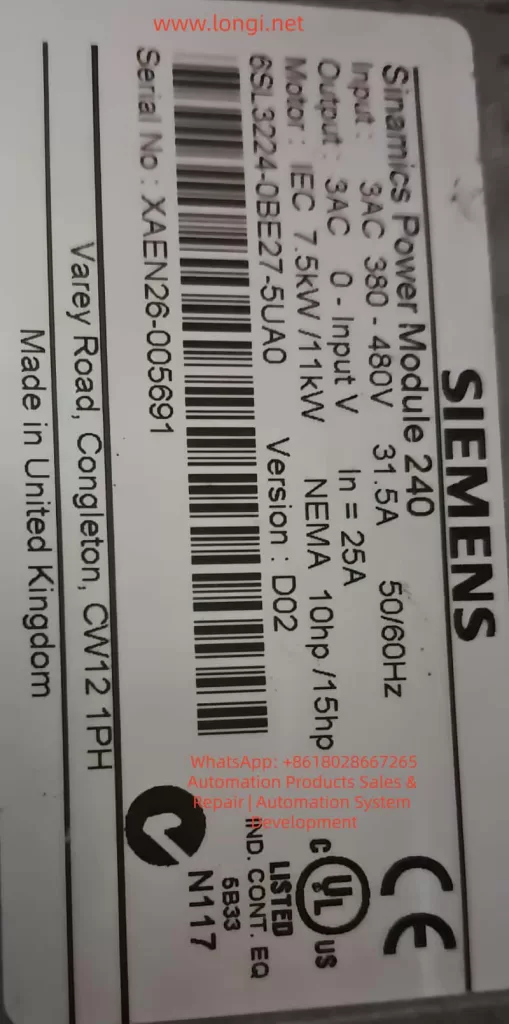
- If CU is faulty, replace the entire unit (e.g., for 6SL3224-0BE27-5UA0 model). Transfer parameters via BOP-2 or IOP.
- Post-replacement, perform acceptance tests if safety functions are enabled.
Remedy 5: Firmware Update
- Check current firmware (r0018) against latest (e.g., V4.7 SP10).
- Download from Siemens support, load via memory card or STARTER.
Remedy 6: Handling Persistent Issues
- If fault recurs after reset, it may indicate deeper hardware damage. Contact Siemens support with r0949 value and serial number.
These remedies resolve 90% of cases, as per industry reports.
Preventive Measures for SINAMICS Drive Parameter Backup Errors
Prevention is key to avoiding F01039 in Siemens G120C drives:
1. Regular Backups and Maintenance
- Schedule monthly parameter backups using IOP or SD card.
- Monitor NVM space via p8400 and clear logs periodically.
2. Hardware Best Practices
- Use only compatible memory cards, avoid removing during operation.
- Install in environments within specs: -10°C to +55°C, IP20 protection.
3. Software Discipline
- Always use latest STARTER/Startdrive versions.
- Avoid interrupting saves; use UPS for commissioning PCs.
4. Training and Documentation
- Train technicians on diagnostics; maintain logs of r0949 values.
- Integrate fault monitoring into PLC via PROFIdrive telegrams.
Implementing these can reduce fault incidence by up to 70%.
Case Studies: Real-World Resolutions
Case 1: Manufacturing Plant Downtime
In a German automotive assembly line, a G120C drive (firmware V4.7.6) repeatedly showed F01039 after parameter changes. Diagnosis revealed r0949=0x00010000, indicating read-only files. Remedy: Edited attributes via STARTER, freed 100 KB space. No recurrence after 6 months.
Case 2: Wastewater Pump System
A U.K. facility reported faults post-power outage. r0949 pointed to defective CU EEPROM. Replacement and firmware upgrade to V4.7 SP10 resolved it. Preventive: Added surge protection.
Case 3: Forum-Reported Issue
Users on Siemens forums described faults in booksize G120C units. Cause: Non-compatible SD cards. Switching to official cards fixed backups.
These cases highlight the importance of systematic approaches.
Advanced Topics in G120C Memory Management
Memory Card Handling
The G120C CU features a top-mounted slot for SD/MMC cards. For backups: Insert formatted card, set p0804=12 to clone. Eject safely to avoid corruption.
Integration with Safety Functions
If using Safety Integrated (e.g., STO, SS1), F01039 can affect parameter persistence for safety data. Post-fix, perform reduced acceptance tests.
Firmware and Compatibility
Upgrades address known bugs; downgrade if incompatible, but verify via p0015.
EMC Considerations
Poor grounding can induce errors; ensure compliance with EMC directives.
Conclusion
The F01039 fault in Siemens SINAMICS G120C drives, while disruptive, is manageable through structured diagnosis and remedies. By addressing file attributes, memory space, and hardware integrity, technicians can restore functionality swiftly. Preventive measures ensure long-term reliability, making this guide an essential resource for anyone dealing with SINAMICS drive error troubleshooting.
For further assistance, refer to Siemens support portals or consult certified integrators. This comprehensive approach not only resolves the immediate issue but also enhances overall system robustness in industrial settings.