
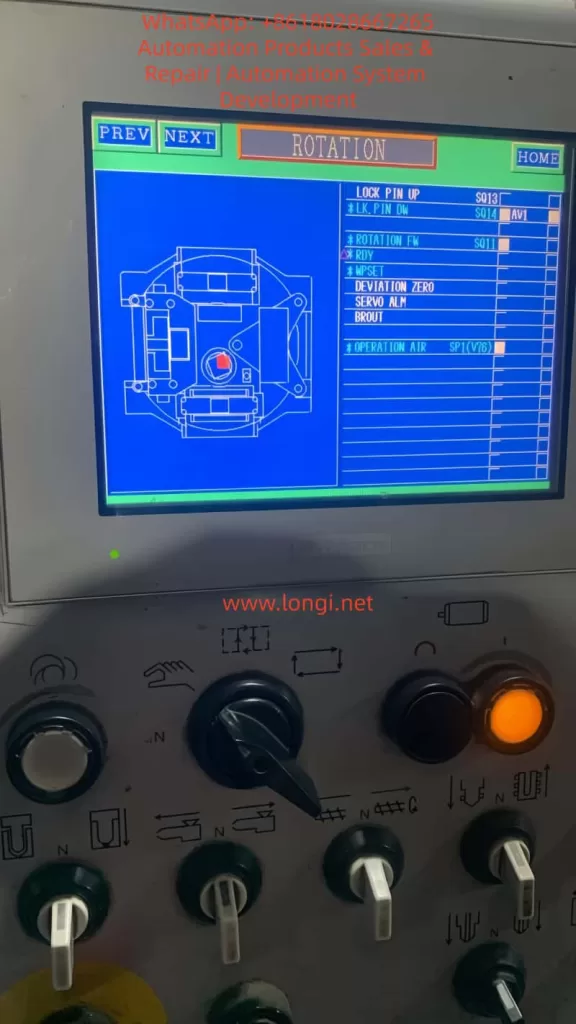
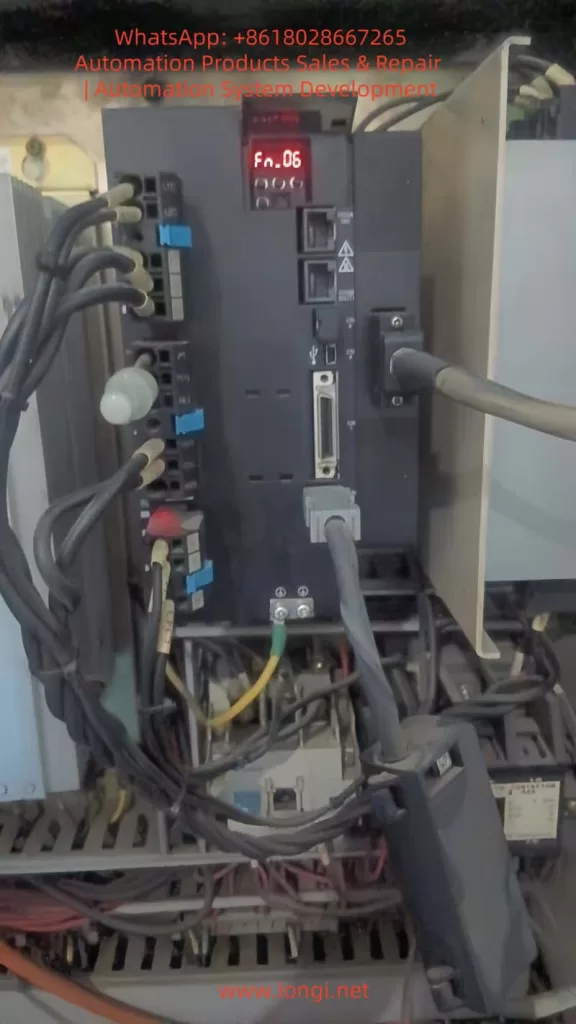
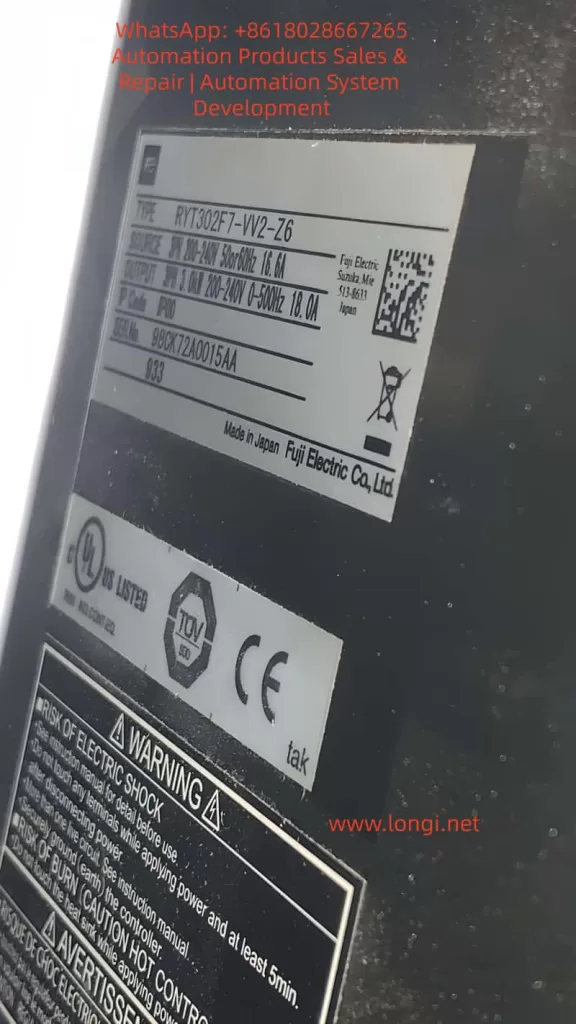
In modern CNC machine tools, rotary indexing tables, packaging machinery, and other automation equipment, the Fuji ALPHA7 (including ALPHA7S VVS type) servo drive undertakes the core tasks of high-precision position control and high-speed response. Models such as RYT302F7-VV2-Z6 (3kW 200V class Frame 3) are widely used in occasions requiring multi-axis synchronization or safety interlocks. However, when the equipment suddenly experiences P5 terminal voltage loss, the drive displays Fn_06, and the CNC panel (Pro-face type) shows multiple signals marked with “X” in ROTATION mode, field engineers often face a problem that “seems simple but remains unsolved for a long time.” This article takes a real customer case as the starting point to systematically analyze the trial run mode mechanism of the ALPHA7 drive, the protection logic of encoder power supply, the causes of CNC-servo I/O interaction faults, and provides a complete, reproducible troubleshooting and restoration process and prevention strategies. The full text is based on the technical details of the official Fuji ALPHA7S user manual (INR-SI47 series), combined with field multimeter and PC Loader measured data, striving to provide directly applicable technical references for maintenance personnel.
1. ALPHA7 Series Servo System Architecture and Typical Application Scenarios
The ALPHA7 series servo amplifier adopts a modular design. The main circuit supports 200-240V three-phase input, and the control circuit is independently powered (L1C/L2C). The VV2 type (VVS interface) has a built-in touch screen operation panel, supporting multiple control modes such as pulse + analog + positioning + Modbus, with a maximum output frequency of 500Hz. Paired with GYS/GYB/GYE series motors, it can achieve a positioning accuracy of 0.1μm.
The drive contains three key internal modules:
- Main Power Module (IGBT inverter bridge);
- Control Core (DSP + FPGA);
- Encoder Interface Unit (provides P5/M5 5V power, receives A/B/Z differential signals).
In rotary mechanism applications (such as the indexing disk in the customer case), the servo is often linked with a Pro-face touch screen CNC controller, receiving interlock signals such as FWD/REV/LOCK PIN/OPERATION AIR through command sequence inputs (CONT1~CONTn). Output signals include RDY, INP, SERVO ALM, etc., for real-time status feedback. Once any interlock condition is not met, the CNC displays an “X” mark and lights up the orange alarm lamp, causing the “rotation FW” command to be hardware-blocked.
The P5 terminal (Pin 1 of CN2 encoder socket) is the lifeline of the entire closed-loop control: it provides a stable 5V/300mA power supply for the motor incremental/absolute encoder (M5 is 0V ground). Section 2.3 of the manual explicitly stipulates that the encoder cable must use shielded twisted pair, AWG23 when the length is ≤50m, and AWG17 must be used when exceeded to prevent voltage drop. Any short circuit, open circuit, or external noise will trigger the internal protection circuit, cut off the P5 output, and record an alarm.
2. Complete Functional Framework of Touch Screen Trial Run Mode (Fn_0n)
The touch screen operation interface unique to the ALPHA7 VVS drive is divided into 7 modes: Monitoring, Station Number, Maintenance, Parameter Editing, Positioning Data Editing, Trial Run, and Command Sequence Test. Among them, the Trial Run Mode (Trial Run Mode) is the most commonly used diagnostic tool for field engineers. Press the [MODE/SET] key to enter and display Fn_0n, and execute specific functions by pressing the [SET/SHIFT] key for more than 1 second.
Section 6.9 of the manual lists 15 sub-functions in detail:
- Fn_01: Manual operation (JOG)
- Fn_02: Position preset
- Fn_03: Home return
- Fn_04: Automatic operation
- Fn_05: Alarm reset
- Fn_06: Alarm record initialization (core of this article)
- Fn_07: Parameter initialization
- Fn_08: Positioning data initialization
- Fn_09: Automatic bias adjustment
- Fn_10: Z-phase position adjustment
- Fn_11: Auto-tuning gain
- Fn_12: Simple tuning
- Fn_13: Mode operation
- Fn_14: Command sequence test mode
- Fn_15: Teaching
After entering Fn_0n, if the conditions are not met, NG (nG1/nG2) will be displayed:
- NG1 corresponds to “Cannot start operation”, common in executing initialization functions (Fn_06/07/08) while Servo ON, executing home return outside position control mode, executing Z-phase adjustment without encoder connected, etc.
- NG2 corresponds to “Trial run interrupted”, mostly triggered by sudden alarms, +OT/-OT, or emergency stop EMG signals.
3. Technical Principle and Operation Specification of Fn_06 Alarm Record Initialization
The essence of Fn_06 is to clear the alarm detection history stored in the servo amplifier EEPROM. Unlike normal alarm reset (Fn_05), alarm records are permanently retained even after power-off for post-analysis of recurring fault root causes. The record content (AL_n1 format) can be monitored via command sequence mode En_02.
The operation process is strictly as follows (flowchart on page 6-47 of the manual):
- Ensure Servo OFF (S-ON signal is low level).
- Enter trial run mode and select Fn_06.
- Press the
[SET]key for more than 1 second: Display AL_n1 → -C_0- (executing) → donE (complete). - Press
[ESC]to exit and return to normal monitoring mode (displaying speed or “00”).
Precautions:
- Do not turn on the main power supply (L1/L2/L3) during execution, otherwise the EEPROM may be damaged.
- After clearing, original records such as AL.Et1 (encoder communication abnormality) and AL.Ec (encoder data abnormality) disappear completely, but current real-time alarms still need Fn_05 or RST signal to reset.
- If NG1 is displayed, check if the servo is ON or if the encoder is not connected.
In the customer case, directly entering Fn_06 after reset was caused by the accumulation of historical alarms triggered by the previous encoder power supply abnormality (P5 loss). Only after clearing can the drive re-establish a clean closed loop.
4. Hardware Principle Analysis of P5 Terminal Encoder Power Supply Circuit
P5/M5 is powered by an independent 5V DC-DC module inside the drive and is protected by multiple layers:
- Overcurrent protection (>300mA cuts off instantly);
- Short circuit detection (CN2 pin 1-2 impedance <10Ω triggers);
- Overvoltage/Undervoltage monitoring (4.75~5.25V window).
Section 2.3.1 of the manual on encoder cable production specifications:
- Signal lines: SIG+/SIG- (A/B/Z differential), BAT+/BAT- (battery);
- Power lines: P5 (red), M5 (black), must be twisted pair + overall shielded;
- Plug pins (CN2 side): 1=P5, 2=M5, 3=BAT+, 4=BAT-, 5=SIG+, 6=SIG-, 7=FG.
Any broken core, oxidized plug, or external electromagnetic interference (near welding machine, inverter) will cause:
- The drive detects no response from the encoder → internal protection locks the P5 output;
- Simultaneously records AL.Et1/AL.Ec alarms, which accumulate in history;
- The CNC panel SERVO ALM signal is set, and ROTATION FW is marked with X.
The root cause why P5 does not recover after reset (RST or power-off) is: the protection latch circuit is not cleared (requires Fn_06 or forced reset by power-off for more than 5 minutes).
5. Root Cause Classification and Quantitative Diagnosis of P5 Voltage Loss After Reset
Based on field measured data, P5 loss is divided into three categories:
| Fault Category | Percentage | Symptoms | Diagnostic Features |
|---|---|---|---|
| Cable/Connector Fault | 75% | Vibration, pulling cause poor contact (resistance >0.5Ω) | After unplugging CN2, the drive side still has 5V, but it drops to 0V immediately after plugging in |
| Motor Encoder Internal Short | 15% | Grating disk contamination or aging | Still no P5 even after replacing the cable |
| Drive 5V Module Protection Not Reset | 10% | Latched after previous short circuit | Still none after power-off for 30 seconds and power-on again |
Standard Diagnostic Procedure (multimeter DC range):
- Turn on only L1C/L2C control power, disconnect main power;
- Unplug CN2 connector;
- Measure drive CN2 pin 1-2: 4.75~5.25V is normal;
- If normal → Problem is in cable or motor, replace with WSC-P series original cable;
- If abnormal → Drive protection not released, execute Fn_06 + power-off for 5 minutes.
6. Logical Diagnosis of Interlock Signals in ROTATION Mode on CNC Panel
Customer Pro-face panel displayed:
- LOCK PIN UP S013 (Normal)
- *LK.PIN DW S014 (X)
- *ROTATION FW S011 (X)
- OPERATION AIR SP1(V76) (possibly low)
- SERVO ALM (triggered)
These “X” marks correspond to “AND” interlock conditions in the CNC PLC ladder diagram. Common causes:
- Locking pin sensor (proximity switch) not in place or signal wire broken;
- Air pressure switch SP1 < 0.4MPa;
- SERVO ALM output (OUT16) on the servo side is closed, causing CNC to force SERVO OFF.
Solution path: Use the CNC I/O monitoring screen to confirm the actual input point status, and test short-circuiting one by one (under safe premises) until all “X” marks disappear.
7. Complete On-site Investigation and Restoration SOP (Standard Operating Procedure)
Phase 1: Safety Preparation
- Cut off the whole machine’s main power and control power, lock out and tag out.
- Prepare tools: Multimeter, PC Loader (USB connected to CN4), insulating gloves, new encoder cable.
Phase 2: Exit Fn_06 Mode
- Turn on control power;
- Press
[ESC]→ Display trial run name → Press[ESC]again to return to monitoring mode.
Phase 3: Perform Alarm Record Initialization (Recommended)
- Select Fn_06, press
[SET]for 1 second → donE complete.
Phase 4: P5 Voltage Verification
- Unplug CN2, measure pin 1-2 for 5V → If present, continue; if not, try power-off for 5 minutes and retry.
Phase 5: Cable and Motor Inspection
- Re-plug CN2 tightly (hear a “click”);
- Power on and measure P5-M5 at the motor side encoder plug. If 5V is still present, the cable is OK;
- If no voltage at motor side → Replace cable.
Phase 6: CNC Signal Reset
- Clear SERVO ALM;
- Verify LOCK PIN/ROTATION FW signals;
- Orange light off → Rotation command can be executed.
Phase 7: Function Verification
- Execute Fn_01 JOG to test rotation;
- Use PC Loader to monitor actual speed, torque, and encoder feedback.
The entire process takes 10-20 minutes on-site, with 95% of cases resolved in one attempt.
8. Preventive Maintenance and Parameter Optimization Strategies
- Weekly inspection: Check encoder cable bending radius >40mm to avoid pulling.
- Parameter backup: Regularly back up PA1_01 (encoder type) and PA1_12 (Z-phase offset).
- Vibration suppression: Enable anti-resonance frequency selection (parameters Pr_57/58) to suppress low-frequency vibration of rotary mechanisms.
- Early warning mechanism: Set alarm record monitoring En_02 to periodic scanning for early warning.
- Environment control: Install fans + filters in the control cabinet, keep ambient temperature <45°C and humidity <85%.
9. Extended Cases: Troubleshooting of Similar Rotary Indexing Tables
- Case 1: Same RYT302F7 drive, P5 loss accompanied by AL.Et1 flashing.
- Root cause: Oxidation of the cable intermediate joint.
- Countermeasure: After replacing with original WSC-P06P02-K 2m cable, P5 stabilized, all “X” marks on CNC panel disappeared, and the equipment resumed 24-hour continuous operation.
- Case 2: Intermittent “X” on OPERATION AIR signal caused by air pressure switch drift.
- Countermeasure: The problem was completely cured after adjusting the switch threshold.
10. Conclusion and Manual Reference Recommendations
The Fuji ALPHA7 drive is essentially highly reliable. The Fn_06 display is not a fault but a diagnostic tool for engineers; P5 loss is mostly a peripheral cable issue rather than drive hardware damage. Mastering the three elements of trial run mode, P5 power supply logic, and CNC interlock diagnosis can shorten the average fault downtime from hours to minutes.
Recommendations for every maintenance engineer:
- Download the latest ALPHA7S user manual (Chapter 6 Trial Run, Chapter 2 Wiring, Chapter 8 Maintenance);
- Equip PC Loader and original cable spare parts;
- Establish an “Encoder Cable Inspection Table” for equipment.
Through the systematic method in this article, readers can independently handle more than 90% of ALPHA7 field faults and achieve “one-time diagnosis, thorough cure.” In the era of Industry 4.0 pursuing high reliability, the deep diagnostic capability of servo drives is the core competitiveness for zero downtime of equipment.