
The JiaDi PE8000 series is a high-performance vector control inverter utilizing Sensorless Vector Control (SVC) and V/F control modes. It features strong starting torque, fast dynamic response, and a wide speed regulation range, making it widely applicable in industrial fields such as fans and pumps, machine tools, textiles, hoisting, packaging, and injection molding. The PE8000 series is compact, easy to operate, and has comprehensive protection functions. This guide is based on the official simplified manual combined with practical engineering experience, systematically explaining operation panel usage, password protection, parameter initialization, external terminal forward/reverse control, potentiometer speed regulation wiring, parameter settings, and fault code troubleshooting. The content is detailed and practical, helping users quickly get started and achieve stable and efficient operation.

1. Operation Panel Introduction and Parameter Protection
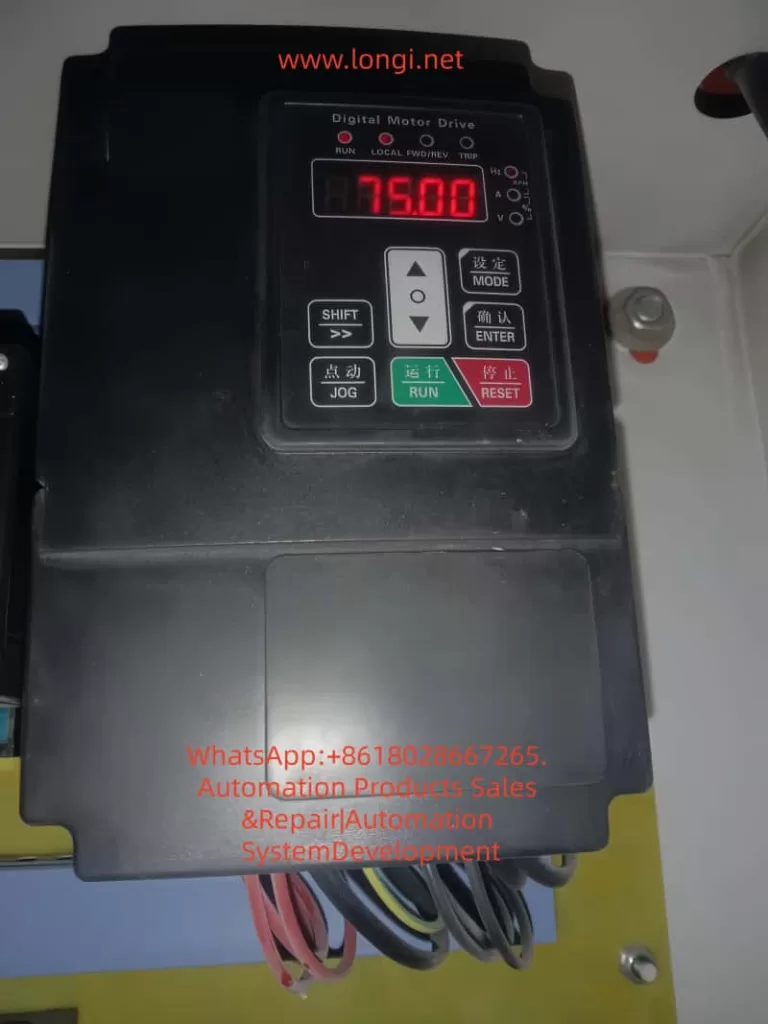
The PE8000 series comes standard with an LED digital tube operation panel, featuring an intuitive display and an ergonomic key layout, facilitating on-site debugging and monitoring.
Panel Composition and Indicators:
- Digital Display Area: Real-time display of frequency, current, voltage, speed, fault codes, etc. (units switched via Hz/A/V lights).
- Indicators:
- RUN (Run Light): On when the inverter is running.
- LOCAL (Local Control Light): On when the panel command channel is active.
- FWD/REV (Forward/Reverse Light): Indicates the current running direction.
- TRIP (Fault Light): On when a protection action occurs.
- Key Functions:
- MODE (Setting): Enter/exit the parameter menu.
- ENTER (Confirm): Confirm parameter modification or enter the next level menu.
- SHIFT (Shift): Switch editing digits or quickly switch monitoring parameters.
- ▲ / ▼ (UP/DOWN): Increase/decrease values or scroll through function codes.
- JOG (Jog): Jog operation (default forward, customizable).
- RUN (Run): Start (valid when panel command is active).
- RESET (Stop/Reset): Stop operation or reset faults.
Basic Panel Operation Flow:
- After power-up, the set frequency is displayed by default (e.g., 50.00Hz).
- Press MODE to enter the P0 group, use ▲/▼ to select the function code, press ENTER to edit, use ▲/▼ to modify the value, press ENTER to save, and press MODE to exit.
- Monitoring Mode: During operation, press SHIFT to cycle through output frequency, current, voltage, speed, etc.
- Quick Return: Long press MODE to return directly to the initial display.
How to Set and Remove Passwords (Parameter Access Restriction)
The PE8000 provides a user password protection function to effectively prevent misoperation and protect intellectual property.
- Set Password: Enter PP-00 (User Password), set any non-zero value between 0~65535 (e.g., 1234), and press ENTER to confirm.
- Enable Protection: After setting the password, the correct password must be entered to enter the menu when modifying any parameters next time.
- Remove Password: Change PP-00 back to 0 to cancel password protection.
- Note: If the password is lost, it can be resolved through manufacturer technical support or parameter initialization (see below), but this will clear user settings. It is recommended to set a password immediately after debugging and keep a backup record.
How to Restore Factory Parameters
- Enter PP-01 (Parameter Initialization).
- Set to 01: Restore factory parameters (excluding motor parameters), press ENTER to execute.
- Other Options:
- 02: Clear fault records, running time, and other historical information.
- 04: Restore user backup parameters.
- 501: Backup current user parameters (highly recommended to perform regularly).
- After execution, the inverter restarts automatically, and all P0~P9 group parameters are restored to default values (P0-01 control mode defaults to SVC, P0-02 command source defaults to terminal, etc.).
- Important Reminder: Key parameters (such as P1 group motor nameplate parameters) must be backed up before initialization. After initialization, motor auto-tuning (P1-11=1 for static or 2 for dynamic) is required.
2. External Terminal Forward/Reverse Control and Potentiometer Frequency Regulation
The PE8000 supports flexible external control, suitable for PLC, button, or automation system integration.
Control Circuit Terminal Layout (Refer to wiring diagram):
- +24V / COM: Control power output (DC24V).
- DI1~DI5: Multi-function digital inputs (can define forward/reverse, jog, multi-speed, etc.).
- AI1: Analog voltage/current input (0~10V / 0~20mA, voltage by default).
- +10V / GND: Analog power output (DC10V, for powering potentiometers).
- FM / FMR: Multi-function outputs (frequency pulse or switch quantity).
- T/A-T/B-T/C: Relay outputs (fault, running, etc.).
- OP: +24V common terminal (used for jumpers on some models).
External Terminal Forward/Reverse Control
Recommended Wiring (Two-wire type, most common):
- Forward button/contact: DI1 connected to +24V (or COM depending on jumper).
- Reverse button/contact: DI2 connected to +24V.
- COM connected to the other end of the button.
- It is recommended to add a stop button (DI3 can be defined as free stop or external fault).
Key Parameter Settings (P0/P4 Group):
- P0-02 (Command Source Selection) = 1 (Terminal command channel, LOCAL light on).
- P4-11 (Terminal Command Mode) = 0 (Two-wire type 1: DI1 closed for forward, DI2 closed for reverse, both closed to stop).
- Alternatives: 1 (Two-wire type 2), 2 (Three-wire type 1, requires an additional enable terminal).
- P4-00 (DI1 Function) = 1 (Forward Run FWD).
- P4-01 (DI2 Function) = 2 (Reverse Run REV).
- P4-10 (DI Filter Time) = 0.010s (anti-jitter).
- P0-09 (Running Direction) = 0 (default forward).
Operation: External buttons control start/stop and direction, with priority higher than the panel. Supports expansion for multi-speed (DI defined 12~15), jog (4/5), etc.
External Potentiometer Frequency Regulation
Recommended Wiring (Voltage type, most stable):
- 10kΩ potentiometer: Connect both ends to +10V and GND respectively.
- Connect the middle tap to AI1 (ensure jumper is on V).
- Use shielded cable, length <30m, to avoid interference.
Parameter Settings:
- P0-03 (Main Frequency Source X Selection) = 2 (AI1).
- P0-04 (Auxiliary Frequency Source Y) = 0 (Off) or superimposed with other sources.
- P0-07 (Frequency Source Superposition Mode) = 00 (Pure main frequency source).
- P0-10 (Maximum Frequency) = 50.00Hz (or 60/400Hz as needed).
- P0-12 (Upper Limit Frequency) = 50.00Hz.
- P0-22 (Frequency Command Resolution) = 2 (0.01Hz, high precision).
- P4-10 filter time appropriately increased (0.05~0.2s) for anti-interference.
Speed Regulation Effect: Rotating the potentiometer achieves continuous and smooth adjustment from 0 to maximum frequency. Combined with SVC control, it provides 150% rated torque above 0.5Hz. The panel potentiometer (P0-03=4) can be used as a backup.
Combined Application: AI1 can be used as an auxiliary source (P0-07 tens digit set to 1, main-auxiliary) to achieve main setting + fine-tuning.
Precautions:
- Analog input requires correct jumpering (V/I switching).
- Acceleration/deceleration times P0-17/P0-18 are recommended to be 5~30s to avoid impact.
- During external control, P0-27 can bind the command source and frequency source.
3. Fault Codes and Troubleshooting
The PE8000 provides 24 protection functions. When a fault occurs, the TRIP light turns on, the relay acts, and the panel displays an Err code. The root cause must be eliminated before pressing RESET to reset.
Main Fault Codes and Handling (Excerpted from manual, combined with engineering practice):
- Err01 Inverter Unit Protection: Output short circuit, module overheating, loose wiring. Handling: Check motor wire insulation, clean air duct, replace fan, seek technical support.
- Err02 Acceleration Overcurrent: Acceleration time too short, motor parameters not auto-tuned, sudden load application. Handling: Increase P0-17 acceleration time, perform motor auto-tuning (P1-11), check for mechanical jamming.
- Err03 Deceleration Overcurrent: Deceleration time too short, no braking unit. Handling: Increase P0-18, install braking resistor (PB terminal).
- Err04 Constant Speed Overcurrent: Load too heavy, undersized selection. Handling: Check load, upgrade power rating.
- Err05 Acceleration Overvoltage: High input voltage, external force dragging. Handling: Add braking unit, extend acceleration time.
- Err07 Constant Speed Overvoltage: Same as above.
- Err09 Undervoltage Fault: Power interruption, power supply abnormality. Handling: Check power grid, enable power-loss restart function.
- Err10 Inverter Overload / Err11 Motor Overload: Load too large, improper protection parameters (P9-01). Handling: Adjust overload factor, reduce load.
- Err14 Module Overheat: High ambient temperature, blocked air duct, high carrier frequency (P0-15). Handling: Reduce carrier frequency (below 8kHz), clean air duct, replace fan.
- Err15 External Device Fault: DI defined as external fault (11 or 33). Handling: Eliminate external signal and then reset.
- Err16 Communication Fault: Wiring or parameter error. Handling: Check 485 wiring, PD group communication parameters.
- Err18 Current Detection Fault: Hall device or drive board abnormality. Handling: Seek technical support.
- Err19 Motor Tuning Fault: Parameters not set according to nameplate or wiring issues. Handling: Correctly input P1 group nameplate parameters and perform auto-tuning again.
- Err22 Hardware Fault: Overcurrent/overvoltage hardware protection. Handling: Troubleshoot according to overcurrent/overvoltage procedures.
- Err23 Ground Short Circuit: Motor or cable shorted to ground. Handling: Use a megohmmeter to measure insulation, replace cable.
- Err30 Load Loss Fault: Operating current below P9-64. Handling: Adjust load loss threshold or check for load detachment.
- Err45 Motor Overheat: Temperature sensor issue. Handling: Check wiring, improve motor heat dissipation.
General Fault Handling Steps:
- Record the Err code and operating parameters (current, voltage, frequency).
- Power off for 10 minutes, check wiring, insulation, and air duct.
- Perform motor auto-tuning.
- Check PP-01 to clear records and retry.
- For frequent faults, contact JiaDi technical support.
Common Non-Code Faults:
- No display on power-up: Check power supply, 34-pin ribbon cable.
- Motor not running: Check P0-02 command source, motor parameters, wiring.
- DI failure: Check P4 group definition, +24V power supply.
4. Typical Application Cases
Case 1: Fan and Pump Energy-Saving Control
A central air conditioning system uses a 22kW PE8000 (P-type). P0-03=2 (AI1 potentiometer remote speed regulation), P0-01=2 (V/F control), PID closed loop (PA group). Achieves constant pressure water supply, saving more than 25% energy. Carrier frequency automatic adjustment (P0-16=1) reduces noise.
Case 2: CNC Machine Tool Spindle Drive
7.5kW G-type PE8000, SVC control (P0-01=0), external terminal forward/reverse (DI1/DI2), AI1 potentiometer fine-tuning. Outputs 180% torque at 0.5Hz, stable low-speed cutting. S-curve acceleration/deceleration (P0-19 unit 0.01s) achieves precise positioning.
Case 3: Textile Machinery Multi-Speed Operation
15kW used for a winding machine. DI3~DI5 defined as multi-speed commands (P4 group 12~14), combined with simple PLC (P0-03=7), achieves 8-speed + frequency swing. P0-09 direction control ensures no impact during forward/reverse switching. Length counting function improves yarn quality.
Case 4: Hoisting Equipment
11kW used for a winch. External terminal three-wire control (P4-11=2), with braking resistor installed, torque boost (P1 group). Four-quadrant operation is stable. Err02/03 overcurrent protection effectively prevents load slipping.
Case 5: Injection Molding Machine Oil Pump Retrofit
18.5kW PE8000 with pressure feedback. AI2 connected to sensor, PID regulates flow and pressure. P0-24 0Hz output selection set to “No Output” for energy-saving standby. Overload protection (Err11) ensures safety, achieving 30% energy savings in actual measurement.
5. Summary and Daily Maintenance Suggestions
The JiaDi PE8000 series is deeply loved by users for its high cost-performance, rich functions, and comprehensive protection. Correct use of the panel, reasonable parameter settings, and strict wiring according to the manual are the keys to stable operation. Recommendations:
- Perform motor insulation test (≥5MΩ) and auto-tuning before first use.
- Backup important parameters (PP-01=501).
- Check air ducts quarterly, tighten wiring, and record maximum temperature.
- Ambient temperature <45℃, humidity <90% non-condensing.
- Contact the manufacturer promptly for complex applications or fault handling.