
Introduction: Why Delcos 3100 Causes So Many Replacement Issues
In the maintenance and spare-parts market for industrial air compressors, few components generate as much confusion as the Delcos 3100 controller.
Technicians and buyers frequently report situations such as:
- The controller powers up normally, but parameters cannot be modified
- The display shows “INPUT CODE” or “CODE ERROR”
- The replacement controller looks different from the original (larger LCD, different layout)
- The compressor refuses to start after installation
These situations often lead to incorrect conclusions:
- “The controller is incompatible”
- “The wrong version was supplied”
- “The controller is defective”
In reality, most Delcos 3100 issues are not hardware problems, but rather permission, configuration, or misunderstanding of CompAir’s controller design philosophy.
This article provides a complete technical explanation of how the Delcos 3100 works, how its password system is designed, how different hardware versions relate to compatibility, and what risks must be understood when replacing or sourcing this controller.
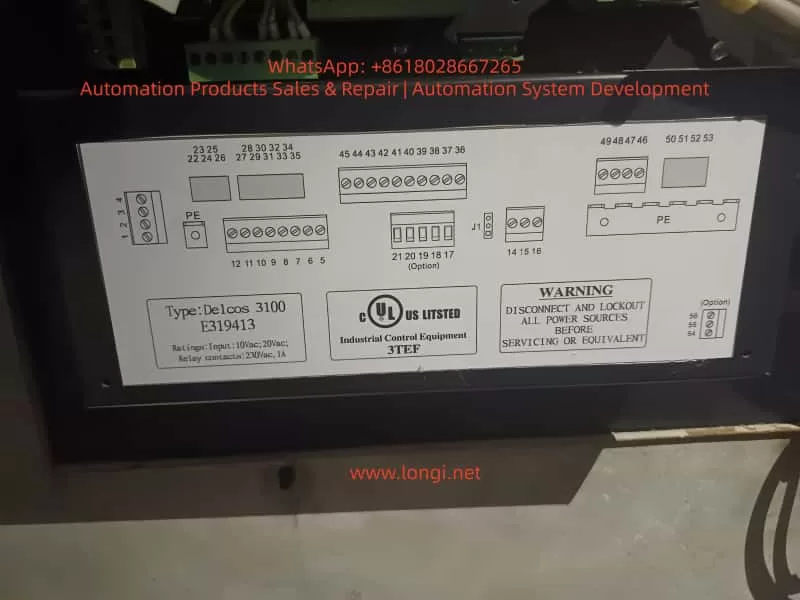
1. What Is the Delcos 3100 Controller?
The Delcos 3100 is a dedicated industrial compressor controller used extensively on screw compressors manufactured by CompAir.
It is not merely a display panel, but a full control and protection unit responsible for:
- Compressor start/stop logic
- Load and unload control
- Pressure regulation (cut-in / cut-out)
- Temperature monitoring (discharge air, oil temperature)
- Alarm and fault handling
- Maintenance interval tracking
- Remote start/stop via digital inputs
- Communication via RS-485 (depending on configuration)
Because it governs machine safety and lifecycle, CompAir designed Delcos 3100 with strict access control and parameter protection.
2. Delcos 3100 Hardware Versions: Why Controllers Look Different
2.1 One Platform, Multiple Hardware Revisions
A common concern arises when a replacement Delcos 3100 looks different from the original unit.
Typical differences include:
- Larger or clearer LCD screen
- Slightly modified front panel layout
- Updated button symbols or LEDs
Key technical fact:
There is only one Delcos 3100 control platform.
Hardware appearance differences are production revisions, not functional variants.
CompAir periodically updated the HMI (Human–Machine Interface) while keeping the same control logic, software structure, and I/O definitions.
2.2 What Actually Determines Compatibility
A Delcos 3100 controller is compatible if the following conditions are met:
- Model identification clearly states DELCOS 3100
- Control supply voltage matches (typically 10 Vac / 20 Vac depending on machine design)
- Terminal layout and numbering correspond to the original wiring
- Relay and digital I/O ratings match the compressor electrical diagram
Screen size or panel design alone never determines compatibility.
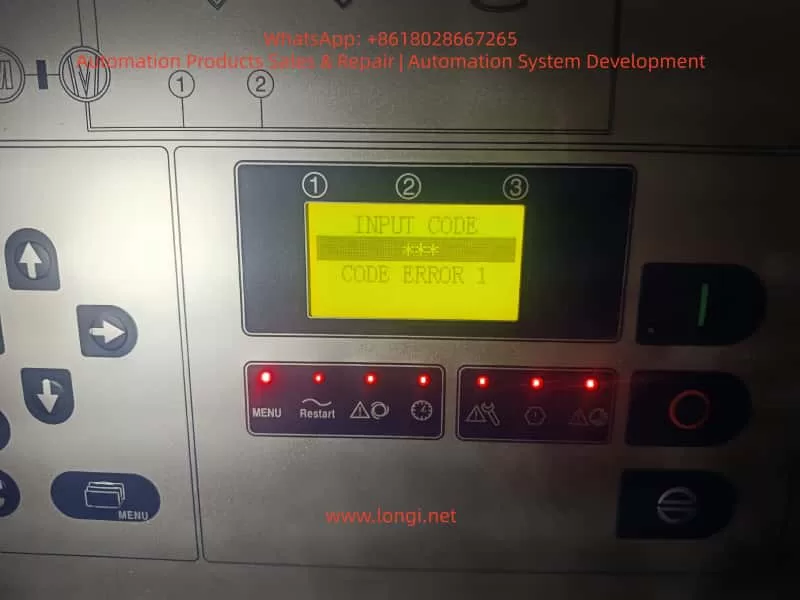
3. Understanding the Delcos 3100 Menu Structure
The Delcos 3100 menu is organized into several hierarchical levels, typically including:
- RUN PARAMETERS – real-time operating values
- USER PARAMETERS – adjustable operational settings
- FACTORY PARAMETERS – protected configuration values
- CALIBRATION PARAMETERS – sensor and reference calibration
Most day-to-day adjustments are performed within USER PARAMETERS, while factory and calibration parameters are intentionally restricted.
4. The Delcos 3100 Password System: Purpose and Design
4.1 Why a Password Is Required
The Delcos 3100 password system exists to prevent:
- Accidental parameter changes
- Unauthorized configuration modifications
- Unsafe operating conditions
- Damage caused by incorrect pressure or temperature limits
This is a deliberate industrial safety design, not a nuisance feature.
4.2 The Standard Operating Password (3031)
According to the official Delcos 3100 operating manual, parameter access is controlled by a fixed operating password:
Standard password: 3031
This password allows access to protected parameters within allowed limits, but does not permit modification of factory-defined safety limits.
4.3 Correct Unlock Procedure
To unlock parameter editing:
- Press the C key
- The display shows
CODE INPUT 0000 - Enter 3031
- Confirm with the Enter key
- The display shows
CODE UNLOCK
If the password is entered incorrectly, the controller displays CODE LOCK and automatically returns to the main screen.
This behavior is normal and expected.
5. Common Misinterpretations During Password Entry
Many reported “faults” result from incorrect assumptions, such as:
- Repeatedly entering random codes
- Expecting the controller to accept a user-defined password
- Assuming a password prompt indicates a defective controller
In reality, the controller is simply enforcing its security logic.
6. The Critical Scenario: SETUP CODE (Triple-Level Protection)
6.1 When Does SETUP CODE Appear?
Under certain conditions, the Delcos 3100 may request SETUP CODE 1 / 2 / 3.
This typically occurs when:
- A controller is transferred from another compressor
- Factory configuration data is missing or corrupted
- A controller is installed without its original machine context
This is not a user-level password.
6.2 What SETUP CODE Really Means
SETUP CODE is part of CompAir’s machine identity and commissioning protection.
- These codes are not universal
- They are tied to:
- The original compressor configuration
- The OEM commissioning process
- Authorized CompAir service channels
Once this mode is triggered, the controller expects a full machine definition, not simple parameter adjustment.
6.3 Practical Consequences
If SETUP CODE is requested:
- End users cannot proceed independently
- Spare-part suppliers cannot bypass it
- Factory documentation and service access are required
This is by design, not a defect.
7. Delcos 3100 Replacement: Risk Scenarios Explained
7.1 Low-Risk Replacement Scenarios
Replacement is typically straightforward when:
- The original controller failed electrically
- The new controller contains valid configuration data
- SETUP CODE is not triggered
- Password 3031 provides sufficient access
In such cases, commissioning is usually completed within minutes.
7.2 High-Risk Replacement Scenarios
Replacement risk increases significantly when:
- The controller originates from a different compressor model
- The configuration memory has been erased
- SETUP CODE is triggered
- Electrical documentation is unavailable
These situations may require:
- Full parameter redefinition
- Access to CompAir service documentation
- Professional commissioning support
8. Recommendations for Maintenance Engineers
- Always document all parameters before controller replacement
- Photograph menu structures and configuration screens
- Verify optional input logic (remote start, load/unload, alarms)
- Confirm restart behavior after power failure
Understanding Delcos logic before replacement saves significant downtime.
9. Recommendations for Spare-Part Suppliers and Traders
- Clearly inform customers about password protection
- Communicate that 3031 is the standard operating password
- Explain that SETUP CODE is not a standard unlock feature
- Avoid representing locked controllers as “plug-and-play”
Transparent communication prevents disputes and misunderstandings.
10. Conclusion: Delcos 3100 Is Not Difficult—If You Understand It
The Delcos 3100 controller is robust, stable, and highly reliable.
Most field problems arise not from hardware defects, but from:
- Lack of understanding of CompAir’s security philosophy
- Incorrect expectations during replacement
- Confusion between operating passwords and setup codes
Once the distinction between 3031 (operating access) and SETUP CODE (commissioning level) is understood, Delcos 3100 becomes a predictable and manageable control system.
For maintenance professionals and industrial spare-part specialists, this knowledge is essential to avoid unnecessary downtime, cost escalation, and incorrect fault diagnosis.