
I. Introduction
In the realm of industrial automation, the stability of servo systems is the cornerstone of machining precision and production efficiency. The ZSMC K-Series (Zhejiang Zhishan Electric Co., Ltd.), a leading domestic servo system in China, is widely deployed in CNC machine tools, robotics, packaging machinery, and textile equipment. Its core competitive advantage lies in its support for bus-type absolute encoders, enabling high-precision position control and multi-turn position memory without the need for homing sequences upon every power-up.
However, Alarm 27 (Bus Encoder Battery Alarm 1) is one of the most frequent and critical faults encountered in this series. If not addressed promptly, it can lead to production downtime, positional deviations, and even mechanical collisions. This article provides a comprehensive technical analysis of Alarm 27, covering its definition, root causes, operational impact, step-by-step troubleshooting, and preventive maintenance strategies. This guide is designed to serve as a practical reference for field engineers and maintenance personnel.
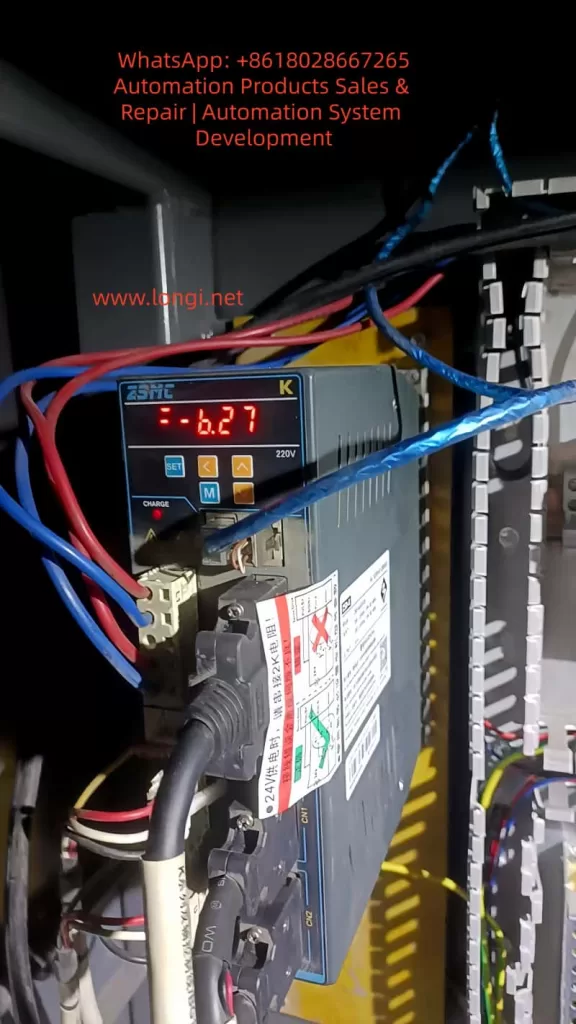
II. Technical Definition and Trigger Mechanism of Alarm 27
1. Fault Definition
According to the official ZSMC K-Series manual, Alarm 27 corresponds to “Bus Encoder Battery Alarm 1”. The specific technical parameters are:
- Trigger Condition: The built-in battery voltage of the encoder drops below 2.5V (the critical threshold).
- Associated Phenomenon: Loss of Multi-turn Position Information (the total count of motor rotations).
- Drive Action: The drive enters a protection state, inhibiting motor operation. The digital panel displays “27” or a specific battery warning code.
2. Working Principle of Bus-Type Absolute Encoders
Unlike incremental encoders, bus-type absolute encoders (utilizing protocols such as RS485 or CANopen) transmit absolute position data via a serial bus to the drive. This data includes:
- Single-turn Position: The angular position within one revolution (0–360°).
- Multi-turn Position: The cumulative count of revolutions since power-on.
The “absolute” nature means the system knows its exact position immediately upon power-up. This capability relies entirely on a backup power source to maintain the counter in non-volatile memory (NVRAM) or specific registers during power outages.
3. Core Function of the Encoder Battery
The encoder typically uses a CR2032 lithium coin cell (nominal voltage 3.0V) for the following purposes:
- Maintaining Multi-turn Counters: Preserving the count of total motor rotations.
- Storing Parameters: Saving encoder-specific data (resolution, zero offset, communication baud rate).
- Powering Static Logic: Supplying the minimal current required for the memory retention circuit.
When the voltage falls below 2.5V, the NVRAM can no longer retain data reliably. Consequently, the multi-turn count resets to zero or becomes invalid, triggering Alarm 27 to prevent the drive from operating with unknown position data.
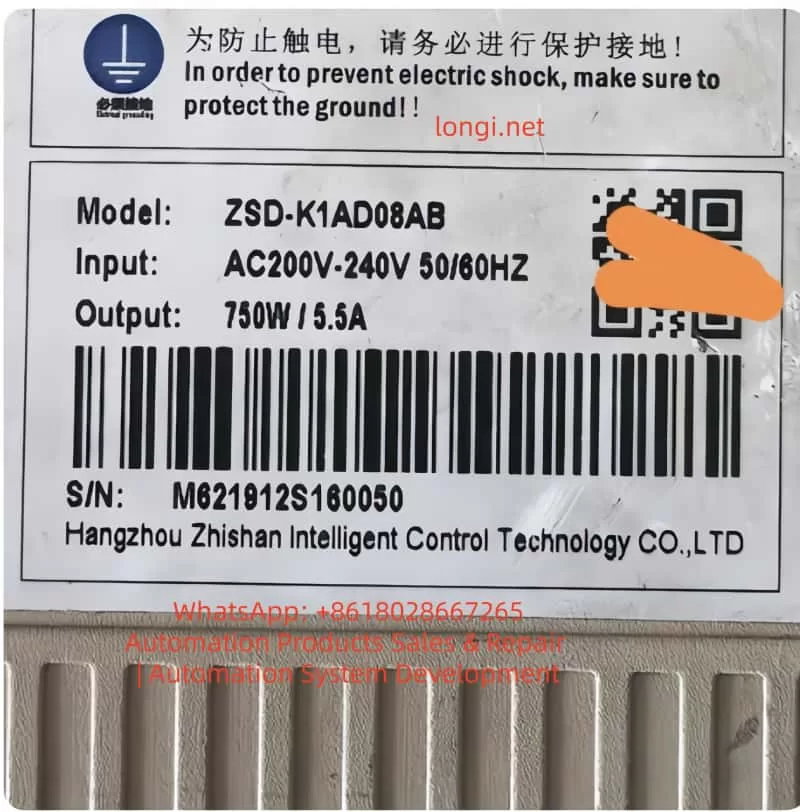
III. Deep-Dive Root Cause Analysis
While the symptom is “low battery,” the underlying causes are multifaceted. We categorize them into four dimensions: Battery Integrity, Installation/Connection, Component Compatibility, and Environmental Factors.
1. Battery-Specific Factors
- Natural Lifecycle: A standard CR2032 battery has a lifespan of 3–5 years at 25°C. However, in high-load applications where the encoder communicates frequently via the bus, the discharge rate increases, potentially shortening lifespan to 1–2 years.
- Quality Issues: Counterfeit or low-quality batteries often have unstable voltage outputs or lower actual capacity. For instance, a factory using generic brand batteries reported Alarm 27 triggering within 6 months of installation.
- Incorrect Specification: Using a battery with insufficient capacity (e.g., CR2025 instead of CR2032) results in rapid voltage sag under load.
2. Installation and Connection Issues
- Contact Resistance: Oxidation on battery terminals (copper oxide/verdigris) or loss of spring tension in the battery holder creates high contact resistance. This causes a “voltage drop” where the actual battery voltage might be 2.8V, but the drive detects only 2.3V due to resistance.
- Polarity Reversal: Installing the battery backward (positive to negative) can cause immediate short circuits or prevent the circuit from charging/discharging correctly.
- Loose Bus Cabling: A loose connector on the encoder bus cable (e.g., RS485 A/B lines) can cause communication timeouts. Some ZSMC drives interpret communication failures as battery faults as a fail-safe mechanism.
3. Encoder and Drive Hardware Faults
- Encoder Internal Short Circuit: Corrosion inside the encoder battery compartment or a failed capacitor on the encoder PCB can create a parasitic drain, draining the battery in weeks rather than years.
- Drive Detection Circuit Failure: The voltage divider resistors or ADC (Analog-to-Digital Converter) chip on the drive’s control board may fail. In this scenario, the battery is fine, but the drive “hallucinates” a low voltage.
- Protocol Mismatch: If the encoder uses CANopen but the drive is configured for RS485 (or vice versa), the handshake fails. While this usually triggers a communication alarm (e.g., Alarm 28), it can sometimes cascade into Alarm 27 if the drive cannot read the battery status register.
4. Environmental Factors
- High Temperature: Lithium batteries degrade rapidly above 60°C. The chemical reaction rate doubles for every 10°C increase (Arrhenius equation). In a forging workshop where ambient temperatures reach 70°C, battery life can shrink to less than 12 months.
- High Humidity: Humidity >80% causes galvanic corrosion on battery contacts, increasing resistance and leading to intermittent voltage detection errors.
- Electromagnetic Interference (EMI): Proximity to high-power inverters or welders can induce noise on the encoder cables. This noise can corrupt the serial data stream, causing the drive to misinterpret the battery voltage telemetry.
IV. Impact Assessment of Alarm 27
Ignoring Alarm 27 poses significant risks to production and equipment integrity:
1. Operational Impact
- Hard Lockout: The servo cannot start. In a CNC lathe, this means the spindle cannot turn, halting the entire production line.
- Homing Failure: After battery replacement, if the multi-turn data is lost, the machine must re-home. If the homing method (e.g., external limit switch) is misconfigured, the axis may drift or fail to find zero.
- Position Deviation: If the operator forces the motor to run in “relative mode” without multi-turn data, the position feedback will be inaccurate. For example, a robot arm might think it has rotated 10 times when it has only rotated 5, leading to collision or scrap parts.
2. Production and Economic Impact
- Downtime Costs: For an automotive production line, one hour of downtime can cost tens of thousands of dollars in lost output.
- Scrap Rates: Position errors lead to out-of-tolerance parts. In precision machining (±0.01mm), a lost multi-turn count can result in 100% scrap rates for a batch.
- Mechanical Damage: Running a servo without absolute position knowledge can cause the tool post to crash into the chuck or the robot arm to exceed soft limits, damaging gearboxes and ball screws.
3. Long-Term Equipment Health
- Battery Leakage: If a lithium battery is discharged below 2.0V, it risks leaking electrolyte, which corrodes the encoder PCB, permanently destroying the encoder.
- Drive Stress: Repeated power cycles while the alarm is active can stress the drive’s IGBT modules and DC bus capacitors.
V. Troubleshooting and Resolution Procedures
(一) Systematic Troubleshooting Flow
Step 1: Confirm the Alarm Code
- Verify via the drive’s 7-segment LED display or the ZSMC Studio software that the code is specifically “27” (Bus Encoder Battery Alarm).
- Note: Check for coupled alarms. If Alarm 28 (Communication Error) is present, address the cabling first.
Step 2: Measure Battery Voltage
- Disconnect main power to the drive (wait 5 minutes for capacitors to discharge).
- Open the encoder battery cover (usually located on the rear or side of the motor).
- Use a multimeter (DC Voltage mode) to measure across the battery terminals:
- ≥ 2.8V: Battery is healthy; investigate connection or drive logic.
- 2.5V – 2.8V: Battery is nearing end-of-life; schedule replacement.
- < 2.5V: Battery is dead; immediate replacement required.
Step 3: Inspect Physical Connections
- Battery Holder: Check spring tension. Clean oxidized terminals with isopropyl alcohol and a fiberglass pen.
- Bus Cable: Unplug and re-plug the encoder cable. Ensure the shielding is grounded properly. Check for pinched wires or broken conductors.
- Mounting: Verify the encoder coupling set screw is tight (Torque: 5–8 N·m for ZSMC K-series).
Step 4: Verify Compatibility via Software
- Connect to ZSMC Studio (or the handheld debugger).
- Read Encoder Information: Confirm the model matches the drive configuration (e.g., “ZSMC-E-2048-4-24V”).
- Check Protocol Settings: Ensure
Pn001(Encoder Type) is set to “Bus Absolute Encoder” (not “Incremental” or “Sin-Cos”).
Step 5: Isolate the Faulty Component
- Swap Test: Replace the battery. If the alarm persists, swap the encoder with a known-good spare.
- Alarm disappears: Original encoder is faulty (internal circuit failure).
- Alarm remains: The drive’s detection circuit is likely damaged (requires board-level repair or drive replacement).
(二) Detailed Resolution Operations
1. Replacing the Encoder Battery
Tools: Multimeter, Phillips screwdriver, CR2032 battery (Genuine ZSMC or reputable brand like Panasonic/Sony).
Procedure:
- Power Down: Cut main power and wait 5 minutes.
- Access: Remove the encoder cover. Extract the old battery (avoid touching the PCB).
- Install: Insert the new battery with correct polarity (+ to +).
- Secure: Tighten the cover.
- Power Up: Restore power.
Critical Note: While some encoders support hot-swapping, ZSMC K-series recommends power-off replacement to avoid bus contention. After replacement, use ZSMC Studio to perform a “Battery Learn” (Pn002 = 1) to recalibrate the drive’s voltage detection.
2. Restoring Multi-Turn Position (Homing)
Once the battery is replaced, the multi-turn count is lost. You must re-establish the mechanical zero. ZSMC K-series supports three methods:
- Method A: External Home (Recommended)
- Install a proximity sensor at the mechanical zero point.
- Set
Pn003(Homing Mode) = 2 (External Signal). - Set
Pn004(Home Input Type) = 1 (NPN Normally Open). - Press the “ORIGIN” button on the keypad. The motor will creep toward the sensor, stop upon detection, and set the position to 0.
- Method B: Z-Phase Home
- Use the encoder’s Z-pulse (once per revolution).
- Set
Pn003= 1. - The drive finds the Z-pulse edge and sets it as zero. Note: This does not reset multi-turn count unless combined with a specific “Clear Multi-turn” command.
- Method C: Software/Manual Setting
- Connect ZSMC Studio.
- Manually rotate the axis to the mechanical zero.
- Click “Set Current Position as Zero” in the software.
- For multi-turn encoders, you may need to execute a “Multi-turn Clear” function (consult the specific encoder manual, e.g., ZSMC E-series “MULTI-TURN RESET”).
3. Addressing Environmental & Connection Issues
- Corrosion: Apply dielectric grease to battery terminals to prevent future oxidation.
- Vibration: Use cable ties to secure the bus cable to the motor body, preventing connector fatigue.
- Heat: Install a forced-air cooling fan (≥5 CFM) directed at the encoder, or maintain the servo cabinet temperature below 30°C using an air conditioner.
- Humidity: Place silica gel desiccants inside the cabinet or pot the encoder connector with epoxy for IP65 protection.
VI. Case Studies
Case 1: Intermittent Alarm Due to Poor Contact
Symptom: A ZSMC-K-110ST-M06025 servo on a CNC lathe triggered Alarm 27 intermittently. Replacing the battery did not fix it.
Investigation:
- Measured battery voltage: 2.9V (Good).
- Inspected holder: The positive spring was flattened and oxidized.
Resolution: - Bent the spring to restore tension.
- Cleaned contacts with contact cleaner.
- Result: Alarm cleared permanently.
Case 2: Premature Battery Failure in High Heat
Symptom: Robotic servos in a forging plant triggered Alarm 27 every 6 months (expected life: 3 years).
Investigation:
- Ambient temp near motor: 75°C.
- Battery voltage: 2.2V (Dead).
Resolution:
- Replaced batteries.
- Installed aluminum heat sinks (100cm²) on the motor backs.
- Installed an industrial air conditioner in the cabinet (set to 25°C).
Result: Battery life extended to 2 years.
Case 3: Encoder Internal Short Circuit
Symptom: Packaging machine servo triggered Alarm 27 immediately after battery replacement. Could not home.
Investigation:
- ZSMC Studio read “Battery Voltage: 2.1V” despite new battery.
- Swapped encoder: Alarm cleared.
- Disassembled old encoder: Found corrosion on battery terminals and a shorted capacitor on the PCB (due to 85% humidity).
Resolution: - Replaced encoder.
- Installed industrial dehumidifier in the factory (humidity controlled to 60%).
VII. Preventive Maintenance & Strategy
1. Scheduled Battery Replacement
- Standard Environment (25°C): Check voltage every 12 months. Replace if < 2.8V.
- High Temp (>40°C): Check every 6 months.
- High Humidity (>70%): Check every 3 months.
2. Environmental Control
- Temperature: Maintain servo cabinet at 20–30°C.
- Humidity: Keep relative humidity at 40–60%.
- EMI: Use shielded twisted-pair cables for the bus. Ground the shield at the drive end only. Keep encoder cables 30cm away from power lines.
3. Component Standardization
- Batteries: Use only CR2032 from reputable sources (Panasonic, Sony, or ZSMC OEM).
- Encoders: Use ZSMC-approved absolute encoders (e.g., ZSMC E-series) to ensure protocol compatibility.
- Cables: Use factory-made bus cables (e.g., ZSMC-CABLE-RS485) to avoid impedance mismatch.
4. Digital Monitoring
- ZSMC Studio Alerts: Configure the software to trigger a “Pre-Alarm” when battery voltage drops to 2.8V, allowing maintenance during planned downtime.
- Maintenance Logs: Record battery changes in a logbook (Date, Axis, Voltage, Technician).
VIII. Common Pitfalls & Precautions
1. Pitfall: Replacing Battery Without Homing
- Consequence: The drive runs in relative mode, accumulating position errors.
- Fix: Always perform a homing sequence after battery replacement.
2. Pitfall: Using Non-Standard Batteries
- Consequence: AA/AAA batteries (1.5V) cannot power the encoder circuitry (requires 3.0V+).
- Fix: Strictly use CR2032 (3V) or the specific model recommended in the manual.
3. Pitfall: Ignoring the Bus Cable
- Consequence: Loose cables cause “ghost” battery alarms due to data corruption.
- Fix: Torque screws on connectors to 0.5 N·m and use thread locker if necessary.
4. Safety Precautions
- Electrical Shock: Always discharge the drive DC bus (wait 5 mins) before touching internal components.
- Data Loss: Some encoders lose parameters if power is removed too long. Replace batteries quickly (within 2 minutes) if the manual specifies “live replacement.”
- Professional Repair: Do not solder on encoder PCBs unless trained; ESD can destroy the chip.
IX. Conclusion
Alarm 27 in the ZSMC K-Series servo system is a critical indicator of battery voltage depletion leading to multi-turn position loss. While the fix often seems as simple as replacing a coin cell, the root causes range from environmental stress to hardware failures.
For engineers, mastering the voltage verification process, homing procedures, and environmental control is essential. As technology evolves, battery-less absolute encoders (using supercapacitors or energy harvesting) are emerging, promising to eliminate this issue entirely. However, until then, a proactive battery maintenance strategy is the most cost-effective way to ensure servo reliability.
Final Recommendation: Integrate battery checks into your daily “Gemba Walk” or start-up checklist. The cost of a CR2032 battery is negligible compared to the cost of a crashed machine or a day of lost production.