
Introduction
In the field of industrial automation, the Lenze 8400 BaseLine D series of frequency inverters is renowned for its reliability and simplicity, widely used in conveyor systems, fans, and pump applications. However, the DC-bus undervoltage fault (code LU) is one of the most common issues with this drive, potentially causing equipment downtime, loss of motor torque, and even impacting the efficiency of the entire production line. According to the Lenze reference manual (DMS 5.5 EN), an undervoltage fault occurs when the DC-bus voltage drops below a threshold (typically below 400 V), triggering the device to enter a Trouble or Fault state.
This article focuses on the undervoltage fault of the Lenze 8400 BaseLine D drive, analyzing its causes, diagnostic methods, troubleshooting steps, and prevention strategies in detail. Through structured analysis, it aims to help engineers and maintenance personnel resolve issues quickly and improve equipment reliability. Based on official manuals and technical practices, this guide provides practical, actionable instructions suitable for both beginners and experienced users.
Undervoltage faults not only affect the normal operation of the drive but can also indirectly lead to other issues, such as motor overheating or unstable control. Understanding this fault requires grasping the internal structure of the drive: power input is converted by a rectifier into DC-bus voltage for use by the inverter. If the voltage is insufficient, the inverter cannot generate the required output waveform, and the device automatically protects itself. The manual emphasizes that the response to an LU fault can be configured as Trouble (auto-reset) or Fault (manual intervention), depending on the setting of parameter C00600. This article will unfold step-by-step, combining practical cases to ensure readers fully master the process.
Overview of Undervoltage Faults
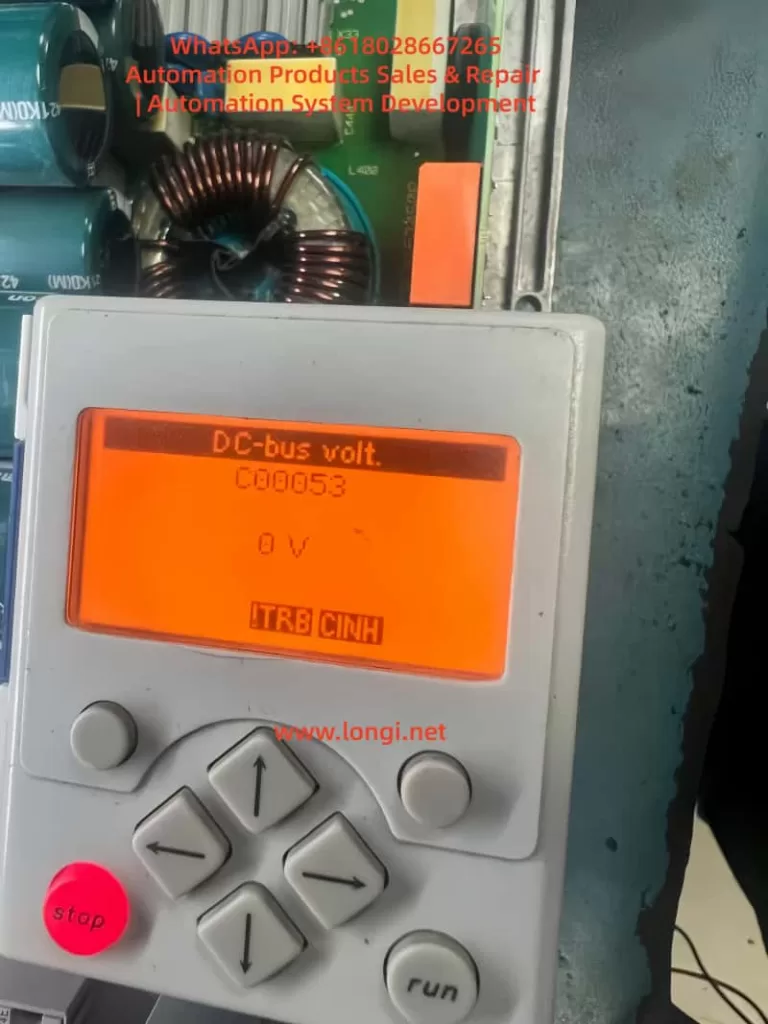
The fault code for an undervoltage condition in the Lenze 8400 BaseLine D drive is “LU,” displayed on the integrated keypad screen, accompanied by the DRV-ERR LED flashing red or staying on. According to pages 61-62 of the reference manual, the device status switches from OperationEnabled to Trouble or Fault, the controller is inhibited (CINH status), and the motor stops outputting torque. The normal DC-bus voltage is approximately 1.414 times the input AC voltage; for example, it is 565 V with a 400 V three-phase input. If the reading falls below the threshold (C00053 < 400 V), the fault is triggered.
Fault characteristics include:
- The screen displays “LU” or C00053 reads 0 V or a low value in diagnostic mode.
- LED Indicators: DRV-RDY green is off, DRV-ERR is red.
- Logbook (C00160): Records error IDs such as xx.0123.00015, including timestamps and relevant parameters.
- System Response: Depending on the C00600 setting, it may reset automatically (if voltage recovers) or require manual reset.
In the error list on page 158 of the manual, LU is classified as a power-related fault, opposed to overvoltage (OU). Undervoltage typically occurs during unstable power supply, connection issues, or hardware damage. If not handled promptly, it can evolve into more severe faults, such as Main Phase Missing (Su02). In industrial environments, the incidence of this fault is relatively high, especially in areas with large grid fluctuations or systems where multiple drives share a DC-bus. Understanding the fault overview helps locate the problem quickly and avoid secondary damage from blind operations.
The drive’s monitoring mechanisms include Ixt overload (C00064) and main phase fault monitoring (C00565), which are closely related to undervoltage. If a main phase is missing beyond the threshold, it indirectly causes the DC-bus voltage to drop. The manual emphasizes that the threshold for LU faults is not user-adjustable, but the response mode can be customized via parameters to suit different application scenarios. For example, in a continuous conveyor system, setting C00600 to 1 (Trouble) allows automatic recovery, while setting it to 3 (Fault) in precision equipment ensures a safe shutdown.
Fault Cause Analysis
The roots of undervoltage faults are diverse and require analysis from three aspects: hardware, software, and the external environment. Referring to page 108 of the manual regarding main phase fault monitoring and pages 102-103 regarding braking energy management, common causes are as follows:
1. Power Supply Issues
This is the most common cause, accounting for over 60% of faults. Unstable three-phase AC input, missing phases, or voltage fluctuations result in insufficient rectifier output. The manual notes that for a 400 V input, the normal DC-bus is 565 V; if the input drops below 380 V, undervoltage is triggered. External factors such as grid peak/valley periods, voltage drop over long cables, or insufficient transformer capacity can all cause this.
2. Connection and Wiring Faults
Loose terminals at X100 (L1/L2/L3/PE), damaged cables, or poor grounding interrupt the power path. Page 120 of the manual requires appropriate cable cross-sections (e.g., 1.5 mm² for 3 kW) and emphasizes shielding for EMC interference. If the DC-bus links multiple devices (+UG/-UG), a fault in one device can cause a chain reaction leading to undervoltage in all units.
3. Hardware Component Damage
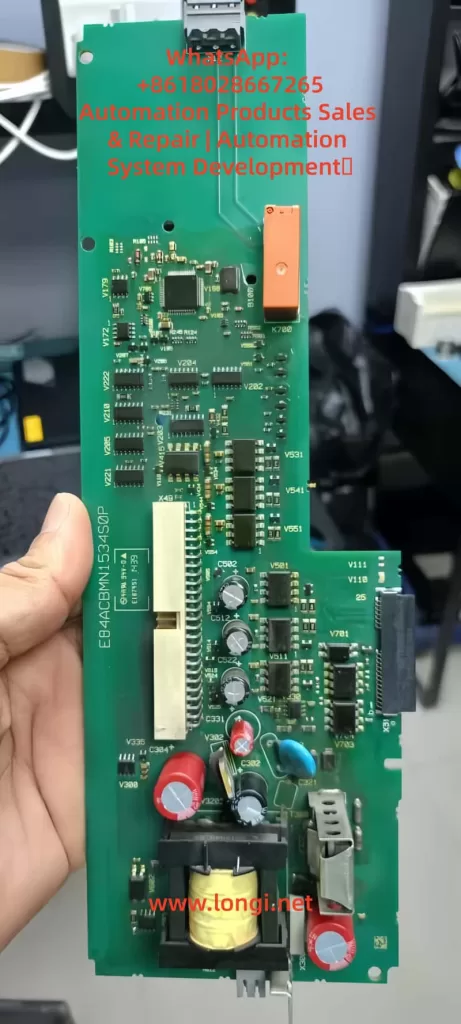
Damage to the internal capacitor bank (cyan capacitors visible in images) or the rectifier bridge prevents the voltage from being maintained. Referring to page 104 of the manual regarding device overload monitoring, accumulated Ixt overload accelerates capacitor aging. Faults appearing after replacing a control board (e.g., E84ACBMN1534SOP) are often due to defects in the power converter on the board (yellow transformer) or improper installation.
4. Parameter Configuration Errors
Although DC-bus voltage is hardware-independent, parameters indirectly affect it. For example, if C00140 (Flying Start function) is disabled, the load’s back-EMF may suppress voltage build-up; incorrect C00056 (Braking Mode) settings result in insufficient energy feedback. Page 50 of the manual notes that if correct data (C00002/12) is not imported after replacing a memory module (EPM), the old configuration may trigger a safety mode.
5. External Load and Environmental Factors
High-inertia loads starting rapidly draw current peaks that pull down the voltage; high ambient temperatures (>40°C) reduce capacitor efficiency. Page 93 of the manual mentions switching frequency selection; high frequency (C00018 = 8 kHz) increases losses, indirectly exacerbating undervoltage risk. In IT grids, failing to remove interference screws can cause instability.
6. Firmware and Compatibility Issues
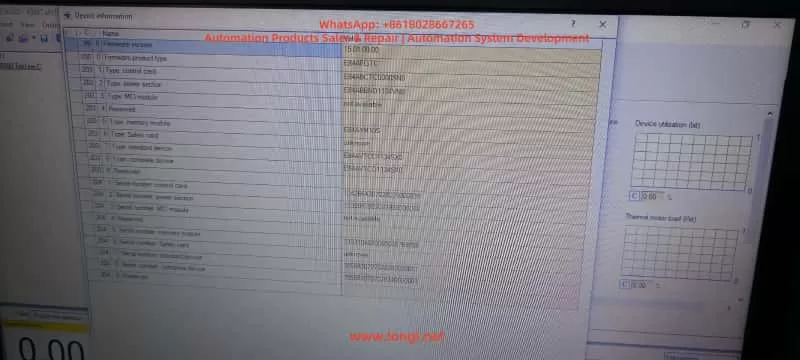
Old firmware (e.g., 15.01.00) has known bugs affecting voltage detection. Referring to Engineer software diagnostics, if the control card (E84ABCTC0000SN0) does not match the power section (E84ABNDT134VN0), voltage readings will deviate.
Through this analysis, users can preliminarily determine the fault type. For instance, if accompanied by Su02 (Phase Missing), prioritize checking the power supply; if only LU is present, focus on internal hardware. The manual recommends using a multimeter to measure the actual voltage and comparing it with the C00053 reading to distinguish sensor faults.
Diagnostic Methods
Accurate diagnosis is a prerequisite for troubleshooting. The Lenze 8400 BaseLine D provides multi-layer diagnostic tools, referring to chapters “Diagnostics & error management” on pages 142-163 of the manual.
1. Keypad and LED Check
Observe the screen upon startup. If “LU” is displayed or C00053 is low, press the navigation key to enter Menu -5- (Diagnostics) to view the C00160 Logbook and C00165 Error ID. LEDs: Red flashing indicates Trouble (auto-recoverable); solid red indicates Fault. Page 19 of the manual’s LED status table aids quick judgment.
2. Parameter Reading
Use the keypad or Engineer software to read key parameters:
- C00053 (DC-bus voltage): Should be approx. 565 V.
- C00054 (Motor current): Abnormalities indicate load issues.
- C00064 (Ixt Utilization): >80% suggests overload.
- Set C00517/2 = 53 to display voltage constantly on the screen for monitoring.
3. Engineer Software Diagnosis
Connect a PC to the X6 USB port (pages 32-34 of the manual). View logs, signal flow charts, and oscilloscope traces online. The Diagnostics tab shows error history; if LU is accompanied by PS02 (Invalid Parameter), it indicates a configuration issue. The software can simulate operation to test voltage response.
4. Hardware Measurement
After powering down, use a multimeter to measure the X100 input voltage (three-phase balance <5% deviation) and DC-bus terminals (+UG/-UG, note high voltage >500 V). If manual measurement is normal but the screen reads 0 V, suspect a voltage sensor fault (control board issue).
5. Logbook Analysis
C00160 records events, such as “LU at timestamp XX,” combined with C00137 (Device Status) to determine the trigger timing. If it occurs at startup, check Flying Start (C00140); if during operation, check load fluctuations.
6. Auxiliary Tools
Use an EPM Programmer to copy memory module data (page 15 of the manual) and compare old and new configurations. An external oscilloscope can monitor the input waveform to detect harmonics or transients.
The diagnostic process should proceed from simple to complex to avoid blind disassembly. The manual emphasizes safety: power down for 10 seconds and wear insulating gear before operating. If diagnosis confirms hardware damage, professional repair is required.
Troubleshooting Steps
Based on diagnostic results, troubleshooting undervoltage faults proceeds step-by-step. Pages 155-156 (Reset Methods) and 158 (Error Handling) of the manual provide guidance.
- Initial Reset
Press the STOP button, then RUN to enable the controller. Set C00002/19 = 1 to reset the error. If it recovers automatically, monitor the voltage for stability. - Power Supply Check and Repair
Measure input voltage to ensure three-phase balance. Replace damaged cables or filters. Page 108 of the manual recommends enabling Main Phase Monitoring (C00565 = 1); if Su02 is triggered, check circuit breakers. - Parameter Optimization
Load Lenze default settings (C00002/1 = 1) and save (C00002/7 = 1). Enable Flying Start (C00140 = 1) to handle load issues. Adjust C00600 to the appropriate response mode. - Hardware Replacement
If the control board is faulty, swap back the original board for testing. Check the capacitor bank for bulging or leakage. Page 15 (Memory Module Handling): Import data (C00002/12 = 1). - Load Adjustment
Extend acceleration time (C00040) to reduce starting shock. Add an external choke to stabilize the input. - Firmware Update
Download the latest firmware using Engineer, then reset parameters after updating. - Test Verification
After troubleshooting, run no-load to monitor C00053. Conduct load tests to ensure the fault does not recur.
Steps should be logged to avoid repeating faults. If ineffective, contact Lenze support with the serial number and logs.
Preventive Measures
Preventing undervoltage faults lies in design and maintenance. Page 26 of the manual emphasizes regular inspections.
- Design Optimization
Consider grid quality during sizing; use UPS or voltage stabilizers. The manual’s project planning section suggests a 20% power margin. - Regular Maintenance
Check connections monthly and clean ventilation. Monitor Ixt and temperature (C00061 < 80°C). - Parameter Monitoring
Enable auto-save (C00141 = 1) and set alarm thresholds. - Training and Documentation
Operators should be familiar with display messages on page 20 of the manual. - Backup Strategy
Regularly export parameters to a PC.
These measures can minimize the fault rate.
Case Studies
Case 1: LU Fault in Factory Conveyor System
- Diagnosis: Input phase missing.
- Solution: Replaced cable and reset.
- Prevention: Added a phase sequence relay.
Case 2: 0 V Reading After Control Board Replacement
- Diagnosis: Parameter incompatibility.
- Solution: Imported EPM data.
- Prevention: Verified board model compatibility.
Case 3: Recurring Fault in High-Temperature Environment
- Diagnosis: Capacitor aging.
- Solution: Replaced module and improved ventilation.
- Prevention: Installed cooling fans.
These cases demonstrate practical applications.
Conclusion
While the Lenze 8400 BaseLine D undervoltage fault is common, it can be resolved efficiently through systematic diagnosis and troubleshooting. This guide provides comprehensive guidance to enhance equipment stability.