
Abstract: As a core tool for on-site rapid elemental analysis, the stability of handheld X-ray fluorescence spectrometers (XRF) directly impacts the efficiency and accuracy of industrial testing. Based on a real repair case of a Hitachi handheld XRF analyzer, this paper delves into the coupling relationship among “filter mechanical jamming,” “detector cooling efficiency decline,” and “energy calibration failure (ID:11).” Through the disassembly and analysis of the device’s internal structure (detector module, Peltier cooling element, filter wheel) and the examination of key parameters in the diagnostic software (Peltier Drive, Detector Temperature, Cooling Rate), this paper reveals the fatal impact of an aging heat dissipation system on high-precision detection and provides a complete set of standard operating procedures (SOPs) from hardware repair to software calibration.
Chapter 1: Introduction – The “Invisible Killer” of On-Site Testing Equipment
In fields such as alloy identification, geological exploration, and RoHS screening, handheld XRF analyzers are indispensable “on-site laboratories.” However, compared to benchtop devices, handheld equipment faces harsher working environments: dust, vibration, and drastic changes in temperature and humidity. These factors often lead to complex composite faults in the equipment.
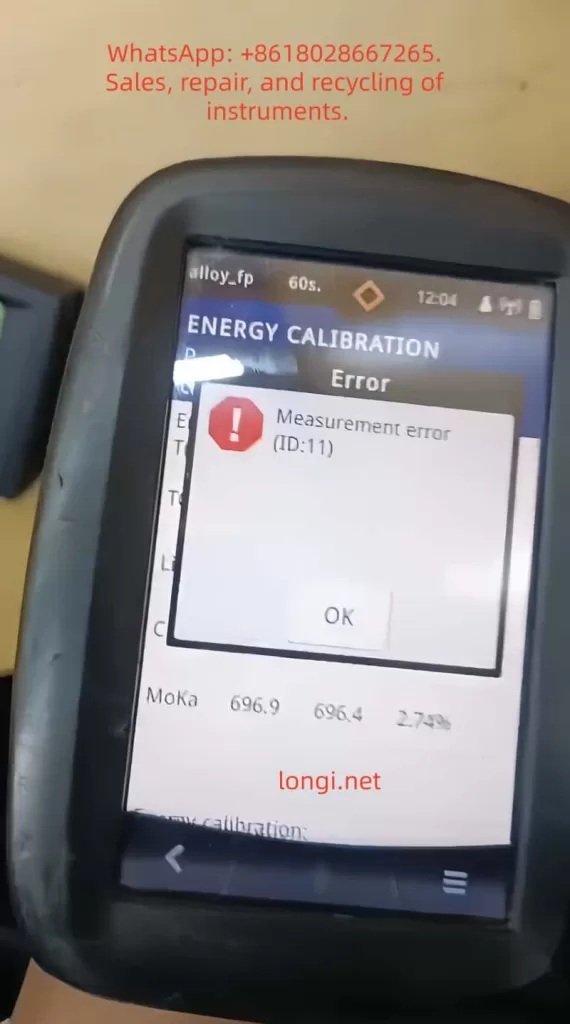
Recently, we received a typical composite fault case: the device emitted “abnormal movement/noise” during startup self-tests and failed to pass energy calibration, with the system reporting error ID:11 (Energy Calibration Failed). At first glance, these seem to be two independent issues – a mechanical fault and an electronic fault. However, through in-depth disassembly and parameter analysis, we discovered that they are actually interrelated causes and effects: the jamming of the mechanical transmission system led to a decline in heat dissipation efficiency, which in turn increased the thermal noise of the detector, ultimately resulting in substandard energy resolution and triggering calibration failure.
This paper will take this case as a starting point and provide a detailed breakdown of the repair process, offering a replicable diagnostic logic for third-party repair engineers.
Chapter 2: Fault Phenomena and Preliminary Diagnosis
2.1 Fault Phenomena Described by the Customer
Primary Fault: During startup self-tests, the device emitted abnormal mechanical friction or high-frequency vibration sounds (described by the customer as “weird movement”).
Secondary Fault: Unable to perform normal elemental analysis. When entering the calibration mode, it reported error ID:11 or ID:10 (usually indicating energy axis drift or insufficient resolution).
Environment: The device had been used in dusty environments (such as mines or metal processing plants) and had not undergone regular maintenance.
2.2 Preliminary Software Diagnosis (Analysis of Key Screenshots)
Before disassembling the device, we obtained the following key data through the device’s built-in diagnostic interface (Parameters menu):
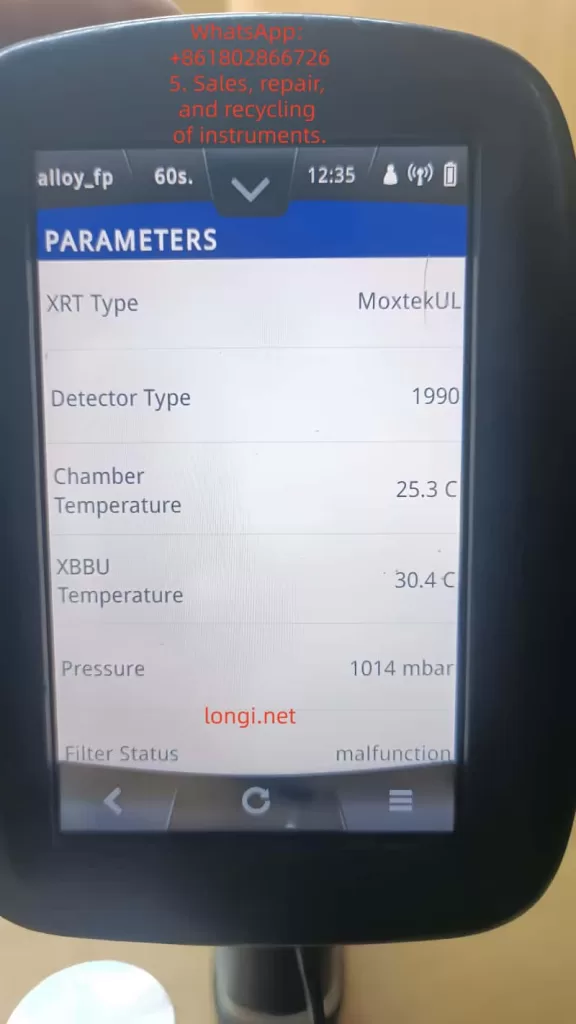
Filter Status:
- Early Status: Malfunction.
- Current Status: position_6.
Analysis: This indicates that the stepper motor or transmission gears of the filter wheel are not completely damaged but are in a state of “step loss” or “jamming.” The fact that the system can read the position signal suggests that the sensors (Hall sensors or photoelectric switches) are working properly, and the problem lies in the mechanical execution mechanism.
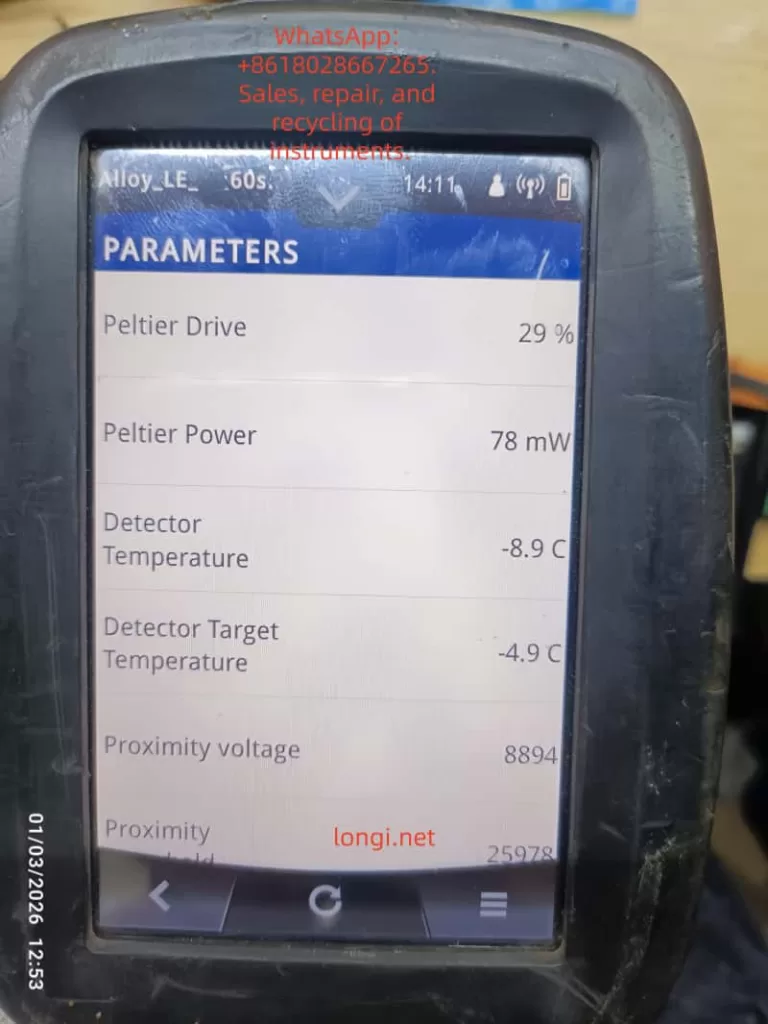
Detector Thermal Management Parameters:
- Detector Temperature: -8.9 °C.
- Detector Target Temperature: -4.9 °C.
- Peltier Drive: 29%.
- Peltier Power: 78 mW.
- Cooling Rate: 1 °C/s.
Analysis: This is a very dangerous signal. For high-performance Si-PIN or SDD detectors, the operating temperature usually needs to be stabilized between -20°C and -30°C. Although the current -8.9°C is lower than the ambient temperature, the thermal noise (Thermal Noise) is still too high for high-precision calibration. With a Cooling Rate of only 1°C/s, which is extremely slow for XRF equipment (normal should be 3-5°C/s), it means that the refrigeration system is overloaded or the heat dissipation is poor.
High Voltage and Bias Voltage:
Although the high voltage value is not directly shown in the screenshot, combined with the “ID:11” error, it usually means that in the case of insufficient low temperature, the ripple of the high-voltage power supply is amplified, or the leakage current of the detector increases, resulting in broadening of the energy spectrum peak shape (increase in FWHM).
Chapter 3: Hardware Disassembly and In-Depth Analysis of Core Components
To verify the inferences from the software diagnosis, we disassembled the device.
3.1 Detector Module Structure
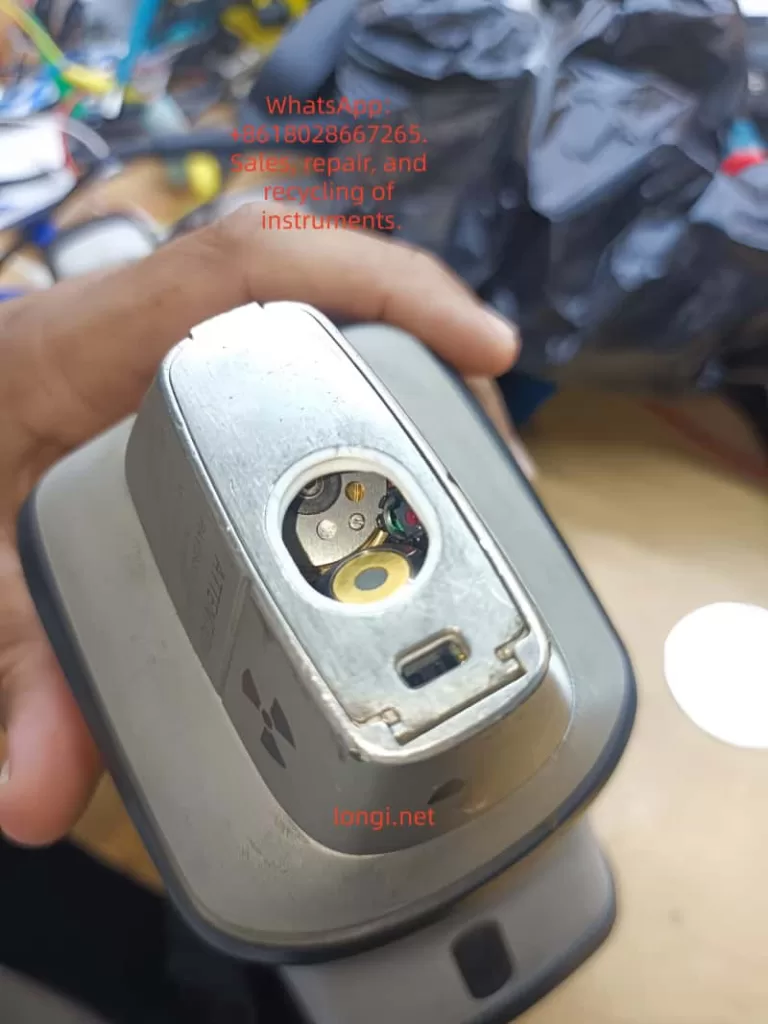
This is the detector window at the front end of the device, which is a highly integrated module containing:
- X-ray Inlet Window: Usually made of beryllium window (Be) or polymer window to seal the vacuum or inert gas environment while allowing low-energy X-rays to pass through.
- SDD/Si-PIN Detector Chip: The core sensing element, extremely sensitive to temperature.
- Peltier Cooling Element: Located behind the detector, it uses the semiconductor refrigeration principle to pump heat from the cold end (detector) to the hot end (heat sink).
- Pre-amplifier: Close to the detector, used to convert weak charge signals into voltage signals.
Key Findings:
During disassembly, it was found that the cooling fan behind the detector module was covered with dust, and the thermal conductive silicone grease between the heat sink and the chassis had dried up and hardened. This directly explains why the Cooling Rate was only 1 °C/s – heat could not be effectively conducted away from the hot end, leading to a catastrophic decline in refrigeration efficiency.
3.2 Mechanical Fault Analysis of the Filter Wheel
The filter wheel is used to switch between different filters (such as Al, Cu, Ti, etc.) to optimize the excitation conditions for different elements.
Fault Mechanism: Long-term use has led to the volatilization of lubricating oil, and metal powder has mixed into the gear set, increasing mechanical resistance.
Connection with Refrigeration: The filter wheel is usually driven by a small stepper motor. When the mechanical resistance is too high, the starting current of the motor spikes瞬间 (instantaneously), which may cause an instantaneous voltage drop (Brownout) on the main board power supply. Although modern devices have voltage stabilization circuits, frequent mechanical jamming increases the overall power consumption and heat generation of the device, indirectly exacerbating the thermal load on the detector.
Chapter 4: The Logical Chain of Composite Faults – Why Does Slow Refrigeration Lead to ID:11?
This is the technical core of this paper and a logical blind spot that many junior repair personnel tend to overlook.
4.1 The Physical Relationship between Energy Resolution and Temperature
The energy resolution (FWHM, Full Width at Half Maximum) of an XRF detector directly determines its ability to distinguish adjacent elemental peaks (e.g., distinguishing S and Pb, or Mo and S).
The formula can be simplified as:
FWHM∝eF⋅E
where F is the Fano factor (Fano Factor), and E is the photon energy.
Key Point: Thermal noise directly broadens the peak width. For every 10°C increase in temperature, the leakage current may double.
At -20°C, the resolution of Mn-Kα (5.9 keV) may be 145 eV.
At -5°C, the same detector may degrade to 180 eV or even worse.
4.2 Trigger Mechanism of ID:11 Error
The device’s energy calibration procedure (Factory Calibration) performs the following steps:
- Excite a standard sample (such as stainless steel or pure metal).
- Collect the characteristic X-ray energy spectrum.
- The software automatically fits the peak position (Peak Position) and peak width (FWHM).
- Judgment: If the measured FWHM > the threshold (e.g., > 160 eV @ 5.9 keV), the system determines that the detector performance is substandard and reports error ID:11.
Conclusion: The -8.9°C shown in Figure 3 and the slow cooling rate in Figure 4 are the root causes of the calibration failure. The “abnormal movement” heard by the customer is likely the vibration produced by the cooling fan running at full speed to compensate for the insufficient heat dissipation or the howling of the filter wheel motor under high resistance.
Chapter 5: Standardized Repair and Restoration Procedures (SOP)
Based on the above analysis, we formulated the following repair plan and guided the customer to implement it:
Step 1: Deep Cleaning and Restoration of the Heat Dissipation System (for slow refrigeration)
Tool Preparation: Dust-free cloth, anhydrous ethanol (99%), soft-bristled brush, new thermal conductive silicone grease (high thermal conductivity, such as Shin-Etsu 7921), compressed air can.
Operations:
- Remove the rear cover of the detector module to expose the heat sink and fan.
- Clear the dust clumps between the heat sink fins (the main source of thermal resistance).
- Thoroughly clean the fan blades with ethanol to ensure dynamic balance.
- Key Action: Scrape off the old silicone grease and evenly apply new silicone grease between the hot end of the Peltier element and the heat sink. Ensure it is thin and even, avoiding air bubbles.
Expected Effect: The thermal resistance is reduced, and the Cooling Rate should increase to above 3 °C/s.
Step 2: Lubrication of the Mechanical Transmission System (for Filter Status)
Operations:
- Drip a small amount of precision instrument lubricating oil (such as Krytox GPL 105) into the gear meshing area of the filter wheel.
- Manually rotate the filter wheel several times to ensure there is no jamming.
Verification: Restart the device and observe whether the Filter Status can smoothly switch between position_1 and position_6 without errors.
Step 3: Cleaning of the Detector Window (for light element detection)
Warning: The circular window in Figure 1 is extremely fragile.
Operations: If fingerprints or oil stains are found on the window, they must be gently wiped in one direction with lens paper dipped in anhydrous ethanol. Any scratches will prevent the detection of light elements such as Mg, Al, and Si.
Step 4: Long-term Cold Starting and Parameter Monitoring
Do not calibrate immediately after repair!
- Turn on the device and enter the Parameters interface.
- Record the Detector Initial Temp (e.g., 20°C).
- Force a wait: Observe the decline process of the Detector Temperature.
- Target: It must be stabilized below -15°C (preferably -20°C).
- Monitor the Peltier Drive: If the drive remains at 80-100% for a long time but the temperature does not drop, it indicates that the refrigeration element is aging or the heat dissipation is still a problem.
- Monitor the Cooling Rate: It should be restored to 2-4 °C/s.
Step 5: Energy Calibration (Energy Calibration)
When the temperature is stabilized within the target range:
- Place a standard sample (such as 304 stainless steel or the calibration block provided by the manufacturer).
- Ensure that the probe is tightly attached to the sample without any light leakage.
- Perform Factory Calibration or Energy Calibration.
Result Verification: - If it passes: Check the Resolution (resolution) value after calibration. It should be within the range of 140-150 eV (Mn Kα).
- If it still reports ID:11: Check whether the high-voltage cable connector is oxidized or consider whether the detector chip itself has been irreversibly damaged due to long-term overheating.
Chapter 6: Advanced Fault Exclusion – When Basic Repairs Are Ineffective
If the device still reports errors after following the above steps, the following deep-seated problems need to be considered:
6.1 Aging of the Peltier Cooling Element
Phenomenon: The Peltier Power shows normal (e.g., 78 mW), but the Detector Temperature cannot reach the target (e.g., stuck at -5°C).
Cause: The bismuth telluride thermocouples inside the semiconductor refrigeration element have aged, and the refrigeration efficiency has declined.
Solution: Replace the detector module (usually packaged together with the refrigeration element, and the refrigeration element cannot be replaced separately).
6.2 Noise from the Pre-amplifier
Phenomenon: The temperature is normal, but the baseline noise (Baseline) of the energy spectrum is extremely high, and the peak shape is distorted.
Cause: Aging or moisture absorption of the FET field-effect transistor.
Solution: Replace the pre-amplifier circuit board.
6.3 Ripple in the High-Voltage Power Supply (HV Supply)
Phenomenon: Peak position drift, and it becomes inaccurate again soon after calibration.
Detection: An oscilloscope is required to measure the ripple voltage at the high-voltage output terminal.
Solution: Replace the high-voltage module or filter capacitors.
Chapter 7: Preventive Maintenance and Best Practices
To prevent such faults from occurring again, the following maintenance mechanisms are recommended:
- Regular Dust Removal: Use compressed air to clean the heat dissipation ports and fans every 3 months.
- Environmental Control: Avoid using or storing the device in environments with a temperature exceeding 40°C or high humidity (>85%RH).
- Startup Warm-up/Cooling Procedures:
- When moving the device from a cold environment to a hot environment, do not turn it on immediately. Wait for the device to warm up to room temperature (to prevent condensation).
- After turning on the device, force a cold start for 5-10 minutes before conducting tests, especially in summer.
- Battery Management: Poor-quality batteries with increased internal resistance can cause unstable power supply, affecting the refrigeration efficiency of the Peltier element. It is recommended to use original batteries.
Chapter 8: Conclusion
This case demonstrates the strong coupling characteristics between the mechanical system and the thermal management system in handheld XRF analyzers.
- Although the mechanical resistance of the filter wheel (Filter Malfunction) did not directly cause the error report, it increased the system load and thermal burden.
- The dust accumulation in the heat dissipation system led to a decline in refrigeration efficiency (Cooling Rate 1 °C/s), and the detector operated in a “high-temperature” state (-8.9°C).
- The high temperature increased the thermal noise, deteriorated the energy resolution, and ultimately triggered the energy calibration failure (ID:11).
The core of repair is not just to “fix it” but to “restore performance.” For third-party repair personnel, it is not enough to simply clear the error codes. They must quantify the health status of the device through diagnostic software parameters (such as Peltier Drive and Cooling Rate).
Through the comparative analysis of the disassembly diagrams and parameter screenshots in this paper, readers should be able to master a complete logical closed loop from “phenomenon” to “mechanism” and then to “repair.” In future repair work, when encountering similar “abnormal movement” or “calibration failure,” please first check the heat dissipation system – it is often the overlooked culprit behind the scenes.
Appendix: Quick Reference Table of Common XRF Diagnostic Parameters
| Parameter Name | Normal Range (Reference) | Abnormal Manifestation | Possible Fault Points |
|---|---|---|---|
| Detector Temp | -20°C ~ -30°C | > -10°C | Heat sink blockage, fan failure, Peltier aging |
| Cooling Rate | 2 ~ 5 °C/s | < 1 °C/s | Dried silicone grease, dust accumulation |
| Peltier Drive | 30% ~ 60% (stable) | > 80% (continuous) | Poor heat dissipation, high ambient temperature |
| Filter Status | position_1~6 (cyclic) | Malfunction / Stuck | Gear jamming, loose motor wires |
| Resolution (Mn) | 135 ~ 155 eV | > 170 eV | Detector aging, electronic noise |
| Proximity | 0 ~ 30000 (close) | > 50000 (悬空, floating) | Distance sensor failure, probe not tightly attached |