
Hitachi SJ300 Inverter Parameters Cannot Be Edited? Complete Troubleshooting Guide
The Hitachi SJ300 series inverter is a classic high-performance vector control AC drive widely used in industrial automation for fans, pumps, conveyors, machine tools, and elevators. Despite being on the market for many years, its reliability and rich parameter set remain favorites among users.
However, during actual maintenance, many users encounter a stubborn problem: The operator panel displays “b37” (parameter B037 code) upon power-up. When using the up/down keys to switch to A001, A002, etc., pressing the FUNC key immediately returns to b37, preventing entry into the parameter value editing mode.
This phenomenon seems simple but often leaves field engineers helpless, causing debugging delays and production line stoppages.
This article starts with the operating principles of the SJ300, systematically analyzes the causes of this fault, the diagnostic logic, the complete solution path, and provides preventive measures and advanced tips. Based on the official Hitachi SJ300 instruction manual (NB613 series) and actual cases, this guide aims to help you quickly locate and fix the problem.
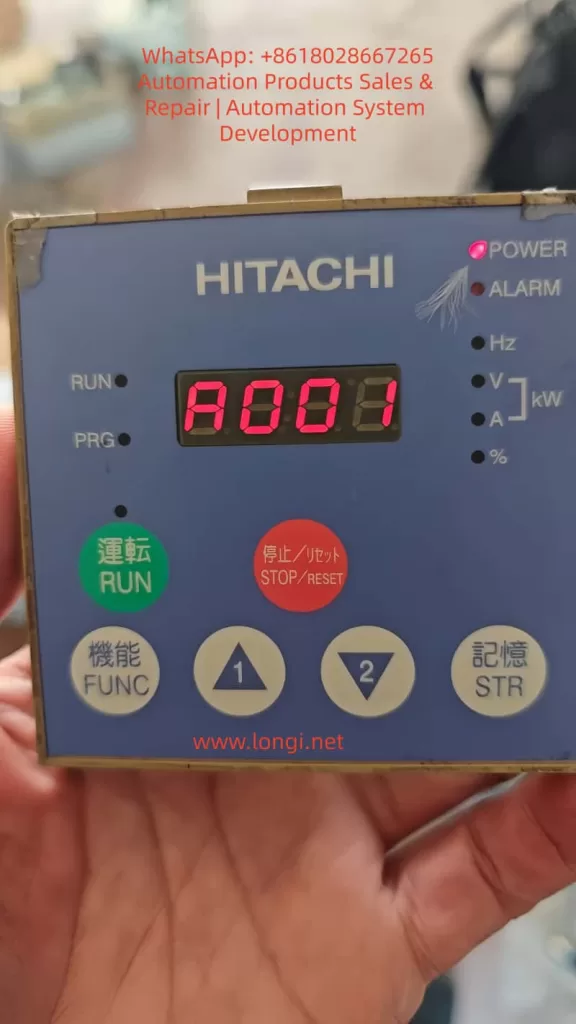
1. Overview of SJ300 Operator Panel and Parameter System
The SJ300 series uses a Digital Operator (common models: OPE-SRE or OPE-S), supporting local/remote mounting.
Panel Layout:
- 7-Segment LED Display: Shows parameter codes (e.g., A001), values (e.g., 60.00 Hz), monitoring quantities (output frequency, current), or error codes.
- Indicators: POWER, ALARM, RUN, PRG (Programming Mode).
- Operation Keys:
- FUNC: Switches between parameter code display and value display/jumps between parameters.
- STR (Memory): Saves modified values to EEPROM.
- ▲/▼ (Up/Down): Selects parameter codes or adjusts values.
- Green RUN: Starts operation.
- Red STOP/RESET: Stops and resets alarms.
- Additional: Potentiometer (OPE-SRE type) for frequency reference.
Parameter Groups:
- Group A: Basic Functions (e.g., A001: Frequency Reference Source).
- Group B: Fine Adjustments (e.g., B031: Software Lock, B037: Function Code Display Restriction).
- Group C: Intelligent Terminals.
- Group D: Monitoring.
- Group U: User Defined.
Standard Modification Process:
- Stop state (RUN light off).
- Select parameter code with Up/Down keys.
- Press FUNC to enter value display (editable).
- Change value with Up/Down keys.
- Press STR to save.
- Press FUNC to return to code list or monitor mode.
Fault Definition: If pressing FUNC fails to enter value display and returns directly to the code (e.g., b37), this is a “Parameter Lock” phenomenon.
2. Detailed Fault Description and Typical Cases
Common User Feedback:
- Default display is b37 (B037 code) on power-up.
- Up/Down keys can switch to A001, F001, but pressing FUNC flashes the display and immediately returns to b37.
- All Group A/B/C parameters cannot be edited.
- PRG light is ON (Programming Mode), but no value is displayed.
Typical Cases:
- New Machine Debugging: Occurs after parameter initialization, suspected factory settings.
- Post-Maintenance: Appears after replacing the panel or remote operator.
- Long-term Operation: Operator error or power failure causes EEPROM anomalies.
This is not a hardware failure but a software protection mechanism trigger. The core lies in parameters B031 and B037.
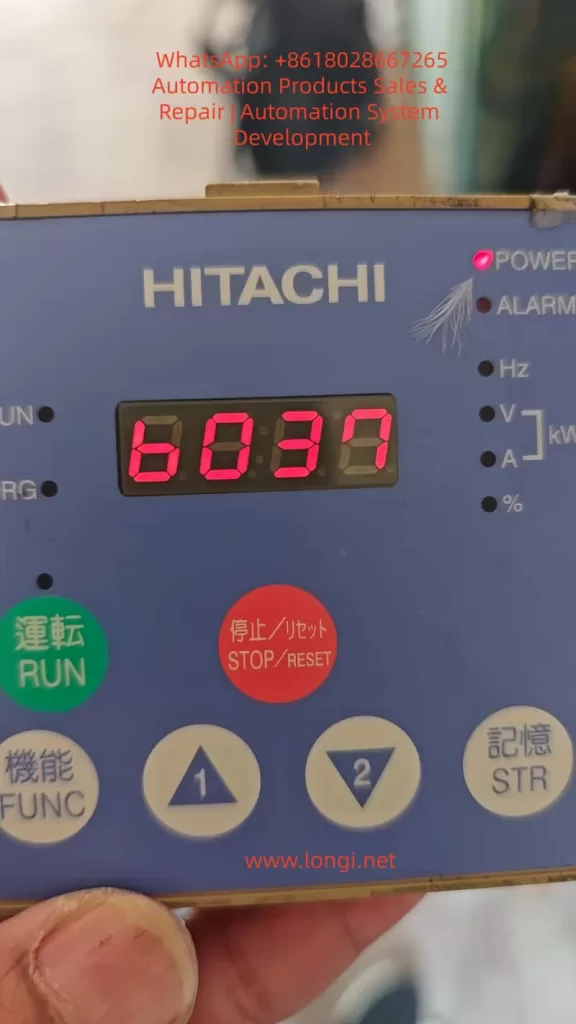
3. Root Cause 1: B031 Software Lock Mode
B031 is the most critical protection parameter in the SJ300, designed to prevent accidental modification of key settings. The official manual explicitly states: “B031 is always accessible when the motor is stopped,” regardless of whether other parameters are locked. This is the breakthrough point for diagnosis.
B031 Options (from SJ300 Manual):
| Value | Name | Description |
|---|---|---|
| 00 | Low-level Access + [SFT] Terminal Full Lock | Stop: ✔ Edit; Run: ✘; [SFT] ON: Full ✘ |
| 01 | Low-level Access + [SFT] Terminal Partial Lock | Except F001, Multi-speed |
| 02 | Completely Prohibit Editing | All ✘ |
| 03 | Prohibit Editing, Except F001/Multi-speed | |
| 10 | High-level Access | Includes B031 itself (Stop/Run: ✔) |
- Default is usually 00 or 10.
- Many users set B031 to 02 or 03 during debugging, locking the entire parameter system.
- Why display b37? Because B037 often works with B031; when locked, the display defaults to the last parameter in Group B (b037).
4. Root Cause 2: B037 Function Code Display Restriction
B037 controls the parameter display range to prevent operators from seeing irrelevant parameters and reducing misoperation risks.
B037 Options:
- 00: Display all function codes (Default/Recommended).
- 01: Display only used functions (Hides unused parameters based on A001, A002, etc. For example, if A001=01, it hides analog input parameters like A005~A016).
- 02: Display only User Defined Group U (U001~U012).
When B037 = 01 or 02:
- Many Group A/B/C parameters are “hidden,” and the Up/Down keys skip them.
- Even if the parameter exists, pressing FUNC cannot enter value display; it returns to the code list or default b37.
- Users mistakenly think “parameters cannot be entered,” but actually, the display is restricted.
5. Other Secondary Causes
- Running State Restriction: Many parameters (especially Group A/B) are prohibited from editing when the RUN light is ON.
- Panel Contact Issues: Loose remote operator cables or aging buttons causing the FUNC key to be invalid.
- EEPROM Anomaly: Power failure or electromagnetic interference corrupting parameters (usually accompanied by E08 error).
- Default after Initialization: After factory reset, B037=00, but some batches preset b37 as the default display.
6. Step-by-Step Complete Solution Guide
⚠️ Premise: Ensure the inverter is stopped (Press STOP/RESET, RUN light off), disconnect the load, and wear insulating protection.
Step 1: Confirm Stop State
- Press the Red STOP/RESET button for more than 2 seconds to ensure no RUN indication.
- If the ALARM light is on, reset it first (STOP/RESET).
Step 2: Access B031 (Must change this first – Core Breakthrough)
- Power on; the display shows b37 (or others).
- Press ▲/▼ to switch to b031 (Display shows b031).
- Press FUNC: You should now enter the value display (Because B031 is always accessible when stopped).
- If the value is not 10, press ▲/▼ to change it to 10 (High-level access).
- Press STR to save (Display flashes to confirm).
- Press FUNC to return to the code.
Step 3: Modify B037
- Switch to b037.
- Press FUNC to enter the value.
- Change it to 00 (Display All).
- Press STR to save.
Step 4: Verification
- Switch to A001, press FUNC; it should display the current value (e.g., 00 or 01).
- Modify A001 to 00 (Keypad reference), save with STR.
- If successful, all parameters return to normal.
Step 5: If FUNC is Still Invalid (Ultimate Solution)
- Check Panel: Re-plug the cable to ensure good contact.
- Try Initialization:
- Power off, hold STR + FUNC, power on and hold for 5 seconds (supported on some models).
- Or check manual: Set B084 to 01 then reset.
- If Still Failing: Replace the operator or send for repair (EEPROM or CPU board failure).
Note: Test after power cycling to avoid changing parameters under load.
7. Key Parameter Quick Reference Table (Group B)
| Parameter | Name | Default | Range | Function | Recommended Setting |
|---|---|---|---|---|---|
| B031 | Software Lock Mode | 00 | 00~03, 10 | Controls editing permission | 10 (Full Open / Debugging) |
| B037 | Display Restriction | 00 | 00~02 | Controls display range | 00 (Display All) |
| B001 | Auto Restart Mode | 00 | 00~04 | Restart after power failure | 00 (Disabled) |
| B084 | Initialization Mode | 00 | 00~03 | Reset parameters | 01 (Factory Reset) |
8. Prevention Measures and Best Practices
- Backup Parameters: Use the SRW-0EX copy unit to upload all parameters to a PC.
- Set B031=10: Fully open during debugging. For production, set to 00 and connect the SFT terminal to a normally closed button.
- Keep B037=00: Unless there is a specific need, avoid hiding parameters to prevent misjudgment.
- Operational Standards: Take photos of original values before modification; label key parameters with protection stickers.
- Regular Maintenance: Check panel cables, cooling, and dust annually.
- Training: Ensure operators understand the B031/B037 mechanism to avoid accidental settings.
9. Advanced Tips: Parameter Batch Management
- Parameter Copy: The SRW-0EX supports uploading/downloading full parameter sets, ideal for replicating multiple devices.
- Custom Group U: Set B037=02, then use U001~U012 to define frequently used parameters (frequency, accel/decel time) for quick maintenance.
- Remote Monitoring: Add a Modbus RTU card to read/write parameters via PLC/SCADA, avoiding manual panel operations.
- EEPROM Protection: Avoid frequent power cuts; install Surge Protective Devices (SPD).
10. Conclusion
The core reason Hitachi SJ300 parameters cannot be edited is the combination trigger of B031 Software Lock and B037 Display Restriction.