
1. Introduction
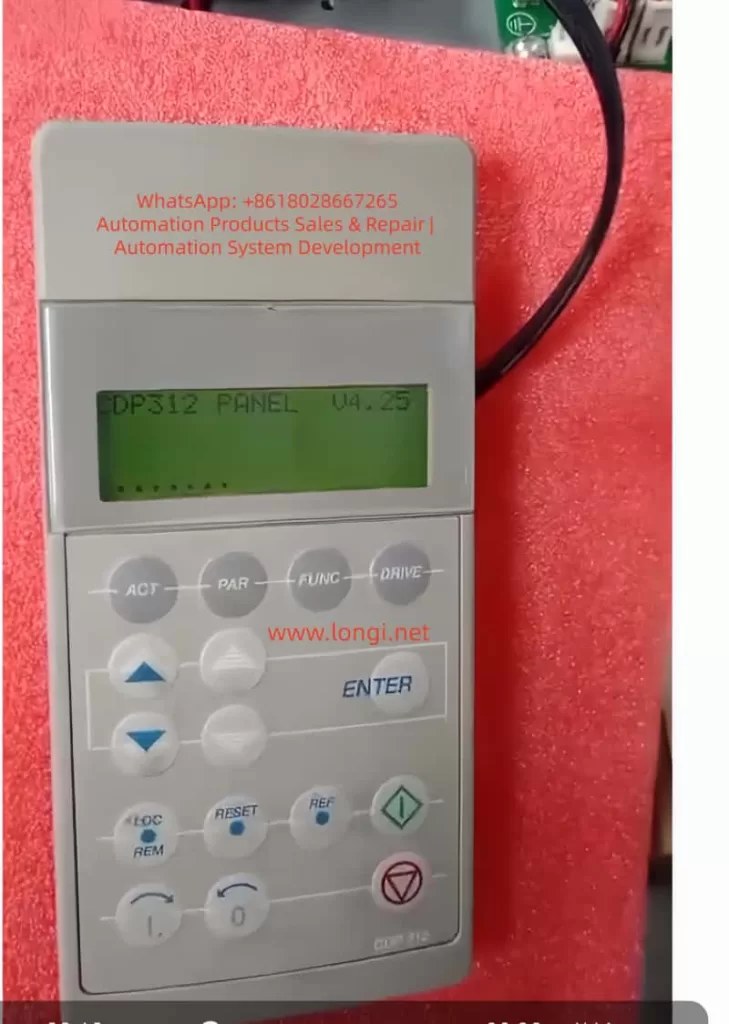
The ABB ACS600 series inverters serve as core equipment in the field of industrial automation, widely used in motor speed control, pump and fan systems, and multi-drive applications. Launched in the late 1990s, this product line supports scalar control and Direct Torque Control (DTC) modes, with a power range from 0.75 kW to 3000 kW, suitable for voltage levels of 380-690 V. Firmware compatibility issues are a common challenge in ACS600 maintenance, especially when replacing components or upgrading aging equipment. Incompatible firmware can lead to initialization failures, communication interruptions, or system freezes. For example, the control panel CDP312 may only display the version information “V4.25” and fail to enter the parameter mode. This problem stems from data inconsistencies between the Flash PROM (FPROM) and EEPROM on the NAMC (Application and Motor Controller) board, or version conflicts in the loading package. According to ABB’s official manuals (e.g., System Application Version 6.x), firmware versions have evolved from 3.x to 6.x, and incompatibility can result in the appearance of the “VN0” (Invalid Version) identifier, while a normal board displays “SN0” (Standard Serial Number). Based on practical diagnostic experience, this article systematically explains the causes, diagnosis, and repair methods of firmware compatibility issues in the ACS600 series, aiming to provide practical guidance for engineers. The article focuses on technical details, avoids redundant descriptions, and ensures rigorous logic.
2. Overview of ACS600 System Architecture
The core architecture of the ACS600 includes a power module, an inverter unit, and a control system. The control system is centered around the NAMC board, which integrates a microprocessor, FPROM, and EEPROM. The FPROM stores the system program and application programs (such as Standard Application 5.2 or Pump and Fan Control PFC), while the EEPROM saves factory configurations, parameter nominal values, and serial numbers. The CDP312 panel connects to the CH3 channel of the NAMC board via an RS485 Modbus link (9600 bps), using optical fibers or cables for data transmission. The panel firmware version (e.g., V4.25) must be compatible with the NAMC application program: V4.x is compatible with 5.x and above but not with 3.x. The NINT board handles speed measurement and LED indications, while the NIOC board manages I/O interfaces.
System Initialization Process: Upon power-up, the NAMC loads the program from the FPROM into RAM, performs a self-check, and then establishes communication with the panel. If the model identifier in the EEPROM is “VN0,” it indicates an invalid or erased configuration, and the system cannot enter the operating state. Typical loading packages include AM4B5230 (4.x series) or AM5Gxxxx (5.x series), and version conflicts trigger a “Version Conflict” error. Hardware interfaces include CH0 (for external systems), CH3 (panel/DriveWindow), and the X28 terminal (termination resistor). Understanding this architecture is crucial for diagnosing firmware issues.
Table 1: Functions of Key ACS600 Components
| Component | Function Description | Common Failure Points |
|---|---|---|
| NAMC Board | Core control, firmware storage and execution | FPROM damage, EEPROM erasure |
| CDP312 Panel | Parameter display and operation, V4.25 requires 5.x compatibility | Communication link interruption |
| NINT Board | Speed feedback, LED fault indication | Red light flashing (speed measurement fault) |
| EEPROM | Saves serial number (e.g., SN0/VN0) and nominal values | Data inconsistency leading to initialization failure |
3. Analysis of Firmware Compatibility Issues
Firmware compatibility issues mainly arise from version mismatches, hardware replacements, or storage damage. The firmware evolution of the ACS600 can be divided into 3.x (early scalar control), 5.x (standard DTC), and 6.x (multi-drive optimization). The panel V4.25 is designed for 5.x, and if connected to a 3.x NAMC, it will get stuck in the identification display mode and fail to display actual signals such as speed or torque. EEPROM dump analysis shows that a normal board has the “SN0” identifier (indicating a standard application sequence), while a faulty board displays “VN0” (version 0 or invalid), reflecting a failure in FPROM loading or an incomplete parameter file (PARAMETER.DDF).
Causes Classification:
- Version Conflict: For example, upgrading from AM4B5230 to AM5G5250 without using the correct tools can lead to a communication monitoring trip (fault code FF84).
- EEPROM Damage: A large number of 00/FF bytes in the hexadecimal dump indicate erasure, with missing valid data near the “SN0” string.
- Communication Fault: Link problems (such as loose cables or lack of termination resistors) can simulate compatibility errors, leaving the panel stuck at V4.25.
- Initialization Delay: Unstable auxiliary power can interrupt RAM loading, commonly seen in aging capacitors.
According to ABB’s fault manual (System Program 6.x), these issues trigger protection mechanisms such as I/O monitoring, over-temperature faults, or DC under-voltage. Quantitative Analysis: Initialization takes 6-10 seconds, and if it times out, the system enters a protection state. The “VN0” identifier is typically located at EEPROM offsets 0x100-0x200 (depending on the board type), with a normal value of “SN0 model” followed by a date code.
4. Diagnostic Methods
Diagnosis requires a systematic approach, starting from hardware inspection to software analysis. The steps are as follows:
4.1 Preliminary Hardware Inspection
- Verify Power Supply: Ensure the auxiliary +24 V is stable, and disconnect the main power for 5 minutes to discharge. Measure the UDC+ and UDC- voltages to be close to 0 V.
- LED Indications: The NINT board’s green light indicates normal operation, while a red light flashing indicates a speed measurement fault (code 7-6). Check the NAMC board’s LED for overswitching frequency.
- Connection Inspection: Ensure the CDP312 cable is secure and the CH3 channel is undamaged. If using an NBCI-01 extension, test for continuity.
4.2 DriveWindow Diagnosis
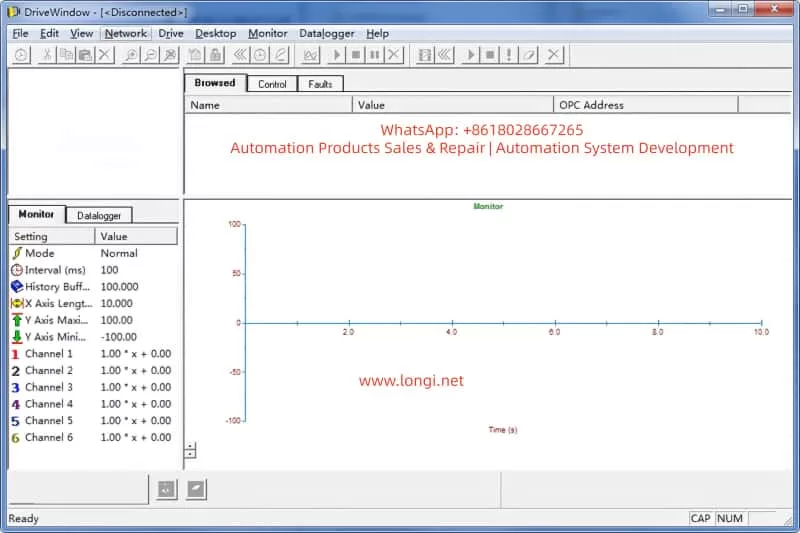
DriveWindow (Classic or Light 2) is the core tool that supports the DDCS protocol. Connection: Disconnect CH0 and connect the optical fiber directly to CH3.
- Status Check: If it displays “[Disconnected],” confirm the protocol settings. Read group 99 startup data to view 4.01 SW PACKAGE VER and 4.03 APPLIC SW VERSION.
- Parameter Browsing: Inability to read indicates a version conflict. Use the Monitor to view actual signals, such as 1.01 MOTOR SPEED.
- Fault Log: Recorded in chapter 7, such as DC OVERVOLT (over-voltage, check the braking resistor) or EARTH FAULT (ground fault, verify the motor cable).
4.3 EEPROM Analysis
Use a programmer to dump the EEPROM. Normal Dump Example:
- Offset 0x000: Serial number header
- Offset 0x100: SN0 model + date (e.g., 2000-01-01)
Faulty Dump: VN0 + a large number of FF bytes, indicating the need for restoration.
4.4 Other Tools
- Oscilloscope: Monitor analog outputs to verify torque references.
- Domino Test: Replace with a spare panel. If it still gets stuck, the issue is with the NAMC.
Common Fault Code Table (Based on Manual 7-14):
| Code | Description | Possible Causes | Actions |
| — | — | — | — |
| TEMP | Internal over-temperature | Fan failure, dust accumulation | Clean the heat sink and check the environment |
| DC UNDERVOLT | DC under-voltage | Unstable power supply | Verify the input voltage |
| COMM MON | Communication monitoring | Link damage, version mismatch | Reset the link and upgrade the firmware |
| ID RUN FAIL | ID run failure | Inaccurate motor model | Re-run the ID process |
The diagnostic time is usually 1-2 hours, and the accuracy depends on the completeness of the tools.
5. Repair Steps
Repair focuses on firmware flashing and backup restoration. It requires qualified electricians to operate to avoid the risk of “bricking” the device.
5.1 Preparation
- Tools: DriveWindow, *.DDB backup file, ABB loading package (e.g., AM5G5250.ldr).
- Backup Normal Board: In Drive, go to Backup >> Create complete backup and save the PARAMETER.DDF file, including nominal values.
5.2 Firmware Flashing Process
- Disconnect CH0, connect DriveWindow to CH3, and apply auxiliary power.
- Select Drive >> Restore >> Complete Backup and load the *.DDB file.
- If prompted with “Version Conflict,” confirm “Yes” only if the node numbers are different; otherwise, load the system program.
- After downloading, restart the power and verify that version 4.03 matches 5.2.
- EEPROM Restoration: If “VN0” persists, use a programmer to write SN0 data, ensuring the offset matches.
5.3 Version Upgrade
- Minor Upgrade (e.g., from 5230 to 5250): Directly use Restore.
- Major Upgrade: Requires an official ABB package and load the .ldr file through the DriveWindow download function.
- Note: The board types must be consistent (e.g., NAMC-11/21); otherwise, there will be hardware incompatibility.
5.4 Testing and Verification
- After power-up, the panel should display actual signals. Run the ID process (group 99) to confirm the motor model.
- Load Test: Gradually increase the speed and monitor torque and current.
The repair success rate is over 90%, and failures are mostly due to package mismatches.
6. Case Studies
Case 1
A pump control system with an ACS600 inverter got stuck at V4.25 on the panel during power-up. Diagnosis: DriveWindow displayed “Disconnected,” and the EEPROM dump showed “VN0.” Cause: The NAMC board was replaced without restoring the backup. Repair: Created a Complete Backup from a normal board and restored it to the faulty board. Verification: The version was upgraded to 5.2, and the system operated normally.
Case 2
In a multi-drive application, there was a communication fault. The LED was red, and the code was COMM MON. Analysis: The link lacked a termination resistor, and there was a version mismatch between 3.x and V4.25. Repair: Added a resistor and upgraded to a 6.x package. Result: Initialization was successful, and the system ran stably.
Case 3
The EEPROM was erased, displaying a large number of FF bytes. Used a programmer to rewrite SN0 data and combined it with DriveWindow Restore. Lesson: Regularly back up parameters.
These cases are derived from actual maintenance and emphasize the importance of backups.
7. Preventive Measures and Maintenance
Preventing firmware issues requires institutionalized maintenance:
- Regular Backups: Create a Complete Backup using DriveWindow monthly and store multiple copies.
- Version Management: Record all board types and loading packages and check compatibility before upgrades.
- Hardware Maintenance: Clean the heat sink annually and check cables and capacitors. Use PT100/PTC sensors to monitor motor temperature (group 30 parameters).
- Training: Engineers should master chapters 2 (startup) and 7 (fault tracking) of the manual.
- Upgrade Path: When upgrading from 5.x to 6.x, prioritize ABB support and avoid third-party packages.
- Monitoring System: Integrate DriveBus (group 71) for real-time diagnosis.
- Maintenance Cycle: Conduct quarterly inspections and annual firmware audits. Follow safety regulations: disconnect power for 5 minutes and measure the voltage.
8. Advanced Topics: Firmware Optimization and Expansion
The ACS600 firmware supports custom macros, such as PFC (Pump and Fan Control). Group 26 torque reference processing can optimize load distribution. Scalar control (group 29) is suitable for simple applications, while DTC improves accuracy. Expansion: Integrate a Modbus Plus adapter (NMBP-01) to achieve PLC interconnection. Future Compatibility: Although the ACS600 is discontinued, it can be bridged to the ACS800 series, and parameters can be migrated using DriveWindow Light.
9. Advanced Fault Analysis
- Overload Protection (Section 7-7): Monitor between I_AC_Nominal and I_AC_1/5min.
- Motor Thermal Model (Section 7-9): Set alarm limits (5-45) in user mode.
- Ground Fault Logic (Section 7-4): Detect current imbalance.
- Speed Measurement Switching (Section 7-7): Switch from measurement to estimation to avoid overspeed.
Table 2: Motor Protection Parameters
| Parameter Group | Description | Setting Range |
|---|---|---|
| 30 | Motor thermal model, stall protection | Zero-speed load 0-300% |
| 31 | Extended fault functions | Underload curve 1-5 |
| 35 | Motor fan control | Delay 0-3600 s |
10. Communication and Integration
- DDCS Control (Group 70): Node address 70.15 CH3 NODE ADDR.
- Data Set Reception (Groups 90-91): Address mapping control words.
- Transmit Address (Groups 92-93): Status word feedback.
- Fieldbus Adapter (Group 51): Supports Profibus, etc.
11. Conclusion
Diagnosing and repairing firmware compatibility issues in the ABB ACS600 series requires a combination of hardware diagnosis, software tools, and system knowledge. The difference between VN0 and SN0 is a typical indicator, and firmware flashing through DriveWindow can efficiently resolve the issues. By strictly following the manual and ensuring safe operations, the service life of the equipment can be maximized.