Posted on

ABB ACS611 Inverter “LINE CONV” Fault: In-Depth Analysis and Troubleshooting Guide

Abstract
The ABB ACS611 series inverter is a versatile product widely used in industrial drives for applications like fans, pumps, and compressors. One common fault in this series is the “LINE CONV” fault (Line Converter Fault), which is one of the main reasons for frequent shutdowns. This fault involves the rectification topology, power system, and control circuits, and if not promptly addressed, it can lead to rectifier module damage, DC bus instability, and even safety incidents. This article begins by explaining the rectification principle of the ACS611 inverter and systematically analyzes the “LINE CONV” fault’s triggering mechanism, core causes, and troubleshooting process, providing practical case studies and preventive measures for engineers.
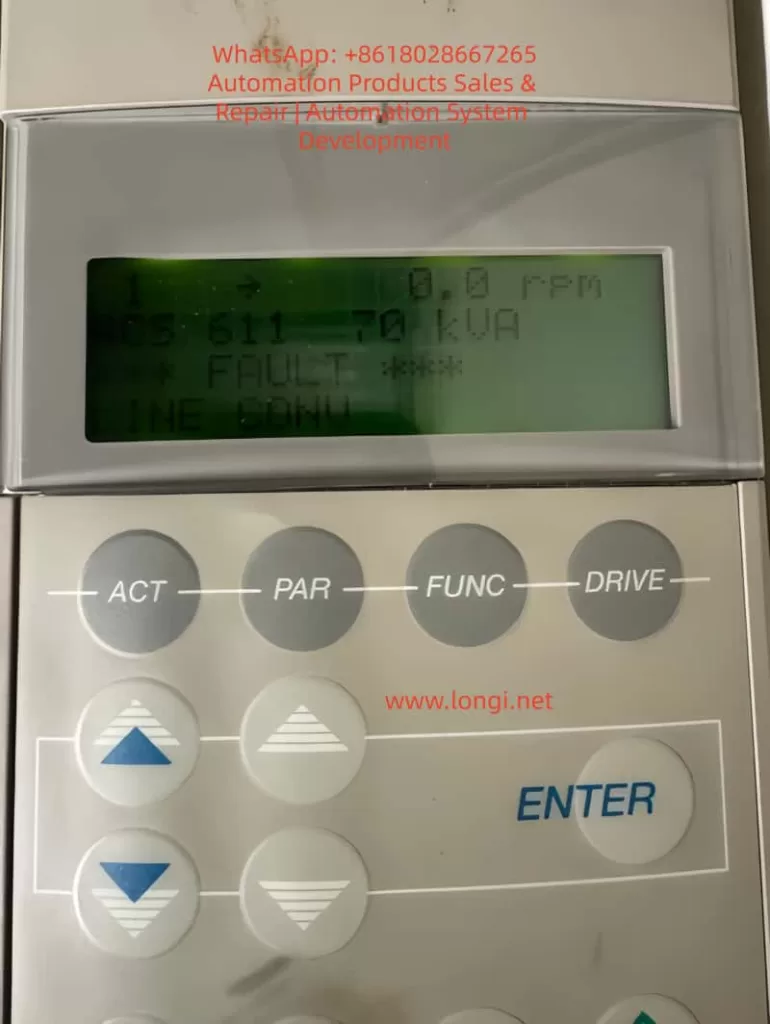

ACS611 Line Converter Fault Troubleshooting

1. Introduction
The ABB ACS611 series inverter, designed for medium to large loads, covers power ratings from 5.5 to 560 kW (approximately 7 to 700 kVA). It supports various topologies such as diode rectification and AFE (Active Front End), with the 70 kVA model commonly used for medium-sized fans, pumps, and compressors. This inverter features energy feedback and power factor correction (PF ≥ 0.98), making it a core component of industrial energy-saving retrofits.

However, during long-term operation, the “LINE CONV” fault (Fault Code: LINE CONV FAULT) becomes a frequent issue in the ACS611 series. According to ABB’s service data, this fault accounts for approximately 18% of the ACS611 inverter’s shutdowns, primarily due to abnormal rectifier unit scenarios. This article breaks down the fault from principle explanation to troubleshooting, offering engineers a step-by-step guide to quickly locate and resolve the issue.


2. ACS611 Rectification Topology and “LINE CONV” Fault Definition
(a) ACS611 Rectification Topology
The line converter (rectifier unit) is the “energy entry point” of the ACS611 inverter, responsible for converting AC input into DC bus voltage. The 70 kVA and higher models typically use the AFE (Active Front End) topology, which includes the following core components:

  • IGBT Modules: These act as the rectifier switches, using PWM control to achieve bidirectional energy flow (motor feedback energy can be fed back into the grid).
  • Pre-charging Circuit: Consisting of pre-charging resistors (PTC/coil resistors) and a pre-charging contactor, it limits inrush current when powering up.
  • DC Bus Capacitors: These buffer the rectified DC voltage, stabilizing the input to the inverter unit.
  • Control Circuit: Includes voltage/current sensors, driver boards, and CPU boards, implementing closed-loop control of the rectifier unit.

Compared to traditional diode rectifiers, AFE topologies offer the advantages of energy feedback and power factor correction, but they are more complex, with more potential fault points (e.g., IGBT drivers, pre-charging circuits).

(b) “LINE CONV” Fault Official Definition
According to ABB’s ACS611 Fault Code Manual, the “LINE CONV” fault is triggered when the rectifier unit fails to convert AC to DC, which can be caused by one of the following issues:

  • The rectifier unit detects abnormal conversion from AC input to DC bus voltage, leading to an unstable DC bus voltage.
  • Rectifier modules (diodes/IGBTs) experience short circuits, open circuits, or driver signal loss.

The typical symptoms of this fault include:

  • The inverter panel displays “*** FAULT ***” followed by “LINE CONV.”
  • Abnormal DC bus voltage (overvoltage, undervoltage, or fluctuation).
  • Rectifier current exceeds the rated value (e.g., 120% rated current).
  • Pre-charging failure (unable to establish DC bus voltage during startup).

3. Core Cause Analysis of “LINE CONV” Fault
The essence of the “LINE CONV” fault is the inability of the rectifier unit to complete the AC-to-DC conversion. The causes can be categorized into four main areas: external power supply issues, hardware damage, control abnormalities, and environmental factors, as detailed below:

(a) External Power Supply Issues (Approximately 35%)
The power supply is the “energy source” for the rectifier unit, and any issues with the power supply can trigger the fault:

  • Phase Loss: If one of the three-phase inputs is disconnected (e.g., fuse blown or contactor contacts burned), the current distribution is uneven, potentially causing overheating and damage.
  • Voltage Imbalance: If the three-phase voltage imbalance exceeds 5%, rectifier current peaks can increase by 2-3 times, accelerating aging.
  • Overvoltage/Undervoltage: If the input voltage exceeds ±10% of the rated value, overvoltage can damage rectifier modules, while undervoltage prevents the DC bus from being established.
  • Harmonic Interference: Large amounts of harmonics in the power supply can trigger false rectifier module actions.

(b) Rectifier Module Damage (Approximately 28%)
Rectifier module damage is a core hardware issue for the “LINE CONV” fault:

  • Diode Rectifier Bridge:
    • Short Circuit: Both forward and reverse directions conduct (measuring 0Ω between input L1 and output + terminal).
    • Open Circuit: Both directions are blocked (measuring “OL” between input and output), causing DC bus voltage fluctuation.
  • AFE IGBT Modules:
    • Gate (G) Damage: Resistance between gate and emitter is lower than expected (<1kΩ, indicating gate damage).
    • Collector-Emitter (C-E) Short Circuit: Both directions conduct, triggering overcurrent protection.
    • Flyback Diode Damage: Internal diode failure causes improper current flow, triggering overvoltage.

(c) Pre-charging Circuit Failure (Approximately 20%)
The pre-charging circuit limits inrush current during startup. Failures in this circuit can directly cause “LINE CONV” faults:

  • Pre-charging Resistor Damage: Overuse or insufficient power rating of the resistor leads to overheating and failure (e.g., 500W resistor used instead of 200W).
  • Pre-charging Contactor Failure: Issues such as open circuits or burnt contact points prevent the pre-charging circuit from engaging, causing excessive inrush current.

(d) DC Bus Issues (Approximately 12%)
The DC bus stabilizes the energy between the rectifier and inverter units. Abnormalities here can affect the rectifier unit’s operation:

  • Overvoltage: A sudden increase in power supply voltage or failure to release motor feedback energy leads to an overvoltage condition.
  • Undervoltage: Drop in input voltage or excessive load causes undervoltage.
  • Ripple Issues: Aging DC bus capacitors increase ripple, causing instability in the rectifier unit.

(e) Control Circuit Failures (Approximately 5%)
The control circuit, the “brain” of the rectifier unit, can cause false alarms or improper control if damaged:

  • Sampling Circuit Failure: Voltage sensor damage can cause incorrect voltage readings.
  • Driver Circuit Failure: Failure in the IGBT driver board causes improper switching of IGBTs.
  • CPU Board Failure: If the CPU board malfunctions, the rectifier unit may not receive proper start-up instructions.

(f) Environmental and Cooling Issues (Minimal Impact)
Though not a primary cause, environmental and cooling issues can contribute to failure:

  • Fan Failure: Fans malfunctioning due to bearing issues lead to overheating of rectifier modules.
  • Excessive Dust: Accumulated dust on heat sinks reduces cooling efficiency.
  • High Ambient Temperature: High installation temperatures can hinder module cooling.

4. Troubleshooting and Resolution Methods
The troubleshooting process begins with safety preparation and proceeds through a step-by-step diagnosis from external to internal causes:

  • Step 1: Check Input Power
    Use a multimeter to measure the three-phase voltage, ensuring no phase loss or imbalance.
  • Step 2: Inspect Rectifier Modules
    Test diodes and IGBT modules for shorts or open circuits, replacing faulty components as necessary.
  • Step 3: Inspect Pre-charging Circuit
    Test the pre-charging resistor and contactor for failure, replacing faulty components to restore functionality.
  • Step 4: Inspect DC Bus
    Use a high-voltage probe to measure DC bus voltage, checking for overvoltage, undervoltage, and excessive ripple.
  • Step 5: Inspect Control Circuits
    Use Drive Composer software to analyze fault history, checking sensors, IGBT drivers, and CPU boards for malfunctions.
  • Step 6: Inspect Cooling and Environment
    Check for fan operation, clean dust from heat sinks, and monitor ambient temperatures to ensure proper cooling.
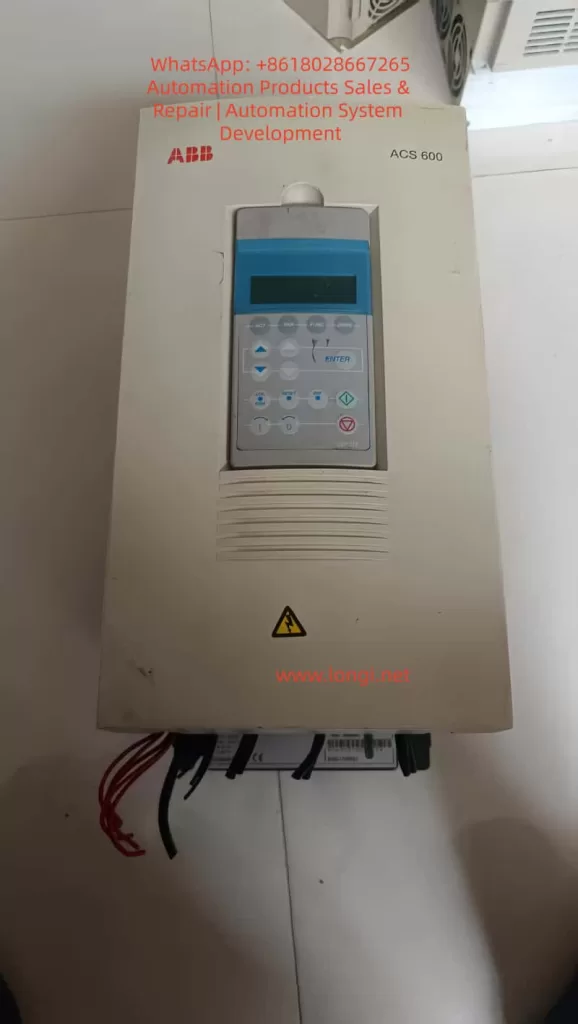
ABB Inverter ACS 600

5. Case Studies

  • Case 1: Chemical Plant ACS611-70kVA Inverter “LINE CONV” Fault
    • Symptoms: Inverter suddenly trips with “LINE CONV” error and 0V DC bus voltage.
    • Diagnosis: Short circuit in the diode rectifier bridge.
    • Solution: Replaced the damaged rectifier bridge (ABB 6SY7000-0AB42).
  • Case 2: Water Plant ACS611-70kVA Inverter “LINE CONV” Fault
    • Symptoms: Pre-charging failure during startup.
    • Diagnosis: Open circuit in pre-charging contactor.
    • Solution: Replaced the pre-charging contactor (ABB A145-30-11).

6. Preventive Measures

  • Regularly maintain power supply, rectifier modules, pre-charging circuits, and cooling systems to avoid “LINE CONV” faults.
  • Use Drive Composer to monitor system performance and detect early signs of trouble.

7. Conclusion
The “LINE CONV” fault in the ABB ACS611 inverter involves complex interactions between the power supply, hardware, control circuits, and environment. Engineers can effectively troubleshoot and resolve these faults by following a systematic approach and utilizing diagnostic tools. Regular preventive maintenance is crucial to avoid such failures and ensure the long-term reliability of industrial drive systems.
Posted on

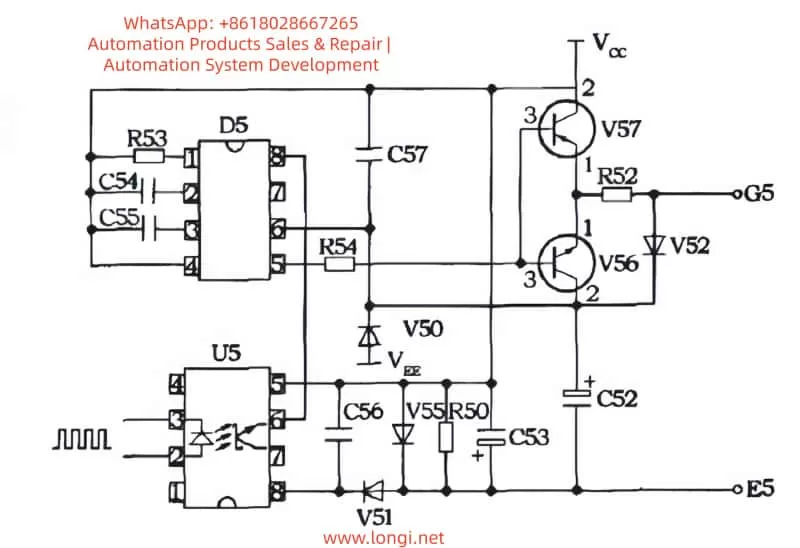
Comprehensive Analysis of IGBT Driver Circuit in Siemens 6SN1123 – 1A00-0EA1: Design, Troubleshooting, and Optimization

Introduction

With the continuous advancements in industrial automation, precise motor control has become a critical application requirement, especially in CNC systems, servo drivers, and other high-performance motor control devices. The Siemens 6SN1123 – 1A00-0EA1 drive, as a motor driver, plays a crucial role in various industrial automation systems. By employing IGBT (Insulated Gate Bipolar Transistor) driver circuits, it ensures stable motor performance even under varying load conditions.

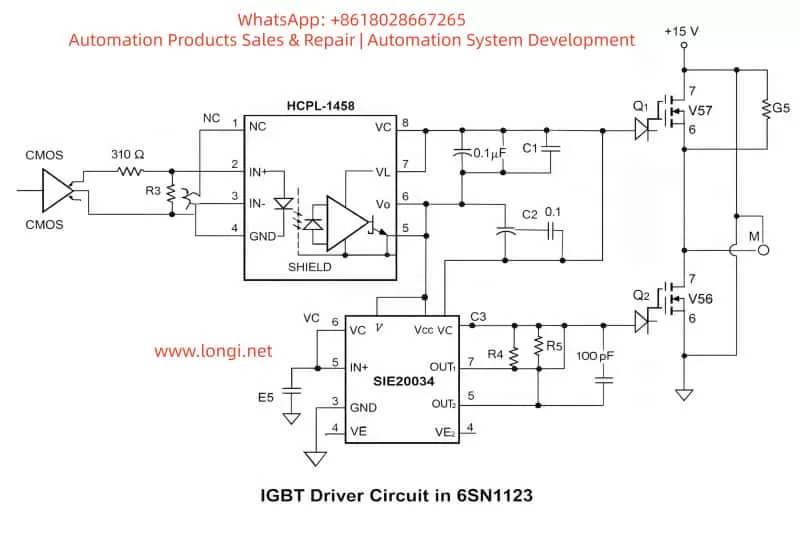
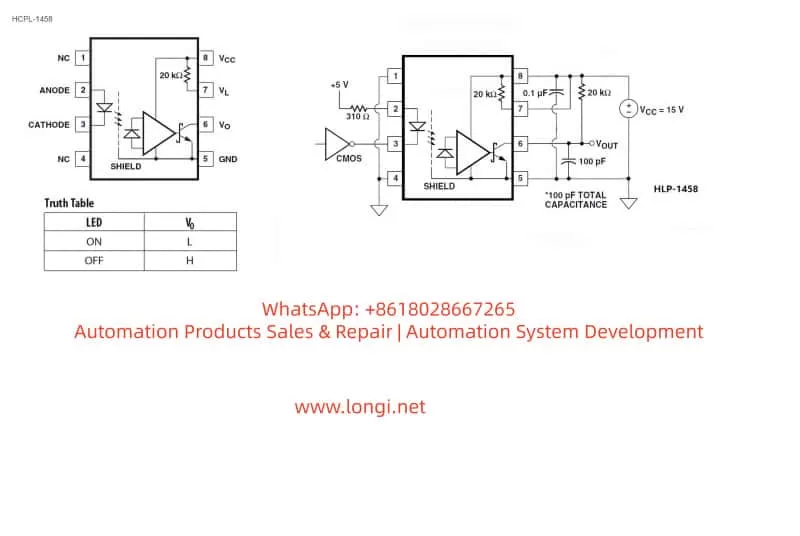
In this article, we will provide a detailed analysis of the IGBT driver circuit used in the 6SN1123 drive, focusing on the SIE20034 gate driver, HCPL-1458 optocoupler, and essential components like IGBT transistors, resistors, and capacitors. We will explain their function in creating an electrically isolated H-bridge configuration, discuss how the system works, and explore troubleshooting methods for common failures in the drive system.


IGBT driver circuit in 6sn1123

1. Overview of the 6SN1123 Drive

The Siemens 6SN1123 – 1A00-0EA1 drive is a high-performance variable frequency drive (VFD), widely used in various motor control applications. Its key features include precise motor control, efficient power conversion, and robust protection mechanisms.

This drive uses a combination of the SIE20034 gate driver and IGBT modules to control the motor efficiently. The HCPL-1458 optocoupler is used for signal isolation, ensuring that the low-voltage control circuit remains protected from high-voltage components. Through an intricate circuit design, the 6SN1123 ensures smooth motor operation while maintaining system stability.


HCPL-1458

2. Working Principle of the IGBT Driver Circuit

The IGBT driver circuit is the heart of the 6SN1123 drive, responsible for controlling the current through the IGBT modules, which in turn control the motor’s speed and torque. The IGBT (Insulated Gate Bipolar Transistor) is a power semiconductor widely used in motor drives and power electronics due to its high efficiency and fast switching capabilities.

2.1 Key Components in the Driver Circuit

  1. SIE20034 Gate Driver
    The SIE20034 is an efficient IGBT driver responsible for controlling the gate voltage of the IGBT modules. This driver chip receives signals from the HCPL-1458 optocoupler and uses them to switch the IGBT transistors on and off, thus controlling the current flowing through the motor.
  2. HCPL-1458 Optocoupler
    The HCPL-1458 optocoupler plays a vital role in isolating the high-voltage section of the circuit from the low-voltage control section. It works by converting the input electrical signal into an optical signal and then back into an electrical signal at the output, maintaining electrical isolation between the control and power circuits.
  3. IGBT Modules
    IGBTs (Insulated Gate Bipolar Transistors) are key to switching high currents and voltages in motor drives. They combine the best features of MOSFETs and BJTs, providing fast switching speeds and low saturation voltage, making them ideal for use in high-power applications like motor drives.
  4. Resistors and Capacitors
    Resistors and capacitors are used in the IGBT driver circuit for signal conditioning and power stabilization. Capacitors smooth out voltage fluctuations, ensuring stable operation, while resistors limit current and set signal levels for the IGBT driver.

2.2 Driver Circuit Workflow

  • Signal Input: The control signal, often from a CMOS signal source, is fed into the circuit. The signal is first passed through the HCPL-1458 optocoupler for isolation, ensuring that the high-voltage IGBT circuit does not interfere with the low-voltage control circuitry.
  • Signal Amplification: The optocoupler converts the input signal into an optical signal and then feeds it into the SIE20034 gate driver. The gate driver amplifies the signal and drives the IGBT gates to control the switching behavior of the IGBT transistors.
  • IGBT Switching: The IGBTs switch the current to the motor based on the gate voltage provided by the SIE20034 driver. The IGBT modules control the speed, torque, and direction of the motor by regulating the current flow through the motor windings.
  • Current Monitoring and Protection: The driver circuit includes overcurrent protection to prevent damage to the IGBT modules or the motor in case of a short circuit or overload condition. The fuse and current sensors help to protect the circuit by disconnecting in case of excessive current.

IE20034 and 4514v

3. Troubleshooting the IGBT Driver Circuit

3.1 Common Failures

  1. Overheating
    Overheating is a common issue in IGBT driver circuits, often caused by excessive current or inadequate heat dissipation. If the IGBT modules or the SIE20034 driver gets too hot, they may fail or trigger fault alarms like E104.
  2. Signal Failures
    A failure in the HCPL-1458 optocoupler or the SIE20034 driver can result in distorted or missing control signals, causing the IGBT modules to malfunction. This may lead to erratic motor behavior or complete motor shutdown.
  3. Overcurrent Protection Failures
    If the overcurrent protection fails, the circuit might experience excessive current, causing damage to the IGBT modules or the motor. A failure in the current sensors or fuse can result in a failure to detect high current, leading to catastrophic failure.

3.2 Troubleshooting Methods

  1. Check the Cooling System: Ensure that the heat dissipation system (such as fans and heat sinks) is functioning properly. If necessary, add extra cooling mechanisms to prevent overheating of the IGBT modules.
  2. Verify the Control Signals: Use an oscilloscope to inspect the signals coming from the HCPL-1458 and SIE20034. Ensure that the signals are not distorted and are within the correct voltage ranges. If there is any signal distortion, replace the damaged components.
  3. Inspect the Protection Circuits: Check the fuse, current sensors, and other protective components. Make sure the overcurrent protection circuits are working correctly. If any of these components are damaged, replace them immediately to avoid further damage to the system.

IGBT driver circuit in 6sn1123

4. Conclusion

The IGBT driver circuit in the 6SN1123 – 1A00-0EA1 drive plays a crucial role in controlling the motor’s performance. Through the combination of the SIE20034 gate driver, HCPL-1458 optocoupler, and IGBT modules, this circuit enables smooth motor control, providing efficient and precise operation even under varying load conditions.

By understanding the working principles of the IGBT driver circuit, we can ensure its proper functioning and troubleshoot any issues that may arise. Proper maintenance, regular inspections, and understanding common failures can significantly extend the life of the drive system and improve its overall performance.

Posted on

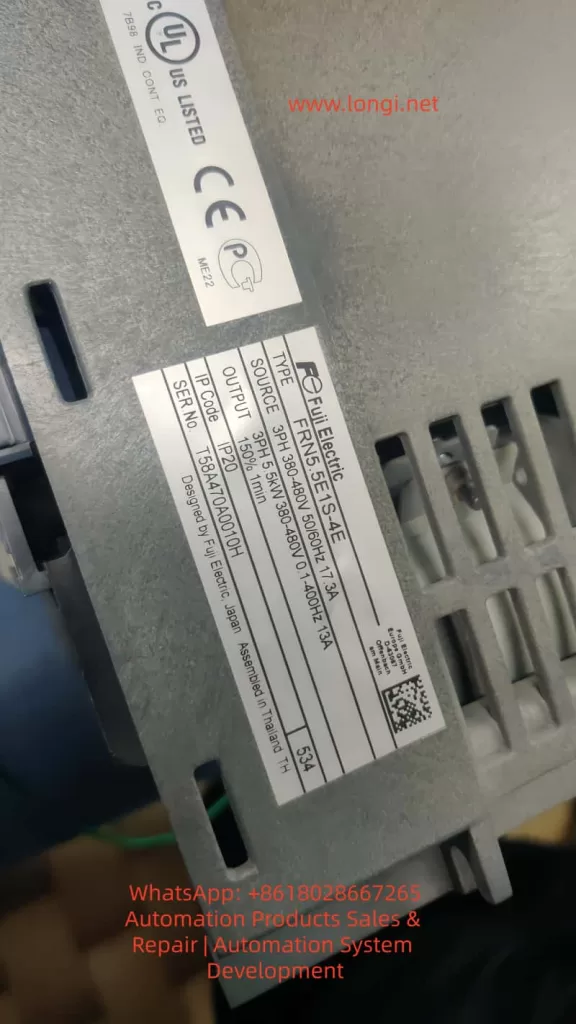
DC Bus Pre-Charge Resistor Failure in Fuji FRENIC-E1S Inverter: Diagnosis, Causes, and Repair Guide

Introduction:

In the field of industrial automation, variable frequency drives (VFDs) are critical components used for controlling motor speed, ensuring efficient and reliable operations. However, due to their complex environment and diverse components, VFDs often encounter failures that impact the continuity and stability of production processes. One of the key components prone to failure in VFDs is the DC bus pre-charge resistor. Specifically, in the Fuji FRENIC-E1S series inverter, this component is highly susceptible to damage from excessive heat, overloads, and other operating stresses.

This article focuses on the failure of the DC bus pre-charge resistor in Fuji FRENIC-E1S inverters, analyzing its role, common causes of failure, diagnostic methods, and offering practical repair solutions. The goal is to help technicians and engineers better understand this critical component and equip them with effective methods for maintaining and restoring inverter functionality.


FRENIC-E1S, Inverter Repair

1. The Role of the DC Bus Pre-Charge Resistor in Variable Frequency Drives

1.1 The DC Bus Capacitor Charging Process
Inverters, including the Fuji FRENIC-E1S, require DC bus capacitors to be charged upon startup. These capacitors are essential for storing energy in the DC bus and enabling smooth operation of the inverter. However, directly charging these capacitors can result in large inrush currents, which can damage both the power supply and other components of the inverter. This is where the pre-charge resistor comes into play.

1.2 Function and Design of the Pre-Charge Resistor
The primary function of the pre-charge resistor is to limit inrush current when the inverter is powered on. It allows the DC bus capacitors to charge slowly by dissipating the charging current over a longer period. Once the charging process is complete, the resistor is bypassed by a relay or thyristor (SCR), thus minimizing power loss and optimizing efficiency.

In the Fuji FRENIC-E1S, the pre-charge resistor helps ensure that the DC bus voltage increases gradually and stabilizes at the designed value. This process prevents sudden large currents, which could damage sensitive components of the inverter.


DC Bus Pre-Charge Resistor

2. Common Causes of DC Bus Pre-Charge Resistor Failure

2.1 Causes of Pre-Charge Resistor Failure
The failure of the pre-charge resistor is typically caused by the following factors:

  1. Overload of Current: When the inverter experiences frequent starts or the bus capacitors have a larger capacity, the pre-charge resistor is subjected to prolonged high currents, which may lead to overheating and failure.
  2. Faulty Relay or Thyristor: If the relay or thyristor used to bypass the pre-charge resistor fails, the resistor will be subjected to continuous high power, eventually causing it to overheat and burn out.
  3. Power Fluctuations or Missing Phases: Inverters are sensitive to fluctuations in the input power supply. If the power supply is unstable or the inverter operates with missing phases, the DC bus capacitors may not charge properly, placing excessive strain on the pre-charge resistor.
  4. Aging of Bus Capacitors: As the bus capacitors age, their charging characteristics change, leading to longer pre-charge times. This increased load on the pre-charge resistor can eventually cause it to burn out.
  5. High Ambient Temperature: In high-temperature environments, the resistor’s heat dissipation capacity may be compromised, leading to overheating and failure.

2.2 Symptoms of Pre-Charge Resistor Failure
When the pre-charge resistor fails, the inverter often exhibits the following symptoms:

  • Inverter Fails to Start: Since the pre-charge resistor is responsible for the initial charging of the DC bus capacitors, a failed resistor prevents proper charging, and the inverter fails to start.
  • Alarms or Fault Codes: In some inverters, the failure of the pre-charge resistor triggers alarms or fault codes such as overcurrent or startup failure.
  • Power Instability: A burned pre-charge resistor can cause instability in the power supply, leading to frequent shutdowns or restarts of the inverter.

Pre-Charge Resistor Failure

3. Diagnosing and Troubleshooting DC Bus Pre-Charge Resistor Failure

3.1 Fault Code Diagnosis
Many inverters come equipped with a fault diagnostic system. When a failure occurs, the inverter will display a fault code indicating the issue. For example, in the Fuji FRENIC-E1S, a burned pre-charge resistor may trigger fault codes such as “Overcurrent” or “Startup Failure.” These codes can serve as initial clues for identifying the problem.

3.2 Visual Inspection of the Resistor
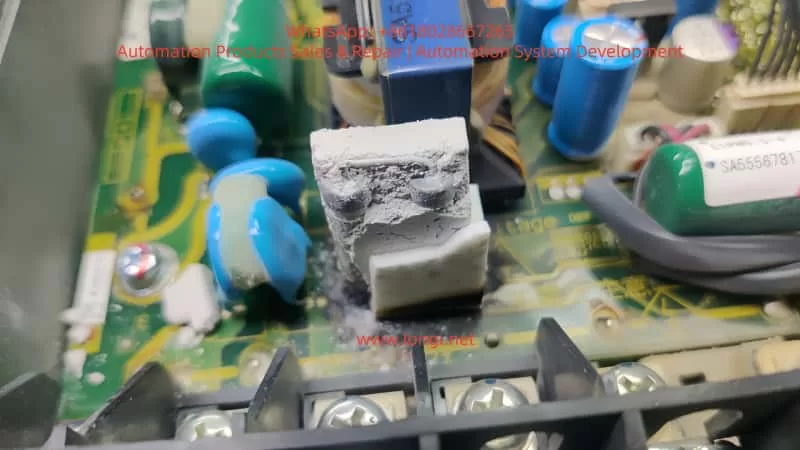
A visual inspection can provide immediate insights into whether the pre-charge resistor has failed. Common signs of failure include:

  • Burnt marks or white powder on the surface of the resistor.
  • Cracked or damaged resistor leads.
  • Overheating signs such as melted or charred components around the resistor.

3.3 Measuring Resistor Value
A multimeter can be used to measure the resistance of the pre-charge resistor. If the measured resistance deviates significantly from the nominal value (usually 22Ω to 27Ω), or if the resistor is open or shorted, it confirms the resistor is damaged.


4. Replacing and Repairing the DC Bus Pre-Charge Resistor

4.1 Preparation for Replacement
Before replacing the pre-charge resistor, ensure that the inverter is powered off and completely cool. Open the inverter enclosure, disconnect the power supply, and prepare the necessary tools and replacement resistor.

4.2 Removing and Replacing the Resistor

  1. Remove the Old Resistor: Use appropriate tools to remove the damaged resistor. Resistors are typically soldered onto the PCB, so use a desoldering pump or hot air rework station to carefully remove it.
  2. Clean the PCB: After removing the old resistor, clean the PCB with electronic cleaner to remove any residue or burnt material, ensuring that the new resistor can be securely mounted.
  3. Install the New Resistor: Choose a replacement resistor with the same specifications (typically 22Ω – 27Ω and 30W – 50W), and solder it into place on the PCB. Ensure that the solder joints are secure and free of cold solder connections.

4.3 Checking the Relay and Capacitors:
After replacing the resistor, check the pre-charge relay and the DC bus capacitors:

  • Relay Test: Verify that the pre-charge relay operates correctly, switching from charging to bypass mode once the capacitors are sufficiently charged.
  • Capacitor Check: Measure the bus capacitor voltage and ESR (Equivalent Series Resistance) to ensure that the capacitors are not aging or damaged.

4.4 Testing the Inverter:
After replacing the resistor, reconnect the power supply and power on the inverter. Observe if it starts up normally and check for any fault codes. If the inverter operates without issues, the problem has been resolved.


5. Preventive Measures and Maintenance Recommendations

5.1 Regular Inspection and Maintenance
To prevent pre-charge resistor failure, regular maintenance of the inverter is essential. This includes periodic checks on the pre-charge resistor, relay, and bus capacitors. Cleaning the PCB, inspecting the resistor condition, and monitoring ambient temperature can help extend the life of the components.

5.2 Environmental Control
Inverters should be installed in environments with suitable temperature and humidity levels. Avoid installing them in high-temperature or humid environments, as this can impact the resistor’s heat dissipation capability and lead to overheating.

5.3 Using High-Quality Components
When selecting components for the inverter, use high-quality resistors and other electrical components. This ensures that the pre-charge resistor is capable of handling the required power and prevents premature failure.


6. Conclusion

The DC bus pre-charge resistor is a small but vital component in a variable frequency drive. Its failure can lead to significant issues such as startup failure and power instability. By understanding the role of the pre-charge resistor, diagnosing the causes of its failure, and following proper repair procedures, technicians can restore the inverter to full functionality. Regular maintenance and preventive measures are essential for ensuring the longevity and reliability of VFDs, minimizing downtime, and optimizing production processes.

For VFD operators and service providers, understanding the working principles and failure modes of key components like the pre-charge resistor is crucial for keeping the system running smoothly and preventing costly downtime.

Posted on

ZS100 Series Servo Drive ERR45 Fault Diagnosis, Analysis, and Optimization Strategies

1. Introduction

The ZS100 series servo drives are developed by Zhejiang Zhengshun Electromechanical Co., Ltd. and are primarily used in servo pump control systems, widely applied in industries such as injection molding machines, hydraulic presses, and spinning machines. Known for their high reliability and stability, these drives support both Ver1.0 and Ver2.0 parameter versions and have a wide power range, allowing precise pressure and flow control.

However, the ERR45 fault, which is a common motor temperature overheat alarm, can occur due to environmental factors, sensor issues, or abnormal loads, affecting the continuity of operations. This article delves into the causes, diagnostic methods, solutions, and preventive strategies of the ERR45 fault, combining manual guidance and industry practices to provide comprehensive technical reference for engineers to efficiently troubleshoot and optimize the system.

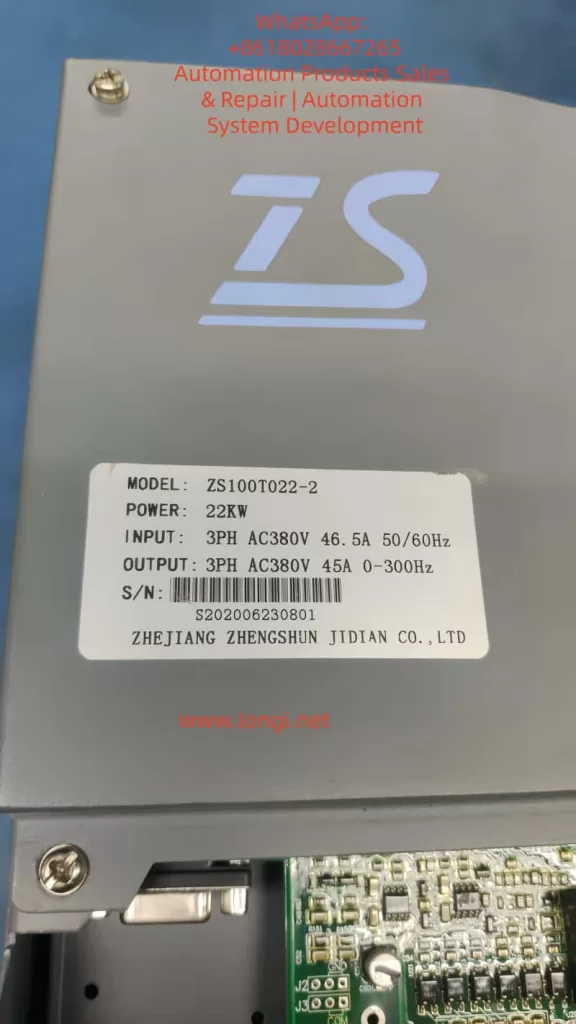
Key components of the ZS100 series include the servo drive, ZM permanent magnet synchronous motor, and ZB braking unit. The drive operates on a three-phase AC380V input with 0-300Hz variable frequency control, suitable for 22KW power models (e.g., ZS100T022-2). The ERR45 fault code specifically refers to the motor temperature sensor detecting abnormal high temperatures, usually accompanied by a protective shutdown. This fault is closely related to hardware connections, parameter settings, environmental adaptability, and system integration. A systematic analysis is required to explore the diagnostic logic.


ZS100T022-2 servo drive label showing model, power, input/output specifications, and manufacturer details from Zhejiang Zhengshun Jidian Co., Lt

2. Servo Drive Basic Principles and ZS100 Series Features

2.1 Working Principle of Servo Drive

Servo drives are key components in industrial automation, achieving precise control of motor position, speed, and torque through closed-loop control. The basic structure includes the power module, control unit, sensor interface, and communication module.

  • Power Module: Utilizes IGBT or MOSFET power devices to convert the AC power supply into PWM signals to drive the motor.
  • Control Unit: Based on DSP or MCU processors, executing PID algorithms to process feedback signals and ensure fast system response.

In servo pump applications, the ZS100 series drive adopts vector control mode and supports dual closed-loop pressure/flow regulation. Motor temperature monitoring is a core protection mechanism, utilizing PTC (positive temperature coefficient thermistor) or KTY (linear temperature sensor) to collect data. When the temperature exceeds the threshold (e.g., default 150°C), the drive triggers the ERR45 alarm and cuts off the output to prevent motor burnout. This reflects the safety redundancy design of the servo system but can also lead to false alarms, causing production downtime.

2.2 ZS100 Series Technical Specifications

  • Power Range: 7.5KW to 132KW
  • Current Parameters: Input current 46.5A (for 22KW model), output 45A
  • Frequency: Supports 50/60Hz input and 0-300Hz output
  • Version Features:
    • Ver1.0: Suitable for basic hydraulic control
    • Ver2.0: Enhanced jitter suppression and pressure overshoot optimization, with new P2 group gain adjustments and P3 group filtering settings
  • Motor Compatibility: ZM series permanent magnet synchronous motors, encoder resolution up to 2500ppr, supports RS485 Modbus communication
  • Installation and Cooling: Wall-mounted or cabinet-mounted, cooling reliant on the built-in fan
  • Peripheral Components: Recommended Schneider or ABB circuit breakers, contactors, and filters; ZB series braking units for energy feedback

2.3 Locating ERR45 Fault in the System

ERR45 is categorized under the temperature-related alarms in the drive fault diagnosis table, found in Chapter 4 of the manual.

  • Fault Definition: “Motor temperature too high,” possibly caused by overheating, sensor disconnection, or short circuit.
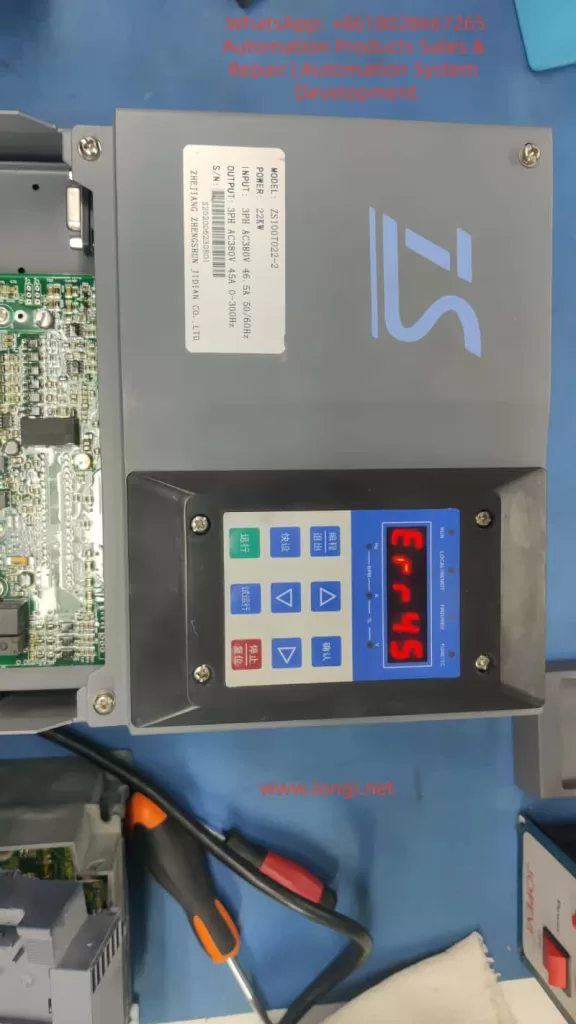
  • Alarm Manifestation: Display “ERR45” on the screen, accompanied by a beeping sound or flashing LED indicators.
  • System Status: Automatically enters protection mode, output is cut off, and manual reset or power restart is required.
  • High-incidence Scenarios: Molding stage of injection molding machines, pressurization process in hydraulic presses.
  • Statistical Data: Approximately 15%-20% of servo faults in industrial settings are temperature-related, with ERR45 being a significant portion.

ZS100T022-2 servo drive displaying the ERR45 fault code on the screen, indicating a motor temperature overheat issue, with a close-up view of the drive and its interface

3. Causes of ERR45 Fault

3.1 Hardware Factors

The core of motor overheating is the disruption of thermal balance. The ZM servo motor, with an IP65 protection rating, has an integrated temperature sensor. However, long-term operation with dust accumulation or blocked cooling ducts can reduce cooling efficiency.

  • Fan Failure: Insufficient fan speed, bearing wear, or power interruption in the drive or motor fan. Check J2 fan interface and P0.15 fan control parameters.
  • Sensor Issues: Loose connections, cable damage, or short circuits in the temperature sensor (PTC/KTY). PG flat cables (encoder cables) carrying temperature signals can cause false alarms if improperly connected.
  • Environmental Impact: Installation environments with temperatures above 40°C, humidity > 90%, or poor ventilation. The ZS100 series requires an operating environment between -10°C and +50°C, and exceeding this range can increase the sensitivity of thermosensitive components.

3.2 Software and Parameter Factors

Incorrect parameter settings are a hidden cause.

  • Version Differences: In Ver1.0, if motor parameters (e.g., P1.04 rated power, P1.05 rated current) are not self-learned, it can cause excessive current, indirectly increasing temperature. Ver2.0 adds P4 group temperature protection threshold adjustment (default 150°C, adjustable from 120°C to 180°C).
  • PID Parameters: Insufficient optimization of P2.01 proportional gain and P2.02 integral time can lead to system oscillations, increasing motor load.
  • Communication Factors: In Modbus communication mode, excessive command frequency from the host machine can amplify thermal effects.

3.3 Load and Application Factors

In servo pump systems, ERR45 is often linked to load fluctuations.

  • Hydraulic Characteristics: The motor torque demand during continuous suction or discharge of hydraulic fluid can reach 150% of the rated value. High oil temperatures (>60°C) cause motor efficiency degradation, leading to increased thermal loss.
  • Multi-pump Configuration: Master-slave synchronization offset can indirectly overload a single motor.
  • Power Supply and Braking: Power fluctuations (input voltage <342V or >418V) or improper braking resistor selection (ZB unit power matching the drive’s power by >1.2 times) can exacerbate bus voltage instability, affecting motor cooling.

3.4 Fault Statistics and Pattern Recognition

Based on industry data:

  • Initial Installation and Debugging Period: Highest occurrence (about 30%), often due to cable connection errors.
  • Seasonal: High-temperature environments lead to frequent alarms in summer.
  • Predictive Methods: Using data recording functions (L0 group monitoring parameters, e.g., L0.11 temperature sensor values), trend analysis can predict faults.

4. Diagnostic Methods and Steps

4.1 Initial Checks

When the fault occurs, record the display screen information first: ERR45 code, current frequency (d0.00), current (d0.01), and temperature values (d0.10).

Follow the manual flowchart:

  • Power off and check external appearance: Ensure the motor has no burnt smell, and the fan is working correctly.
  • Measure temperature: Use an infrared thermometer to verify the motor shell temperature. If <100°C, it may be a false alarm.

4.2 Sensor and Connection Diagnosis

Focus on troubleshooting the temperature sensor:

  • Interface check: Inspect CN1 or J3 interfaces to ensure the PG cable is intact.
  • Resistance measurement: Use a multimeter to measure resistance (PTC normal >100Ω, KTY approximately 1kΩ at 25°C).
  • Parameter verification: Enter P1 group and perform motor self-learning (P1.00=1), observe temperature feedback.

4.3 Electrical and Parameter Diagnosis

Use an oscilloscope to monitor the output waveform and check for current harmonics. If abnormalities are found, adjust P3 filtering parameters.

Measure the three-phase balance on the power side. A deviation of >3% needs rectification.

For Ver2.0, use the new diagnostic tools (e.g., P5.01 fault log query) to analyze historical records.

4.4 Advanced Diagnostic Tools

Integrate with host software via RS485 to read internal variables (communication address defined in Appendix K, e.g., 0x2000 for fault codes).

Use MATLAB or dedicated simulation software to model the load and verify the temperature model.

In multi-pump systems, check CAN communication (Chapter 9 case) to ensure synchronization without delay.


5. Solutions and Repair

5.1 Immediate Repairs

  • Reset Method: Follow the manual to press the STOP/RESET button or power off for 10s and restart. If the fault reoccurs, enter fault mode.
  • Hardware Replacement: Replace the fan with a same-model part. For short-circuited sensors, cut and insulate the wiring.
  • Parameter Optimization: Reduce P2.01 gain by 10%, increase P2.02 integral time to 0.5s to reduce oscillation-related heat.

5.2 System-Level Optimization

Upgrade to Ver2.0 for enhanced suppression capabilities.

Add external heat exchangers or water cooling systems for high-temperature environments.

In hydraulic control, use DI schemes (Chapter 9) to adjust speed thresholds and avoid peak loads.

5.3 Case Applications

  • Injection Molding Case: ERR45 caused by pump blockage. Fault eliminated by cleaning the filter and adjusting P9 high-pressure lock mode parameters.
  • Spinning Machine CAN Application: Communication delay led to overheating. System stabilized by optimizing PD group parameters.
  • Direct Drive Screw Solution: Matching the braking resistor (Manual Section 6.6) improved energy efficiency by 20%.

6. Preventive Measures and Maintenance Strategies

6.1 Daily Maintenance

  • Clean the cooling ducts regularly and check cables quarterly.
  • Use environment monitoring devices to ensure temperature <40°C.
  • Back up parameters using Modbus for quick recovery after faults.

6.2 Predictive Maintenance

  • Integrate IoT modules for real-time temperature monitoring.
  • Set early warning thresholds (e.g., 130°C) for preemptive action.
  • Train operators to recognize early signs (e.g., unusual noise or power drop).

6.3 Upgrades and Compatibility

Consider upgrading to the ZS200 series, which offers richer Ver2.0 parameters. It is compatible with older systems, with only parameter extensions required.


7. Advanced Topics: The Role of Temperature Management in Servo Systems

7.1 Thermal Modeling and Simulation

Motor thermal models are based on thermal resistance-capacitance networks. The temperature TTT satisfies the formula:dTdt=CthPlossQcool\frac{dT}{dt} = \frac{C_{th}}{P_{loss} – Q_{cool}}dtdT​=Ploss​−Qcool​Cth​​

Where PlossP_{loss}Ploss​ represents the loss power and QcoolQ_{cool}Qcool​ is the cooling heat flux. ANSYS software can be used for simulation and fan design optimization.

7.2 Algorithm Optimization

Adopt adaptive PID algorithms that dynamically adjust gains based on temperature feedback. Ver2.0 supports this function through the P4 group.

7.3 Industry Comparison

Compared to Siemens S120 or Yaskawa Sigma-7, the ZS100 offers high cost-effectiveness but with more conservative temperature protection. It is recommended to learn from international standards to improve flexibility in setting thresholds.


8. Real-World Case Studies

8.1 Common Hydraulic Drive Debugging

  • Problem: In standard injection molding machines, ERR45 due to motor parameter mismatch.
  • Solution: After self-learning, setting P1.04 to 22KW reduced fault rates by 90%.

8.2 Multi-Pump Configuration

  • Problem: Delays in master-slave mode causing overheating.
  • Solution: Adjusting PD communication parameters achieved 99.9% synchronization rate.

8.3 Spinning Machine CAN Application

  • Problem: ERR45 due to data packet loss.
  • Solution: Added redundancy checks, stabilizing the system.

8.4 Direct Drive Screw Solution

  • Problem: Thermal load balancing under gear reducer configuration.
  • Solution: Selected ZB braking units, improving energy efficiency by 20%.

8.5 DI Control Scheme

  • Solution: Digital input scheme to adjust thresholds and avoid peak heat.

8.6 High-Pressure Strategy

  • Solution: Gradual speed control during lock mold pressurization to prevent ERR45.

9. Communication and Expansion

In RS485 Modbus mode, the monitored temperature address is 0x2006. For specific communication settings, refer to Appendix H.


10. Conclusion

The ERR45 fault is common but can be effectively controlled through systematic diagnostics and optimization. The ZS100 series’ reliability is attributed to its comprehensive protection mechanisms. Engineers should familiarize themselves with the manual content and enhance system performance through practical applications. With the ongoing evolution of intelligent upgrades, temperature management will become more precise, driving progress in industrial automation.

Posted on

Fanuc CNC System Fault Troubleshooting: Alarm Codes SYS_ALM455 and SPM 24 – Diagnosis, Repair, and Prevention Strategies

Introduction

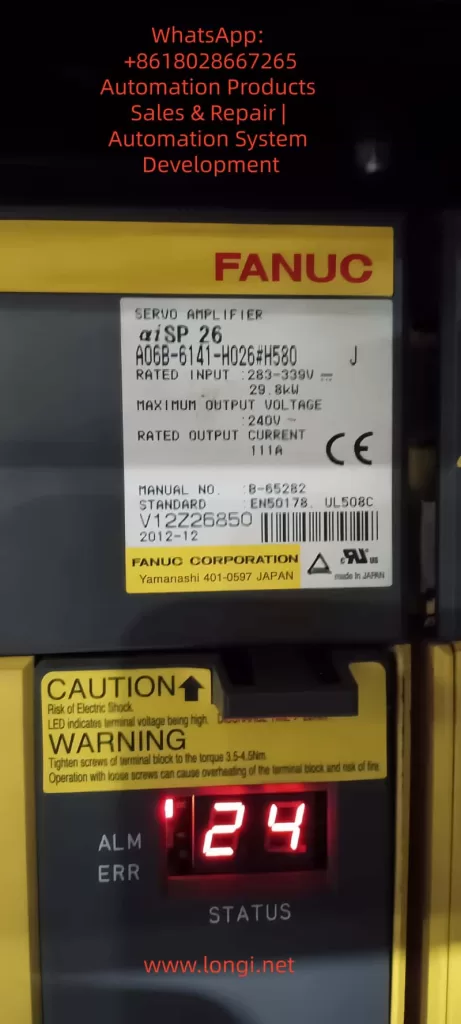
The Fanuc CNC (Computer Numerical Control) system is a core component in modern manufacturing, driving precise machining across industries from aerospace to automotive. These systems, such as the Series 0i-MD, rely on precision servo amplifiers, spindle modules, and control units to ensure high-speed, accurate operation. However, faults such as alarm codes SYS_ALM455 (indicating fan motor stop and system shutdown) and SPM 24 (serial data error) can disrupt production, leading to costly downtime. Based on real-world diagnostics, these alarms often relate to each other, with the failure of a DC bus connector exacerbating the issue.

This article offers a comprehensive technical exploration of these alarms in Fanuc systems, especially focusing on the βiSVSP amplifier series (e.g., model A06B-6164-H343). Based on the Fanuc maintenance manual and troubleshooting guides, we detail the causes, diagnostic methods, repair procedures, and preventive measures. The goal is to provide engineers and technicians with actionable insights to minimize faults and extend system lifespan, following a structured approach from symptom recognition to root cause analysis, ensuring efficient repairs and preventing recurrence.


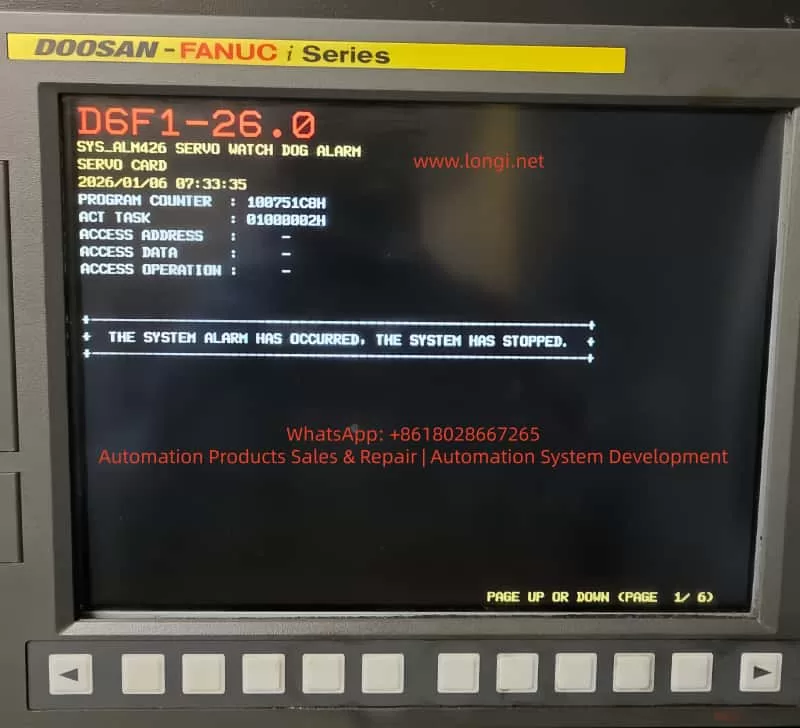
Fanuc alarm SYS_ALM426

1. Overview of the Fanuc CNC System

The Fanuc CNC architecture includes key components: the control unit (e.g., Series 0i-MD), servo amplifiers for axis control, spindle amplifiers (SPM) for rotation operations, and power supply modules (PSM). The βiSVSP series integrates the servo and spindle amplifiers into a compact unit, supporting multi-axis operation with high voltage capabilities up to 400V. For example, the A06B-6164-H343 model handles 40/40/80A servo current and 15kW spindle output, with a rated input of 200-240V AC at 50/60Hz.

Critical to the system’s reliability is the cooling mechanism, such as external or internal fans on the amplifier heat sinks, which dissipate heat from power transistors to prevent thermal shutdowns. Serial communication links the CNC controller to amplifiers via optical or electrical cables, ensuring synchronized data transmission of commands and feedback. Failures in these links or power distribution—such as through DC bus connectors (e.g., CX1A/B interface)—can cascade into alarms.

Understanding system interconnects is crucial: the DC bus links share power between modules, so loose connectors may underpower the fan or interrupt serial data, triggering SYS_ALM455 and SPM 24. Alarm logs with program counters (e.g., 10018B30H) and access addresses (e.g., 0100000AH) provide diagnostic clues, with timestamps (e.g., 2026/01/11 19:47:41) used for event correlation.


SPM 24 serial data error

2. Alarm Code Analysis

SYS_ALM455: Fan Motor Stop and Shutdown

SYS_ALM455 indicates a cooling fan failure, prompting an immediate system shutdown to prevent damage from overheating of the amplifiers or motors. In the Fanuc Series 0i-MD, this alarm appears as “SYS_ALM455 FAN MOTOR STOP AND SHUTDOWN,” typically accompanied by a red LED on the amplifier.

Causes:

  1. Fan Hardware Failure: Motor burnout, bearing seizure, or blockage from accumulated dust. Fans in the βiSVSP units (typically 24V DC, 40mm in size) are prone to wear after 20,000-50,000 hours of operation.
  2. Power Issues: Fan circuit under-voltage due to DC bus fluctuations. Faulty main bus connectors (e.g., loose copper bars or oxidized pins) can drop the voltage below 22.8V DC, causing the fan to stop.
  3. Environmental Factors: High ambient temperatures (>40°C) or poor ventilation increase thermal load, accelerating failure. Electromagnetic interference (EMI) from nearby motors can also disrupt fan control signals.
  4. Software/Parameter Errors: Misconfigured parameters (e.g., No. 7310 for axis sequence) or checksum errors in the servo software, though rare in fan-specific alarms.

Diagnosis:

  • Visual Inspection: Check the amplifier LED (e.g., red ALM/ERR indicates a fault). Verify fan rotation by powering up the cabinet.
  • Voltage Measurement: Use a multimeter to measure voltage at the fan terminals; expect a stable 24V DC. Probe the DC bus (nominal 300V) for voltage drops.
  • Log Analysis: Review CNC diagnostics (Nos. 400-499) for serial status and temperature readings. Use an oscilloscope to check for EMI on cables.
  • Isolation Test: Disconnect the fan and test it independently. If it doesn’t rotate, the resistance between wires should be infinite.

If the alarm persists after power cycling, suspect an interconnect issue, such as a DC bus fault.

SPM 24: Serial Data Error

SPM 24 indicates a serial communication error between the CNC controller and the spindle amplifier module, shown as “24” on the SPM LED. It indicates data corruption or interruption, typically requiring a power cycle to reset.

Causes:

  1. Communication Interruption: Noise on the serial cable (e.g., optical fibers or CX3/CX38 interface) from EMI, exceeding the maximum cable length (per B-65282EN manual), or poor grounding.
  2. Power-Related Failures: CNC power loss during operation causing under-voltage on the SPM control PCB. Issues with main bus plugs—loose, damaged pins, or arcing—lead to unstable voltage, causing data parity errors.
  3. Hardware Defects: Faulty SPM PCB, transistor modules, or feedback signals. In βiSVSP, this correlates with DC bus undervoltage alarms (e.g., Alarm 5: Low DC Voltage).
  4. Cascading Effect: Often a secondary consequence of SYS_ALM455. The shutdown triggered by the fan failure disrupts power, resulting in SPM 24 as a “normal” response, but a persistent issue signals deeper problems.

Diagnosis logs may show “Serial Transfer Data Error,” with DGN No. 471 detailing spindle speed ratios or feedback mismatches.

Diagnosis:

  • Cable Inspection: Check for damage on the serial link. Test continuity and shielding. Use a logic analyzer to measure signal integrity.
  • Power Verification: Confirm AC input (200-240V) and DC bus (300V). Voltage fluctuations point to bus connector issues.
  • Parameter Review: Check Nos. 400-499 for communication status. Reset if noise is suspected.
  • LED Interpretation: SPM shows “-24” or “0 24” indicating specific sub-errors (e.g., cable fault vs. PCB issue).

3. Interlinking Alarms and DC Bus Issues

SYS_ALM455 and SPM 24 often occur together because they share a dependence on the DC bus. The main bus connector (copper bars or CX1 interface) distributes power; failures here lead to a cascade of alarms:

  • Voltage drops cause fan stoppage (SYS_ALM455).
  • Instability damages serial data (SPM 24).

In diagnostics, a loose connector manifests as intermittent alarms, exacerbated by vibration.


4. Fault Diagnosis Methodology

Effective diagnosis follows a logical, layered approach: symptom recording, isolation, and verification.

1. Initial Assessment:

  • Record alarm timestamps, program counters, and access data on the CNC screen.
  • Check the amplifier LED: red ALM indicates an error, blank display indicates a power failure.
  • Use Fanuc’s teaching pendant or MDI panel to access parameters.

2. Tools and Techniques:

  • Multimeter/Oscilloscope: For voltage, resistance, and waveform analysis.
  • Thermal Imaging: Detect hotspots on amplifiers or connectors.
  • Diagnostic Software: Fanuc’s PMC ladder logic viewer for signal tracking.
  • Isolation: Swap modules (e.g., test the fan on a separate power supply) to pinpoint the fault.

3. Step-by-Step Protocol:

  • Power Cycle: Reset alarms; if persistent, continue.
  • Environmental Scan: Measure temperature/humidity; clean dust.
  • Component Testing: Fan (rotation test), cables (continuity), connectors (visual/torque checks).
  • Advanced: Monitor DGN parameters during operation to detect transient errors.

For βiSVSP, refer to the wiring diagram in B-65322. Document findings to identify patterns.


5. Repair Procedures

Repairs must prioritize safety: isolate power, use ESD protection, and follow OEM specifications.

For SYS_ALM455:

  • Fan Replacement: Locate fan on the amplifier heat sink (rear/top). Disconnect, remove (screws/clips), and install a new fan (e.g., A06B-6134-K002). Test rotation.
  • Cleaning: Use compressed air on the heat sink; avoid solvents on electronics.
  • Power Repair: If voltage is low, reset the DC bus plug; clean oxidation with isopropyl alcohol. Torque to specification (e.g., 2-3 Nm).
  • Verification: Power on, monitor for 30 minutes, and check diagnostics to clear.

For SPM 24:

  • Cable Repair: Replace faulty serial cables; ensure proper shielding/grounding.
  • PCB Replacement: If the PCB is suspected, replace the SPM control board (A20B-1009-0650 series).
  • Bus Connector Repair: Discharge the system, remove the plug, and check the pins. Clean/replace if damaged; reconnect securely.
  • Reset Sequence: Power down CNC and amplifier. Wait 5 minutes. Power on the amplifier first, then CNC.

Integrated Fix for Linked Alarms:

  • Address the root cause (e.g., bus plug): disconnect, test resistance (<1Ω), and reassemble.
  • After repairs: run spindle test (M03 S1000) and axis jog; monitor temperatures.

If the alarm recurs, escalate to Fanuc Service for PCB analysis.

Total repair time: 1-4 hours, depending on access.


6. Preventive Maintenance Best Practices

Proactive maintenance can reduce alarm frequency by 70-80%, based on industry benchmarks.

Daily/Weekly Routine:

  • Visual Inspection: Check fans, cables, and connectors for wear.
  • Cleaning: Remove dust from the cabinet; use intake filters.
  • Monitoring: Check CNC logs for temperature (e.g., spindle load table).

Monthly/Quarterly:

  • Voltage Audit: Measure input/output; calibrate if deviation >5%.
  • Fan Service: Lubricate bearings; replace every 2 years.
  • Cable Integrity: Torque check for bus plugs; validate EMI shielding.

Annual Overhaul:

  • Comprehensive Diagnostics: Use Fanuc tools for parameter backup, firmware updates.
  • Component Replacement: Batteries, fuses (e.g., F3 in PSM).
  • Training: Ensure operators follow the power-up sequence (amplifier before CNC).
  • Checklists: Daily (cleaning), 500 hours (check), 2000 hours (overhaul). Fanuc’s lifetime support and refurbished parts programs help control costs. Grounding to Class C standards prevents noise-induced errors.

7. Case Study: Resolving Interlinking Alarms in a Production Environment

In a recent scenario involving Fanuc Series 0i-MD and βiSVSP amplifiers, SYS_ALM455 and SPM 24 appeared simultaneously on 2026/01/11 at 19:47:41. Initial checks showed no fan rotation, with the DC bus voltage at 250V (below the nominal 300V). Diagnostics traced the fault to a loose main bus plug, causing undervoltage.

Fix: The system was powered off, and after cleaning, the plug was reset. The fan was independently tested (rotating at 24V). After repairs, alarms cleared, and spindle tests confirmed stable operation. Prevention: Added monthly torque checks and EMI filters. Downtime: 2 hours; prevented recurrence through planned maintenance.

This case highlights the value of comprehensive diagnostics, consistent with Fanuc’s B-65285EN manual recommendations.


Conclusion

SYS_ALM455 and SPM 24 showcase how interconnected Fanuc CNC components can lead to cascading faults, often stemming from power distribution issues like DC bus connectors. By mastering diagnostics (logs, tools), repairs (step-by-step), and prevention (routines), technicians can achieve >99% uptime. Always consult Fanuc manuals (e.g., B-65322, B-65282EN) and leverage OEM support for complex issues. Implementing these strategies not only resolves immediate problems but fosters long-term system resilience and optimized manufacturing efficiency.

Posted on

Siemens Masterdrives VC F002 Precharging Fault – Complete Diagnosis and Troubleshooting Guide

Abstract

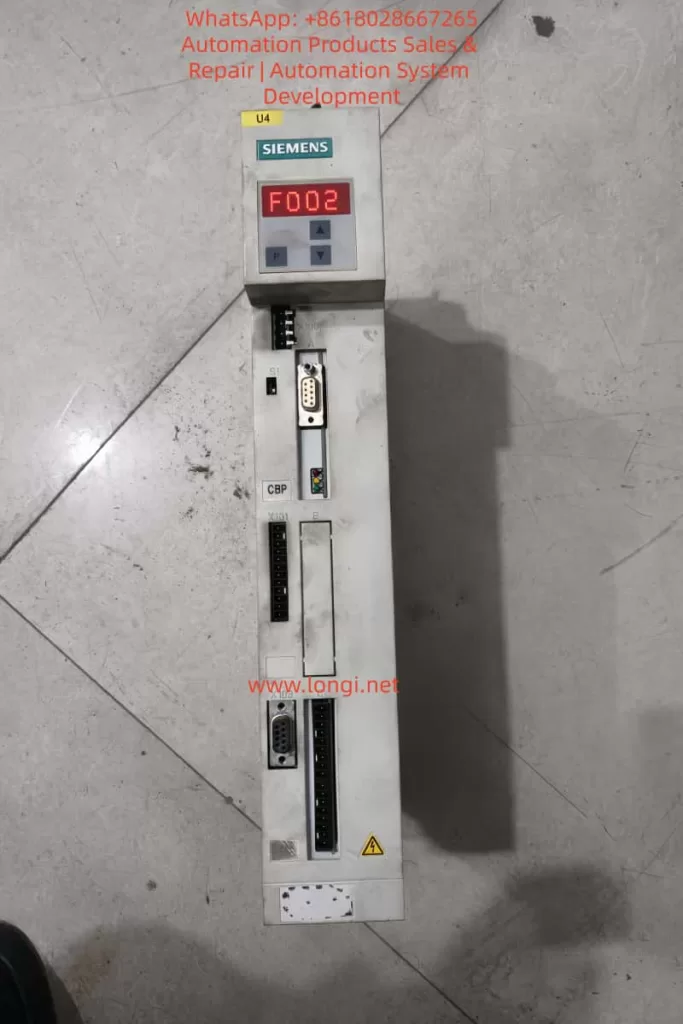
The Siemens Masterdrives VC series is a high-performance vector-controlled drive system widely used in industrial automation, traction systems, and hoisting equipment. Fault code F002 indicates a precharging fault, meaning that the DC link voltage fails to reach the required threshold within the specified time (typically 3 seconds). This fault usually occurs when the DC bus voltage does not reach approximately 80% of (P071 × 1.34).

The F002 fault is commonly related to power supply issues, faulty contactors, damaged precharge circuits, or incorrect parameter configuration. It prevents the drive from completing the startup sequence, causing system downtime and potential production losses.

This article provides a comprehensive technical guide covering the working principle, fault mechanism, diagnostic methods, corrective actions, real-world case studies, and preventive maintenance strategies. The content is based on Siemens documentation and field experience, and is intended to help engineers quickly locate root causes and restore reliable operation.


Siemens Masterdrives VC drive showing F002 precharging fault on display, DC link precharge error during startup sequence

1. Introduction

In modern industrial environments, variable frequency drives such as the Siemens Masterdrives VC series are core components for precision motor control. These drives support multiple control modes ranging from open-loop V/Hz to closed-loop vector control, enabling accurate speed and torque regulation for asynchronous and synchronous motors.

The F002 precharging fault is one of the most frequently encountered startup faults. It occurs when the DC link voltage does not build up correctly during power-on. This fault not only prevents the drive from starting, but can also indicate deeper electrical or hardware issues, such as unstable incoming power, defective precharge resistors, or main contactor malfunctions.

Industrial statistics show that DC link and precharge-related faults account for approximately 15–20% of inverter startup failures, making systematic troubleshooting essential for minimizing downtime.


2. Overview of Siemens Masterdrives VC Series

The Siemens Masterdrives VC (Vector Control) series is a modular drive platform designed for applications requiring high dynamic response and accurate torque control.

Typical features include:

  • Input voltage: 3-phase 380–480 V AC, 50/60 Hz
  • Output: 3-phase 0–480 V, 0–500 Hz
  • Power range: From less than 1 kW up to several hundred kW
  • DC link voltage: Approximately 1.34 × line voltage
  • Control modes:
    • V/Hz open loop (fans, pumps)
    • Vector control closed loop (hoists, traction, extruders)

The system architecture consists of:

  • Control Unit (CU)
  • Power Electronics Unit (PEU)
  • Optional boards (CB, TB, SCB, TSY, encoder modules)

Integrated protection functions include overload monitoring, temperature estimation, ground fault detection, and extensive fault logging.

The Masterdrives VC series is widely used in cranes, rolling mills, traction systems, conveyors, and test benches where precise dynamic performance is required.


3. Drive Operating Principle

Masterdrives VC uses vector control technology to decouple magnetic flux and torque. The operating sequence includes:

Rectification and Precharging

Incoming AC voltage is rectified into DC. The precharge circuit limits inrush current while charging the DC link capacitors.

DC Link Stabilization

The DC capacitors store energy and smooth voltage ripple. During precharging, the DC voltage must rise above the internal monitoring threshold.

Inversion

IGBT modules generate a PWM output to supply the motor with variable voltage and frequency.

Control Loop

Encoder or analog feedback enables closed-loop speed or torque control.

State Machine

The internal sequence transitions from:

  • Ready to power-up
  • Precharging
  • Ready
  • Run

If the DC voltage does not rise fast enough during precharge, the system remains in the precharging state and finally triggers F002.


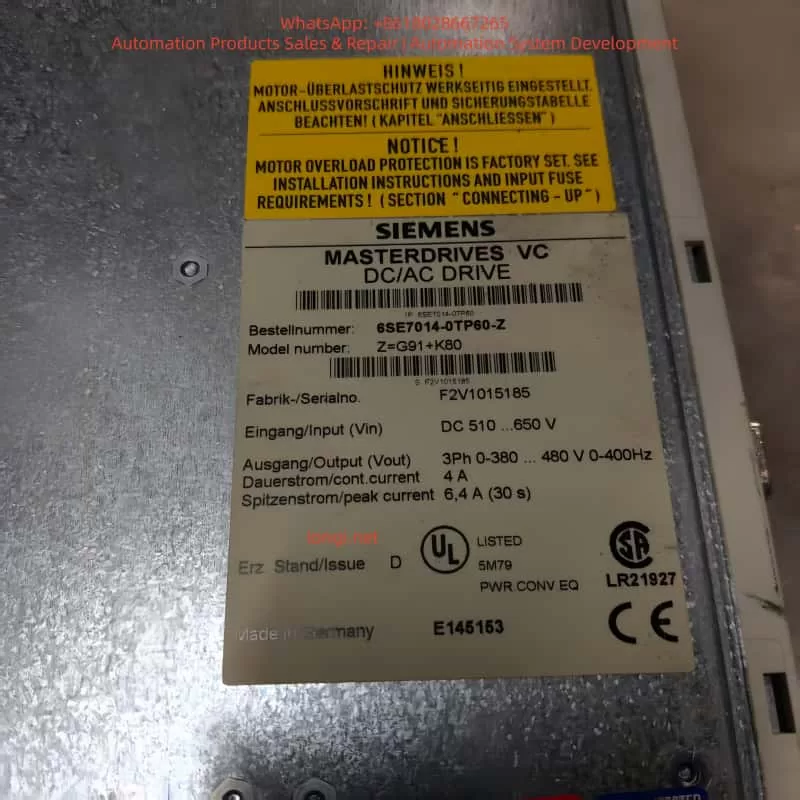
Siemens Masterdrives VC DC/AC drive nameplate, model 6SE7014-0TP60-Z, technical specifications and serial number label

4. Parameterization and Startup Process

Commissioning is typically performed using the PMU panel, OP1S, or DriveMonitor software.

Important configuration steps include:

  • Factory reset: P052 = 2
  • Enter MLFB number: P070
  • Motor data: P100 – P109
  • Automatic motor identification: P052 = 7 or 8
  • Control tuning: P225 – P229, P253 – P254
  • Feedback configuration: P208, P209
  • Setpoint source: P443
  • Contactor control:
    • Output: P612
    • Feedback: P591
  • Auto restart: P366, P367

During precharge, parameter P071 (supply voltage) determines the DC voltage reference. Parameter r006 displays actual DC link voltage.


5. Fault Code System

Masterdrives VC uses three-digit fault codes.

  • Fxxx: Trip faults (pulse inhibited)
  • Axxx: Alarms (drive still running)

Fault memory registers:

  • r947 – fault code
  • r949 – fault value
  • r951 – timestamp

F002 belongs to the precharging fault group and is directly linked to the startup state machine.


6. Detailed Explanation of F002 Precharging Fault

Fault definition:
The DC link voltage fails to reach the defined threshold within the monitoring time.

Threshold:
Approximately 80% of (P071 × 1.34)

Typical example:
P071 = 400 V → DC nominal ≈ 536 V → Threshold ≈ 430 V

Fault condition:
If r006 < threshold after approximately 3 seconds during the precharge phase, F002 is triggered.

Typical root causes:

  • Incorrect or unstable incoming power
  • Main contactor not closing
  • Missing contactor feedback
  • Failed precharge resistor or board
  • DC capacitors degraded
  • Wrong hardware configuration
  • Long-term storage without capacitor reforming

7. Diagnostic Procedure

A structured approach is recommended:

  1. Check incoming power
    • Measure 3-phase voltage
    • Verify P071 matches actual supply
  2. Monitor DC link voltage
    • Observe r006 during startup
  3. Verify contactor operation
    • Check P612 output
    • Check P591 feedback signal
    • Measure coil voltage
  4. Observe drive states
    • r001 = 010 indicates precharging
  5. Inspect hardware
    • Precharge resistors
    • DC bus capacitors
    • Wiring and fuses
  6. Check grounding
    • Run P354 ground fault test
  7. Analyze fault memory
    • r947 – r951
  8. Perform internal test
    • P052 = 11

8. Corrective Actions

Depending on findings:

  • Adjust P071 or correct power supply
  • Repair or replace contactor and feedback wiring
  • Replace precharge board or resistors
  • Reform or replace DC capacitors
  • Reinitialize parameters
  • Replace defective control or power modules

After repair, clear fault and restart. Monitor DC voltage rise and confirm the drive transitions to “Ready” state.


9. Case Studies

Case 1 – Traction drive in steel plant

F002 occurred intermittently. DC voltage only reached 520 V. Precharge resistor found open-circuit. Replaced precharge board and stabilized power supply. System restored.

Case 2 – Crane slewing system

Main fuse failure damaged precharge resistor. F002 occurred every startup. Replaced resistor and fuse. Verified contactor feedback.

Case 3 – Long-term stored drive

DC capacitors lost forming. Reformed capacitors slowly using external DC supply. Fault cleared.


10. Preventive Maintenance and Best Practices

  • Annual inspection of DC link voltage and contactors
  • Capacitor reforming after long storage
  • Regular parameter backup
  • Maintain proper cabinet temperature and humidity
  • Use shielded motor cables
  • Update firmware where applicable
  • Operator training on startup diagnostics

11. Advanced Configuration Considerations

Key parameters related to F002:

ParameterDescriptionTypical ValueRelevance
P071Line voltage380–480 VDefines DC threshold
P366Auto restart0–3Monitoring behavior
P367Restart delay0–650 sPrecharge timing
P612Contactor output1001Enables precharge
P591Contactor feedback1003Confirms closure
r006DC voltage> thresholdReal-time check
r001Drive state010 = prechargeFault location

DriveMonitor software is strongly recommended for trend analysis and documentation.


12. Conclusion

The Siemens Masterdrives VC F002 precharging fault is a critical startup protection mechanism. Although common, it can be resolved efficiently through systematic diagnosis focusing on supply voltage, precharge circuitry, and contactor control.

With proper maintenance and configuration, Masterdrives VC systems remain highly reliable. Applying the methods described in this guide can significantly reduce downtime and extend equipment service life.

Posted on

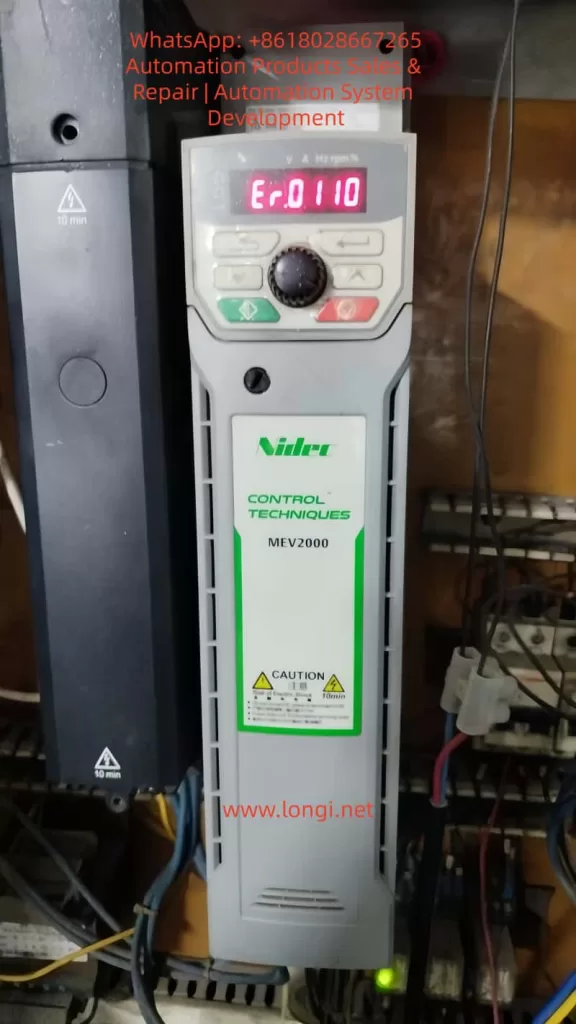
MEV2000 Inverter Hardware Fault Diagnosis and Repair Strategy: A Case Study of Er.0110

Introduction

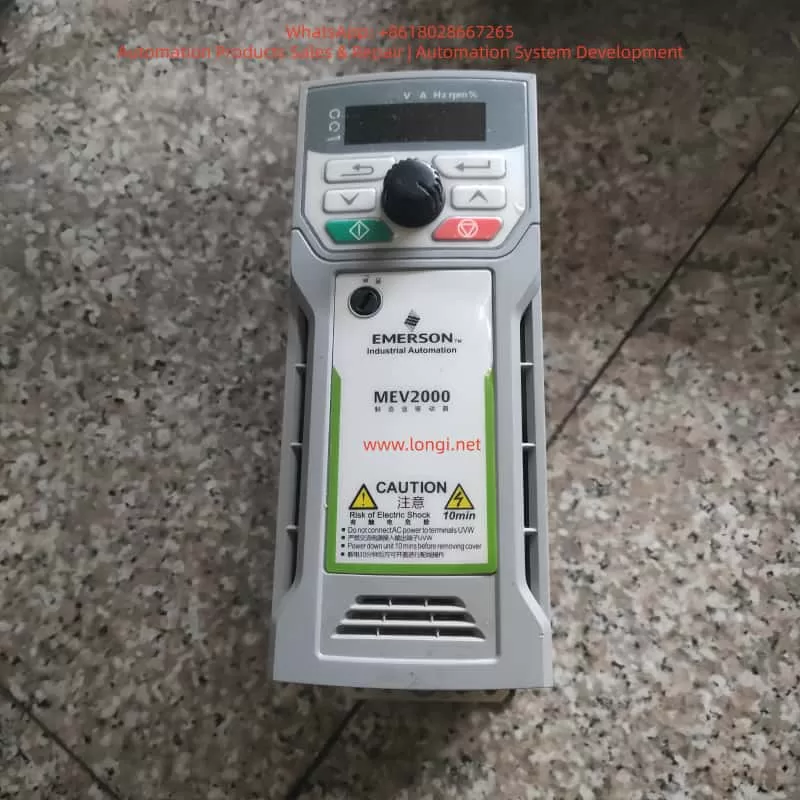
The MEV2000 series inverter is a high-performance industrial drive developed by Nidec Control Techniques (formerly Emerson). It is widely applied in fan, pump, conveyor, and textile machinery systems. While the MEV2000 series is known for its robust design and advanced vector control capability, hardware-level faults can still occur under harsh operating conditions. Among these, fault code Er.0110 is a critical alarm typically associated with large-frame models and indicates internal hardware abnormalities.

This article provides a systematic technical analysis of the MEV2000 inverter, its working principles, installation standards, parameter configuration, common fault types, and focuses in depth on the diagnosis and maintenance strategy for Er.0110 hardware faults.


1. Overview of the MEV2000 Series Inverter

The MEV2000 series inverter is designed for industrial motor control applications, supporting both induction motors and permanent magnet synchronous motors. It integrates vector control and V/F control technologies to meet various load requirements.

Key specifications include:

  • Power range: 0.37 kW to 250 kW
  • Voltage classes: 200 V, 400 V, 575 V
  • Control modes: V/F, open-loop vector, closed-loop vector
  • Built-in EMC filter, RS485 communication interface, and PID controller
  • Modular architecture supporting remote keypad, SD card adapter, and Ethernet options

For example, the MEV2000-400-0011 model delivers a continuous output current of 1.1 A and up to 1.65 A in heavy-duty mode. The product complies with IEC 61800-3 EMC standards and has an IP20 protection rating, upgradeable to IP66 using enclosure options.

The drive integrates overload protection, short-circuit monitoring, and thermal modeling, making it suitable for pumps, fans, conveyors, and textile machinery.


2. Operating Principle and Control Technology

The inverter converts fixed-frequency AC power into variable-frequency, variable-voltage output using PWM (Pulse Width Modulation) technology. Internally, the MEV2000 consists of a rectifier, DC bus, capacitor bank, inverter bridge, and control board.

  • AC input is rectified to DC.
  • DC bus capacitors stabilize the voltage (typically ~565 V for 400 V models).
  • IGBT inverter modules generate three-phase PWM waveforms.

The inverter uses Space Vector Modulation (SVM) to improve harmonic performance and energy efficiency. Under vector control, torque and flux are independently regulated using Park transformation algorithms. Rotor position is obtained via encoder feedback or sensorless estimation.

In V/F mode, voltage-frequency ratio is maintained constant, with low-frequency voltage compensation to prevent torque loss. Built-in PID functions allow closed-loop control for pressure, flow, and tension systems. Communication is based on Modbus RTU, supporting baud rates up to 38.4 kbps for PLC and SCADA integration.


3. Installation and Wiring Standards

Recommended installation environment:

  • Temperature: –10 °C to 50 °C
  • Humidity: <95% RH, non-condensing
  • Free from corrosive gas, oil mist, and vibration

Wall-mounted installation requires at least 100 mm top clearance and 150 mm bottom clearance. For panel installation, forced ventilation is recommended.

Main circuit wiring guidelines:

  • L1/L2/L3: AC input
  • U/V/W: Motor output
  • PE: Protective earth (cross-section ≥ input cable)

Shielded motor cables shorter than 50 m are recommended. Control terminals include digital inputs (DI1–DI5), analog inputs (AI1/AI2), and relay outputs (RO1/RO2). RS485 uses differential A/B terminals with 120 Ω termination.

Before first power-on, verify insulation resistance >5 MΩ. Factory reset can be performed using parameter F0.00 = 1.


4. Parameter Configuration and Optimization

Key parameter groups:

  • F0 group: Control mode (F0.02 = 0 for V/F)
  • FH group: Motor nameplate data
  • F4 group: Auto-tuning (static or rotating)
  • F2 group: Acceleration and braking control
  • F5 group: PID configuration
  • F7 group: Digital input assignment
  • FF group: Communication parameters

Auto-tuning calculates stator resistance, leakage inductance, and magnetizing inductance to optimize torque response. Proper configuration significantly improves stability and fault immunity.


5. Common Fault Types and Diagnostic Approach

MEV2000 fault codes begin with “Er.” and are classified into overload, overvoltage, undervoltage, communication faults, and hardware faults.

Examples:

  • Er.0010: Overcurrent
  • Er.0020: DC bus overvoltage
  • Er.0030: Undervoltage
  • Er.0180: Communication fault
  • Er.0110: Hardware fault (large-frame models)

Fault history can be accessed via Fn.00. Diagnosis should combine fault code review,现场 measurement, waveform observation, and power quality evaluation.


6. Detailed Analysis of Er.0110 Fault

Er.0110 (sub-code 1) indicates that internal operating parameters have exceeded safe limits and is limited to high-power MEV2000 models (typically above 75 kW). It is categorized as a hardware-related alarm.

Typical causes include:

  1. IGBT module failure or gate driver abnormality
  2. DC bus capacitor aging or imbalance
  3. EEPROM or control board malfunction
  4. Unstable or unbalanced input power supply
  5. Grounding defects and EMI interference

Diagnostic steps:

  • Record operating conditions before trip
  • Power off and discharge for 10 minutes
  • Check DC bus connections and insulation resistance
  • Reset and observe recurrence
  • Measure DC bus ripple (<50 V p-p recommended)
  • Inspect power modules and capacitor bank

Corrective measures:

  • Replace faulty IGBT modules
  • Renew aging electrolytic capacitors
  • Upgrade firmware
  • Install input reactors or harmonic filters
  • Improve grounding and cabinet ventilation

Field experience shows that more than 70% of Er.0110 events are linked to external power quality problems rather than internal device defects.


7. Maintenance Strategy and Case Studies

Maintenance includes both preventive and corrective actions.

Preventive measures:

  • Monthly cleaning of cooling fans and heat sinks
  • Quarterly insulation and grounding inspection
  • Annual auto-tuning and firmware updates

Corrective maintenance tools include multimeters, oscilloscopes, thermal cameras, and insulation testers.

Typical cases:

  • Textile plant: Er.0110 caused by phase imbalance
  • Pump station: capacitor degradation
  • Conveyor system: moisture ingress on control board

Establishing spare part inventory and predictive monitoring through Modbus data collection significantly reduces downtime.


8. Maintenance and Upgrade Recommendations

  • Replace cooling fans periodically
  • Back up parameters using SD card modules
  • Maintain cabinet temperature below 40 °C
  • Implement LOTO safety procedures
  • Consider upgrading to newer Unidrive M200 series platforms for Ethernet and advanced diagnostics

Regular maintenance can extend service life beyond ten years and reduce unexpected shutdowns.


9. Conclusion

The MEV2000 inverter remains a reliable industrial platform, but hardware faults such as Er.0110 require systematic diagnosis and professional maintenance. By understanding internal principles, ensuring proper installation, and implementing preventive maintenance, users can significantly improve system stability and service continuity.

Posted on

HACH SC1000 Water Quality Analyzer Controller User Guide

Introduction

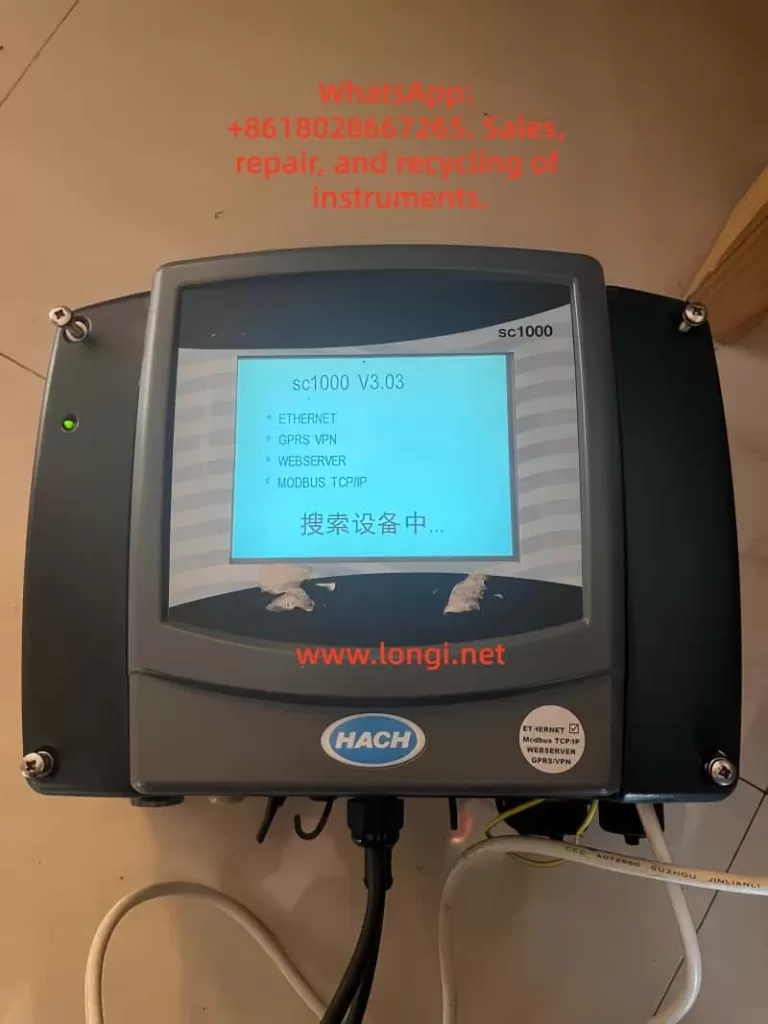
The HACH SC1000 Water Quality Analyzer Controller is a high-precision, multi-parameter monitoring platform widely used in drinking water treatment, industrial wastewater treatment, and environmental monitoring applications. Designed as a modular and scalable controller, the SC1000 supports multiple digital sensors and communication options, enabling centralized monitoring and control of complex water quality systems.

This user guide provides a comprehensive overview of the SC1000 controller, including product features, installation procedures, operating instructions, and maintenance guidelines, to help users deploy and operate the system efficiently and reliably.


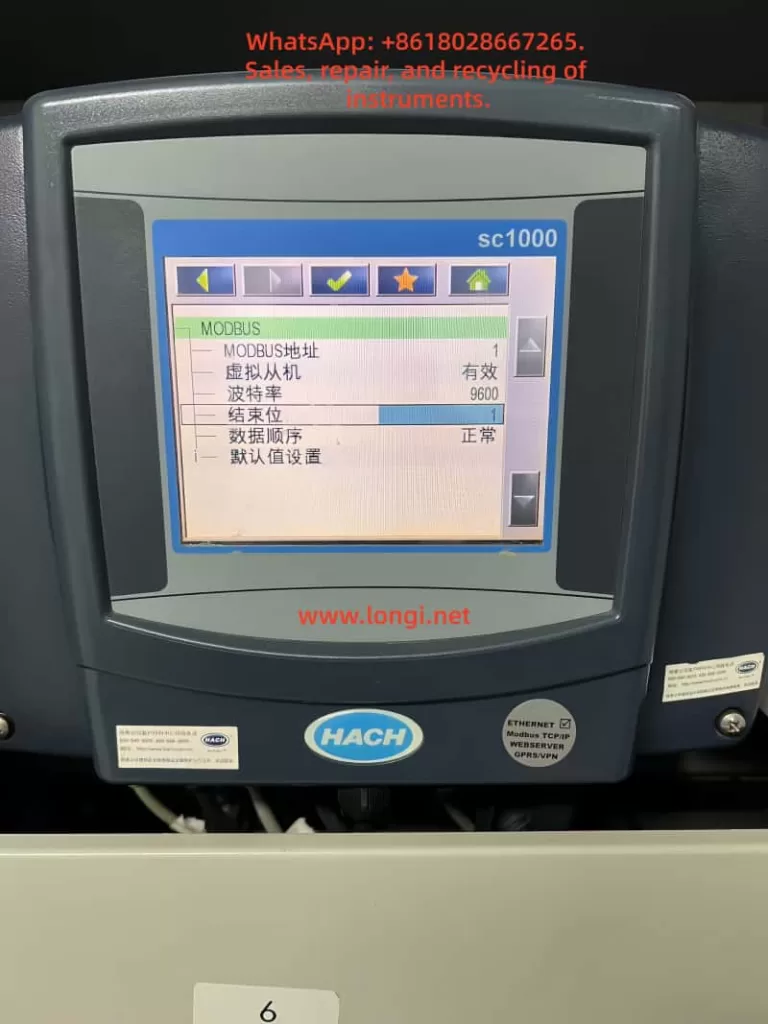
SC1000 controller MODBUS settings screen on HACH water analyzer

1. Product Overview

1.1 Key Features

The SC1000 is a menu-driven, modular multi-parameter controller with the following core advantages:

  • Multi-parameter monitoring: Supports simultaneous connection of multiple digital sensors such as pH, dissolved oxygen, conductivity, turbidity, chlorine, and more.
  • High-accuracy measurement: Advanced digital signal processing ensures stable, precise, and repeatable measurements.
  • Modular expansion: Supports plug-in communication cards, analog/digital I/O cards, and relay modules.
  • User-friendly interface: Color display with intuitive menu navigation and on-screen configuration.
  • Remote monitoring capability: Supports Ethernet and fieldbus modules for remote data access and system integration.

1.2 System Components

A standard SC1000 system typically consists of:

  • Display module: Color display unit for real-time values, alarm status, and system configuration.
  • Probe (controller) module: Core processing unit for sensor communication, data acquisition, and output control.
  • Expansion cards: Including relay cards, analog input/output cards, and digital or fieldbus communication modules.
  • Power and accessories: Power cables, fuses, mounting brackets, terminal blocks, and communication cables.

2. Installation Guide

2.1 Pre-installation Checklist

Before installation, verify the following:

  • All components are complete and undamaged.
  • The installation environment is dry, well ventilated, and free of strong electromagnetic interference.
  • Adequate space is reserved for cable routing, ventilation, and maintenance access.
  • Required tools are prepared (screwdrivers, drill, mounting hardware, cable glands, etc.).

2.2 Mechanical Installation

2.2.1 Dimensions and Space Requirements

  • Display unit: approximately 200 × 230 × 50 mm
  • Probe module: approximately 315 × 255 × 120 mm (excluding display)
  • Clearance requirements:
    • At least 5 cm clearance on sides and top for heat dissipation
    • At least 15 cm clearance at the bottom for wiring

2.2.2 Wall-mount Installation

  1. Mark mounting hole positions on the wall according to the backplate.
  2. Drill holes and insert expansion anchors.
  3. Hang the controller on the mounting screws.
  4. Secure the bottom screws and verify the unit is firmly fixed.

2.2.3 Pipe or Panel Mounting

  • Use the official HACH mounting kit.
  • Install the brackets securely on horizontal or vertical pipes.
  • Ensure vibration is minimized and cables are properly strain-relieved.

2.3 Electrical Installation

2.3.1 Power Supply Connection

The SC1000 supports both AC and DC power input:

  • AC power: 100–240 VAC, 50/60 Hz
  • DC power: 24 VDC (18–30 VDC range)

Installation procedure:

  1. Disconnect all power sources before wiring.
  2. Remove the probe module cover and safety barrier.
  3. Route the power cable through the sealed cable gland.
  4. Connect the power wires to the designated terminals.
  5. Reinstall the safety barrier and enclosure cover.

2.3.2 Expansion Card Wiring

Relay modules

  • Disconnect power before installation.
  • Remove the relay cover.
  • Wire alarm or control loads according to the terminal diagram.
  • Verify correct NO/NC selection and tighten all screws.

Analog / digital I/O cards

  • Connect signal cables according to the card type (4–20 mA, digital input, digital output).
  • Use shielded cables where possible.
  • Ground shields at one end only to avoid ground loops.

2.4 Network and Sensor Connection

The SC1000 uses a digital network bus to connect probe modules and sensors.

Installation steps:

  1. Strip and prepare the network cable.
  2. Connect the wires to the communication terminal block.
  3. Secure the connector and install termination resistors if required.
  4. Insert the connector into the probe module network port.
  5. Power on the system and verify sensor recognition.

HACH SC1000 controller front panel and touchscreen interface

3. Operating Instructions

3.1 Display and Interface Operation

3.1.1 Touchscreen Calibration

Touchscreen calibration is recommended during initial commissioning or after display replacement.

Procedure:

  • Enter System Settings → Display Settings → Touchscreen Calibration
  • Follow on-screen instructions and confirm calibration points.

3.1.2 Menu Navigation

The main menu provides access to:

  • Sensor status
  • Measurement values
  • Configuration and calibration
  • Outputs and alarms
  • System diagnostics

Navigation is performed using on-screen icons and soft keys.


3.2 Sensor Management

3.2.1 Sensor Status Monitoring

  • View real-time measurements for each connected sensor.
  • Check diagnostic messages, warnings, and error codes.
  • Confirm communication and sensor health status.

3.2.2 Sensor Configuration

Within the sensor menu, users can configure:

  • Measurement units
  • Calibration parameters
  • Alarm thresholds
  • Output assignments
  • Temperature compensation and filtering

Always follow sensor-specific manuals when performing calibration.


3.3 System Configuration

3.3.1 Output Settings

  • Configure analog outputs (for example, 4–20 mA)
  • Assign outputs to specific parameters
  • Define scaling ranges, damping time, and failure behavior

3.3.2 Relay Settings

  • Assign relays to alarms, setpoints, or system events
  • Configure activation logic, delays, and hysteresis
  • Test relay actions before commissioning

3.3.3 Communication and Network Settings

  • Set Modbus address and baud rate
  • Configure Ethernet or fieldbus parameters
  • Verify data format consistency with PLC or SCADA systems

4. Maintenance and Troubleshooting

4.1 Routine Maintenance

  • Inspect enclosures for dust, corrosion, or moisture ingress.
  • Verify all terminals and connectors are secure.
  • Clean the display and housing with a soft, damp cloth.
  • Perform periodic sensor calibration according to application requirements.

4.2 Fuse Replacement

Before replacing fuses, disconnect all power sources.

Typical fuse types include slow-blow fuses such as M3.5A or T8A (refer to the nameplate).

Procedure:

  1. Remove the probe module cover.
  2. Take out the damaged fuse.
  3. Insert a fuse with identical rating.
  4. Reinstall covers and restore power.

4.3 Common Faults and Solutions

No display or no power

  • Check power supply voltage.
  • Inspect fuses and terminal connections.

Unstable or abnormal readings

  • Check sensor wiring and connectors.
  • Perform recalibration.
  • Inspect sensors for fouling or damage.

Communication errors

  • Verify address, baud rate, and protocol settings.
  • Inspect network cables and termination.
  • Check expansion cards and power stability.

5. Conclusion

The HACH SC1000 controller is a powerful and flexible water quality monitoring platform suitable for both industrial and municipal applications. With proper installation, configuration, and maintenance, the SC1000 provides reliable long-term performance and accurate multi-parameter measurement.

By following the procedures and best practices described in this guide, users can ensure stable system operation, accurate data acquisition, and efficient troubleshooting.

Posted on

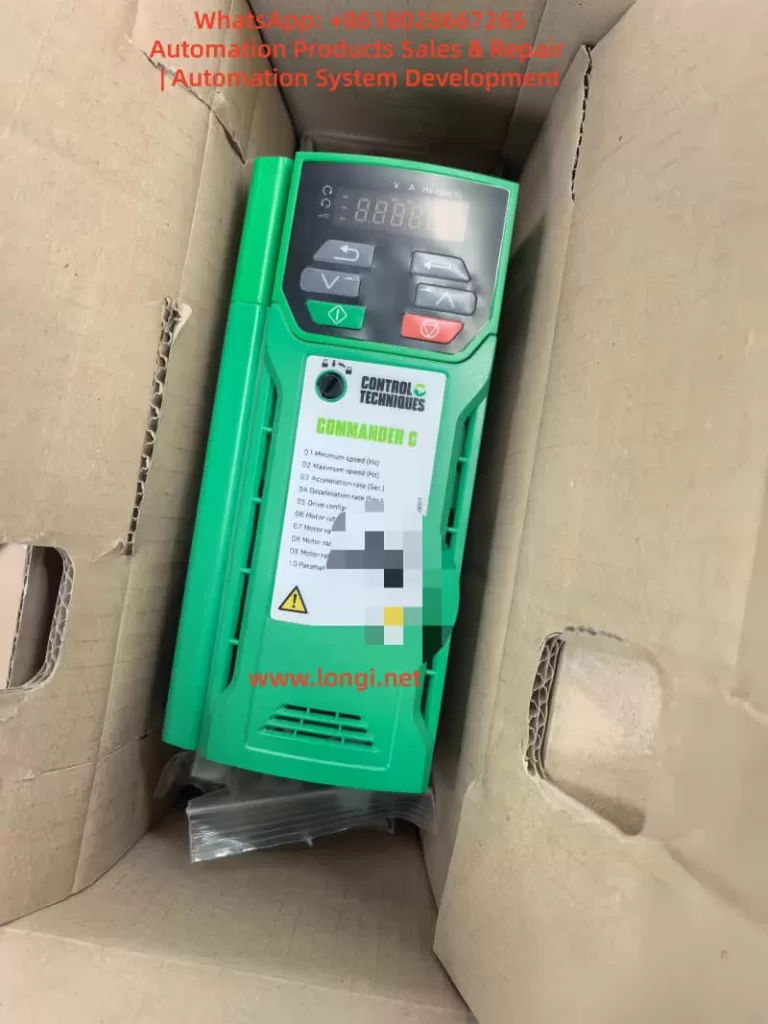
📘 Nidec Commander C200 C300 Manual – Drive User Guide

Keypad Operation · Factory Reset · Pulse Position Control · Fault Codes & Troubleshooting

The Nidec Commander C200 C300 manual is an essential technical reference for engineers and maintenance professionals working with Commander C200 and C300 AC drives in industrial automation systems.

The Nidec Control Techniques Commander C200 and C300 series AC drives are high-performance general-purpose variable frequency drives widely used in industrial automation, machine tools, conveyors, pumps, fans, packaging machines, and light positioning applications.

The Commander series is known for its flexible I/O configuration, reliable open-loop vector control, advanced diagnostics, and (on C300 models) integrated Safe Torque Off (STO) safety functionality. When correctly configured, these drives can not only perform traditional speed control, but also support pulse-based motion and positioning applications.

This technical guide is written for engineers, technicians, and maintenance professionals. It focuses on the most important practical topics:

  • Commander C200/C300 keypad and operating panel functions
  • How to restore factory default parameters
  • How to set and remove passwords and access levels
  • How to implement pulse-based forward/reverse position control
  • Control terminal wiring logic
  • Core parameter configuration concepts
  • Common fault codes and professional troubleshooting methods

This is not a simple manual translation, but a structured engineering guide based on real-world field application and maintenance practice.


Nidec Commander C200 C300 manual drive keypad

1. Overview of Nidec Commander C200 / C300 Drives

This Nidec Commander C200 C300 manual is designed to help users understand configuration, diagnostics, and real industrial applications.

The Commander C200 and C300 are part of the Nidec Control Techniques Commander platform, positioned between compact micro-drives and high-end servo or regenerative drives.

Key technical highlights include:

  • Open-loop vector control, V/F control, and RFC-A mode
  • Wide motor compatibility for standard induction motors
  • Flexible digital and analog I/O configuration
  • High-speed frequency and pulse input capability
  • Built-in relay outputs and analog monitoring outputs
  • Support for Modbus RTU and optional fieldbus modules
  • NV Media Card support for parameter cloning
  • Integrated STO safety inputs on C300 models
  • Powerful diagnostics and internal status monitoring

From an engineering perspective, Commander C200 is mainly aimed at standard industrial applications, while Commander C300 is designed for more demanding systems requiring functional safety, system integration, or advanced logic.


2. Commander C200 / C300 Keypad and Operating Panel Guide

The local keypad is the main human-machine interface for the Commander drive. It allows technicians to monitor operating states, modify parameters, start and stop the drive, and reset faults.

2.1 Keypad Button Functions

The standard Commander keypad includes:

  • ESC – Exit, cancel, or return
  • UP / DOWN arrows – Navigate menus and adjust values
  • ENTER – Confirm or access a parameter
  • RUN (green) – Local run command
  • STOP / RESET (red) – Stop motor and reset trips
  • Forward indicator LED
  • Reverse indicator LED
  • Local reference indicator

The display shows:

  • Output frequency
  • Motor current
  • DC bus voltage
  • Drive status
  • Active fault or alarm codes
  • Parameter numbers and values

In maintenance work, the keypad is also the most important diagnostic tool, allowing access to fault history, I/O monitoring, and internal operating data.


2.2 Parameter Menu Structure

Commander drives use a structured menu system:

  • Menu 0 – Quick start and essential parameters
  • Menu 1–6 – References, ramps, control, torque, and logic
  • Menu 7 – Analog inputs and outputs
  • Menu 8 – Digital inputs and outputs
  • Menu 9 – Logic functions, timers, and internal blocks
  • Menu 10 – Status, monitoring, and fault diagnostics
  • Menu 11 – General system configuration
  • Menu 18 / 20 – Application menus

In real-world commissioning and repair, most work is done in:

  • Menu 0 (motor and control basics)
  • Menu 7 (analog signal configuration)
  • Menu 8 (digital terminal mapping)
  • Menu 10 (faults and internal status)

Understanding this menu structure significantly improves troubleshooting efficiency.


Nidec Commander C200 C300 manual industrial AC drive

3. Restoring Factory Defaults and Parameter Initialization

3.1 Why Factory Reset Is Important

Restoring factory parameters is essential in situations such as:

  • Second-hand drives with unknown configuration
  • After major faults or memory errors
  • Before converting the drive to a new application
  • When troubleshooting unpredictable behavior

Factory reset clears:

  • Motor data
  • Terminal assignments
  • Control sources
  • Application logic
  • Safety or password settings

After reset, the drive returns to its original state and must be recommissioned.


3.2 Factory Reset Procedure

Typical procedure:

  1. Ensure the drive is stopped and safe.
  2. Enter the parameter menu.
  3. Locate the “Restore Defaults” or “Factory Reset” function.
  4. Execute the reset.
  5. Power the drive off and on.

After reset, always re-enter the essential motor parameters:

  • Motor rated voltage
  • Motor rated current
  • Motor rated frequency
  • Motor speed (RPM)
  • Control mode

Failure to do this often causes overcurrent trips, unstable operation, or torque loss.


3.3 Password and Access Level System

Commander drives support multi-level parameter access:

  • Operator level
  • Engineer level
  • Advanced or protected level

Passwords can be configured to:

  • Lock critical parameters
  • Prevent unauthorized changes
  • Protect machine tuning
  • Control service access

Once activated, only users with the correct password can modify restricted parameters.


3.4 Removing or Recovering a Forgotten Password

This is a very common maintenance problem.

Professional recovery methods include:

  • Factory parameter restoration
  • Parameter overwrite via NV Media Card
  • Manufacturer service reset procedures

In most industrial service scenarios, the most reliable solution is:

Factory reset + full recommissioning

This guarantees stable operation and removes hidden logic or unsafe settings.


4. Pulse-Based Forward/Reverse Position Control with Commander Drives

Although the Commander C200 and C300 are not servo drives, they support high-speed frequency and pulse input functions. This makes them suitable for:

  • Simple positioning systems
  • Length control
  • Pulse speed reference systems
  • PLC-controlled motion
  • Stepper motor replacement projects

4.1 Control Principle

A typical pulse control structure is:

  • PLC or controller outputs pulse train
  • Commander drive reads pulses as frequency or position reference
  • Direction signal defines forward or reverse rotation
  • Run/Enable signals start or stop the drive
  • Internal ramp and scaling parameters define motor behavior

In this structure:

  • Pulse frequency = speed or movement rate
  • Pulse count = displacement
  • Direction input = forward / reverse
  • Enable input = safety or start control

4.2 Terminal Wiring Concept

Although terminal numbers differ by frame size, the typical wiring logic is:

  • 0V common
  • +24V user supply
  • High-speed input terminal → Pulse signal
  • Digital input → Direction
  • Digital input → Run/Stop
  • Enable or STO → Drive enable

Common engineering practices:

  • Use shielded twisted pair cable for pulses
  • Keep signal wiring away from motor cables
  • Ensure proper grounding
  • Verify signal voltage compatibility

Pulse input types typically supported:

  • Open collector
  • Push-pull
  • Frequency signal

4.3 Core Parameter Configuration Logic

Successful pulse control depends on four parameter groups:

4.3.1 Operating Mode

Select a suitable mode such as:

  • Open-loop vector
  • RFC-A

Then assign the speed reference source to an external or pulse input.


4.3.2 Reference Source Assignment

Configure:

  • Pulse or frequency input as main reference
  • Scaling parameters
  • Filtering time constants

This tells the drive to treat pulses as the main speed or position signal.


4.3.3 Pulse Scaling

Critical settings include:

  • Pulses per revolution
  • Pulses per Hz
  • Maximum input frequency
  • Speed conversion ratio

Example:

If 1000 pulses = 50 Hz
Then 1 Hz = 20 pulses

Correct scaling ensures predictable motion.


4.3.4 Direction and Run Control

Digital inputs are assigned to:

  • Run forward
  • Run reverse
  • Direction control
  • Drive enable

This configuration allows the PLC or controller to command motion precisely.


4.4 Typical Applications

Commander pulse control is commonly used for:

  • Conveyor length control
  • Packaging feed systems
  • Simple screw drives
  • Coil winding machines
  • Small lifting or indexing systems

It is ideal for applications that do not require high-precision servo loops but demand reliable synchronized motion.


5. Commander C200 / C300 Fault Codes and Troubleshooting Guide

Commander drives include a comprehensive diagnostic system. Faults are generally grouped into:

  • Power supply faults
  • Motor and load faults
  • Control faults
  • Safety or enable faults
  • Hardware faults

5.1 Overcurrent Trips

Typical messages:

  • Overcurrent
  • Instantaneous overcurrent

Common causes:

  • Motor phase short circuit
  • Output cable damage
  • IGBT module failure
  • Incorrect motor parameters
  • Mechanical overload

Professional checks:

  • Measure U/V/W to ground
  • Insulation test motor
  • Check power module
  • Increase acceleration time
  • Verify motor nameplate data

5.2 Overvoltage Trips

Typical messages:

  • DC bus overvoltage

Causes:

  • Rapid deceleration
  • Regenerative energy
  • Faulty braking resistor
  • High supply voltage

Solutions:

  • Install braking resistor
  • Increase deceleration time
  • Check braking circuit
  • Test DC bus capacitors

5.3 Undervoltage Trips

Causes:

  • Input phase loss
  • Rectifier failure
  • Weak power supply
  • Aging capacitors

Troubleshooting:

  • Measure three-phase input
  • Check rectifier bridge
  • Inspect charging resistors
  • Measure DC bus ripple

5.4 Overtemperature Trips

Triggers include:

  • Drive overheating
  • IGBT thermal alarms
  • Motor thermal input

Checkpoints:

  • Cooling fans
  • Heatsink contamination
  • Load conditions
  • Ambient temperature
  • Thermal sensor wiring

5.5 Speed or Control Model Faults

Often related to:

  • Incorrect motor parameters
  • Unstable loads
  • Signal noise
  • Control mode mismatch

Actions:

  • Re-enter motor data
  • Check grounding and shielding
  • Verify feedback or RFC settings
  • Reduce electrical noise

5.6 STO and Enable Faults (C300)

Typical symptoms:

  • Drive cannot start
  • STO active
  • Drive inhibited

Inspection:

  • 24 V supply on STO channels
  • Dual-channel consistency
  • Safety relay logic
  • Wiring integrity

Many “no run” service calls are caused by STO miswiring rather than drive failure.


5.7 Hardware and Internal Faults

Such faults often indicate:

  • Power board damage
  • Control board faults
  • EEPROM corruption
  • Gate driver failure

These typically require:

  • Professional board-level repair
  • Replacement modules
  • Factory service intervention

6. Engineering Recommendations

  • Always back up parameters before modification
  • After repairs, perform a full factory reset
  • Verify pulse signals with an oscilloscope
  • Enter real motor nameplate data
  • Ensure high-quality grounding
  • Keep signal and power wiring separated
  • Investigate power quality issues early

7. Conclusion

The Nidec Commander C200 and C300 series drives provide a powerful, flexible, and reliable solution for a wide range of industrial automation tasks. With correct configuration, they can perform not only standard variable speed control, but also pulse-based motion control, logic integration, and safety-critical operation.

With this Nidec Commander C200 C300 manual, engineers can significantly reduce downtime and improve commissioning efficiency.

Understanding keypad operation, parameter logic, terminal mapping, and fault diagnostics is essential for successful commissioning and long-term system reliability.

Frequently Asked Questions about Nidec Commander C200 C300 Manual

Q1. What is the Nidec Commander C200 C300 manual used for?
Q2. Does the Commander C300 support pulse position control?
Q3. How can I reset a Commander C200 drive to factory settings?

Posted on

ABB ACH580 Inverter Motor Identification Run Fault Diagnosis and Optimization Guide

Introduction

The ABB ACH580 series of inverters are low-voltage AC drive devices specifically designed for heating, ventilation, and air conditioning (HVAC) applications. They are renowned for their high efficiency, reliability, and user-friendly interfaces. This series is suitable for controlling asynchronous induction motors, permanent magnet motors, and synchronous reluctance motors, supporting a power range from 0.75 kW to 250 kW and voltage levels covering 208-480 V.

One of the core functions of the ACH580 is the motor identification run (ID Run), an automatic tuning process that precisely measures motor parameters to ensure a perfect match between the inverter and the motor, thereby achieving optimal performance, energy efficiency, and protection.

However, in practical applications, motor ID run faults are one of the common issues. Typical faults include FF86 (ID Run Failed) and AFF6 (Identification Run Warning). These faults can result in the motor failing to start, operating inefficiently, or causing equipment damage. According to ABB’s official manuals and technical notes, these problems often stem from improper parameter settings, mechanical constraints, or external interference. The FF86 fault is usually accompanied by auxiliary codes, such as 0000 0003, indicating that the maximum torque limit is too low.

This article will comprehensively elaborate on the ID run principles, fault analysis, diagnosis, and repair methods of the ACH580 inverter, drawing on ABB’s official documents, fault diagnosis guides, and best practices. It will also provide installation and maintenance recommendations to help engineers and maintenance personnel efficiently resolve issues.

By reading this article, you will learn how to avoid these faults and ensure stable system operation. The content is based on ABB’s firmware manuals (version 2.15 and above) and real-world cases, ensuring originality and practicality.

FF86 fault

ACH580 Inverter Overview

The ACH580 series is a dedicated HVAC model within ABB’s low-voltage general-purpose drive product line, emphasizing energy efficiency, ease of use, and compatibility. Its main features include:

  • Harmonic Suppression: Built-in active filters reduce harmonic distortion, with a total harmonic distortion (THDi) of less than 5%, complying with IEEE 519 standards and improving grid quality.
  • Control Modes: Supports scalar control and vector control, suitable for constant torque and fan/pump loads. Vector mode requires an ID run to optimize torque control.
  • Communication Interfaces: Integrated Modbus RTU, supporting BACnet MS/TP, LonWorks, and other HVAC protocols for easy building automation integration.
  • Safety Features: Built-in Safe Torque Off (STO), complying with SIL 3/PL e standards; supports emergency stops and external event inputs.
  • Technical Specifications: Input voltage of 208-240 V or 380-480 V; output frequency of 0-500 Hz; protection class IP21/IP55; ambient temperature range of -15°C to 50°C (no derating). The power module uses IGBT technology, achieving an efficiency of up to 98%.

The ACH580 is suitable for HVAC equipment such as fans, pumps, and compressors, significantly reducing energy consumption (saving 30-50% compared to direct starting). Its control panel (ACH-AP-H) provides an intuitive menu, supporting multiple languages and an assistant mode for quick startup. However, ID run faults are prone to occur during initial configuration or after parameter changes, requiring a systematic understanding.

AFF6

Motor ID Run Principles

The motor ID run is a crucial function of the ACH580 inverter, used to automatically identify the electrical parameters of the motor, such as resistance, inductance, and magnetization current. These parameters are used to build a motor model, ensuring precise speed, torque, and flux control. The ID run is divided into two modes:

  • Normal ID Run: Rotating mode. The inverter applies a variable frequency signal to rotate the motor shaft (without load) and measures the dynamic response. Suitable for most applications, it lasts 1-2 minutes and provides the highest precision. However, it requires ensuring that the motor shaft can rotate freely; otherwise, a fault will occur.
  • Standstill ID Run: Stationary mode. Only the motor stator is magnetized, and the shaft does not rotate. Suitable for scenarios where the load cannot be removed, such as when a fan impeller is connected. The precision is slightly lower, but it is safer.

The triggering conditions for an ID run include:

  • Initial startup.
  • Changes to parameter group 99 (motor data), such as rated current (99.06), voltage (99.07), frequency (99.08), speed (99.09), power (99.10), and torque (99.12).
  • After a firmware upgrade or factory reset.

The process is as follows:

  1. Set parameter 99.13 (ID Run Requested) to the desired mode.
  2. Start the inverter in local mode (Hand).
  3. The inverter injects test signals and calculates parameters.
  4. If successful, the internal model is updated; if failed, FF86 is triggered.

The ID run improves performance by enhancing low-speed torque (up to 200% of rated torque) and reducing vibration and noise. Systems that have not undergone an ID run may experience overcurrent, stalling, or low efficiency.

Common Fault Analysis

The main ID run-related faults in the ACH580 are FF86 and AFF6.

  • FF86 (ID Run Failed): Indicates that the ID run was not successfully completed. The auxiliary code provides details:
    • 0000 0001: The maximum current limit is too low (parameter 30.17 < 99.06).
    • 0000 0002: The maximum speed or field weakening point is too low (check 30.11/30.12 with 99.09).
    • 0000 0003: The maximum torque limit is too low (30.20 < 100% of rated torque).
    • 0000 0012: The motor is too large (the drive size does not match).
    • Others: Incorrect motor data or external interference.
      This fault stops the motor and requires a reset and repair.
  • AFF6 (Identification Run Warning): An informational warning indicating that an ID run will be automatically performed at the next startup. Not a serious error, but ignoring it may affect performance. Common after parameter changes.

These faults are common in HVAC systems and affect the continuous operation of fans or pumps. According to ABB Technical Note 143, the failure rate can reach 10-20%, mostly due to human configuration errors.

Detailed Fault Causes

The reasons for ID run failures are diverse and can be classified into parameter, mechanical, electrical, and external factors.

  • Improper Parameter Settings (Most Common, Accounting for Over 50%):
    • Incorrect motor nameplate data entry: Rated values do not match the actual values, leading to calculation deviations.
    • Overly conservative limit parameters: For example, a torque upper limit (30.20) lower than 100% prevents the inverter from applying sufficient excitation signals.
    • Mismatched control modes: Vector mode requires an ID run but is not enabled.
  • Mechanical Constraints:
    • The motor shaft is not free: Load connection, brake locking, or bearing seizure. In Normal mode, the shaft must be able to rotate at least a few turns.
    • Mechanical resonance: Vibration interference in high-load applications affects measurements.
  • Electrical Issues:
    • Wiring errors: Reversed phase sequence, loose connections, or insulation faults cause current imbalances.
    • Ground faults: Motor or cable grounding triggers A2B3 (ground leakage) related alarms.
    • Power supply fluctuations: Low voltage (<0.66 × rated voltage) affects magnetization.
  • External Interference:
    • PLC or fieldbus control: External signals interrupt the ID process.
    • Environmental factors: High temperatures (>50°C) or dust trigger overheating protection activation.
    • Drive hardware: IGBT failures or control board power supply issues (check 95.04).

According to search results, auxiliary code 0003 often occurs when the torque setting is too low (<150% of the recommended value), especially after replacing a new motor.

Diagnostic Steps

Diagnosis requires a systematic approach using the control panel and tools.

  1. View Fault Display: The panel displays FF86/AFF6 and auxiliary codes. Press “How to Fix” for suggestions.
  2. Check Event Log (Parameter Group 04):
    • Records the time, code, and parameter status of recent faults.
    • For example, 04.01 displays active faults, and 04.11-04.15 display historical records.
  3. Parameter Verification:
    • Group 99: Compare with the motor nameplate to ensure accuracy.
    • Group 30: Check limit values (30.11 minimum speed, 30.12 maximum speed, 30.17 maximum current, 30.20 maximum torque).
    • Group 96: System settings, such as 96.06 parameter recovery.
  4. Electrical Testing:
    • Use a multimeter to measure motor insulation resistance (>1 MΩ) and continuity.
    • Check cable phase sequence (U-V-W corresponds to T1-T2-T3).
    • Measure input voltage stability.
  5. Isolation Testing:
    • Disconnect external control (PLC) and test in local mode.
    • Remove the load and attempt an ID run.
    • If the panel is unavailable, use the Drive Composer PC tool to connect and view detailed logs.

Repair Methods

Repairs should be carried out in sequence, ensuring safety (power off, lockout/tagout).

  1. Basic Restart:
    • Power off for 5-10 minutes and restart the inverter. Clears temporary faults.
  2. Adjust Torque and Limits (for 0003 code):
    • Set 30.20 to 150-200%.
    • Ensure 30.17 > 99.06 and 30.12 > 0.55 × 99.09.
  3. Verify Motor Data:
    • Enter nameplate values: current, voltage, frequency, speed, power, and torque.
    • If changed, trigger AFF6 and manually run the ID.
  4. Ensure Shaft Freedom:
    • Disconnect the load and release the brake.
    • Check bearings and couplings.
  5. Disable External Control:
    • Disconnect DI/DO and fieldbus.
    • Set 20.12 Run Enable to local.
  6. Manual ID Run:
    • Set 99.13 to Normal or Standstill.
    • Start locally and monitor progress.
    • After success, reset the fault (96.08 or panel Reset).
  7. Restore Factory Settings:
    • Method 1: Menu > Primary Settings > Reset to Defaults > Reset All to Factory Defaults.
    • Method 2: Set parameter 96.06 to 34560.
    • After resetting, re-enter group 99 data and back up parameters (96.07).
  8. Advanced Repairs:
    • If the issue persists, check hardware: replace cables and test motor windings.
    • Contact ABB support, providing the model, serial number, and firmware version.
    • After repair, verify: Run a no-load test and monitor current and speed.

Installation Best Practices

Correct installation reduces ID run faults.

  • Location Selection:
    • Install in a well-ventilated, dry, and dust-free environment. Avoid direct sunlight and vibration sources.
    • Maintain spacing: 200 mm on the top/bottom and 100 mm on the sides to ensure airflow.
  • Electrical Installation:
    • Use shielded cables and ensure good grounding. Separate input/output cables to reduce EMI.
    • Power cables: Copper core, cross-sectional area matching power (e.g., 6 mm² for 10 kW).
    • Control cables: Shielded twisted pair, with signal lines isolated from power lines by >30 cm.
  • Grounding Requirements:
    • Dual PE conductors: One main and one auxiliary, with a cross-sectional area of ≥10 mm² Cu.
    • Avoid ground loops and ensure the motor and inverter share the same ground.
  • Initial Startup:
    • Disconnect the load before entering motor data.
    • Verify safety circuits (STO, emergency stop).
    • Follow IEC/EN 61800-5-1 standards and check insulation after installation.

Maintenance Best Practices

Regular maintenance extends lifespan and prevents faults.

  • Cleaning:
    • Vacuum the panel and fan monthly to avoid using compressed air for dust removal.
    • Clean the radiator annually to ensure it is dust-free.
  • Inspection:
    • Check connections quarterly for tightness, with a torque of 5-10 Nm.
    • Monitor temperature (<50°C), vibration, and noise.
    • Test the STO function: Disconnect during operation to confirm the motor stops.
  • Parameter Backup:
    • Regularly back up parameters using Drive Composer.
    • Check for firmware updates on the ABB website and ensure compatibility.
  • Preventive Testing:
    • Perform an ID run calibration annually, especially after motor replacement.
    • Monitor energy consumption and efficiency, and diagnose anomalies.
  • Environmental Control:
    • Maintain humidity <95% without condensation and stable temperature.
    • Install in a NEMA 12 enclosure for dust protection.
    • Keep a maintenance log for tracking.

Case Studies

  • Case 1: In an HVAC system of a commercial building, an ACH580 drove a fan. After initial installation, FF86 (0003 code) occurred. Diagnosis: The torque limit 30.20 was set to 80%. Repair: Adjusted to 150% and manually ran the ID run successfully. Result: Efficiency improved by 15%.
  • Case 2: In an industrial pump station, AFF6 recurred. Cause: PLC interference. Repair: Isolated control and reset parameters. Prevention: Added a filter.
  • Case 3: Based on search results, a paper mill using an ACH580 experienced ID failures due to an oversized motor. Solution: Upgraded the drive size.

These cases emphasize the importance of parameter accuracy and isolation.

Preventive Measures

  • Initial Configuration: Strictly enter data according to the nameplate and select the appropriate ID mode.
  • Training: Ensure operators understand the panel and fault codes.
  • Monitoring System: Integrate remote diagnostics for early warnings.
  • Spare Parts Preparation: Keep cables and modules in stock.
  • Compliance: Follow ABB guidelines and avoid non-original accessories.

Conclusion

The motor ID run of the ABB ACH580 inverter is crucial for ensuring efficient operation, but faults such as FF86 and AFF6 require prompt handling. By understanding the principles, analyzing causes, conducting systematic diagnosis and repair, system reliability can be maximized. Combining installation and maintenance best practices, the ACH580 can provide long-term stable performance, reducing energy consumption and downtime risks. It is recommended to regularly refer to ABB manuals and technical support to adapt to specific applications. Correct implementation not only resolves issues but also optimizes the overall HVAC system.