Posted on

Technical Analysis and Diagnostic Methods for ABB PSTX Soft Starter F0613 Shunt Fault

ABB PSTX series soft starters are widely used for starting three-phase asynchronous motors in applications such as pumps, fans, compressors, conveyors, crushers, mixers, cooling towers, and other industrial drive systems. Compared with direct-on-line starting by contactor, a soft starter gradually increases the motor terminal voltage through thyristor phase-angle control. This reduces starting current, limits mechanical shock, minimizes voltage dip on the supply network, and extends the service life of both the motor and the driven mechanical equipment.

The ABB PSTX series belongs to the more advanced category of soft starters. It integrates the control unit, thyristor power modules, current measurement, voltage measurement, protection logic, and an internal bypass mechanism. Because of this integrated design, the PSTX is able to monitor the main power circuit and detect abnormal operating states more precisely than a simple starter.

In practical repair work, F0613 Shunt Fault is a relatively common but often misunderstood fault on ABB PSTX soft starters. When the HMI displays “Shunt Fault,” many field technicians may misinterpret it as a problem related to multiple motors connected in parallel, communication parallel operation, or some kind of external parallel control. However, from the perspective of the soft starter main power circuit, this fault usually refers to an abnormal bypass path, an unintended short-circuit path, uncontrolled conduction, or a low-resistance path detected in the main circuit.

Therefore, F0613 should not be treated as a normal parameter alarm or a simple resettable warning. In many cases, it points to a real problem in the main power circuit, internal bypass contactor, thyristor module, external wiring, or load-side circuit. A correct diagnosis must follow the logic of power electronics and three-phase motor control rather than simply clearing the fault code.
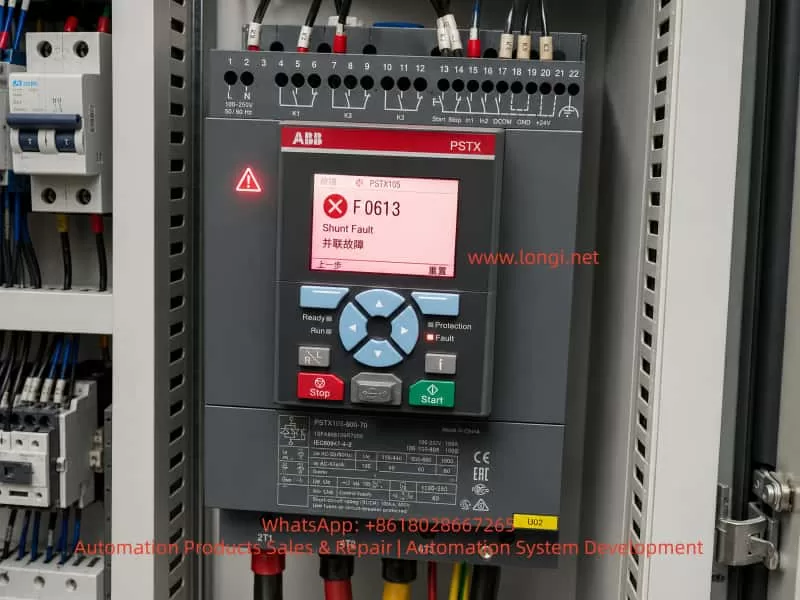
ABB PSTX105 soft starter installed in an electrical control cabinet, displaying F0613 Shunt Fault and Chinese text for parallel fault on the HMI screen.

1. Basic Working Principle of a PSTX Soft Starter

To understand the F0613 shunt fault, it is necessary to understand the basic structure of a soft starter. In a three-phase soft starter, each phase is controlled by an anti-parallel thyristor pair. During motor starting, the soft starter controls the firing angle of the thyristors and gradually increases the RMS voltage applied to the motor. At the beginning of the start ramp, the motor receives a reduced voltage. As the ramp progresses, the voltage rises until it reaches nearly full line voltage.

This controlled voltage ramp reduces inrush current and avoids the mechanical shock associated with direct-on-line starting. It is especially useful for centrifugal pumps, large fans, belt conveyors, and other loads where sudden torque can damage couplings, belts, bearings, shafts, or hydraulic systems.

However, if the motor current continues to flow through the thyristors during long-term operation, the thyristors generate heat and reduce overall efficiency. For this reason, many medium- and high-end soft starters include a bypass contactor. During the start ramp, the thyristors control the voltage. Once the motor reaches full speed, the bypass contactor closes and carries the main current. The thyristors are then largely removed from the main current path, reducing heat generation and improving efficiency.

The ABB PSTX series has an internal bypass design. This is beneficial for energy efficiency and thermal management, but it also creates an important diagnostic point. If the internal bypass contactor becomes welded, stuck, mechanically jammed, or if a thyristor becomes short-circuited, the soft starter may detect an abnormal shunt path and report a fault such as F0613.

2. Meaning of F0613 Shunt Fault

The essential meaning of F0613 can be understood as follows: the soft starter has detected a main power circuit condition that does not match the expected control state. This may involve an abnormal bypass path, low-resistance path, or uncontrolled conduction between the input and output sides of the soft starter.

In a normal stopped condition, the soft starter should not provide an effective output voltage to the motor. During starting, the thyristors should conduct only according to the firing commands from the control board. During full-speed operation, the bypass contactor may close. During stopping or soft stopping, the bypass contactor and thyristors should return to their proper non-conducting or controlled states.

If the soft starter detects that one or more phases are already conducting when they should not be, or if it detects an abnormal low-resistance path between the input and output terminals, it may interpret this as a shunt fault.

This fault is different from common faults such as phase loss, overcurrent, overload, or overtemperature. A phase loss fault usually indicates missing or unbalanced supply or load phases. An overcurrent fault indicates excessive motor current. An overload fault indicates excessive thermal load. An overtemperature fault indicates insufficient cooling or excessive heat. A shunt fault is more structural in nature. It is usually related to the integrity of the main power circuit and the correct isolation or conduction of the thyristors and bypass path.

3. Common Causes of F0613 Shunt Fault

3.1 Internal Bypass Contactor Contact Welding

One of the most common causes is welded or stuck contacts in the internal bypass contactor. In a PSTX soft starter, the internal bypass contactor closes after the motor has completed its start ramp. Under normal conditions, the bypass contacts carry the motor current during continuous running.

If the motor is started frequently, operates under heavy load, experiences repeated overloads, or suffers from mechanical jamming, the bypass contacts may be exposed to repeated electrical and thermal stress. Over time, the contact surface may become burned, pitted, oxidized, or even welded together.

Once the bypass contactor contacts are welded, they may remain closed even after the control board commands them to open. This creates a direct low-resistance path between the input and output of the soft starter. The control system then detects that the actual main circuit state does not match the expected state and generates a shunt fault.

This condition is potentially dangerous because the soft starter may lose normal control over the motor. In some situations, the motor may remain electrically connected when it should be isolated by the starter. Therefore, repeated reset and restart attempts are not recommended before the main circuit has been checked.

3.2 Short-Circuited SCR Thyristor

Each phase of the soft starter contains an anti-parallel thyristor pair. These thyristors withstand high current, voltage transients, thermal stress, and switching stress during motor starting. If the motor load is too heavy, the start time is too long, the cooling condition is poor, the supply has severe surge voltage, or the output side experiences a short circuit, the thyristors may fail.

A failed thyristor may become short-circuited. Once this happens, the affected phase may show a low-resistance path between the line input terminal and the motor output terminal. A normal thyristor should block voltage when it is not triggered. A shorted thyristor loses this blocking ability and creates an uncontrolled conduction path.

From the soft starter’s monitoring logic, this is similar to an abnormal shunt path. The controller detects that a phase is conducting when it should not be and may report F0613.

A shorted thyristor and a welded bypass contactor can produce similar external measurement results. Both may cause low resistance between L and T terminals. Therefore, further internal inspection is needed to determine whether the fault is in the bypass contactor or in the thyristor power module.

3.3 External Bypass Contactor Wiring Error

Some control panels use an external bypass contactor in addition to or instead of the internal bypass function. In many retrofit projects, old contactors, star-delta starters, or previous bypass circuits may remain inside the cabinet. If the external bypass contactor is wired incorrectly, or if its control logic is wrong, it may connect the input and output sides of the soft starter at the wrong time.

The ABB PSTX already has an internal bypass mechanism. If an external bypass contactor is added, the wiring and control sequence must be carefully designed. The external bypass contactor should not close before the soft starter has completed its starting sequence, and it must open correctly during stop or fault conditions.

If the external bypass contactor closes too early, remains closed after stop, or has welded contacts, the soft starter will detect an unexpected shunt path. This can cause F0613 even if the soft starter itself is not internally damaged.

This type of problem is common in old control cabinets that have been modified. For example, a panel originally designed for direct-on-line starting, star-delta starting, or autotransformer starting may later be converted to soft starter control. If old contactors and wiring are not completely removed or correctly interlocked, an unintended parallel path may remain.

3.4 Mismatch Between Wiring Method and Parameter Setting

Soft starters may support different wiring configurations, such as standard in-line connection and inside-delta connection. These configurations produce different voltage, current, and phase relationships. If the actual main circuit wiring does not match the parameter setting inside the soft starter, the controller may misinterpret the measured signals.

For example, if the unit is physically wired in a standard in-line configuration but the parameter is set for inside-delta operation, the internal measurement logic may not match the actual current path. Conversely, if the motor is wired in inside-delta but the soft starter is configured as in-line, abnormal current and voltage relationships may be detected.

However, a parameter mismatch is usually not the highest-probability cause if the equipment has been operating normally for a long time and suddenly starts reporting F0613. In such cases, hardware faults in the main power circuit should be suspected first. Parameter and wiring mode verification is especially important after new installation, cabinet modification, soft starter replacement, or parameter reset.

3.5 Abnormal Short Path on the Motor or Load Side

The motor, motor cable, terminal box, and downstream contactors may also cause abnormal electrical conditions. Motor winding short circuits, cable insulation breakdown, water ingress in the terminal box, incorrect motor connection, or additional load-side contactors can all create abnormal low-resistance paths.

Although F0613 often points to the soft starter’s internal power circuit or bypass logic, external load-side faults must not be ignored. Industrial sites such as pump rooms, cooling towers, mining plants, chemical plants, and outdoor fan systems often have harsh environments. Moisture, conductive dust, oil mist, vibration, and cable aging can all contribute to insulation failure.

For this reason, the motor output cables should be disconnected during diagnosis to separate the soft starter from the external load. If the fault condition disappears after disconnecting the motor cables, the external circuit must be inspected before condemning the soft starter.

3.6 Current or Voltage Detection Circuit Fault

The PSTX soft starter uses internal current and voltage feedback to determine the operating state of the main circuit. If the current sensor, voltage sampling circuit, connector, ribbon cable, sampling resistor, comparator, or control board input circuit becomes faulty, the control unit may misjudge the actual state of the main circuit.

This cause is less common than a welded bypass contactor or shorted thyristor, but it does occur in real repair work. Surge voltage, poor control power quality, board contamination, moisture, corrosion, or cracked solder joints may affect the measurement circuit.

If the L-to-T resistance measurements are normal, the bypass contactor is not welded, the thyristors are not shorted, and the external wiring is correct, yet F0613 still appears repeatedly, the internal detection circuit or control board should be considered.
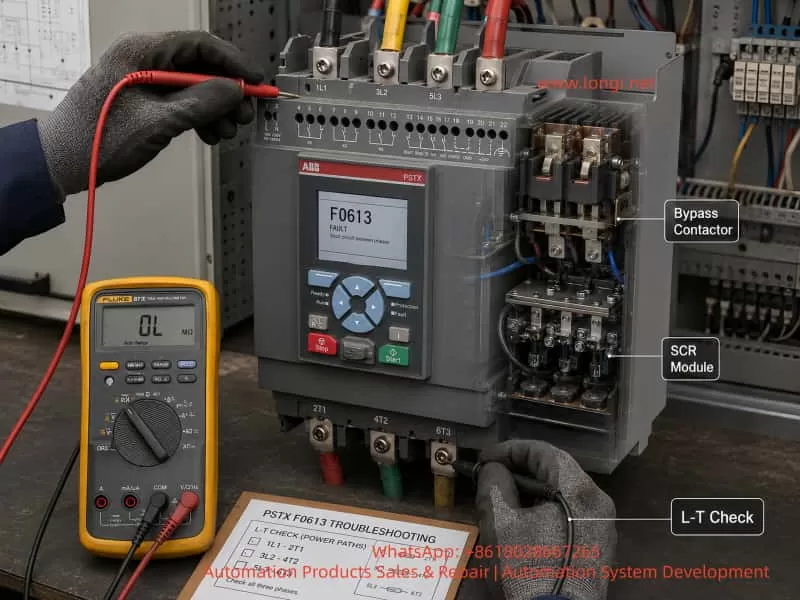
Technician diagnosing an ABB PSTX soft starter F0613 shunt fault with a multimeter, showing L-T terminal checks, bypass contactor, and SCR module inspection.

4. Initial Field Diagnostic Procedure

4.1 Record the Fault Condition Before Resetting

The first step is not to repeatedly press reset. F0613 is related to the main circuit, so repeated forced resets can expand the damage or create safety risks. The technician should first record when the fault appears:

Does it appear immediately after power-on?
Does it appear only after pressing start?
Does it occur during acceleration?
Does it occur after the motor reaches full speed?
Does it appear during stop or soft stop?
Does it appear intermittently after a period of operation?

The timing of the fault provides important diagnostic information. If the fault appears immediately after power-on before any start command, the most likely causes are a welded bypass contactor, shorted thyristor, or external shunt path. If it appears during acceleration, wiring method, motor load, thyristor firing, and parameter settings should also be checked. If it appears during running, the internal bypass contactor and its feedback logic should be inspected carefully.

4.2 Measure Resistance Between Input and Output Terminals

After completely isolating the three-phase supply and verifying absence of voltage, measure the resistance between the input and output of each phase:

1L1 to 2T1
3L2 to 4T2
5L3 to 6T3

Use a multimeter in resistance or continuity mode. In a normal stopped and de-energized state, the input and output of each phase should not show a direct low-resistance short.

If one or more phases show nearly 0 ohms or continuity, there is likely an abnormal conduction path. If all three phases are low resistance, the internal bypass contactor may be welded closed or an external bypass path may still be connected. If only one phase is low resistance, a shorted thyristor or one welded bypass contact is more likely.

This measurement is one of the most direct and useful checks for F0613.

4.3 Disconnect the Motor Cables and Measure Again

To determine whether the fault is inside the soft starter or outside in the load circuit, disconnect the motor output cables from the soft starter and repeat the L-to-T resistance measurements.

If the soft starter itself still shows low resistance after the motor cables are removed, the fault is almost certainly inside the soft starter or its connected bypass circuit.

If the low-resistance condition disappears after the motor cables are removed, the motor, cable, terminal box, downstream contactors, or load-side wiring must be checked. In this situation, replacing or repairing the soft starter alone may not solve the problem.

4.4 Inspect for External Bypass or Residual Contactors

In many industrial cabinets, the soft starter is not the original starting device. The cabinet may have been modified from a direct-on-line, star-delta, or autotransformer starter system. Old contactors and wiring may remain inside the panel.

The technician should trace the main power cables and inspect whether any external contactor is connected across the soft starter input and output. Check whether the contactor is mechanically stuck, whether its auxiliary contacts are wired correctly, and whether its control logic is properly interlocked with the soft starter.

A wrongly wired or stuck external bypass contactor can produce the same symptom as an internal soft starter fault.

4.5 Verify Wiring Mode and Parameters

The wiring mode parameter must match the actual main circuit. If the soft starter is installed in the standard in-line configuration, the corresponding parameter must be set accordingly. If inside-delta connection is used, the motor wiring, current setting, and configuration parameters must all match that method.

It is not enough to rely on drawings. The actual cabinet wiring must be inspected, because drawings are often outdated after field modifications.

5. Key Components to Inspect During Repair

5.1 Internal Bypass Contactor

After disassembling the soft starter, the bypass contactor should be inspected first. Look for burned contacts, pitting, melted contact surfaces, mechanical jamming, coil damage, loose connections, and overheated copper bars.

With the contactor in the open state, check whether the main contacts are still conductive. If the contacts remain closed or show very low resistance when they should be open, the contactor is welded or mechanically stuck.

For high-current soft starters, minor contact wear may not immediately cause failure. However, if the contact surface is badly burned or welded, the contactor must be repaired or replaced. Simply polishing the contacts may only provide a temporary solution and is not suitable for reliable long-term operation.

5.2 Thyristor Power Module

The thyristors should be checked with a multimeter and, when necessary, with more advanced test equipment. Compare the forward and reverse resistance of the three phases. If one phase shows a much lower resistance than the others, or if it is nearly shorted in both directions, the thyristor is likely damaged.

However, some thyristor faults are not obvious under cold multimeter testing. A thyristor may have increased leakage current, reduced blocking voltage, or thermal failure that appears only under voltage or load. In such cases, insulation and withstand-voltage testing may be required.

A repair technician should not rely only on a simple continuity test to conclude that all thyristors are good. The measurement results must be compared phase by phase and interpreted with the actual fault behavior.

5.3 Gate Trigger Circuit

If the thyristors are not shorted but the fault occurs during starting, the gate trigger circuit should also be inspected. A missing trigger pulse, incorrect phase synchronization, weak gate drive, or failed isolation component may cause abnormal conduction or serious phase imbalance.

The trigger circuit may include optocouplers, pulse transformers, gate resistors, isolated drive power supplies, and synchronization circuits. Failure in this section may cause the soft starter to start abnormally or report power circuit faults.

Although F0613 is more directly related to shunt or bypass detection, trigger problems can sometimes cause secondary fault symptoms during the start sequence.

5.4 Current Sensors and Sampling Circuit

The current feedback system is essential for the PSTX protection logic. A loose connector, damaged current transformer, cracked solder joint, burned sampling resistor, or failed signal conditioning component can lead to incorrect current feedback.

During repair, inspect current sensor wiring, connectors, ribbon cables, solder joints, and nearby components. Pay special attention to signs of overheating, corrosion, conductive dust, or mechanical stress.

5.5 Control Board and Detection Board

If the power circuit measurements are normal, the bypass contactor is not welded, the thyristors are not shorted, the motor circuit is healthy, and the wiring mode is correct, but the F0613 fault still appears repeatedly, the control board or detection board may be misjudging the main circuit state.

Possible causes include unstable control power, excessive ripple in the internal power supply, drifted reference voltage, failed comparator circuit, damaged input protection components, optocoupler aging, moisture leakage on the PCB, or contamination by conductive dust.

Board-level diagnosis requires careful inspection and signal measurement. In harsh industrial environments, board contamination and moisture-related leakage are common causes of intermittent and misleading faults.

6. Fault Symptom Patterns and Diagnostic Direction

If F0613 appears immediately after power-on before any start command, the most likely causes are internal bypass contact welding, shorted thyristor, or an external bypass path that is already closed.

If the fault appears immediately after pressing start, the technician should check not only the internal power circuit but also wiring mode, motor connection, parameter configuration, and thyristor triggering.

If the fault appears after the motor reaches full speed, the internal bypass contactor should be checked carefully. It may be failing to close correctly, chattering, overheating, or producing abnormal feedback.

If the fault appears during stopping, inspect whether the bypass contactor releases correctly and whether there is any residual external shunt path. Also check whether the load has regenerative or backfeed effects that may interfere with detection.

If the fault is intermittent and can be reset temporarily, suspect unstable mechanical contacts, loose terminals, thermal-related component failure, control board signal drift, or intermittent insulation problems.

7. Safety Precautions During Diagnosis

A soft starter is a high-power three-phase electrical device. Repair work must be performed only after complete isolation, lockout, voltage verification, and appropriate safety procedures.

The input terminals may remain live even when the motor is stopped. Some cabinets may also contain separate control voltage, external bypass supply, capacitor circuits, or backfeed sources. Before measuring resistance, all power sources must be isolated. A multimeter resistance range must never be used on a live circuit.

When removing motor cables, mark the phase sequence clearly to avoid incorrect reconnection. After repair, all main circuit terminals and copper bar connections must be tightened to the proper torque. Loose power terminals can cause overheating, arcing, and repeated failure.

After replacing parts or repairing the main circuit, the soft starter should not be immediately returned to full-load operation. It should first be tested under safe conditions, then with the motor connected, and finally under normal load. During testing, monitor the three-phase current balance, start ramp behavior, bypass contactor action, fault history, and thermal condition.

8. Practical Repair Logic for F0613

The key to diagnosing ABB PSTX F0613 is to focus on one question: is there an unintended conduction path in the main power circuit?

If the L-to-T resistance is low when the soft starter is stopped and de-energized, the diagnosis should focus on the bypass contacts, thyristor modules, and external bypass wiring.

If the L-to-T resistance is normal but the fault occurs during starting, check the wiring mode, parameter setting, motor condition, current feedback, voltage feedback, and trigger circuit.

If the main power circuit is normal and the external circuit is confirmed healthy, but the fault still appears, the detection circuit or control board may be causing a false shunt fault.

The diagnosis should proceed in the following order:

First, record the fault timing and operating condition.
Second, isolate power and measure the main circuit resistance.
Third, disconnect the motor cables and repeat the measurement.
Fourth, inspect external bypass contactors and residual old wiring.
Fifth, check the internal bypass contactor and thyristor modules.
Sixth, verify wiring mode and parameter configuration.
Seventh, inspect current and voltage detection circuits.
Finally, evaluate the control board if all power circuit checks are normal.

This sequence prevents unnecessary replacement of expensive components and reduces the risk of misdiagnosis.

9. Conclusion

ABB PSTX F0613 Shunt Fault is a main-circuit-related fault. It usually means that the soft starter has detected an abnormal shunt path, bypass path, or uncontrolled low-resistance conduction state. It should not be treated as a simple parameter warning or a normal resettable alarm.

The most common causes include internal bypass contactor welding, SCR thyristor short circuit, external bypass wiring error, mismatch between wiring method and parameter setting, motor or cable short path, and internal detection circuit malfunction.

In real repair work, the most effective starting point is to isolate power and measure the resistance between the line input and motor output terminals of each phase. If a low-resistance path exists between L and T, the fault direction becomes clear: bypass contactor, thyristor module, or external shunt wiring. If the main circuit resistance is normal, the technician should then investigate wiring configuration, current and voltage feedback, trigger logic, and control board detection.

For long-running equipment used in heavy-load, high-temperature, humid, dusty, or frequently started applications, F0613 has a strong hardware fault implication. A careful step-by-step diagnosis of the main circuit, bypass mechanism, thyristor modules, load circuit, and detection electronics is essential for accurate repair.

The core principle is simple: a soft starter should only conduct when its control logic commands it to conduct. If the unit detects conduction when it should be off, or detects a bypass path that does not match the expected state, it will report a shunt fault. Understanding this principle makes the diagnosis of ABB PSTX F0613 much clearer and prevents unnecessary guesswork during repair.
Posted on

ABB ACS510 F0009 / MOT TEMP Fault Analysis and Troubleshooting Guide for Motor Overtemperature Protection

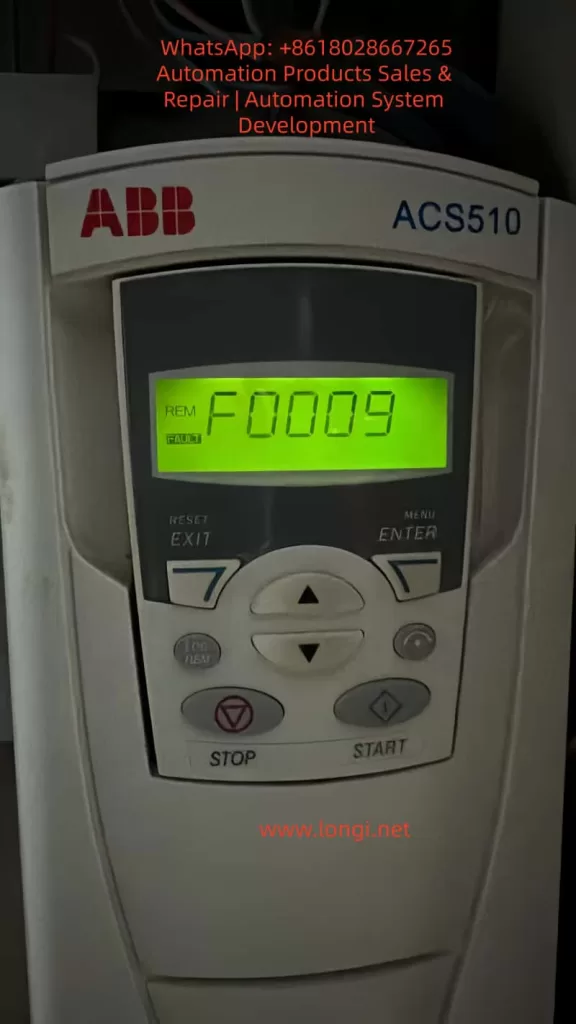
The ABB ACS510 is one of the most widely used low-voltage AC drives in HVAC systems, water pumps, constant-pressure water supply systems, ventilation equipment, conveyor systems, industrial fans, and various variable-speed motor applications. In real industrial maintenance work, one of the most common faults encountered on the ACS510 is F0009, also displayed in the fault list as MOT TEMP or Motor Overtemperature.

According to the ABB ACS510 user manual, fault code 9 “MOT TEMP” indicates that the drive has detected a motor overheating condition based on either the internal thermal model calculation or an external temperature feedback signal. ABB recommends checking whether the motor is overloaded, adjusting parameters 3005–3009 related to the motor thermal model, and checking the temperature sensor configuration and parameter group 35 settings.

This fault is frequently misunderstood in the field. Many technicians immediately assume the inverter itself is defective as soon as F0009 appears. In reality, this fault primarily concerns the motor thermal condition rather than the ACS510 heatsink temperature. The ACS510 has separate alarms and faults for drive overtemperature conditions. F0009 specifically focuses on motor thermal protection, including real motor overheating, overload conditions, insufficient cooling at low speed, incorrect motor parameter settings, thermal model mismatch, or external temperature sensor problems.

For this reason, troubleshooting F0009 must follow a systematic process. Resetting the drive repeatedly or replacing boards without analysis often leads to wasted time, unnecessary repair costs, and even motor damage.


F0009 Fault of the ACS510 VFD

1. Understanding the Real Meaning of F0009

The ACS510 determines motor overheating in two primary ways.

The first method is the internal motor thermal model. The drive continuously estimates motor temperature based on:

  • Motor rated current
  • Output current
  • Operating frequency
  • Load conditions
  • Running time
  • Thermal characteristics

When the calculated thermal level exceeds the protection threshold, the drive first may generate a warning and eventually trips with F0009.

The second method is external temperature feedback. If the motor is equipped with a PTC thermistor, PT100 sensor, thermal switch, or other temperature feedback device, and parameter group 35 is enabled, the ACS510 can monitor actual motor temperature through the sensor input.

This explains why the same F0009 fault may have completely different causes depending on the installation.

In some cases the motor is genuinely overheating. In others the issue is caused by incorrect parameters, sensor wiring problems, or thermal model configuration errors.


2. F0009 Does Not Mean the Drive Itself Is Overheating

One of the most common mistakes in industrial troubleshooting is confusing motor overtemperature with inverter overtemperature.

F0009 is specifically related to motor thermal protection.

This does not automatically mean the ACS510 heatsink or power section is overheating.

When the drive itself overheats, troubleshooting usually focuses on:

  • Cooling fan failure
  • Heatsink dust accumulation
  • Poor cabinet ventilation
  • High ambient temperature
  • Improper installation spacing
  • Airflow obstruction

However, when F0009 occurs, the primary focus must remain on:

  • Motor temperature
  • Motor current
  • Mechanical load
  • Motor cooling
  • Thermal protection settings

Even though drive heating and motor heating can occur together under overload conditions, the diagnostic sequence should not start with inverter hardware replacement.


3. Step One: Confirm Whether the Motor Is Actually Hot

The first action after F0009 appears is to verify the real motor temperature.

Use an infrared thermometer or contact thermometer to measure:

  • Motor housing temperature
  • Front bearing temperature
  • Rear bearing temperature
  • Cooling fan area
  • Coupling or pulley area
  • Gearbox or pump bearing temperature

If the motor surface is extremely hot, bearings are overheating, or there is a strong burnt insulation smell, then the fault is likely a real overtemperature condition.

In this situation, repeatedly resetting the drive is dangerous. Continuous restarting may eventually damage motor insulation, burn the winding, or cause mechanical failure.

On the other hand, if the motor is only slightly warm and F0009 occurs quickly after startup, parameter mismatch or sensor issues become more likely.


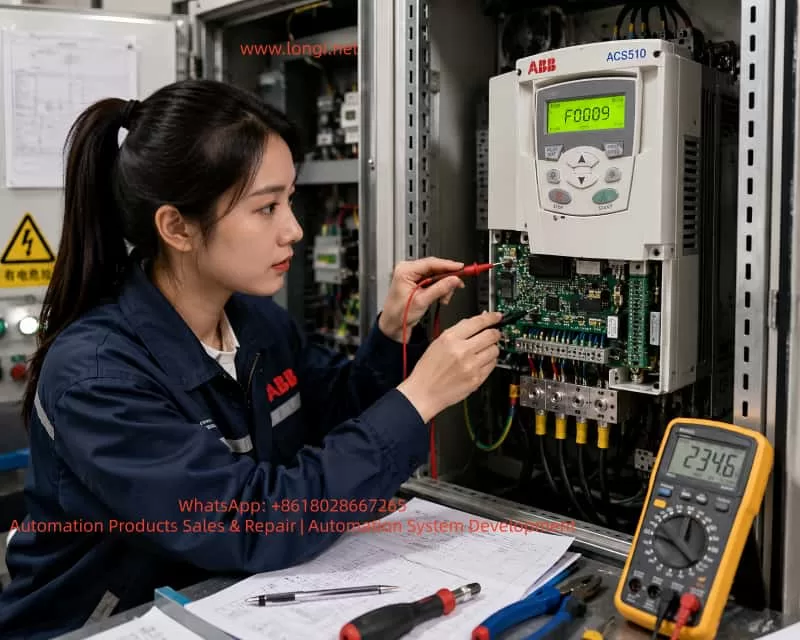
Industrial Chinese female engineer troubleshooting an ABB ACS510 variable frequency drive inside an electrical control cabinet, measuring PCB signals with multimeter probes while the inverter display shows F0009 motor overtemperature fault.

4. Step Two: Check Whether the Motor Current Exceeds Rated Current

Motor overheating is commonly caused by overload conditions.

The ACS510 should be monitored together with an external clamp meter.

The following values must be compared:

  • Motor nameplate rated current
  • Drive output current
  • Actual measured phase current
  • Phase current balance
  • Starting current
  • Loaded operating current

If the motor is rated at 20A but continuously operates at 25A or higher, overheating is expected.

If the phase currents are significantly unbalanced, such as:

  • Phase A: 18A
  • Phase B: 25A
  • Phase C: 19A

then the problem may involve:

  • Motor winding damage
  • Loose cable connections
  • Output terminal problems
  • Contactor issues
  • Partial short circuit
  • Ground leakage

When the drive display current differs greatly from actual measured current, additional investigation of current feedback or measurement accuracy may be required.


5. Step Three: Inspect Mechanical Load Problems

Many F0009 faults are not electrical failures at all.

Mechanical overload is extremely common.

Typical causes include:

  • Pump blockage
  • Fan blade contamination
  • Damper problems
  • Bearing seizure
  • Belt overtension
  • Gearbox damage
  • Conveyor jams
  • Coupling misalignment
  • Excessive friction
  • Product buildup
  • Increased process load

The inverter only sees increased motor current and rising thermal estimation.

The drive cannot determine the exact mechanical cause.

One effective troubleshooting method is to disconnect the mechanical load temporarily and run the motor unloaded. If the current drops significantly and the overheating fault disappears, the problem is mechanical rather than electrical.


6. Step Four: Low-Speed Operation and Cooling Problems

This is one of the most overlooked causes of motor overheating in variable frequency drive systems.

Standard induction motors use shaft-mounted cooling fans.

When the motor runs at low frequency, such as:

  • 10 Hz
  • 15 Hz
  • 20 Hz

the motor cooling fan also rotates slowly.

As airflow decreases, motor cooling performance drops dramatically.

Even if the current is not extremely high, the motor may gradually overheat.

This problem is especially common in:

  • Conveyors
  • Mixers
  • Compressors
  • Extruders
  • Constant torque applications

Solutions may include:

  • Increasing minimum operating frequency
  • Installing independent cooling fans
  • Using inverter-duty motors
  • Reducing mechanical load
  • Improving ventilation
  • Cleaning motor cooling fins

If the customer reports that the fault occurs mainly during summer or after long low-speed operation, insufficient cooling is a major suspect.


7. Step Five: Verify Motor Nameplate Parameters 9905–9909

The ACS510 motor thermal model relies heavily on accurate motor data.

Incorrect motor parameter settings are a very common cause of F0009.

The following parameters must be checked carefully:

Parameter 9905 — Motor Rated Voltage

This must match the actual motor nameplate voltage.

Parameter 9906 — Motor Rated Current

This is the most critical parameter.

It must match the actual motor nameplate current.

If 9906 is set too low, the ACS510 will falsely estimate motor overheating much earlier than normal.

Parameter 9907 — Motor Rated Frequency

Usually:

  • 50 Hz
  • 60 Hz

depending on the motor.

Parameter 9908 — Motor Rated Speed

Must match the motor nameplate RPM.

Parameter 9909 — Motor Rated Power

Must match actual motor power.

Parameter mismatch frequently occurs when:

  • Motors are replaced
  • Drives are restored to factory settings
  • Used equipment is installed
  • Parameters are copied from another machine
  • Control boards are replaced

For example, if the original motor was 7.5 kW and later replaced with an 11 kW motor while the old current settings remain unchanged, the drive may falsely trip with F0009.


8. Step Six: Check Parameters 3005–3009

The ABB manual specifically recommends checking parameters 3005–3009 when F0009 occurs.

These parameters control the motor thermal protection model.

Parameter 3005 — Motor Thermal Protection

Defines how the drive reacts to thermal overload.

Disabling this protection entirely is not recommended in industrial applications unless external thermal protection exists.

Parameter 3006 — Motor Thermal Time Constant

Defines how quickly the thermal model responds.

If set too low, the drive may trip prematurely.

If set too high, motor protection may become insufficient.

Parameters 3007–3009 — Load Curve and Low-Speed Thermal Characteristics

These parameters influence low-speed motor heating estimation.

Incorrect settings can easily cause false overheating trips.

This is particularly common in:

  • Used drives
  • Systems with modified parameters
  • Equipment with undocumented adjustments

9. Step Seven: Check Parameter Group 35 and Temperature Sensors

If external motor temperature sensors are used, parameter group 35 becomes extremely important.

Common problems include:

  • Open-circuit PTC sensors
  • Incorrect sensor type configuration
  • Broken wiring
  • Loose terminals
  • Grounding problems
  • Analog input interference
  • Incorrect sensor resistance
  • Wrong terminal assignment

In some cases, parameter group 35 is enabled even though no motor temperature sensor exists.

This can directly generate false F0009 faults.

Sensor-related faults often show these characteristics:

  • Motor is physically cool
  • Fault appears immediately after startup
  • Fault changes when wiring is moved
  • Intermittent trips occur randomly

10. Distinguishing Between Alarm and Fault Conditions

The ACS510 may first display a motor overtemperature warning before finally tripping with F0009.

This progression is important.

If the fault develops gradually over time, thermal accumulation is likely.

If the drive trips immediately after startup, parameter or sensor problems are more likely.

If the fault appears mainly in hot weather or during long operating cycles, cooling and environmental conditions become key suspects.


11. Recommended Field Troubleshooting Procedure

A professional troubleshooting sequence should follow these steps:

  1. Record the fault condition.
  2. Measure actual motor temperature.
  3. Measure three-phase motor current.
  4. Inspect mechanical load conditions.
  5. Verify motor nameplate parameters 9905–9909.
  6. Check thermal model parameters 3005–3009.
  7. Inspect parameter group 35 and temperature sensors.
  8. Test the system after reset under controlled load.
  9. Perform insulation resistance testing if necessary.

This structured approach prevents unnecessary board replacement and reduces downtime.


12. Real Overheating vs False Overheating

When the motor is genuinely overheating, the root cause must be corrected physically.

Possible solutions include:

  • Reducing load
  • Repairing bearings
  • Cleaning cooling fins
  • Improving airflow
  • Replacing cooling fans
  • Upgrading motor size
  • Installing forced cooling
  • Correcting alignment
  • Repairing mechanical equipment

Simply disabling thermal protection does not solve the real problem.

When the motor is not actually overheating, the issue usually involves:

  • Incorrect motor parameters
  • Wrong thermal model settings
  • Sensor problems
  • Parameter corruption
  • Wiring errors
  • Control board feedback issues

13. Common Mistakes Made During Troubleshooting

Several mistakes appear repeatedly in industrial service work.

Mistake 1: Assuming the inverter is defective immediately

F0009 primarily concerns the motor thermal condition.

Mistake 2: Repeatedly resetting the drive

This can eventually destroy the motor.

Mistake 3: Disabling thermal protection

This removes a critical protection layer.

Mistake 4: Ignoring mechanical load

Mechanical overload is extremely common.

Mistake 5: Replacing motors without updating parameters

Parameter mismatch causes false trips frequently.

Mistake 6: Ignoring low-speed cooling limitations

This is one of the most common real-world causes.


14. Example Field Case

A water pump system using ACS510 repeatedly generated F0009 during summer operation.

The customer believed the inverter was defective.

Field inspection revealed:

  • Motor current near rated value
  • Long-term operation at 18 Hz
  • Poor ventilation
  • Standard self-cooled motor
  • High ambient temperature

The real issue was insufficient motor cooling at low speed.

The solution included:

  • Cleaning motor cooling fins
  • Improving ventilation
  • Raising minimum frequency
  • Installing independent cooling

No inverter repair was required.

In another case, a larger motor had been installed but parameter 9906 still contained the old motor current value. The drive repeatedly tripped with F0009 after several minutes of operation. Correcting the motor parameters solved the problem immediately.


15. Conclusion

ABB ACS510 fault F0009 / MOT TEMP indicates that the drive believes the motor thermal condition has exceeded safe operating limits. The drive may determine this through the internal thermal model or through external temperature feedback devices.

Successful troubleshooting requires systematic analysis of:

  • Actual motor temperature
  • Motor current
  • Mechanical load
  • Low-speed cooling capability
  • Motor nameplate parameters
  • Thermal protection settings
  • Temperature sensor circuits

The correct diagnostic philosophy is:

Verify real overheating first, then investigate false thermal estimation, and only consider inverter hardware failure after all motor-side causes have been eliminated.

In most real industrial cases, F0009 is caused by:

  • Motor overload
  • Poor cooling
  • Incorrect parameters
  • Mechanical load issues
  • Sensor configuration errors

rather than defective ACS510 hardware itself.

A structured troubleshooting process can prevent unnecessary drive replacement, reduce maintenance costs, avoid repeated downtime, and protect the motor from catastrophic thermal damage.

Posted on

ACS580 Drive RS485 (Modbus RTU) Communication Testing and Parameter Adjustment Using a Serial Assistant Tool

During industrial maintenance, second-hand drive inspection, PLC communication debugging, HMI integration, and remote technical support, engineers often need to verify whether the embedded fieldbus interface of an ABB ACS580 drive is functioning correctly. The ACS580 includes an internal EFB (Embedded Fieldbus) interface that can operate as a Modbus RTU slave. With a USB-to-RS485 converter, a computer, and a serial communication tool, it is possible to perform complete communication testing, including register reading, control word writing, frequency reference adjustment, remote start/stop control, and fault reset.

This method is extremely practical because it does not require a PLC, HMI, or ABB commissioning software. As long as the RS485 physical layer and the drive parameters are configured correctly, engineers can directly determine whether the communication port, Modbus settings, control logic, and remote control chain are operating properly.

This article explains the complete process of ACS580 Modbus RTU communication testing using a USB-RS485 converter and a serial assistant tool. It covers wiring, parameter configuration, serial software settings, Modbus frames, control word logic, startup and stop procedures, common faults such as 6681 EFB communication loss and AFE1/off2 emergency stop, as well as communication instability caused by electromagnetic interference during drive operation.


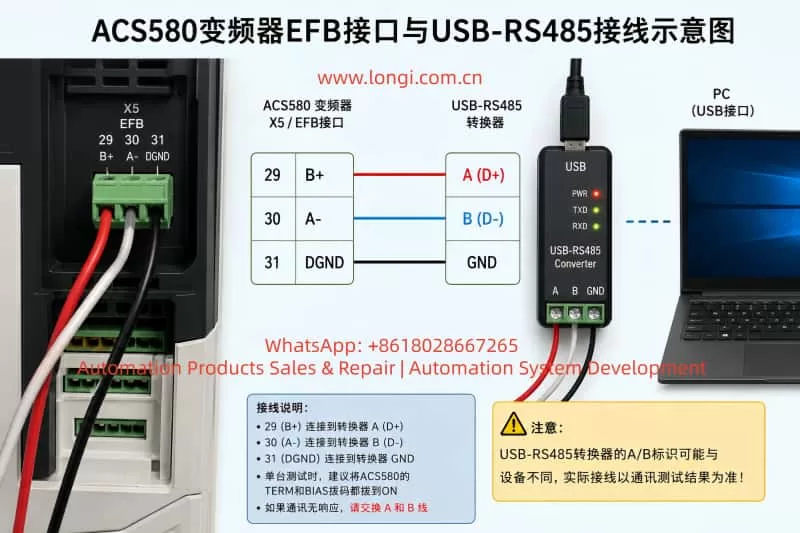
Schematic diagram of ACS580 frequency converter EFB interface and USB-RS485 wiring

1. ACS580 EFB Interface and RS485 Wiring

The ACS580 control board includes a three-pin EFB terminal used for embedded fieldbus communication. This interface can be used directly for Modbus RTU testing.

Typical terminal definitions are:

ACS580 TerminalFunction
29B+
30A-
31DGND

The wiring between the ACS580 and the USB-RS485 converter is typically:

ACS580 X5/EFBUSB-RS485 Converter
29 B+RS485 A/B
30 A-RS485 opposite line
31 DGNDGND

One important point is that many USB-RS485 converters use inconsistent A/B or D+/D- labeling. Cheap converters especially may reverse the line naming compared to the drive definition. Therefore, if the parameters and serial settings appear correct but no communication occurs, the first troubleshooting step should be swapping the A and B communication wires.

For single-drive bench testing, it is recommended to enable both TERM and BIAS on the ACS580 communication interface. This improves communication stability in short-distance point-to-point testing.

For long-term industrial use, twisted-pair shielded cable should be used for the A/B communication pair. The shield should typically be grounded at one end only to avoid ground loop current.


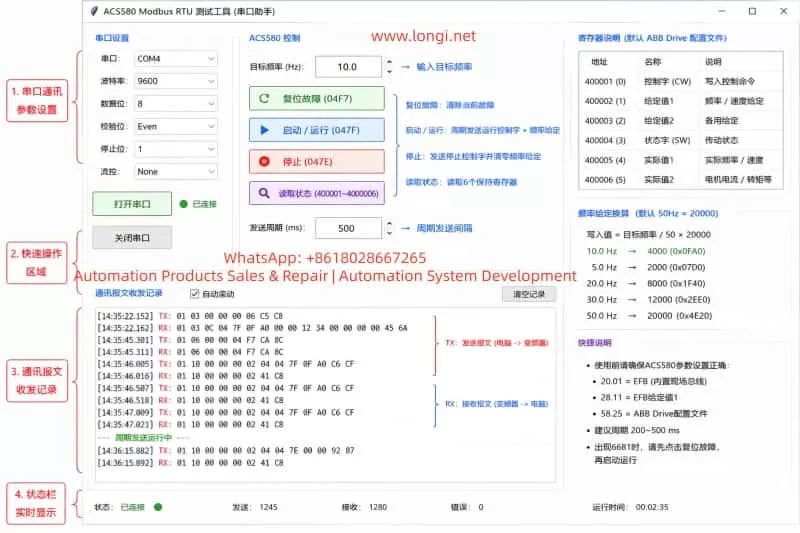
ACS580 Modbus RTU Testing Tool

2. ACS580 Parameters Required for Modbus RTU Communication

To allow Modbus RTU control, the embedded fieldbus interface must first be enabled and configured correctly.

Recommended communication parameters:

ParameterRecommended ValueDescription
58.01 Protocol EnableModbus RTUEnable embedded fieldbus
58.03 Node Address1Modbus slave address
58.04 Baud Rate9.6 kbpsMatches serial tool setting
58.05 Parity8 Even 1Matches serial tool
58.06 Communication ControlRefresh SettingsApply communication changes
58.25 Control ProfileABB DriveEnables ABB control word format

After modifying the 58-group parameters, 58.06 “Refresh Settings” must be executed, or the drive must be power-cycled. Many communication failures occur simply because the communication settings were not refreshed.

The command source and frequency reference source must also be assigned to EFB:

ParameterRecommended ValueDescription
19.11 EXT1/EXT2 SelectionEXT1Use external control set 1
20.01 EXT1 CommandsEmbedded Fieldbus / EFBStart/stop via Modbus
28.11 EXT1 Frequency Reference 1EFB Reference 1Frequency reference from Modbus
19.01 Operating ModeScalar Hz / Speed ModeCommon for testing

If 20.01 is not assigned to EFB, the drive may acknowledge Modbus commands without actually starting. If 28.11 is not assigned to EFB Reference 1, writing frequency values may not affect the drive output.

During testing, it is also recommended to temporarily disable communication-loss trips:

ParameterRecommended Temporary Value
58.14 Communication Loss ActionNo Action
58.15 Communication Loss ModeAny Message
58.16 Communication Loss Time30 seconds or longer

This prevents fault 6681 from occurring while manually testing communication using a serial tool.


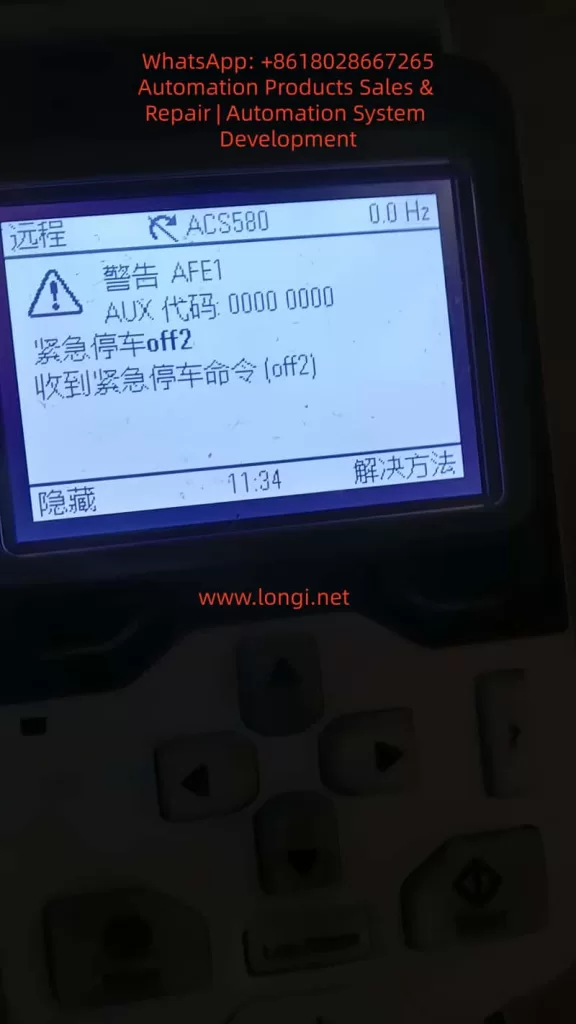
AFE1 ALARM

3. Serial Assistant Software Configuration

The USB-RS485 converter driver must first be installed so that Windows recognizes the device as a COM port.

Typical serial settings:

SettingValue
COM PortCOM3 / COM4 / etc.
Baud Rate9600
Data Bits8
ParityEven
Stop Bits1
Flow ControlNone
Send FormatHEX
Receive FormatHEX

If ACS580 parameter 58.05 is set to “8 Even 1,” the serial assistant must also use Even parity. A parity mismatch will prevent proper communication.

Another critical point involves CRC handling. Some serial tools automatically append Modbus CRC bytes. If CRC auto-generation is enabled, the user should only enter the Modbus frame without CRC. If the complete frame including CRC is entered manually while auto-CRC is still enabled, the resulting frame becomes invalid.

Example read command:

01 03 00 00 00 06 C5 C8

If CRC auto-generation is disabled, the complete frame above should be transmitted exactly as shown.


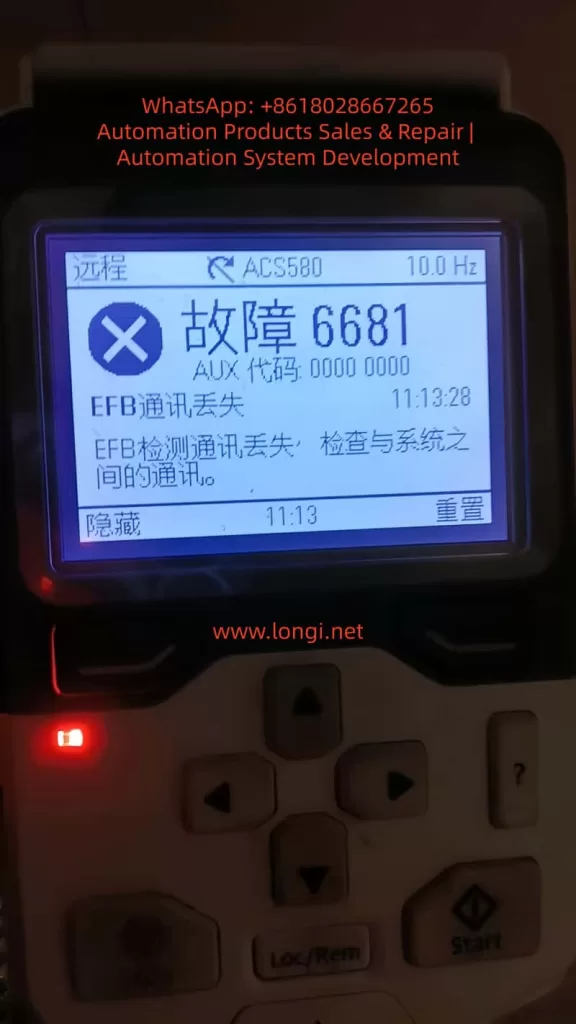
6681 Fault

4. Read Registers Before Attempting Startup

The first communication test should always be a register read operation rather than an immediate start command.

Command for reading registers 400001–400006:

01 03 00 00 00 06 C5 C8

Frame meaning:

BytesDescription
01Slave address
03Read holding registers
00 00Starting register
00 06Read 6 registers
C5 C8CRC

A typical response:

01 03 0C 00 00 00 00 00 00 00 00 11 33 00 00 95 E4

If the drive responds, the physical layer, slave address, baud rate, parity, and CRC are likely correct.

ACS580 communication diagnostics can also be monitored:

ParameterDescription
58.08 Received PacketsValid incoming frames
58.09 Sent PacketsValid outgoing frames
58.11 UART ErrorsSerial framing/parity errors
58.12 CRC ErrorsInvalid CRC or communication noise

5. Writing Frequency References

Under the ABB Drive profile, the frequency scaling is typically:

50Hz = 20000

Frequency calculation:

Reference Value = Target Frequency / 50 × 20000

Example for 10Hz:

10 / 50 × 20000 = 4000

4000 decimal equals 0FA0 hexadecimal.

Command to write 10Hz into register 400002:

01 06 00 01 0F A0 DD 82

The drive should echo the same frame back if the command is accepted.

Common frequency conversions:

FrequencyDecimalHEX
5Hz200007D0
10Hz40000FA0
20Hz80001F40
30Hz120002EE0
50Hz200004E20

6. Control Word Logic: Reset, Run, and Stop

The ACS580 control word is the key element for remote control via Modbus.

Common control words:

Control WordFunction
04F7Fault Reset
047FRun
047EStop

Fault reset command:

01 06 00 00 04 F7 CA 8C

Run command:

01 06 00 00 04 7F CA EA

Stop command:

01 06 00 00 04 7E 0B 2A

For stable operation, it is better to periodically write both control word and frequency reference together using Modbus function code 10.

10Hz run command:

01 10 00 00 00 02 04 04 7F 0F A0 C6 CF

Stop and zero-frequency command:

01 10 00 00 00 02 04 04 7E 00 00 92 87

In practical testing, a periodic transmission interval of 200–500ms proved much more stable than one-shot commands. With a 1-second interval, the panel sometimes displayed the frequency reference without actual output. At 500ms intervals, the drive produced stable output frequency and cooling fan operation.


7. Understanding Fault 6681: EFB Communication Loss

Fault 6681 indicates that the drive detected a communication loss on the embedded fieldbus.

Typical causes:

  1. The drive command source is assigned to EFB, but the PC is not continuously transmitting Modbus frames.
  2. Communication-loss action remains enabled during manual testing.
  3. Parameters were copied from another drive, but no real-time control word is being transmitted after power-up.

During manual testing, it is recommended to disable communication-loss trips temporarily. However, in actual industrial applications, communication supervision should remain active and PLCs should continuously refresh control words and references.


8. Understanding AFE1 / OFF2 Emergency Stop

Another common issue is the AFE1 warning showing “Emergency Stop OFF2.”

This is not always caused by hardware emergency stop wiring. It can also occur when the fieldbus control word is incomplete or invalid.

Example:

06.01 = 408 hex

In this state, Off1/Off2/Off3 bits may not be properly enabled.

Under ABB Drive control word logic:

  • OFF2 bit = 1 → OFF2 inactive, operation allowed
  • OFF2 bit = 0 → Emergency stop active

Therefore, after power-up or communication interruption, the drive may interpret the control word as an OFF2 command.

The practical solution is:

  1. Send fault reset 04F7
  2. Begin periodic transmission of 047F + frequency reference

Once the control word stabilizes at 047F, the OFF2 warning disappears.


9. Local Mode vs Remote Mode

For Modbus control, the drive must operate in Remote mode.

In Local mode, panel commands have priority, and Modbus commands may appear to work without actually controlling the drive.

Therefore:

ModeDescription
LocalPanel control priority
RemoteExternal control active
Remote + EFBModbus control active

A successful Modbus test must ultimately operate in Remote mode.


10. Parameter Copying Between Drives

Copying parameters from one ACS580 to another does not copy the current control word state.

The copied drive still requires:

  1. Power cycle
  2. Fault reset
  3. Continuous control-word transmission

Copied parameters include communication settings and command-source assignments, but not the live Modbus control state.


11. USB-RS485 Communication Instability During Drive Output

If the COM port disappears from Windows Device Manager while the drive is running, the issue is usually electromagnetic interference rather than software alone.

Variable-frequency drives generate strong PWM-related common-mode noise on motor cables.

Cheap CH340-based USB-RS485 adapters are especially vulnerable.

Recommended solutions:

  1. Use isolated industrial USB-RS485 converters.
  2. Keep USB and RS485 cables away from motor output cables.
  3. Use twisted-pair shielded communication cable.
  4. Install ferrite cores on USB cables.
  5. Use rear motherboard USB ports instead of front-panel ports.
  6. Enable TERM and BIAS for single-drive testing.

12. Recommended Complete Testing Procedure

Step 1: Configure Drive Parameters

Set all required EFB and Modbus parameters.

Step 2: Read Registers

Send:

01 03 00 00 00 06 C5 C8

Step 3: Reset Faults

Send:

01 06 00 00 04 F7 CA 8C

Step 4: Start Drive at 10Hz

Transmit periodically:

01 10 00 00 00 02 04 04 7F 0F A0 C6 CF

Step 5: Stop Drive

Send:

01 10 00 00 00 02 04 04 7E 00 00 92 87

13. Conclusion

Testing an ACS580 using a USB-RS485 converter and a serial assistant tool is an extremely effective method for verifying embedded Modbus RTU communication without requiring PLCs or engineering software.

A successful communication test requires more than simply receiving Modbus responses. Proper EFB command assignment, valid ABB control words, periodic transmission timing, remote mode selection, and stable hardware wiring are all critical.

The most common troubleshooting issues include reversed A/B wiring, missing communication refresh, incorrect parity, duplicated CRC generation, communication-loss supervision, OFF2 emergency stop logic, and electromagnetic interference affecting USB-RS485 adapters.

Once the Modbus control sequence is understood, ACS580 communication testing becomes a reliable and repeatable process for maintenance, refurbishment, commissioning, and customer technical support.

Posted on

Systematic Troubleshooting of ABB ACS800 Inverter INT CONFIG (5410) Fault: Correlation Analysis of AC Contactor Failure, DC Link Undervoltage, and Parallel Inverter Configuration Mismatch, with Complete Solutions

Abstract: In the field of industrial automation, the ABB ACS800 series inverter is renowned for its high power density, parallel inverter module design, and Direct Torque Control (DTC) technology, widely used in high-power applications such as metallurgy, cranes, papermaking, and water pumps. However, when the system displays an “INT CONFIG (5410)” fault accompanied by an AC contactor that fails to latch and a DC link voltage stuck at 347.9 V (significantly lower than the normal ~540 V), it often indicates a deep-seated issue in the pre-charge circuit or module communication link. Based on actual cases, ABB official fault manuals, hardware schematics, and on-site troubleshooting experience, this article provides a comprehensive technical analysis of the fault and offers a full-link solution—from phenomenon identification to root cause elimination and preventive maintenance—helping engineers quickly restore equipment operation and avoid secondary failures.


I. Overview of ACS800 Parallel Inverter Architecture: Why Configuration Faults Are Critical

The ACS800 (especially cabinet-type multi-drive or CraneDrive versions) adopts a modular parallel design. High-power models (such as the R8i series) achieve current sharing through parallel connection of multiple inverter units. Core control is managed by the APBU (PPCS Branching Unit) board, which communicates with each module via fiber optics (PPCC LINK) to achieve synchronized PWM and status monitoring.

Normal Power-Up Sequence

  1. Main line contactor closes.
  2. Pre-charge Circuit slowly charges the DC link capacitors through a current-limiting resistor.
  3. Pre-charge Bypass Contactor engages, shorting the resistor, and the DC link voltage rises to the rated value (for a 400 V system, typical UDC​=1.35×400V≈540V).
  4. Inverter modules power up, and the APBU detects the number of modules and compares it with parameter 95.03 INT CONFIG USER.
  5. If consistent: Drive is Ready; Otherwise: INT CONFIG (5410) is triggered.

Key Logic: When pre-charging fails, the DC link voltage only reaches 347.9 V (approx. 64% of rated value). Some modules fail to initialize properly, causing the APBU to misjudge “module count mismatch” and directly trigger fault 5410. This is not an isolated communication issue but a chain reaction of hardware power-up chain interruption.

Parallel systems have extremely high requirements for configuration consistency: even a missing module can cause IGBT overload or output imbalance due to uneven current distribution. Parameter 95.03 defaults to the factory module count (e.g., 2 or 4); any physical loss or insufficient voltage triggers protection.


CONFIG (5410) Fault

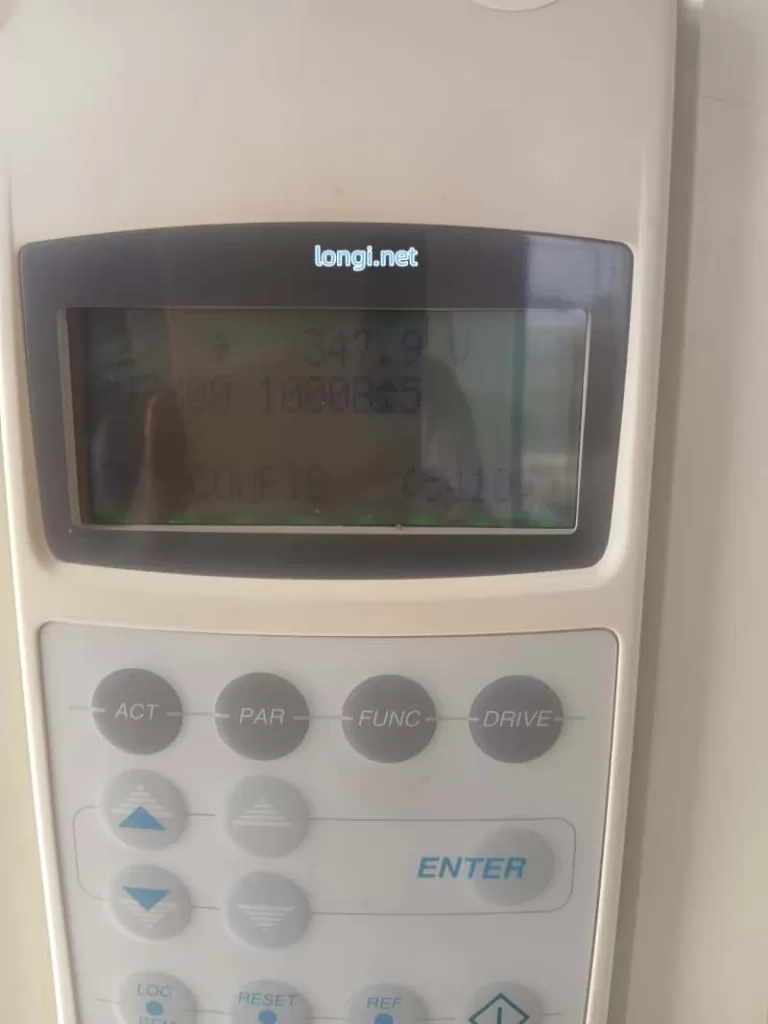
II. Precise Interpretation of Fault Phenomena: Meaning of “347.9 V + INT CONFIG 16 (5410)”

The panel photo provided by the user shows:

  • Top347.9 V (Real-time DC link voltage, far below normal).
  • MiddleU 32000 10008±5 (Likely an internal signal or configuration word).
  • BottomINT CONFIG 16 (5410).

Phenomenon Analysis

  • Meaning of “16”: Likely corresponds to the internal configuration word (08.22 INT CONFIG WORD) or extended fault info, indicating 1 abnormal module detected (or total module mismatch). Press the ACT key to view 04.01 FAULTED INT INFO to precisely identify the faulty module number (INT 1~N).
  • “AC Contactor Not Hold”: This is the core symptom, referring to the main line contactor or pre-charge bypass contactor coil failing to latch (insufficient coil voltage, mechanical jamming, or auxiliary contact self-holding failure).
  • Reason for Voltage Lock: Contactor chatter or instant engagement followed by drop-out → Pre-charge resistor cannot be shorted → Bus voltage stays at the low value after voltage division by the resistor (347.9 V is the typical “semi-charged” state limited by the pre-charge resistor).

Why is the voltage stuck?

  • Resistor Charging StageUDC​ slowly climbs to ~410 V (UDC,chr​ charging threshold).
  • After Bypass Contactor Closes: Resistor is shorted, UDC​ rapidly rises to 540 V.
  • Fault State: Contactor not holding → Resistor remains in circuit → Voltage cannot reach full charge → Module undervoltage → Configuration failure.

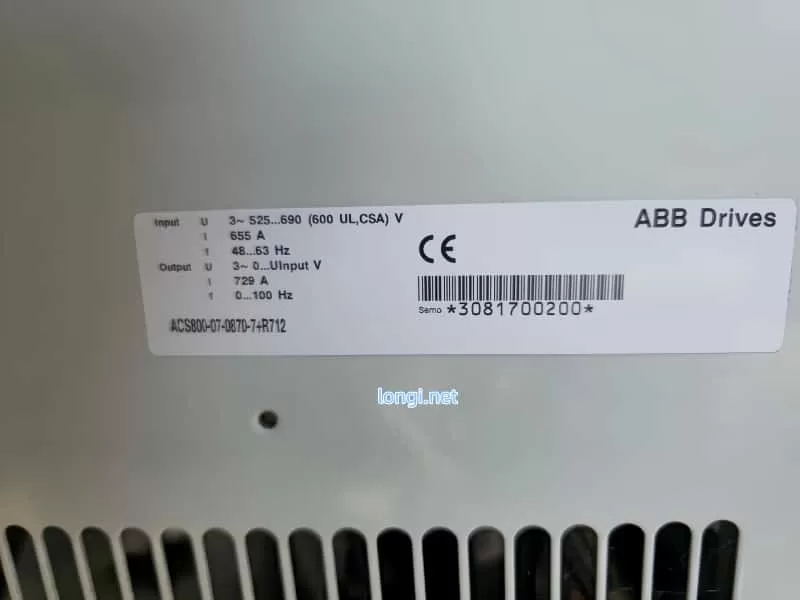
ACS800-07-0870-7+R12

III. In-Depth Root Cause Analysis: The Link Between Pre-Charge Circuit, Contactor, and INT CONFIG

3.1 Typical Composition and Failure Modes of Pre-Charge Circuit

The pre-charge circuit for high-power ACS800 models includes: charging resistors (e.g., 3.3 Ω / 65 W, multiple in parallel), a bypass contactor (or thyristor), a half-wave rectifier diode (prevents reverse flow), and voltage detection/timing logic (controlled by AINP/AIBP boards).

Failure Mode Ranking (High to Low Probability):

  1. Bypass Contactor Failure (Most Common): Coil burnout, contact erosion, unstable control power (220 V / 110 V / 24 VDC), oxidized auxiliary contacts. Result: Resistor cannot be shorted, leading to continuous heating or burnout.
  2. Pre-Charge Resistor Open/Drift: Carbonization after long-term energization or multiple cycles, increased resistance, too small charging current.
  3. Diode or Thyristor Breakdown/Open: Causes asymmetric charging path.
  4. Control Board Issues: Low output from APOW power board, abnormal detection circuit on AINT board.

3.2 Electrical and Mechanical Reasons for AC Contactor Not Holding

  • Control Circuit: Contactor coil voltage below 85% of rated value (measure voltage at coil terminals), excessive series resistance, relay outputs (RO1/RO2) locked by fault.
  • Mechanical Factors: Iron core jamming, spring fatigue, contact welding.
  • Power Supply Factors: High ripple in auxiliary control power (24 V or 110 V), poor grounding.
  • Drive Interlock: The INT CONFIG fault itself locks the contactor output, further worsening the cycle.

3.3 Impact of Low Voltage on Parallel Modules

When DC link voltage is below UDC,uvc​ (undervoltage control threshold ≈ 436 V), modules cannot complete self-check. The status word read by APBU via fiber optics is “Not Ready”. Even if fiber optics are intact, insufficient voltage is judged as “module missing,” triggering 5410. Bit 10 of parameter 03.17 FAULT WORD 5 will be set to 1.


IV. On-Site Diagnostic Procedure: Step-by-Step Positioning, Confirm Root Cause in 30 Minutes

⚠️ Safety First: Power off, lockout/tagout, discharge capacitors (wait >5 min, confirm <50 V with multimeter).

1. Panel Data Collection (No Dismantling Required)

  • ACT → 01.02 DC BUS VOLTAGE (Confirm 347.9 V).
  • ACT → 04.01 FAULTED INT INFO (Record faulty module).
  • PAR → 95.03 INT CONFIG USER (Check current setting).
  • ACT → 08.22 INT CONFIG WORD (Status bits of each module).

2. Hardware Inspection of Contactor & Pre-Charge (Highest Priority)

  • Visual: Check for burnt smell on contactor, blackened contacts, or carbonized resistor surface.
  • Power-on Test: Measure contactor coil voltage (should be ≥ 85% rated).
  • Manual Bypass Test (Emergency): After power-off, short bypass contactor main contacts with insulated tool. Power on and observe if voltage rises to 540 V. If it rises, contactor failure is confirmed.
  • Resistance Measurement: Measure resistor value after power-off (should match nameplate, deviation < 10%).

3. Fiber Optic & Module Communication Link (If voltage is normal but fault persists)

  • Check fiber optics from APBU to modules: Clean end-faces, no bending, fully inserted.
  • Swap fiber positions to see if the fault follows the movement.

4. Power Supply & Auxiliary Circuits

  • Measure control power stability.
  • Check self-holding circuit of main line contactor auxiliary contacts.

V. Repair Solutions: Hardware First, Parameters Second, Balancing Emergency and Permanent Fixes

5.1 Immediate Repair

  • Replace Contactor: Prioritize original or equivalent models, ensure coil voltage matches.
  • Replace Pre-Charge Resistor: Replace the whole set, avoid single repair.
  • Clean Fiber Optics: Wipe end-faces with alcohol cotton.
  • Temporary Bypass Shorting (Debugging only): Confirm voltage is normal then restore immediately; strictly prohibited for long-term operation.

5.2 Parameter Adjustment (Reduced Run Mode)

  1. Enter PAR menu, modify 95.03 INT CONFIG USER to the actual number of available modules (e.g., change from 2 to 1).
  2. Save → Power cycle → RESET.
  3. Also check 95.10 Ambient Temp setting and cooling fans.

5.3 Advanced Verification

  • Monitor 01.02 voltage rise curve after power-up (should reach target in < 5 s).
  • Run light load, observe if 03.19 INT INIT FAULT clears.
  • Record fault history (03.20 LATEST FAULT).

VI. Preventive Maintenance & Best Practices: Avoid Recurrence

  1. Regular Inspection: Check pre-charge resistor temperature, contactor contact wear, and fiber cleanliness every 6 months.
  2. Parameter Backup: Export full parameters (via DriveStudio or panel) after commissioning.
  3. Environmental Control: Cabinet temp < 40°C, clean dust filters, add voltage regulator to control power.
  4. Spare Parts Strategy: Keep 1 set of pre-charge resistors + main contactor for high-power models.
  5. Software Monitoring: PLC reads DC BUS VOLTAGE and FAULT WORD via fieldbus, set warning threshold (< 500 V alarm).
  6. Upgrade Suggestion: Consider migrating old models to ACS880, which has a more reliable pre-charge circuit.

VII. Real Case Review: Complete Solution Path for Indian Customer Machine

Case Background: An ACS800 cabinet (2 parallel R8i modules, 400 V system) at an Indian factory showed the described symptoms. Panel showed 347.9 V + INT CONFIG 5410, contactor chattering.

Findings:

  • Oxidized auxiliary contacts on pre-charge bypass contactor.
  • Resistor value drifted from 3.3 Ω to 12 Ω.
  • Failure to fully charge caused 1 module to be unrecognized.

Process:
Replaced contactor + resistor bank → Temporary shorting verified voltage rose to 548 V → Updated 95.03 to 1 → RESET cleared fault.

Result: No recurrence after 3 months of operation.

Conclusion: This case proves that for >90% of INT CONFIG faults accompanied by low voltage, the root cause is pre-charge hardware, not fiber optics or software.


VIII. Conclusion & Extended Thinking

The INT CONFIG (5410) fault on ABB ACS800 is not merely a “configuration error” but a systemic protection signal fed back from DC link charging failure. AC Contactor Not Hold and 347.9 V Low Voltage are two manifestations of the same issue. By focusing on the critical node of the pre-charge circuit, the problem can be solved efficiently.

Troubleshooting Principle for Engineers:

Voltage First, Hardware Second, Parameters Third

Avoid blindly modifying parameters to mask hidden dangers. Hardware circuit faults must be thoroughly eliminated to prevent module explosions or main circuit short circuits.

Posted on

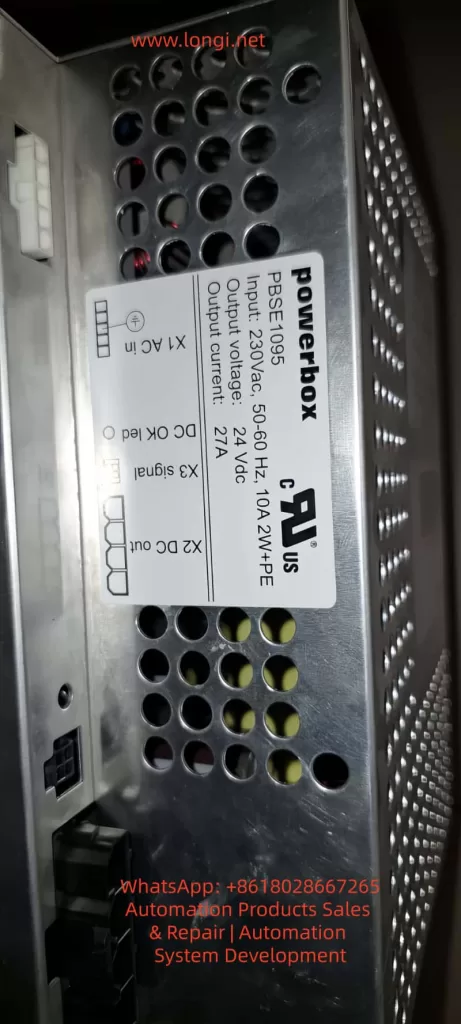
ABB IRC5 Robot Control Cabinet DSQC661 Switched-Mode Power Supply (Powerbox PBSE1095) Fault Diagnosis and Maintenance Technical Guide

The Switched-Mode Power Supply (SMPS) is one of the core components of an industrial robot control system. In the ABB IRC5 series robot control cabinets, the DSQC661 (Powerbox PBSE1095 rev.7) serves as the system power module, responsible for converting 230V AC input into a stable 24V DC output with a rated current of up to 27A and a total power of approximately 648W. This module powers the control panel, I/O boards, computer units, and safety circuits exclusively. Once a “No output” fault occurs, the entire control cabinet cannot be energized, causing the robot system to shut down.

This article uses a real fault case provided by a user (the module has no output after being connected to the control panel; the user suspects the large yellow transformer is damaged) as the starting point. It systematically explains the SMPS working principle, common failure modes, diagnostic procedures, maintenance techniques, and prevention strategies. The content is based on ABB official manuals, general SMPS topology analysis, and practical maintenance experience. It does not rely on public schematics (ABB classifies internal circuit diagrams as proprietary) but achieves precise localization through circuit topology reasoning and component-level testing. The full text focuses on technical details without any redundant descriptions.


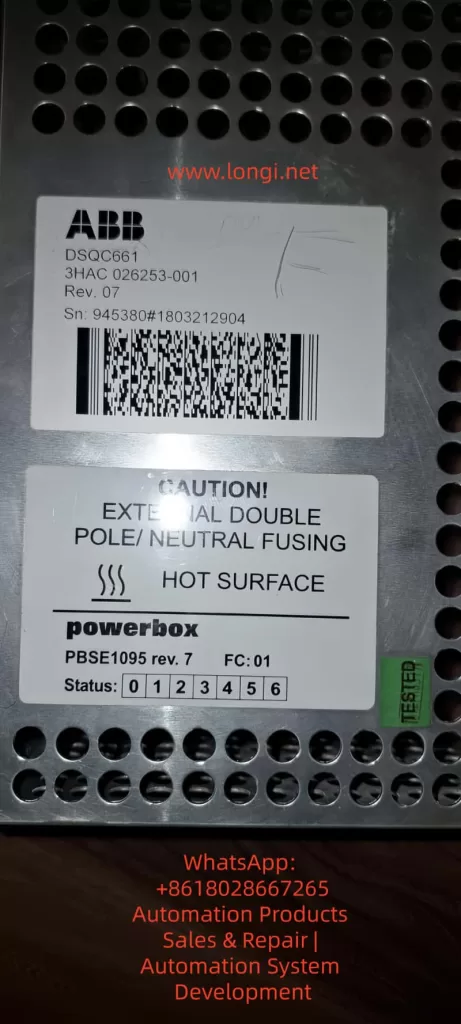
DSQC661 3HAC 026253-001

I. Role of SMPS in Industrial Robots and DSQC661 Specifications

Industrial robot control cabinets have extremely high requirements for power supplies: high efficiency (>85%)low ripple (<100mV)strong anti-interference capability, and strict isolation safety. Traditional linear power supplies are bulky and generate severe heat, having been completely replaced by SMPS. The DSQC661 adopts an offline topology, first using a bridge rectifier to generate a DC bus voltage of approximately 325V, then achieving isolated step-down through high-frequency switching (typically 50-100kHz).

Key Specifications (extracted from module labels and ABB product manuals):

  • Input: 230V AC ±10%, 50-60Hz, 10A, 2W+PE (with protective earth).
  • Output: 24V DC ±5%, 27A continuous, with brief peak overload capability.
  • Efficiency: Typically 88-92% (full load).
  • Protection: Input bipolar fusing, output overvoltage/overcurrent/short-circuit protection, over-temperature shutdown.
  • Indicators: Front panel status LEDs (bits 0-6), DC OK LED (lights up when X2 output is normal), X3 signal interface.
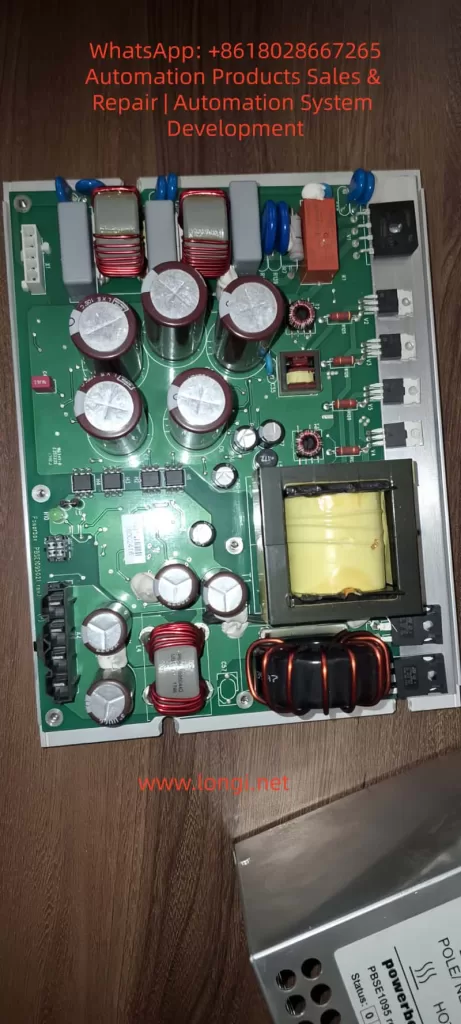
  • Physical: Aluminum housing with ventilation holes; internal PCB contains large-capacity electrolytic capacitors, main transformer (yellow epoxy potted, square core), output choke, and multiple MOSFETs.

Power Calculation Example:
Output power Pout​=Vout​×Iout​=24×27=648W.
Considering efficiency η=90%, input power is approximately 720W, and input current Iin​≈720/230≈3.13A (actually higher due to PFC). Ripple requirements are strict, typically ΔV<50mV, to avoid affecting robot safety circuits.

The DSQC661 internally uses a typical Forward Converter or Half-Bridge topology, rather than a simple Flyback.

  • Reason: An output current of 27A is medium-to-high power; Flyback is suitable for <200W. The Forward Converter provides low ripple and high efficiency through secondary-side inductance filtering.
  • Main Transformer: The large yellow block in photos is a high-frequency isolation transformer. The primary winding withstands 325V pulses, and the secondary multi-output is rectified by Schottky diodes.

Forward Converter Core Equation:

  • Output voltage Vout​=Vin​×D×NpNs​​, where D is the duty cycle (typically 0.2-0.4).
  • Transformer reset requires a third winding or an RCD clamp circuit (red small capacitor + diode commonly seen in photos).
Internal circuitry of PBSE1095

II. DSQC661 Typical Failure Modes and “No Output” Cause Analysis

The symptom “no output after connecting to the control panel” in the user’s case is the most common. Possible causes ranked by probability:

  1. Input Side Failure (Highest probability, ~40%): Fuse blown, bridge rectifier diode shorted, PFC circuit (if present) damaged. Check if terminal X1 AC in has 230V and if the fuse is intact.
  2. Main Electrolytic Capacitor Aging (Probability 30%): Input filter capacitors (multiple large-capacity 450V aluminum electrolytic capacitors in photos) and output filter capacitors (low-voltage large-capacity) bulge, leak, or have increased ESR due to high temperature and ripple current. Bulging capacitors cause unstable bus voltage, leading to overvoltage breakdown of switching tubes and ultimately no output.
  3. Main Transformer Failure (User’s suspicion, Probability 15%): Insulation breakdown, winding short circuit, or open circuit of the yellow potted transformer. Long-term overload or dust causes partial discharge; insulation resistance between primary and secondary <1MΩ results in failure. Symptoms: Input voltage present but no switching ringing sound; transformer heats up or smells burnt.
  4. Switching Devices and Control Circuit (Probability 10%): MOSFET/IGBT breakdown, PWM controller IC (UC384x series or similar) damaged, feedback optocoupler aged. PWM drive signal is 0V when there is no output.
  5. Load Side Short Circuit Protection (Probability 5%): Internal short circuit in the control panel triggers output protection. No-load testing is required.
  6. Others: Output diode short circuit, over-temperature protection lockout, control chip supply missing.

Measured Data: Normal no-load output is 24.0-24.5V; ripple under load <100mV. If output is 0V or <1V, it is a “dead” fault.

PBSE1095

III. Complete Diagnostic Procedure (Recommended 8-Step Method)

Step 1: Safety Preparation
Power off for 10 minutes. Discharge all large capacitors using a 1kΩ/5W resistor (bus voltage can reach 325V DC). Wear an anti-static wrist strap. Prepare a Digital Multimeter (DMM), oscilloscope, insulation resistance tester (Megger), and LCR meter.

Step 2: Visual and LED Inspection
Inspect PCB: Are capacitors bulging? Does the transformer have cracks or burn marks? Is the PCB carbonized?
Front Panel LEDs: Is DC OK lit? What value do status bits 0-6 show? (In ABB manuals, 0 means normal; 1-6 are specific error codes).

Step 3: No-Load Independent Test
Disconnect all loads from X2 DC out, connect only 230V AC.

  • Measure X2 output: Should be 24V DC.
  • If still no output, the fault is in the power supply itself; if there is output, the load is shorted.

Step 4: Input Side Test

  • Measure voltage at X1 AC in terminals (L-N ≈230V, L-PE ≈230V).
  • Check input fuses (internal or external).
  • Voltage across the bus capacitor after rectification should be ≈325V DC (no load).

Step 5: Capacitor and ESR Test
Use an LCR meter to measure ESR of large capacitors (Normal <0.1Ω, high-voltage capacitor <0.05Ω). Bulging capacitors with ESR >1Ω need replacement.

  • Formula: Ripple current Irms​=Iout​D(1−D)​. Aging accelerates failure due to heat.

Step 6: Transformer Special Test (Targeting user’s suspicion)

  • Resistance Method: Primary winding resistance ≈ several to十几 ohms, secondary <1Ω. Open circuit is infinite; short circuit is near 0Ω.
  • Insulation Test: Primary-secondary, primary-ground, and inter-winding insulation measured with 500V Megger should be >10MΩ.
  • Ring Test: Inject a pulse into the primary using an oscilloscope + signal generator and observe the decay waveform. Normal damped oscillation >10 cycles; short circuit causes waveform collapse.
  • Turns Ratio Verification: If an oscilloscope is available, measure the primary/secondary voltage ratio under low-voltage testing.

Step 7: Switching Circuit Dynamic Test
After powering on (with a current-limiting bulb in series for protection), use an oscilloscope to measure the MOSFET gate drive waveform (should be a 10-15V square wave). If no drive, check the PWM IC supply (usually 12-15V auxiliary power).

Step 8: Load Test and Thermal Imaging
Connect a 24V/10A dummy load and monitor temperature (Transformer <80°C, Capacitor <60°C). Use a thermal camera; hot spots indicate the fault point.

If the above steps still fail to locate the fault, it is recommended to send it to an ABB authorized service station (they hold complete schematics) or a professional SMPS repair shop.

IV. Maintenance Operation Standards and Component Replacement Guide

  1. Capacitor Replacement: Prioritize 105°C/2000 hours or longer life models (e.g., Rubycon, Nippon Chemi-Con). Low-voltage large-capacity capacitors on the output side require low ESR series. Use a hot air gun (350°C) for soldering to avoid overheating the PCB.
  2. Transformer Repair or Replacement: If the winding is open, rewinding can be attempted (requires professional equipment to measure turns); insulation breakdown usually requires replacing the whole unit. Pay attention to the yellow potting glue; soften it with isopropanol when disassembling.
  3. MOSFET Replacement: Select the same model or higher voltage rating (≥600V, Rds(on)<0.5Ω). Gate drive parameters must match, and parallel Zener diodes and gate resistors must be replaced.
  4. PWM IC and Optocoupler: Commonly UC3843/3845 or VIPer series. After replacement, the feedback loop (resistor divider + TL431) needs calibration.
  5. Post-Assembly Testing: First no-load, then gradually increase load to 27A. Monitor ripple: Vripple​=f×CIout​×D​ (C is output capacitance). After passing, connect to the robot control panel.

Tool List: Multimeter, Oscilloscope (≥100MHz), Hot air gun, Desoldering pump, Insulation tester, Dummy load (24V power resistor or electronic load).

V. Preventive Maintenance and Reliability Improvement Strategies

  • Regular Inspection: Check capacitor appearance every 6 months, clean ventilation holes, and measure output ripple.
  • Environmental Control: Cabinet temperature <45°C; avoid dust (common in robot workshops). Install additional fans or filter screens.
  • Load Management: Avoid long-term full load; add fuses before control panel short circuits.
  • Upgrade Solutions: If failures are frequent, consider third-party compatible 24V 30A industrial SMPS (need to verify isolation and signal compatibility) or upgrade to the latest rev.8 version.
  • Life Prediction: Capacitor life formula L=L0​×2(T0​−T)/10 (Arrhenius model); life halves for every 10°C rise in temperature.

VI. Real Case Review and Precautions

  • Case 1: DSQC661 in an IRC5 cabinet at an automotive factory had no output. Diagnosis revealed all main filter capacitors were bulging. Restored after replacement. Root Cause: Cabinet temperature was constantly 55°C.
  • Case 2: Transformer insulation breakdown; user smelled a burnt odor. Confirmed by Ring Test and replaced the whole unit; system restarted normally.
  • Case 3: Load short-circuit protection falsely triggered. After no-load testing, a capacitor short on the control panel I/O board was found.

⚠️ Safety Warning:

  • Must discharge before working on the high-voltage side.
  • High-voltage withstand test must be performed after maintenance (>1.5kV AC for 1 minute).
  • Non-professionals are strictly prohibited from attempting this to avoid electric shock or damage to robot safety circuits.

VII. Conclusion and Resource Recommendations

80% of DSQC661 “no output” faults can be located through visual inspection + multimeter + no-load testing. The transformer is not the most common culprit; capacitor aging and switching tube failures are more prevalent. Mastering Forward Converter topology and component-level diagnosis enables efficient maintenance and reduces downtime losses.

Posted on

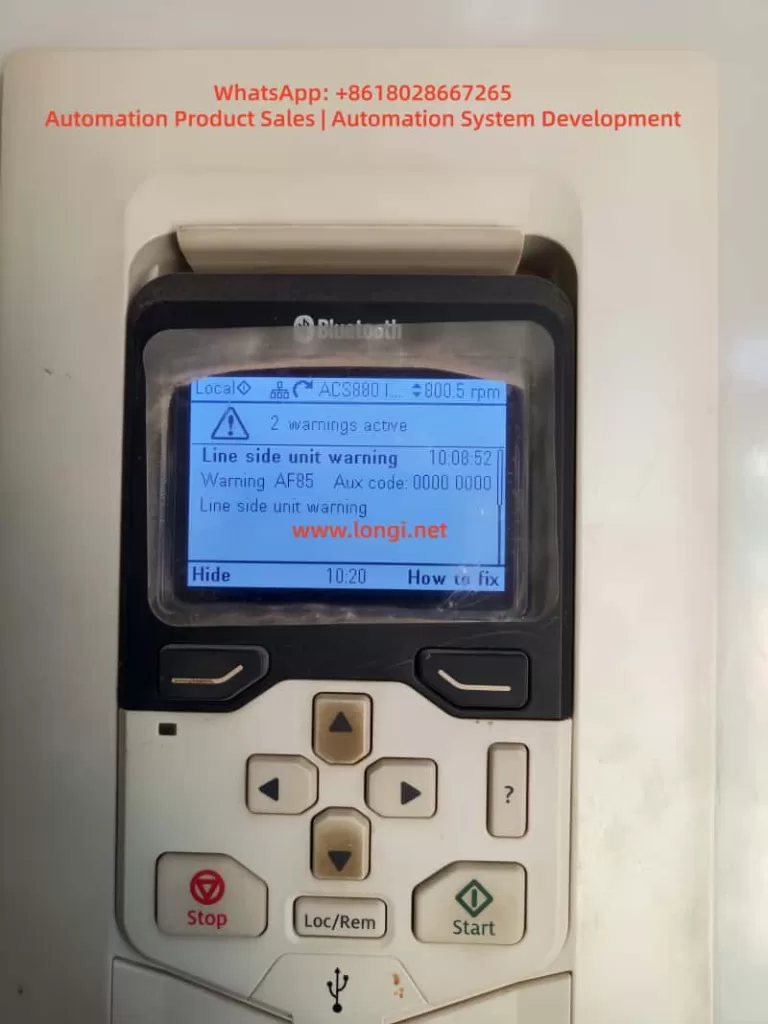
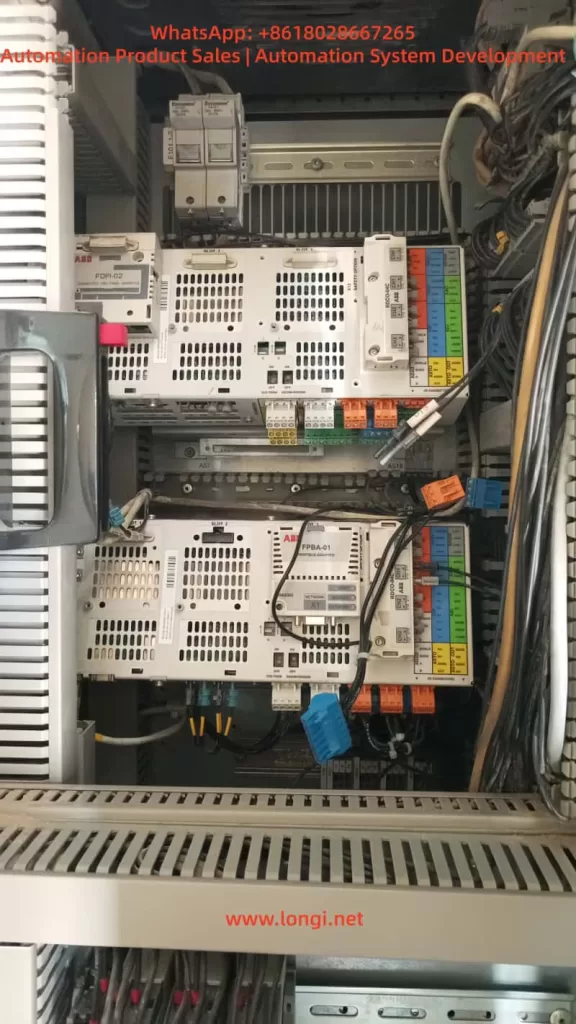
In-depth Troubleshooting Guide for ABB ACS880-07 Cabinet Converter: Systematic Analysis and Recovery of AF85 Line Side Unit Warning and Communication Loss After Dual BCU Battery Replacement

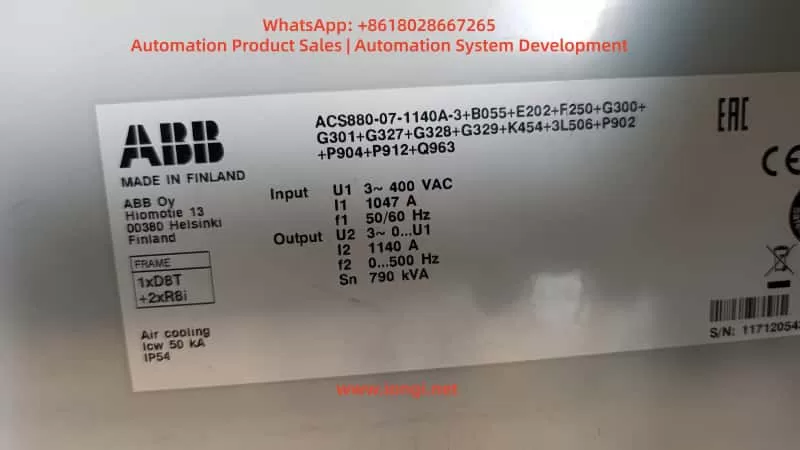
Introduction

The ABB ACS880 series is a benchmark product in the industrial drive field. The ACS880-07 cabinet model is specifically designed for high-power multi-module applications. A typical configuration, as seen in user cases, is the ACS880-07-1140A-3 (rated output 790 kVA, FRAME 1xD8T + 2xR8i). This model adopts air cooling (IP54), three-phase 400 V input, and 1140 A output current, widely used in heavy-duty machinery, fans/pumps, and process production lines.

Its core architecture includes an independent Line Side Unit (LSU, typically a diode-type D8T module) and an inverter unit (2×R8i power modules), managed by two BCU control units (BCU-02/12/22 series):

  • One BCU is responsible for LSU power supply logic;
  • The other is responsible for inverter DTC control and motor output.

In actual operation, the phenomenon where the panel displays “AF85 Line side unit warning” (Aux code 0000 0000) accompanied by “2 warnings active”, followed by a total system failure (“not working at all”) and only one BCU being visible on the panel after replacing the battery for “CPU battery dead” (with RO3 relay output only showing on one side), is a typical composite fault chain in the dual-BCU configuration of the ACS880-07.

This article provides a systematic analysis of the hardware architecture, firmware mechanisms, warning decoding, battery replacement pitfalls, communication recovery, and prevention strategies. It combines official ABB firmware manuals (ACS880 Primary Control Program Firmware Manual, IGBT Supply Control Program Firmware Manual, BCU-x2 Hardware Manual) with practical cases to offer actionable diagnosis and repair paths.

⚠️ Safety Declaration: All operations must strictly comply with the ABB Safety Manual (3AUA0000102301): Cut off main power, close the Q9 grounding switch, and wait for the DC link to discharge to a safe voltage.


ACS880-07-1140A-3

1. ACS880-07 Cabinet Architecture: Multi-Module and Dual BCU Control Logic

The ACS880-07 cabinet adopts a modular stacking design:

  • Left side: Power Supply Unit (D8T frame), responsible for AC-DC rectification;
  • Right side: Parallel R8i inverter modules, providing DTC vector control.

Power parts are connected via busbars, while the control layer relies on BCU (Basic Control Unit) for distributed management.

1.1 BCU Control Unit and Communication Architecture

Unlike the single-unit ZCU, the BCU supports up to 12 channels of optical fiber (BCU-22), dedicated to parallel modules or multi-unit cabinets. Typical configuration:

BCU LocationSlot PositionManaged ObjectCore Functions
BCU1SLOT 2/3 UpperLSU (D8T)Handles charging, MCB closing, DC voltage monitoring
BCU2SLOT 3 Lower2×R8i InvertersHandles motor current sampling, DTC algorithm, RO1/RO2/RO3 relay outputs
  • Communication Link: Uses DDCS (Distributed Drive Control System) optical fiber link (orange/blue POF fiber, max 35 m), supplemented by D2D (Drive-to-Drive) link for status word synchronization.
  • Key Parameter: Parameter 95.20 HW options word 1 determines the INU-LSU communication mode (Bit 11 activates diode supply control, Bit 15 activates IGBT type).
  • Panel Display: The keypad defaults to showing “Main BCU” parameters (visible in Group 96 System info). Switching requires the Diagnostics menu or Drive Composer to view both BCUs simultaneously.

1.2 Hardware Key Points

  • Real-Time Clock Battery (CR2032): Powers the BCU’s RTC and parameter buffer. After power loss, parameters are stored on the SDHC memory card (slot X205).
  • External 24 V Power (XPOW): The BCU must be externally powered (Parameter 95.04 set to External 24V). Redundant input is supported to prevent AFEC warnings.
  • Cooling and Protection: IP54 air cooling, 50 kA short-circuit withstand. Over-temperature triggers AE14/AE16 aux codes directly.

Architecture Conclusion: The AF85 warning inevitably originates from the LSU side, while the “one BCU visible, one BCU lost” phenomenon after battery replacement is a typical manifestation of DDCS link or memory synchronization failure.


Line side unit warning AF85

2. ACS880 Firmware Warning Mechanism and In-depth Analysis of AF85

ACS880 uses a Primary Control Program (main program) and a dedicated Supply Control Program (power supply program). Warnings are divided into:

  • Warning (AFxx): Operation can continue;
  • Fault (Fxxx): Immediate shutdown.

2.1 AF85 Exclusive Mechanism

AF85 is exclusive to “Line side unit warning,” indicating that the LSU (or parallel converter) has generated a warning, which is forwarded to the main BCU panel via DDCS.

  • Generation Principle: The LSU control board (independent firmware) detects an anomaly (e.g., AE01 overcurrent) → generates an original warning → The main BCU receives it and maps it to AF85.
  • Aux Code: This is the original code from the LSU (format XXXX YYYY). In the user case, Aux Code 0000 0000 indicates a “generic unspecified mapping,” requiring a check of the LSU event log for confirmation.

2.2 Official Aux Code Mapping Table (Common Items)

Excerpted from the IGBT/Diode Supply Firmware Manual and Primary FW Manual page 539:

Aux CodeFault NameTroubleshooting Direction
AE01OvercurrentInput fuses, cables, harmonics
AE02Earth LeakageCable insulation (Check Parameter 31.120)
AE04IGBT OverloadCooling fan blockage, ambient temp >40°C
AE09DC Link OvervoltageInput voltage fluctuation, Parameter 195.01 setting
AE0ADC UndervoltagePhase loss, MCB not closed
AE14Over-temperatureParameter 105.111 Line converter temperature
AE73Fan FaultParameter 105.04 Fan on-time counter limit exceeded
AE85Excessive Charging CountParameter 94.10 LSU max charging time (default >2 times within 15s)

Field Tip: The “How to fix” button on the panel points directly to the Event Logger (Group 04). “2 warnings active” indicates a persistent issue on the LSU side. AF85 is only a Warning; the drive can still run at 800 rpm, but if unaddressed, it will escalate to 3E08 LSU charging fault.


FPBA-01,FPDI-02

3. Common Root Causes of AF85 and On-site Diagnosis Process

90% of AF85 issues stem from LSU hardware/environmental problems:

  1. Power Quality: Three-phase 400 V fluctuation > ±10%, harmonic THD > 5% (Check Parameter 01.102 Line current distortion) — Install input reactors.
  2. Cooling System: IP54 filter clogged, cabinet temperature > 45°C (Parameter 05.111 temp percentage > 90%) — Check door intake/top exhaust filters.
  3. Wiring and Protection: Loose input cables, poor grounding, blown fuses (AE02 aux code) — Re-torque (M12 bolts at 18 Nm).
  4. Charging Circuit: MCB closing delay, aging pre-charge resistor (94.10 timeout) — Set Parameter 94.11 LSU stop delay to 600 s.
  5. Parallel Imbalance: Current difference between 2×R8i modules > 5% (AE02) — Check fiber optic connection consistency.

Diagnosis Steps (No Tools Required)

  • PanelDiagnostics → Event log, record the AF85 timestamp (e.g., 10:08:52).
  • Parameters:
    • 06.36 LSU Status Word (Bit 7 = Warning);
    • 06.116 LSU drive status word 1.
    • 95.01 Supply voltage to confirm 400 V.
  • Physical Check: Fans rotating, no loose cables, DC link voltage (01.01) stable.

If the aux code remains 0000 0000, upgrade to the Drive Composer PC tool (USB connected to panel port) to read the LSU-specific event log.


4. Function of BCU RTC Battery and Standard Replacement Procedure

The built-in CR2032 battery (3 V lithium) in the BCU is responsible for:

  • RTC real-time clock (event log timestamps);
  • Temporary storage of parameter buffer (no loss if power off < 5 min);
  • Backing up parameters to the SDHC card (slot X205).

When the battery is dead (BATT LED off), the panel still displays, but event log timestamps become chaotic, and parameter backup fails. This is the typical symptom of “battery dead of CPU.”

⚠️ Standard Replacement Procedure (from BCU-02/12/22 Hardware Manual)

  1. Shutdown: Stop the machine, cut off main power, close Q9, wait for DC discharge (>5 min, multimeter <50 V).
  2. Locate Hardware: Open the cabinet door, locate the BCU (SLOT marking).
  3. Cut Auxiliary Power: Unplug XPOW external 24 V (to prevent residual voltage).
  4. Replace Battery: Unscrew the battery compartment fixing screw (1 piece), remove the old battery (note polarity: + facing up).
  5. Insert New Battery: Insert new CR2032 (ABB original or equivalent, capacity ≥220 mAh).
  6. Reassemble: Screw the cover back on, restore XPOW.
  7. Critical Step: If replacing the BCU unit itself, the SDHC memory card must be transplanted (to maintain parameters)!
  8. Power Up:
    • Panel → 96.51 Clear fault logger;
    • Drive Composer → Backup/Restore all parameters.

❌ Common Errors (Main causes of “bricking”)

  • Hot-swapping: Causes BCU lock-up;
  • Not transplanting memory card: Parameters lost, dual BCU desynchronization;
  • Not saving parameters: Group 96 parameters not cleared or backed up.

5. Root Cause Analysis of “One BCU Visible, One BCU Lost” After Battery Replacement

The phenomenon of the whole machine not working and only one BCU showing RO3 on the panel after battery replacement is essentially dual-BCU communication desynchronization:

  1. RTC/Buffer Cleared: Dead battery causes RTC/buffer to reset to zero. The second BCU (usually the inverter side) fails to complete DDCS synchronization upon power-up.
  2. Fiber Link Fault: Loose/dirty fiber optics (reports AE56 INU-LSU comm loss), bent connectors.
  3. Memory Card Recognition Failure: AE75 SD card error, Parameter 95.14 Connected modules mismatch.
  4. 24 V Power Fluctuation: AFEC External power signal missing, Parameter 95.04 not set to Redundant.
  5. RO3 Visible on One Side Only: Since RO1/RO2/RO3 (XRO1-3) are bound to the Main BCU, the auxiliary BCU not being online makes the parameter group invisible.

Correlation: The customer reported “PLC signals not given” because with the BCU not fully online, the Profibus/FPBA-01 adapter cannot exchange control words.


6. Advanced Diagnosis and Precise Recovery Operations

Step 1: Quick Panel Check

  • Switch BCU ViewDiagnostics → Control unit selection.
  • Check Faulty Modules: 04.25 Faulted modules (BCU specific).
  • Export Log: Use “How to fix” to export timestamps.

Step 2: Drive Composer Deep Recovery (Highly Recommended)

  1. Connect: Connect via USB to the panel or Ethernet (XETH).
  2. Scan: Scan both BCUs simultaneously. Check fiber status (Group 60 DDCS) and Parameter 95.20 bit settings.
  3. Compare: Compare parameters of dual BCUs (especially Group 95 hardware configuration).
  4. Force Synchronization:
    • Backup current parameters → Restore to the lost BCU → Restart (power off for 5 min).
    • View the complete aux code in the event log (instead of 0000 0000).

Step 3: Hardware Verification

  • Fiber Optics: Clean connectors (anhydrous alcohol), confirm TX/RX alignment, no bending (radius >30 mm).
  • Power Supply: Measure XPOW 24 V (dual redundancy).
  • Relays: Check continuity of RO3 relay (XRO3 terminal).
  • Last Resort: If still lost, set Parameter 95.16 Router mode to On (BCU specific), or replace the lost BCU (must transplant memory card).

Step 4: PLC Side Linkage

  • Confirm FPBA-01 adapter parameters (Group 50 FBA A), cyclic data 10/11 (Control Word/Status Word).
  • Crucial: The PLC must only send the start signal after the drive is fully online.

7. Real Case Study: 1140A Dual-BCU System Recovery

  • Device Info: Serial No. 11712054 (Made in Finland), ACS880-07-1140A-3.
  • Fault: Initial AF85 (Aux code 0000 0000, suspected AE73 fan or AE09 voltage). System “bricked” after battery replacement; panel showed only one BCU with RO3.
  • On-site Operation:
    1. Drive Composer Connection: Found inverter BCU fiber link timeout (AE56).
    2. Action: Cleaned fiber connectors + Parameter Restore (full overwrite to lost BCU).
    3. Result: Synchronization successful. Cleared event log.
    4. Reset: Set 94.01 LSU control = On.
  • Outcome: Test run stable at 800 rpm, AF85 disappeared, PLC signals normal.
  • Time Spent: 2 hours (saved tens of thousands of dollars by avoiding module replacement).

8. Best Practices for Preventive Maintenance

To avoid such composite faults, implement the following strategies:

  1. Annual Battery Check: Replace when the BATT LED is lit (lifespan 3-5 years). Do not wait for “CPU battery dead” alarm.
  2. Parameter Backup System: Perform a full backup to PC using Drive Composer monthly and export event logs (.txt/.csv).
  3. Fiber Maintenance: Clean fiber tips every six months. Check bending radius >30 mm to prevent dust accumulation.
  4. Environmental Monitoring: Install temperature/humidity sensors inside the cabinet, linked to AE14 over-temperature warning.
  5. Firmware Upgrade: Confirm the latest Primary/Supply programs (e.g., version 7.24) to fix old communication bugs.
  6. Redundancy Configuration:
    • Set 95.04 to Redundant 24V;
    • Optimize 94.10 charging time based on grid quality.
  7. Training: Operators must master the use of the “How to fix” button and event log export.

9. Conclusion

AF85 is not an isolated warning but a window into anomalies on the LSU side. Battery replacement, though seemingly simple, can easily trigger a system-level crash due to the communication dependency of the dual-BCU architecture.

Mastering DDCS fiber principles, the meaning of Group 95/96 parameters, and the forced synchronization function of the Drive Composer tool enables minute-level positioning and recovery. The power of the ABB ACS880-07 lies in its modularity and diagnostic depth, but this relies on standardized maintenance and documented operations.

Recommendation: All users should download the corresponding manuals and establish an event log archive. For complex cases, contact professional technical support first. Through systematic troubleshooting, you can not only solve current faults but also significantly improve equipment MTBF and ensure production line continuity.

Posted on

In-Depth Analysis of ABB ACS510 Inverter F0018 Fault: Hardware Mechanisms, Troubleshooting Logic, and Resolution Strategies

I. Introduction

The ABB ACS510 series inverter is a widely used general-purpose drive in the industrial sector, renowned for its high reliability, ease of operation, and comprehensive protection functions. It serves as the core control component for equipment such as fans, pumps, and conveyors. However, during long-term operation, the F0018 fault (THERM FAIL) is a frequently encountered “tricky issue” for users. It not only causes sudden shutdowns, disrupting production continuity, but also requires precise troubleshooting due to its involvement with the core protection mechanism of “internal temperature monitoring.”

This article systematically analyzes the handling logic for F0018 faults from five dimensions: fault definition, hardware mechanisms, root cause analysis, troubleshooting steps, and resolution strategies, combined with practical cases. It aims to provide actionable operational guidelines for engineers and technical personnel.

ACS510-01-07A2-4

II. The Essence of F0018 Fault: Failure of Internal Temperature Monitoring System

1. Fault Code Definition

According to the ABB ACS510 User Manual, F0018 corresponds to “THERM FAIL” (Temperature Sensor Fault), described as follows:

Internal fault. The internal temperature thermistor monitoring the drive is open or short-circuited. Please contact your local ABB office.

This fault is a hardware-level protection. When triggered, the inverter immediately blocks the output to prevent damage to power modules caused by overheating due to the failure of temperature monitoring.

2. Hardware Mechanism of Temperature Monitoring

The core of the ACS510 temperature monitoring system is an NTC Thermistor (Negative Temperature Coefficient Thermistor). Its characteristic is that resistance decreases as temperature increases (typically 10kΩ at 25°C, with a B-value of 3950K).

(1) Installation Location of the Thermistor

The thermistor is usually integrated into the power module (IGBT module) or mounted on the heat sink (as a discrete component in some models). It is in direct contact with the heat source to monitor the temperature of power devices in real-time.

(2) Monitoring Logic

The inverter’s CPU reads the resistance value of the thermistor via a voltage divider circuit and converts it into a temperature value (Formula: T=ln(R25​RT​​)+298BB​−273, where RT​ is the current resistance and R25​ is the nominal resistance at 25°C).

  • When the resistance exceeds the normal range (e.g., Open Circuit → Resistance ∞, Short Circuit → Resistance ≈ 0), or the temperature exceeds the threshold (default 90°C), the CPU triggers the F0018 fault.
  • Critical Distinction: Difference between F0018 and “Overheat Fault (F0006)”:
    • F0006: The temperature is genuinely too high (e.g., fan failure, blocked heat sink). The thermistor detects a temperature exceeding the threshold.
    • F0018: The thermistor itself or the circuit is abnormal (e.g., open circuit, short circuit), causing the CPU to fail to read the temperature correctly.
F0018 fault of ACS510 Inverter

III. Core Root Cause Analysis of F0018 Fault

The essence of F0018 is an abnormality in the thermistor monitoring loop. Specific causes can be categorized into four types: hardware damage, wiring issues, environmental factors, and parameter misconfiguration, with hardware damage being the most common (approx.60%).

1. Thermistor Damage (Most Common)

  • Aging: Long-term exposure to high-temperature environments (e.g., frequent temperature fluctuations in power modules) causes the semiconductor properties of the NTC material to degrade. The resistance drifts (e.g., from 10kΩ to 20kΩ at 25°C) and eventually results in an open or short circuit.
  • Mechanical Damage: Pins broken during installation, burned out during soldering, or broken due to vibration during operation.
  • Overload Shock: Motor stall or short circuits cause a sudden temperature spike in the power module, damaging the thermistor due to excessive heat.

2. Wiring Connection Issues (Second Most Common)

  • Loose Connections: Vibration during inverter operation loosens the screws of the thermistor terminals (e.g., X10, X20), causing poor contact (equivalent to an open circuit).
  • Corrosion: In humid environments, terminal oxidation (e.g., verdigris) increases contact resistance. The CPU misinterprets this as an abnormal thermistor resistance.
  • Broken Wires: Rodent bites, external pulling forces, or cold solder joints cause line breaks.

3. Cooling System Failure (Indirect Cause)

  • Fan Failure: If the fan motor is damaged, the bearing is seized, or the fan power line fails (e.g., blown fuse), the heat sink temperature rises.
    • Note: If the thermistor is functioning normally, this should trigger F0006, not F0018. F0018 is only triggered if the cooling failure causes the thermistor itself to overheat and fail.
  • Blocked Heat Sink: Dust, pulp, or oil covering the heat sink prevents heat dissipation. The thermistor remains in a high-temperature environment for long periods, accelerating aging.

4. Environmental and Parameter Factors (Rare but Necessary to Check)

  • Harsh Environment: Installation in dusty (e.g., textile mills), humid (e.g., sewage treatment), or hot (e.g., boiler rooms) environments causes the thermistor to absorb moisture or dust, leading to resistance anomalies.
  • Parameter Misconfiguration: Users accidentally modify temperature monitoring parameters (e.g., setting Group 14, 1401 “Temperature Sensor Type” to “PTC”, or setting 1403 “Temperature Fault Threshold” to 50°C), causing the CPU to misjudge.

5. Power Module Failure (Associated Cause)

  • IGBT Damage: When an IGBT shorts or breaks down, it generates massive heat, which may affect the thermistor (e.g., blowing the pins during an explosion), causing F0018 to trigger simultaneously with F0002 (Overvoltage) or F0003 (Undervoltage).

IV. Systematic Troubleshooting Steps for F0018 Fault

Troubleshooting F0018 must follow the principle of “Safety First, Simple to Complex, Hardware Priority.”

1. Safety Preparation (Critical!)

  • Power Off: Disconnect the inverter’s input power (L1, L2, L3) and hang a “Do Not Energize” sign.
  • Discharge: Use a multimeter to measure the DC bus voltage (+DC, -DC). Ensure it is below 36V (safe voltage) before proceeding. Note: The DC bus voltage of ACS510 is approx 1.35x the input voltage (e.g., 540V for 380V input). Wait 5-10 minutes for discharge.
  • Verify: Use a voltage tester to confirm no voltage on the power side.

2. Visual Inspection (Quick Location of Obvious Issues)

Open the inverter front door and observe:

  • Thermistor Appearance: Are the pins broken or burned? Is the body cracked? (If integrated into the power module, check for explosion marks on the module).
  • Cooling System: Is the fan rotating? (If not fully powered down, briefly energize to observe). Is the heat sink covered in heavy dust or oil?
  • Wiring: Are the thermistor terminals loose or oxidized (e.g., blackened terminals, loose screws)?

3. Thermistor Resistance Measurement (Core Step)

  • Locate: Find the thermistor position according to the manual (usually labeled “TH,” “TEMP,” or near the power module).
  • Tool: Use a digital multimeter (accuracy ≥ 0.5%) on the Resistance Range (20kΩ or 200kΩ).
  • Method:
    1. Disconnect the thermistor from the inverter to avoid line interference.
    2. Measure the resistance between the two pins. At room temperature (25°C), the nominal value should be 10kΩ ± 10% (e.g., ABB spare part 1SFA896108R7000 is 10kΩ at 25°C).
    3. Hold the thermistor in your hand (simulate heating) and observe if the resistance decreases (NTC characteristic). If there is no change, the thermistor is damaged.
  • Judgment Criteria:
    • Resistance = ∞ → Open Circuit.
    • Resistance ≈ 0 → Short Circuit.
    • Resistance deviates from nominal by ±20% → Aged/Defective.

4. Line Continuity Check

  • Tool: Multimeter Continuity Mode (Buzzer).
  • Steps:
    1. Locate the thermistor terminals on the Control Board (CPU board) (e.g., X10-1, X10-2).
    2. Measure continuity between the terminal and the thermistor pin. If there is no beep, the line is broken.
    3. Check terminal torque (M3 screws should be 0.8-1.0 N·m). If loose, tighten and polish oxidation with sandpaper or alcohol.

5. Cooling System Check

  • Fan Test:
    1. Disconnect the fan power plug.
    2. Measure voltage across the fan terminals (should be 24V DC or 380V AC depending on model).
    3. If voltage is normal but the fan doesn’t spin, the fan is damaged (replace with same model).
    4. If voltage is abnormal, check the fan power circuit (fuses, relays).
  • Heat Sink Cleaning: Blow out dust from heat sink fins using compressed air (pressure ≤ 0.2 MPa) or brush with a soft brush. Caution: Do not touch sensitive components like power modules or capacitors.

6. Environment and Parameter Check

  • Environment: If dusty, install a dust filter (clean every 1-2 weeks). If humid, install a dehumidifier or heater (maintain humidity ≤ 80%).
  • Parameters: If misconfiguration is suspected, use Parameter 9902 (Reset to Factory Settings)Warning: This clears user-defined parameters; back up first.

7. Substitution Test (Final Verification)

If the above steps yield no results, replace the thermistor with a spare part of the same model (ensure model match: NTC 10kΩ/25°C, B-value 3950K).

  • If F0018 clears, the original thermistor was damaged.
  • If the fault persists, inspect the Control Board’s temperature monitoring circuit (voltage divider resistors, op-amps). Contact ABB or professional repair services at this stage.

V. Resolution Strategies and Case Studies

1. Solutions for Common Scenarios

Fault CauseResolution Strategy
Thermistor Open/ShortReplace with same model (ABB Part: 1SFA896108R7000). Solder securely and tighten connections.
Loose/Oxidized TerminalsPolish oxidation, apply conductive grease, and tighten screws to specified torque.
Blocked Heat Sink / Fan FailureClean dust, replace fan, install dust filter.
Harsh EnvironmentRelocate to ventilated room; install dust/dehumidification equipment.
Parameter ErrorReset to factory settings (Param 9902); reconfigure essential parameters.
Associated Power Module FailureReplace power module (e.g., 1SFA896107R7000 for ACS510-01-07A2-4) and thermistor.

2. Practical Case Studies

Case 1: Chemical Plant Agitator Motor Inverter F0018

  • Equipment: ABB ACS510-01-07A2-4 (7.5kW), driving an agitator in a chemical workshop (high dust).
  • Phenomenon: Sudden stop during operation, displaying F0018.
  • Troubleshooting:
    1. Safety: Power off, discharge. DC bus voltage confirmed 0V.
    2. Visual: Heat sink covered in chemical dust; fan jammed by dust. Thermistor pins intact but dusty.
    3. Resistance: Disconnected thermistor; measured ∞ (Open Circuit).
    4. Wiring: Terminals tight; continuity normal.
    5. Cooling: Cleaned dust from heat sink and fan; fan resumed rotation.
  • Solution: Replaced thermistor (1SFA896108R7000), cleaned dust, installed dust filter.
  • Result: Cleaning filter every 3 months; fault did not recur.

Case 2: Elevator Factory Inverter F0018

  • Equipment: ABB ACS510-01-012A-4 (11kW), driving an elevator motor in a well-ventilated machine room.
  • Phenomenon: F0018 triggered frequently; restart allowed brief operation.
  • Troubleshooting:
    1. Safety: Power off, discharge.
    2. Visual: Heat sink clean; fan spinning normally. Thermistor pins OK.
    3. Resistance: Measured 15kΩ (should be 10kΩ at 25°C) – significant deviation.
    4. Wiring: Terminals oxidized, causing poor contact.
  • Solution: Sanded terminal oxidation, applied conductive grease, tightened screws. Re-measured resistance: 10kΩ. Fault cleared upon power-up.
  • Analysis: Oxidation increased contact resistance. The CPU read 15kΩ (implying ~15°C) while the actual temperature was normal. This logic contradiction triggered F0018.

3. When to Contact ABB Office

  • The thermistor is integrated into the power module (common in compact models) and cannot be user-replaced.
  • The cause cannot be determined after troubleshooting (e.g., suspected control board circuit failure).
  • The inverter is under warranty (self-disassembly voids warranty).
  • Calibration of the temperature system is required (e.g., high-precision monitoring in large drives).

VI. Preventive Measures for F0018 Fault

1. Regular Maintenance (Key)

  • Every 1-3 Months: Clean heat sink dust, check fan operation, measure thermistor resistance (compare with nominal).
  • Every 6-12 Months: Check terminal torque, clean oxidation, back up parameters.
  • Every 2-3 Years: Replace fans (lifespan ~20,000 hours), test thermistor aging (replace if resistance deviates >10%).

2. Improve Operating Environment

  • Install in a well-ventilated, dust-free, low-humidity location (Temp: -10°C ~ 40°C, Humidity: 10% ~ 80%).
  • Avoid proximity to heat sources (motors, transformers); maintain ≥500mm clearance.
  • Install dust filters (intake), dehumidifiers (humid), or air conditioners (hot).

3. Avoid Overload Operation

  • Ensure motor load does not exceed inverter rating (e.g., 7.5kW inverter for 7.5kW motor; avoid sustained 10%+ overload).
  • Set overload protection parameters (e.g., Group 15, 1501 “Overload Current Threshold” to 110% rated current) to prevent motor stalls.

4. Parameter Management

  • Prohibit casual modification of temperature monitoring parameters (Group 14: 1401~1403).
  • Regularly back up parameters using ABB Drive Composer software.

VII. Conclusion

The F0018 fault is a typical manifestation of internal temperature monitoring system failure in ABB ACS510 inverters. Its core cause is abnormality in the thermistor or its wiring. Troubleshooting should follow the logic of “Safety → Visual → Resistance → Wiring → Cooling → Environment,” prioritizing hardware issues (thermistor, wiring) before considering environmental or parameter factors.

Resolution strategies must be precise: replace hardware if damaged, repair wiring, or improve the environment. For integrated thermistors or complex circuit faults, contact ABB promptly to avoid further damage.

Prevention is paramount: Regular maintenance, environmental control, and avoiding overloads can reduce F0018 occurrence by over 80%. Mastering the troubleshooting logic outlined above enables engineers to restore production quickly and ensure equipment reliability.

Posted on

ABB ACH580 Inverter Troubleshooting Complete Guide: Detailed Analysis and Solutions for Motor Overload (7122), Short Circuit (2340), and Current Measurement Calibration Fault (2281)

The ABB ACH580 series inverter, as a dedicated drive for HVAC applications, is widely used in fans, pumps, and air conditioning systems. Its stable operation directly impacts building energy efficiency and equipment lifespan. However, users frequently encounter the “2 faults active” panel alarm, accompanied by fault codes 7122 (Motor overload), 2340 (Short circuit), and 2281 (Current measurement calibration fault). Based on the ABB official firmware manual (ACH580 HVAC control program firmware manual), Calibration Fault 2281 technical note (LVD-EOTKN111U-EN), and actual field cases, this article systematically sorts out the causes, diagnostic logic, and troubleshooting steps of these faults to help engineers, maintenance personnel, and equipment owners quickly locate problems and avoid downtime losses.


Fault 2281

Overview of ACH580 Inverter Fault Mechanism

The ACH580 adopts vector control technology with built-in high-precision current sensors to monitor the U/V/W three-phase output current in real-time. The fault protection logic is completed by the coordination of the control board and the power unit:

  • 7122 Motor overload: Triggered when the motor thermal model (I²t) or measured current exceeds the threshold.
  • 2340 Short circuit: The power unit detects an output short circuit or a mismatch in status feedback.
  • 2281 Calibration: The current measurement offset or the difference between U2 and W2 phase values exceeds the limit (updated during calibration).

The panel displaying “2 faults active” indicates that at least two faults are activated simultaneously, often accompanied by an Aux code (such as 00000003 for 2281). These faults are not isolated; they often form a chain: motor/cable issues first trigger a 2340 short circuit, which causes current measurement inaccuracy triggering 2281, while load abnormalities叠加 a 7122 overload. This article will break them down one by one and provide an end-to-end diagnostic process.


Fault 2340

In-depth Interpretation of Three Major Fault Codes

1. Fault 7122: Motor Overload

  • Official Description (ACH580 Firmware Manual): Motor current is too high.
  • Aux code: Usually 0000 0000.
  • Trigger Conditions: Actual output current exceeds the motor’s rated value, or the cumulative I²t of the thermal model reaches 100%.
  • Common Causes:
    • Mechanical overload caused by fan/pump load jamming, bearing wear, or valves not opening.
    • Ambient temperature > 40°C or motor cooling fan failure.
    • Improper parameter settings: 35.51 Motor load curve, 35.52 Zero speed load, 35.53 Break point do not match the actual load curve; 35.55/35.56 action levels are too strict.
    • Voltage fluctuations or unstable power supply amplifying current peaks.
  • Risk: Continuous operation may burn out motor windings or IGBT modules.

2. Fault 2340: Short Circuit

  • Official Description: Short circuit in motor cable or inside the motor (monitored by the power unit).
  • Aux code (Common in R6 and above models): 0001~0020 indicates IGBT upper/lower tube short circuit; 0080 indicates output phase status feedback mismatch with control signal; 0040 indicates DC bus capacitor short circuit.
  • Trigger Conditions: Instantaneous sudden change in output current or phase-to-phase/ground resistance < specified value.
  • Common Causes:
    • Motor cable insulation damage, loose connections, aging, or rodent bites.
    • Motor windings damp, burnt, or incorrect star-delta connection.
    • Installation Taboo: Connecting power factor compensation capacitors or surge absorbers to the motor cable (explicitly prohibited by ABB).
    • Cable is too long (>100m) causing capacitive current superposition.
  • Chain Effect: The current peak at the moment of short circuit interferes with the sensor, easily inducing a subsequent 2281 calibration fault.

3. Fault 2281: Current Measurement Calibration Fault

  • Official Description (ACH580/ACQ580/ACS580 Manual & LVD-EOTKN111U-EN Technical Note): The output phase current measurement offset is too large, or the difference between U2 and W2 phase measurements is too large (updated during calibration).
  • Key Aux code Interpretation (ACH580 Specific Table):
    • 0001: U-phase current offset too high.
    • 0002: V-phase current offset too high.
    • 0003: W-phase current offset too high (Typical for cases in this article, Aux code 00000003).
    • 0004: Inter-phase gain difference is too large.
  • Trigger Conditions: During power-up or ID run, the drive automatically calibrates the three-phase current sensors and detects a deviation exceeding the limit (typical threshold 0.5%~1%).
  • Common Causes (Priority Order):
    1. Motor cable/W-phase wiring is loose, has poor contact, or is oxidized (accounts for 70% of field cases).
    2. Motor windings are asymmetrical, long cable capacitance effect, or ground fault.
    3. Power board current sensor hardware aging/damage (if reported even at no-load, 90% is this cause).
    4. Parameter Group 99 motor nameplate data does not match reality, or current calibration was not performed.
  • Technical Essence: ACH580 vector control relies on precise current feedback (basis of Park transformation). W-phase offset causes torque ripple, efficiency drop, and even IGBT overheating.

Timeline Case Correlation: 11:27:53 triggered 7122 overload → 11:30:33 triggered 2340 short circuit → 11:32:07 triggered 2281 calibration (W-phase), fully conforming to the chain logic of “Load abnormality → Short circuit → Sensor inaccuracy”.


Fault 7122

Root Cause Analysis and Logic Chain

Field data shows that when 2281 and 2340 appear simultaneously, over 90% originate from the motor side (cable/winding), not the drive hardware. The logic chain is:

  1. Cable/W-phase issue → 2340 short circuit protection.
  2. Transient current from short circuit disturbs sensor → 2281 calibration fails (especially W-phase).
  3. Load remains high → 7122 overload叠加.

Other Secondary Factors: Power supply harmonics, incorrect motor data in parameters 99.03~99.12, humid environment (common in US sites). If 2281 is still reported with the motor completely disconnected, the probability of hardware failure is >80% (power board or whole unit needs replacement).


Safety Precautions and Tool Preparation

⚠️ Mandatory Steps (Compliant with IEC 61800-5-1 and ABB Manual):

  1. Disconnect the main power supply and hang a “Do Not Energize” sign.
  2. Wait at least 5 minutes for the DC bus capacitors to discharge (measure UDC+~UDC- voltage < 30V).
  3. Use a 500V insulation resistance tester, multimeter, and clamp meter.
  4. Wear insulating gloves and confirm no residual voltage.

Prohibited: Unplugging motor cables while energized; resetting without discharging.


Step-by-Step Troubleshooting Process (Recommended completion time: 30~60 minutes)

Phase 1: Hardware Inspection (Isolate Root Cause, Execute First)

  1. Disconnect the motor cable (U/V/W+PE).
  2. Measure:
    • Motor three-phase to ground insulation ≥ 5MΩ (500V range).
    • Cable three-phase to ground ≥ 100MΩ.
    • Focus on checking W-phase connector for burn marks, looseness, or oxidation.
  3. Visually inspect the cable for damage, oxidized connectors, or non-standard installation (vibration is common in US sites).
  4. Remove any PFC capacitors or surge protection devices from the motor cable.

Judgment:

  • Low insulation → Replace cable/motor.
  • Still reports 2281/2340 at no-load power-up → Drive hardware failure (contact ABB).

Phase 2: No-Load Test and Reset

  • Disconnect motor cable, then power up.
  • Enter Diagnostics → Active faults, record all codes and timestamps.
  • Press “Reset” on the panel to clear.
  • If faults disappear → Problem is on the load side; if still reported → Hardware or calibration parameter issue.

Phase 3: Perform Current Calibration (For 2281)

Parameter Path: 99.13 ID run requested.

  1. Set to “4 = Current measurement calibration” (Only supported by R6 and above; R1~R5 require a full ID run).
  2. Ensure the motor is disconnected or at no-load, then start calibration (panel shows progress).
  3. Restore 99.13=0 after success.
  4. If it fails → Check W-phase wiring and execute again; if it still fails, replace the unit.

Phase 4: Handle 7122 Overload

  • Check actual load current (Panel 01.07 Motor current).
  • Parameter Adjustment (Caution):
    • 35.51~35.53: Optimize load curve (refer to motor nameplate).
    • 35.55~35.56: Temporarily increase overload action threshold (but do not cancel protection).
    • 35.57 Motor overload class: Set to 10 (IEC standard).
  • Confirm motor ambient temperature < 40°C and cooling is good.

Phase 5: Comprehensive Test and Parameter Verification

  1. Gradual recovery: No-load test run → Light load → Full load.
  2. Monitor Diagnostics → Fault history (last 5 faults + 20 events).
  3. Verify Group 99 motor data (99.04~99.12) matches the nameplate.
  4. Enable auto-reset (31.12 Autoreset) only in safe applications (must mark “Auto-restart” warning).

Complete Flowchart Logic: Hardware Check → No-Load Reset → Calibrate 2281 → Adjust Group 35 → Full Load Verify → Record Logs.


Advanced Diagnostic Tips and Preventive Maintenance

Fault Data Recorder

The Drive Composer PC tool can capture 22,000 sampling points at 500μs intervals before a fault, precisely locking the current waveform at the trigger moment.

Preventive Strategies (Reduce recurrence rate by 80%)

  • Annual Calibration: Perform 99.13 current calibration once a year.
  • Cable Specification: Use shielded cables; add output filters (du/dt or sine filter) if length > 50m.
  • Regular Inspection: Regularly measure insulation resistance and motor temperature (35.02/35.03).
  • Wiring Isolation: Avoid running motor cables parallel to control lines.
  • Environment Control: IP55 cabinet + anti-condensation heater.
  • Parameter Backup: Use Drive Composer to export the complete parameter set.

Maintenance Cycle

  • Monthly: Panel cleaning, fan inspection.
  • Semi-annually: Insulation test + calibration.
  • Annually: Full ID run (vector mode).

Case Study: ACH580 Field Fault for a US Customer

Site: A US HVAC site. The ACH580 panel showed “2 faults active” with timestamps in sequence:

  • 11:27:53 → 7122 Motor overload
  • 11:30:33 → 2340 Short circuit (Aux 00000000)
  • 11:32:07 → 2281 Calibration (Aux 00000003, W-phase offset)

Diagnostic Process:

  1. Disconnected cable → Insulation was normal, but the W-phase connector was slightly loose.
  2. Tightened connection + Executed 99.13 current calibration → 2281 cleared.
  3. Adjusted 35.51~35.53 load curve → 7122 no longer triggered.
  4. Ran at full load for 24 hours without alarms; system restored.

Note: If 2281 is still reported at no-load, replace the drive directly (high probability of hardware failure).


Frequently Asked Questions (FAQ)

Q1: What does Aux code 00000003 specifically mean?
A: W-phase current offset is too high. Prioritize checking W-phase wiring and cables.

Q2: What to do if 2281 is still reported at no-load?
A: Drive current sensor or power board failure. Return to factory or replace the unit.

Q3: Can 2281 be temporarily masked?
A: No. Calibration failure leads to vector control inaccuracy, torque ripple, and even IGBT damage.

Q4: How to adjust parameters if 7122 triggers repeatedly?
A: Check the load first, then fine-tune the Group 35 curve; do not blindly increase 35.56.

Q5: Is the Drive Composer tool necessary?
A: Highly recommended for the fault data recorder and parameter backup.


When to Contact ABB Official Service

  • 2281/2340 still reported during no-load testing.
  • Calibration fails multiple times.
  • Drive serial number is within warranty period ( provide nameplate photo, fault log, insulation measurement values).
  • Complex applications (such as parallel operation or special motors).

ABB US local service responds quickly, usually providing on-site support or spare parts within 24~48 hours.


Conclusion: Closed-Loop Management from Fault to Prevention

The faults 7122, 2340, and 2281 of ACH580 seem complex, but they actually follow a clear logic of “Cable → Sensor → Load”. Mastering the 99.13 current calibration, Group 35 thermal protection, and systematic insulation testing can reduce downtime from days to hours. It is recommended that all users establish a “Fault Log + Annual Calibration” system and realize digital maintenance combined with the Drive Composer tool.

Posted on

A Complete Guide to 30 Common Alarm Codes of ABB ACS880 Inverter: Detailed Explanations and Maintenance Instructions (Comprehensive Fault Troubleshooting Manual)

In modern industrial automation systems, the Variable Frequency Drive (VFD) is one of the core components of motor control systems. With the increasing requirements for energy efficiency, precise control, and automation levels in industrial equipment, VFDs have been widely used in fans, pumps, conveying equipment, compressors, and various production lines.

As a new-generation high-performance drive product from ABB, the ABB ACS880 inverter holds a very high market share in the global industrial sector. This series of drives is widely applied in industries such as steel, mining, chemicals, textiles, papermaking, food processing, and new energy due to its high reliability, modular design, and powerful control functions.

However, during long-term operation, any industrial equipment may experience alarms or faults. For maintenance engineers, quickly identifying the alarm codes of the inverter and determining the fault causes are crucial for restoring production.

This article systematically organizes 30 common alarm codes of the ACS880 inverter and provides detailed explanations of their meanings, common causes, and troubleshooting methods, serving as a practical technical reference guide for field engineers.


ACS880 inverter

I. Classification of ABB ACS880 Alarm Codes

The alarm system of the ACS880 is mainly divided into two categories:

1. Warning

A warning indicates that the system operating conditions are not met, but the equipment itself is not damaged.

Characteristics:

  • The equipment can continue to operate or remain in standby mode.
  • Control conditions need to be checked.

Examples:

  • Run Enable Missing
  • Emergency Stop

2. Fault

A fault indicates that the system has detected an abnormal state, and the drive must stop operating.

Characteristics:

  • The motor stops.
  • Resetting is required before operation can resume.

Examples:

  • Overcurrent
  • Overvoltage
  • Motor overload

II. List of Common ACS880 Alarm Codes

Below is a list of the 30 most common ACS880 alarm codes.

CodeAlarm Name
AE50Emergency Stop
AE5BRun Enable Missing
F0001Overcurrent
F0002DC Bus Overvoltage
F0003DC Bus Undervoltage
F0004Drive Overtemperature
F0005Motor Overtemperature
F0006Motor Stall
F0007Earth Fault
F0008Short Circuit
F0009Communication Fault
F0010Encoder Fault
F0011Parameter Error
F0012Brake Resistor Overload
F0013Motor Phase Loss
F0014Supply Phase Loss
F0015Speed Feedback Loss
F0016STO Active
F0017Current Measurement Fault
F0018Memory Fault
F0019Control Board Fault
F0020Cooling Fan Fault
F0021Fieldbus Communication Loss
F0022Torque Limit
F0023Speed Limit
F0024Internal Hardware Fault
F0025DC Bus Ripple
F0026Parameter Memory Error
F0027AI Signal Loss
F0028DI Configuration Error

The following provides a technical analysis of each of these alarms.


ACS550 inverter

III. Detailed Explanations of Common ACS880 Alarm Codes

1. AE50 – Emergency Stop

Meaning:

The drive has received an emergency stop signal.

Common Causes:

  • The emergency stop button is pressed.
  • The safety relay is disconnected.
  • The PLC safety output is triggered.

Solutions:

  • Check the emergency stop circuit.
  • Check the safety relay.
  • Check the STO signal.

2. AE5B – Run Enable Missing

Meaning:

No run enable signal is received.

Common Causes:

  • DI1 is not connected to 24V.
  • The PLC has not sent a Run Enable signal.
  • The safety circuit is disconnected.

Solutions:

Check the digital input terminals.

3. F0001 – Overcurrent

Meaning:

The motor current exceeds the allowable range.

Common Causes:

  • Motor stall.
  • Mechanical jamming.
  • Too short acceleration time.

Solutions:

Check the load and parameter settings.

4. F0002 – DC Bus Overvoltage

Meaning:

The DC bus voltage is too high.

Common Causes:

  • Too fast deceleration.
  • Excessive regenerative energy.

Solutions:

  • Increase the deceleration time.
  • Install a brake resistor.

5. F0003 – DC Bus Undervoltage

Meaning:

The bus voltage is too low.

Common Causes:

  • Low grid voltage.
  • Poor power supply contact.

Solutions:

Check the input power supply.

6. F0004 – Drive Overtemperature

Meaning:

The internal temperature of the drive is too high.

Causes:

  • Poor heat dissipation.
  • Fan damage.
  • High ambient temperature.

7. F0005 – Motor Overtemperature

Meaning:

The motor temperature exceeds the allowable range.

Causes:

  • Overload.
  • Poor cooling.

8. F0006 – Motor Stall

Meaning:

The motor is stalled.

Causes:

  • Excessive load.
  • Mechanical jamming.

9. F0007 – Earth Fault

Meaning:

The motor or cable has a ground leakage.

Causes:

  • Motor insulation damage.
  • Cable damage.

10. F0008 – Short Circuit

Meaning:

Output short circuit.

Causes:

  • Motor winding short circuit.
  • Cable short circuit.

IV. Communication and Encoder Faults

11. F0009 – Communication Fault

Meaning:

Control system communication failure.

Causes:

  • PLC communication disconnection.
  • Modbus failure.

12. F0010 – Encoder Fault

Meaning:

Encoder signal abnormality.

Causes:

  • Encoder damage.
  • Wiring error.

13. F0011 – Parameter Error

Meaning:

Parameter configuration error.

Causes:

  • Parameter out of range.
  • Parameter conflict.

V. Hardware and System Faults

14. F0012 – Brake Resistor Overload

Brake resistor overload.

15. F0013 – Motor Phase Loss

Motor phase loss.

16. F0014 – Supply Phase Loss

Input power phase loss.

17. F0015 – Speed Feedback Loss

Speed feedback signal loss.

18. F0016 – STO Active

Safe torque-off activated.

19. F0017 – Current Measurement Fault

Current measurement abnormality.

20. F0018 – Memory Fault

Internal memory error.

VI. Control Board and Hardware Issues

21. F0019 – Control Board Fault

Control board failure.

22. F0020 – Cooling Fan Fault

Fan damage.

23. F0021 – Fieldbus Communication Loss

Fieldbus communication interruption.

24. F0022 – Torque Limit

Torque limit reached.

25. F0023 – Speed Limit

Speed limit reached.

VII. System Parameter and Signal Faults

26. F0024 – Internal Hardware Fault

Internal hardware abnormality.

27. F0025 – DC Bus Ripple

Excessive DC bus ripple.

28. F0026 – Parameter Memory Error

Parameter storage error.

29. F0027 – AI Signal Loss

Analog input signal loss.

30. F0028 – DI Configuration Error

Digital input configuration error.

VIII. General Steps for ACS880 Fault Troubleshooting

When performing on-site maintenance, the following steps can be followed for inspection:

Step 1

Check the alarm code.

Step 2

Check the control circuit.

Step 3

Check the motor and load.

Step 4

Check the input power supply.

Step 5

Check the drive hardware.

IX. Maintenance Recommendations for Inverters

To reduce the occurrence of faults, the following maintenance measures can be taken:

  • Regularly clean the heat sink.
  • Check cable connections.
  • Back up parameters.
  • Regularly test motor insulation.

Conclusion

The ABB ACS880 inverter, as a core component in industrial automation systems, provides important safety protection for equipment operation through its alarm system. Correctly understanding the meanings of alarm codes and mastering systematic troubleshooting methods can significantly improve equipment maintenance efficiency and reduce production downtime.

For maintenance engineers, being familiar with these common alarm codes not only enables quick problem localization but also allows for the proactive prevention of potential faults during equipment maintenance and system design.

By establishing standardized maintenance procedures and a technical data library, industrial equipment can operate stably for a long time, thereby improving production efficiency and reducing maintenance costs.

Posted on

ABB ACS880 Inverter: Causes and Complete Troubleshooting Guide for “Emergency Stop” and “Run Enable Missing” Alarms

In industrial automation systems, variable frequency drives (VFDs) are one of the core devices in motor control systems. When alarms occur or the equipment fails to start during operation, quickly and accurately determining the cause is crucial for production recovery.

During the use of ABB’s new-generation high-performance drive, the ABB ACS880, field engineers often encounter the following alarms:

  • AE50 – Emergency Stop (OFF2)
  • AE5B – Run Enable Missing

Many maintenance personnel may mistakenly assume that the inverter itself has malfunctioned when encountering these two alarms for the first time. However, in most cases, these two alarms are not caused by hardware failures but by missing safety circuit or control signals.

This article will provide a detailed explanation from the perspective of industrial control principles, covering the following aspects:

  • The meaning of the ACS880 Emergency Stop alarm
  • The logical relationship of the Run Enable Missing alarm
  • The control circuit structure of the ACS880
  • The working principle of the safety circuit (Emergency Stop / STO)
  • On-site troubleshooting steps and diagnostic methods

Through this technical analysis, engineers can locate the problem and restore equipment operation within minutes on site.


warning AE58 of ACS880

I. Interpretation of Alarms on the ABB ACS880 Inverter

When the following information is displayed on the ACS880 control panel:

Emergency stop (OFF2)
Warning AE50
Emergency stop command received

or

Run enable missing
Warning AE5B
No run enable signal received

This indicates that the inverter has received a control logic signal prohibiting operation.

It should be noted that:

Warning and Fault are different.

StatusMeaning
WarningOperating conditions are not met
FaultEquipment malfunction

Therefore, when AE50 or AE5B occurs:

The drive itself is usually normal; only the operating conditions are not met.


II. Three Stop Modes of ABB Inverters

The stop logic of ABB drives complies with international industrial safety control standards and mainly consists of three stop modes:

OFF1 — Normal Stop

The motor stops according to the set deceleration time.

Application scenarios:

  • Normal production shutdown
  • PLC-controlled stop

OFF2 — Emergency Stop (Emergency Stop)

This is a safety stop mode.

Characteristics:

  • The motor stops immediately
  • The drive is locked by the safety system

Trigger sources:

  • Emergency stop button
  • Safety relay
  • PLC safety output

OFF3 — Free Stop

The drive immediately disconnects the output, and the motor stops due to inertia.


When the ACS880 displays:

Emergency stop (OFF2)

It means:

The drive has received an emergency stop signal.


warning AE5B of ACS880

III. The Role of the Run Enable Signal

In the ABB ACS880 system, two basic conditions must be met for the motor to operate:

  1. Run Enable (Operating permission)
  2. Start Command (Starting command)

Only when:

Run Enable = TRUE
Start Command = TRUE

will the drive operate.

If the Run Enable signal is missing, the drive will display:

Run enable missing

In this case, even if the Start button is pressed, the motor will not start.


IV. Typical Control Circuit Structure of the ACS880

In industrial settings, the ACS880 is usually controlled by a PLC or safety system, and its typical wiring structure is as follows:

24V control power supply
      │
      │
 Emergency stop button (NC)
      │
      │
 Safety relay
      │
      │
 Run Enable input (DI1)
      │
      │
 ACS880 control board

In this circuit:

  • The emergency stop button is used for emergency stops
  • The safety relay is used for safety control
  • DI1 serves as the operating permission input

If any link in the circuit is broken:

DI1 loses 24V

The drive will consider the operating conditions to be unmet.


V. STO (Safe Torque Off) Function

In many ACS880 systems, the STO (Safe Torque Off) safety function is also used.

The role of STO is:

To immediately shut off the motor torque output under safe conditions.

The STO circuit usually consists of two independent channels:

STO1
STO2

Only when both channels are closed:

The drive is allowed to output

If either one is disconnected:

The drive is prohibited from running

This is also one of the reasons for many Run Enable Missing alarms on site.


VI. Why Emergency Stop and Run Enable Missing Often Occur Simultaneously

Many engineers find that:

AE50 + AE5B

often occur simultaneously.

This is because:

After the Emergency Stop is triggered, the safety system cuts off the Run Enable signal.

The logical relationship is as follows:

Emergency stop button is pressed
      ↓
Safety relay is disconnected
      ↓
Run Enable signal disappears
      ↓
Drive is prohibited from running
      ↓
AE50 + AE5B are displayed

Therefore, these two alarms are essentially the result of the same safety event.


VII. On-site Quick Troubleshooting Steps

When the above alarms occur on the ACS880, the following steps can be followed for inspection:


Step 1: Check the Emergency Stop Button

Confirm whether the emergency stop button on the equipment cabinet has been pressed.

Many times, the problem is simply:

Emergency stop button not reset

Step 2: Check the Safety Relay

Check whether the safety relay is working properly.

Common brands include:

  • Pilz
  • Sick
  • Omron
  • ABB

If the safety relay is not reset:

Run Enable cannot be output

Step 3: Check the STO Circuit

Use a multimeter to detect whether:

STO1
STO2

are closed.

If STO is disconnected:

The drive will also be prohibited from running.


Step 4: Test the DI1 Input

Measure the voltage at the DI1 terminal:

DI1 → COM

It should normally be:

24VDC

If there is no voltage:

It indicates a problem in the control circuit.


VIII. Local Mode Testing Method

The ACS880 provides a Local/Remote control mode switching function.

Operating steps:

  1. Press the LOC/REM button
  2. Switch to LOCAL mode
  3. Press START

If the motor can start at this time:

It indicates that the problem lies in:

PLC control signals

rather than the inverter.


IX. Summary of Common Fault Causes

According to on-site statistics, the main causes of AE50 and AE5B alarms include:

CauseProbability
Emergency stop button not reset40%
Safety relay not reset25%
STO circuit disconnected15%
PLC not outputting Run Enable10%
Wiring problems10%

As can be seen:

Most problems are related to the safety control system, not the inverter itself.


X. Engineering Maintenance Recommendations

To reduce production downtime, the following points are recommended for system design and maintenance:

Establish Standard Wiring Diagrams

A complete control wiring diagram should be kept for each piece of equipment.


Set Up Alarm Records

The PLC or SCADA system should record:

  • Emergency Stop trigger times
  • Safety circuit status

Regularly Inspect the Safety System

Including:

  • Emergency stop buttons
  • Safety relays
  • STO circuits

Backup Parameters

Regularly back up ACS880 parameters for quick system recovery.


Conclusion

When the ABB ACS880 inverter displays the Emergency Stop (OFF2) and Run Enable Missing alarms, in most cases, it is not due to equipment failure but rather caused by missing safety circuit or control signals.

By understanding the operating logic of the drive and following the troubleshooting steps provided in this article, engineers can quickly locate the problem and restore system operation.

In modern industrial automation systems, safety control has become an indispensable part. Correctly understanding the relationship between the inverter and the safety system is of great significance for improving equipment reliability and maintenance efficiency.