
1. Overview: The TBD Is Not a Conventional Laser Tool Setter
The MARPOSS TBD is a non-contact laser tool breakage detector used on CNC machining centers, drilling/tapping machines, and automated machine tools. At first glance, many technicians may mistake it for a normal laser tool setter. This leads to a common misunderstanding: as long as an object blocks the laser beam, the output should change immediately.
That is not how this device works.
The TBD is not primarily designed to measure tool length or automatically write tool offset values into the CNC system. Its core function is to check whether a tool is present, broken, or still suitable for machining. A more accurate description would be:
MARPOSS TBD laser tool breakage detector / non-contact tool presence detector.
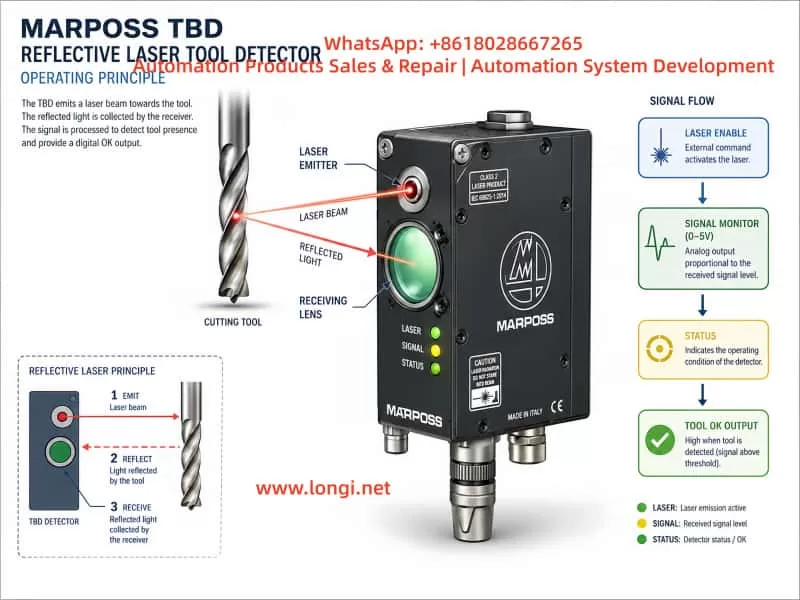
During operation, the CNC or PLC enables the TBD through an external input signal. The spindle moves the tool to a preset inspection position. The TBD emits a laser beam toward the tool surface. If the tool is intact, the laser is reflected back to the receiver lens. If the tool is broken, the expected reflective surface is missing, and the detector will classify the tool as broken or not identified.
Therefore, the TBD should not be treated as a simple through-beam or reflective photoelectric switch. It does not merely detect whether something blocks the laser beam. It must receive a valid reflected signal that matches its internal recognition logic. Only after the controller identifies a valid tool condition will the STATUS indicator turn on and the Tool OK output become active.
This distinction is crucial for repair work. If the technician only blocks the laser with a finger or metal plate and expects the output to change, the test result may be misleading.
2. External Structure and Key Components
A typical MARPOSS TBD unit has several important physical features.
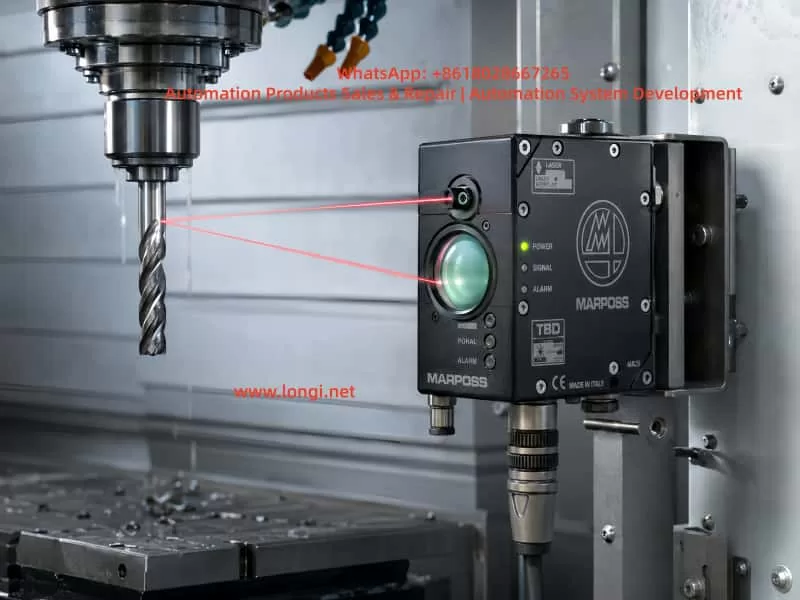
The first is the large circular optical window on the front. This is mainly the receiving window. Reflected laser light from the tool surface enters through this lens and is detected by the internal optical receiver. Behind this window are typically the receiving optics, photodiode circuit, preamplifier, and signal conditioning circuits. If this window is cracked, fogged, contaminated, or filled with coolant residue, the detector may fail to identify the tool even when the laser emitter is working.
The second feature is the small laser emission aperture. The laser beam is emitted from this small opening and aimed toward the tool. The reflected light then returns to the large receiving lens. In many units, an air purge port is also provided near the optical area. The purpose of the air port is to keep coolant mist, oil, dust, and chips away from the optical surfaces.
The third feature is the multi-pin circular connector. This connector carries the power supply, Laser Enable input, Tool OK output, Signal Monitor analog output, and related common terminals. Different TBD versions and cable assemblies may use different wiring colors. Therefore, wiring should not be identified only by wire color. It must be confirmed by PCB tracing, component function, and actual testing.
The fourth feature is the front indicator panel. It usually has three indicators:
- POWER
- SIGNAL
- STATUS
POWER indicates the power and laser enable state. SIGNAL indicates reflected signal strength. STATUS indicates whether the tool has been successfully identified. In troubleshooting, STATUS is the most important indicator for judging whether the Tool OK output should be active.
The fifth feature is the FOCUS POSITION adjustment. On some versions, this appears as a small adjustment mechanism marked with “FOCUS POSITION” and “FAR.” This is not a general operating mode selector. It is related to optical focus or detection distance. If the distance, angle, or focus setting is incorrect, the detector may show analog signal variation while the STATUS indicator remains off.
3. Identifying the Six Signal Wires
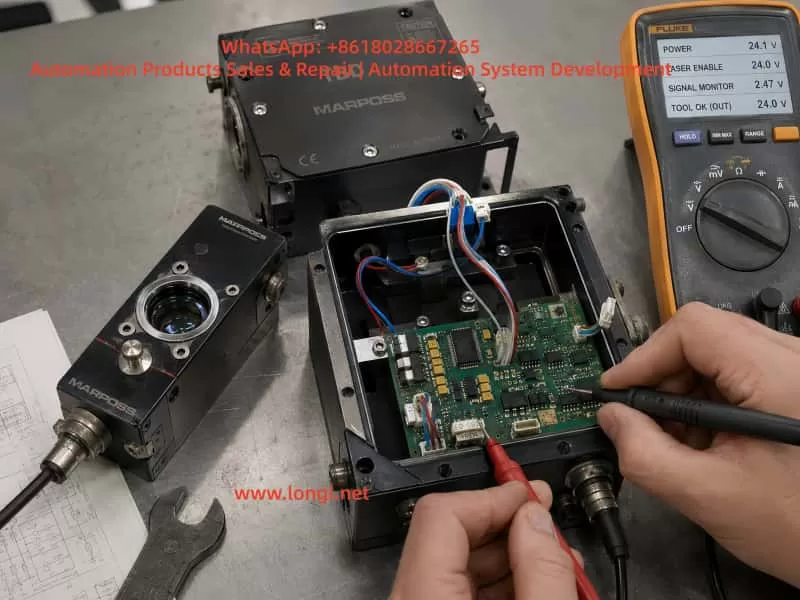
During repair, the unit may contain a separate pair of main power wires and a six-wire signal harness connected to the circular connector. By comparing a faulty unit with a known-good TBD, the six signal wires can be identified as follows:
| Wire Color | Probable Function | Description |
|---|---|---|
| Black | Signal Monitor reference ground | Analog reference, not necessarily connected to main power 0V |
| Red | Signal Monitor analog output | 0–5V analog monitor signal |
| Yellow | Tool OK / COM OUT terminal | One side of PVT212S output |
| Green | Tool OK / COM OUT terminal | The other side of PVT212S output |
| Pink | Laser Enable input | External enable input |
| Gray | COM IN | Common terminal for Laser Enable input |
Several important points must be emphasized.
First, the black wire may connect to a local capacitor negative terminal or local signal reference node on the PCB, but it is not necessarily connected to the main power supply negative terminal. It should not be assumed to be the same as the device power 0V.
Second, the red wire is not the Laser Enable wire. PCB tracing shows that the red wire passes through a resistor and enters an AD823A signal conditioning stage. This strongly suggests that it belongs to an analog signal path, most likely the Signal Monitor output. Applying 12V or 24V to the red wire may damage the analog front end.
Third, the pink and gray wires form the Laser Enable input pair. In actual testing, applying an external 12V signal through a 4.7kΩ resistor to the pink wire, with the gray wire connected to 0V, caused the POWER indicator to change from green to orange and the laser to turn on. This confirms the pink/gray pair as the enable input.
Fourth, the yellow and green wires connect to the output side of a PVT212S PhotoMOS relay. They are not active voltage outputs. They behave like an isolated solid-state contact. An external power source and load are required to observe switching behavior.
4. The Role of the PVT212S PhotoMOS Relay
The PCB contains a PVT212S device. This component is not a simple optocoupler and not an analog amplifier. It is a PhotoMOS solid-state relay. Internally, it contains an input LED and an output MOSFET switch, optically isolated from each other.
In the TBD, the PVT212S is used as the final isolated Tool OK output stage.
Its working logic can be understood as follows:
The controller determines that a valid tool has been identified
↓
The controller drives the input LED of the PVT212S
↓
The PVT212S output MOSFET turns on
↓
The yellow and green wires form a closed solid-state switch
↓
The CNC / PLC receives the Tool OK signal
This explains why the yellow and green wires do not output 12V or 24V by themselves. They are equivalent to an isolated relay contact. Measuring yellow-to-ground or green-to-ground with a multimeter may show no meaningful voltage.
The correct way to test this output is to create an external low-current load circuit, for example:
+12V → 2.2kΩ or 4.7kΩ resistor → LED → Yellow wire
Green wire → 0V
If there is no response, reverse the yellow and green wiring and test again. In many PhotoMOS outputs, polarity may not matter for low-current DC tests, but both directions should still be verified.
However, the PVT212S output will only switch if its input side is driven. If pins 1 and 2 of the PVT212S always measure 0V, the yellow/green output will not change no matter how the external output circuit is connected.
5. Why Blocking the Laser Does Not Necessarily Activate the Output
A common mistake is to block the laser beam with a hand or metal plate and expect the Tool OK output to change. This is not a valid test for a TBD.
The TBD is based on reflected laser detection. It is not checking simple beam interruption. It is looking for reflected light from a tool surface under the correct geometric and optical conditions.
When a hand blocks the laser, the red/black Signal Monitor output may change significantly. For example, it may rise from about 0.6V to around 5V. This only proves that the receiver and analog signal chain respond to optical changes. It does not prove that the controller has recognized a valid tool.
A hand, flat metal plate, or random obstruction may create a saturated or invalid reflection. The internal logic may classify this as an invalid condition rather than a valid tool.
A more realistic test should use:
- A drill bit
- A tap
- A shiny round steel rod
- A screwdriver shaft
- A cylindrical metal tool
The laser should strike the cylindrical surface or tool surface, not simply a flat plate. The best simulation is to rotate the tool or round bar slowly, because the real application typically involves rotating tools.
Only when the controller decides that the reflected signal corresponds to a valid tool will the STATUS indicator turn on. Only then should the PVT212S input and yellow/green output be expected to change.
6. Meaning of the POWER, SIGNAL, and STATUS Indicators
The three front indicators are essential for diagnosing the TBD.
POWER Indicator
The POWER indicator shows the power and laser enable state.
A typical operating sequence is:
- Main power only: POWER should be green.
- Laser Enable active: POWER should change to orange.
- Fault state: POWER may show red or fail to remain on.
If the unit cannot hold a green POWER indicator with only main power applied, it has not entered normal standby. In that case, there is no point in expecting the yellow/green output to switch. The internal power supply, control logic, reset circuit, laser driver, or local regulators must be checked first.
SIGNAL Indicator
The SIGNAL indicator reflects the strength or quality of the received optical signal. It does not directly mean that the Tool OK output is active.
Signal Monitor voltage and the SIGNAL indicator are useful for aligning the optical path. However, signal variation alone does not guarantee that the tool has been identified.
STATUS Indicator
STATUS is the key indicator.
When STATUS turns on, the unit has identified the tool. When STATUS remains off, the tool is not identified or is considered broken. As long as STATUS is off, the PVT212S output may remain inactive. This is normal behavior.
If STATUS turns on but PVT212S pins 1 and 2 still remain at 0V, then the output drive circuit should be investigated.
7. The Red and Black Signal Monitor Wires
The red and black wires form the analog Signal Monitor output.
In testing, the voltage between red and black may vary from roughly 0V to 5V depending on the reflected signal. For example:
- No valid reflection: around 0.6V
- Strong obstruction or saturated reflection: near 5V
This signal is useful for optical alignment and signal evaluation. It is not a switching output and not a Laser Enable input.
The correct use of the Signal Monitor is:
- Apply the Laser Enable signal through the pink/gray pair.
- Measure DC voltage between the red and black wires.
- Move a drill bit or round rod in the laser path.
- Observe voltage changes.
- Use the voltage together with SIGNAL and STATUS indicators to find a valid detection position.
If red/black voltage changes but STATUS remains off, the receiver circuit is responding, but the signal is not being accepted as a valid tool identification condition.
8. The Importance of FOCUS POSITION Adjustment
The TBD is highly sensitive to distance, angle, and focus. The FOCUS POSITION adjustment is critical.
The unit may output laser light and show analog signal variation, but still fail to identify the tool if the focus is not correct. Typical symptoms include:
- POWER changes from green to orange after Laser Enable.
- The laser is visible.
- Red/black Signal Monitor voltage changes.
- SIGNAL may change.
- STATUS remains off.
- PVT212S is not driven.
- Yellow/green output does not change.
This does not necessarily mean the electronics are faulty. It may simply mean the optical geometry is wrong.
A proper bench test should use a fixed setup. The TBD should be clamped securely. The test drill or round rod should also be fixed in a stable holder. Suggested starting distances are:
300mm → 500mm → 800mm
At each distance, slowly adjust:
- Tool height
- Tool angle
- Lateral position
- FOCUS POSITION
- Tool rotation
The goal is to make STATUS turn on stably. If the technician holds the detector and tool by hand, the position may be too unstable, and STATUS may appear only briefly or not at all.
9. Function of the Air Port
The air port is often misunderstood. It is not usually an electrical interlock.
Its purpose is to provide air purge for the optical windows. It prevents coolant mist, oil vapor, dust, and chips from sticking to the transmitter aperture and receiver lens.
The air purge helps with:
- Keeping the laser emission aperture clean
- Keeping the receiver window clean
- Reducing coolant interference
- Improving long-term stability
- Preventing false alarms in machine environments
For bench testing, air supply is generally not required to verify main power, Laser Enable, laser output, Signal Monitor, STATUS, and Tool OK output. However, for actual machine operation, clean and dry compressed air should be used. If the air contains oil or water, it may make the optical window dirtier rather than cleaner.
10. Complete Test Procedure Using a Known-Good Unit
The most efficient troubleshooting method is to compare the faulty unit with a known-good TBD.
Step 1: Main Power Test
Apply main power only.
Expected result:
- POWER indicator stays green.
- No abnormal heating.
- The main controller appears to start normally.
If the POWER indicator does not stay green, check internal power supply, local regulators, reset circuit, MCU power, and laser driver supply.
Step 2: Laser Enable Test
Apply the enable signal:
+12V or +24V → 4.7kΩ resistor → Pink wire
0V → Gray wire
Expected result:
- POWER changes from green to orange.
- Laser output becomes active.
This confirms the pink/gray pair as Laser Enable and COM IN.
Step 3: Signal Monitor Test
Measure between red and black:
Red probe → Red wire
Black probe → Black wire
Move a drill bit or round metal rod in front of the laser. The voltage should change in the 0–5V range.
Step 4: STATUS Recognition Test
Use a drill bit, tap, or round steel rod to simulate a tool. Adjust distance, angle, rotation, and FOCUS POSITION until STATUS turns on.
This is the key step. Without STATUS, the Tool OK output should not be expected to switch.
Step 5: PVT212S Input Test
When STATUS is on, measure the DC voltage directly across PVT212S pins 1 and 2.
If the controller is driving the output, the input side should show a forward LED drive voltage.
If STATUS is on but pins 1 and 2 remain at 0V, check the PVT drive circuit.
Step 6: Yellow/Green Output Test
Build a low-current external test circuit:
+12V → 4.7kΩ resistor → LED → Yellow wire
Green wire → 0V
If there is no response, reverse yellow and green. Observe whether the LED changes when STATUS turns on and off.
11. Troubleshooting a Faulty TBD Unit
When a faulty TBD has a cracked lens, coolant ingress, corrosion, or unstable output, the repair should proceed stage by stage.
Case 1: POWER Does Not Stay Green
If the unit cannot remain in green standby with only main power applied, check:
- Main power input
- Power driver daughterboard
- 5V and 3.3V regulators
- MCU reset
- Clock circuit
- Laser driver detection
- Corrosion leakage
- Protection devices
At this stage, Tool OK output testing is not meaningful.
Case 2: POWER Is Green, but Laser Enable Does Not Turn It Orange
Check:
- Pink/gray input circuit
- Input current limiting resistor
- Input optocoupler or isolation device
- Input protection diodes
- COM IN reference circuit
- MCU input recognition
Case 3: POWER Turns Orange, but There Is No Laser
Check:
- Laser diode
- Laser driver
- Laser module cable
- Laser aperture contamination
- Driver daughterboard
- Laser fault detection circuit
Case 4: Laser Works, but Red/Black Signal Monitor Does Not Change
Check:
- Receiver window
- Photodiode
- Transimpedance preamplifier
- AD823A signal conditioning circuit
- Lens contamination
- Optical alignment
Case 5: Signal Monitor Changes, but STATUS Never Turns On
Check:
- Detection distance
- FOCUS POSITION
- Tool surface
- Tool rotation
- Signal saturation or insufficient signal
- Receiver window fogging
- Controller recognition logic
Case 6: STATUS Turns On, but Yellow/Green Output Does Not Switch
Check:
- PVT212S pins 1 and 2 drive voltage
- PVT input resistor
- PVT driver transistor or MOSFET
- PVT212S device itself
- Output protection components
- Yellow/green cable path
12. Common Mistakes During Repair
Mistake 1: Treating Red/Black as Power Wires
Red and black belong to Signal Monitor, not main power. A low voltage between red and black is normal when there is no valid optical signal.
Mistake 2: Applying 12V to the Red Wire
The red wire is part of the analog signal chain. Applying 12V to it may damage the AD823A input stage or related analog circuitry.
Mistake 3: Expecting Yellow/Green to Output 24V
Yellow and green are isolated switch output terminals. They do not actively output voltage. An external load and supply are required.
Mistake 4: Testing with a Hand Blocking the Laser
Blocking the laser with a hand only proves that the receiver sees optical disturbance. It does not simulate a valid rotating tool.
Mistake 5: Replacing the PVT212S Before STATUS Turns On
If STATUS is not on, PVT212S may not be driven. Replacing the PhotoMOS relay without proving that the controller is issuing Tool OK may be unnecessary.
Mistake 6: Assuming the Air Port Is Required for Electrical Output
The air port is for optical cleaning and protection. It is not the main reason the Tool OK output fails to switch during bench testing.
13. Practical Recommendations for Machine Installation
When installing or repairing a MARPOSS TBD on a machine tool, several practical points should be observed.
The detector must be mounted rigidly. Any movement between the TBD and the tool detection position can cause unstable recognition.
The CNC program must move the tool to the correct inspection position. The TBD does not automatically search for the tool tip. It checks whether a valid reflective tool surface exists at the programmed location.
The tool should ideally rotate during detection. A rotating tool produces a more realistic reflective pattern than a static flat surface.
The optical windows must be kept clean. Coolant residue, oil mist, and chips can cause false broken-tool alarms.
The air purge should use clean, dry air. Dirty air may contaminate the optics instead of cleaning them.
When replacing a damaged TBD with a used unit, do not rely only on similar appearance. Confirm the code, connector, wiring, optical focus, detection distance, and output behavior.
Before returning a repaired unit to service, the technician should verify:
- Main power
- Laser Enable
- Laser output
- Signal Monitor
- STATUS recognition
- Tool OK output
A unit that only powers on but cannot identify a simulated tool is not properly tested.
14. Conclusion
The MARPOSS TBD laser tool breakage detector is not a simple laser switch. It is an optical tool recognition system consisting of laser emission, reflected light reception, analog signal conditioning, controller judgment, status indication, and isolated output stages.
Based on practical tracing and testing, the six signal wires can be defined as:
Black: Signal Monitor reference ground
Red: Signal Monitor 0–5V analog output
Yellow / Green: Tool OK / COM OUT isolated output
Pink: Laser Enable
Gray: COM IN
When the pink/gray enable input is activated, POWER changes from green to orange and the laser turns on. The red/black Signal Monitor voltage varies with reflected light. The yellow/green output is controlled by the PVT212S PhotoMOS relay and only changes when the detector identifies a valid tool.
The key point is this:
The PVT212S output will not operate merely because the laser is blocked. It operates only when the detector receives valid reflected tool information, the STATUS indicator confirms Tool Identified, and the controller drives the PVT212S input.
For repair technicians, this means that troubleshooting must follow the signal chain:
Main power
↓
Laser Enable
↓
Laser emission
↓
Reflected signal reception
↓
Signal Monitor
↓
STATUS recognition
↓
PVT212S drive
↓
Tool OK output
Once this logic is understood, troubleshooting becomes much more systematic. Faults such as cracked receiver glass, coolant ingress, corroded PCB areas, unstable output, no Tool OK signal, or false broken-tool alarms can be separated into optical faults, power faults, analog reception faults, controller recognition faults, or output stage faults.
This is the correct way to repair and test a MARPOSS TBD laser tool breakage detector: not by guessing from wire colors or simply blocking the laser, but by verifying each stage of the signal path step by step.