
Abstract
Industrial variable frequency drives (VFDs) play a critical role in modern automation systems, providing precise control of motor speed and torque. The Schneider Electric Altivar Process ATV660 series is widely used in heavy industrial applications, where high reliability and operational continuity are paramount. Despite robust design, certain internal errors can occur, potentially disrupting production. This article examines Internal Error 29, a common fault code reported on the ATV660, and analyzes a case where the root cause was identified as a poorly connected X22 communication cable, rather than a control board failure. The discussion covers system architecture, error diagnostics, maintenance best practices, and preventive strategies for engineers and technicians.
1. Introduction
Variable frequency drives (VFDs) regulate AC motor operation by adjusting frequency and voltage supplied to the motor. In high-power industrial environments, failures in VFDs can result in substantial downtime and production losses. Schneider Electric’s ATV660 series is designed for demanding applications, offering integrated process control, energy efficiency, and communication with higher-level automation systems via standardized protocols.
Despite their robustness, internal errors such as Internal Error 29 occasionally occur. Traditionally, this error has been associated with control board malfunctions, EEPROM issues, or firmware anomalies. However, real-world case studies demonstrate that internal errors can sometimes arise from external hardware connections, particularly communication cables. This article documents a case study, explores root cause analysis, and provides guidelines for troubleshooting similar faults.
2. ATV660 System Architecture Overview
The ATV660 drive consists of several key modules:
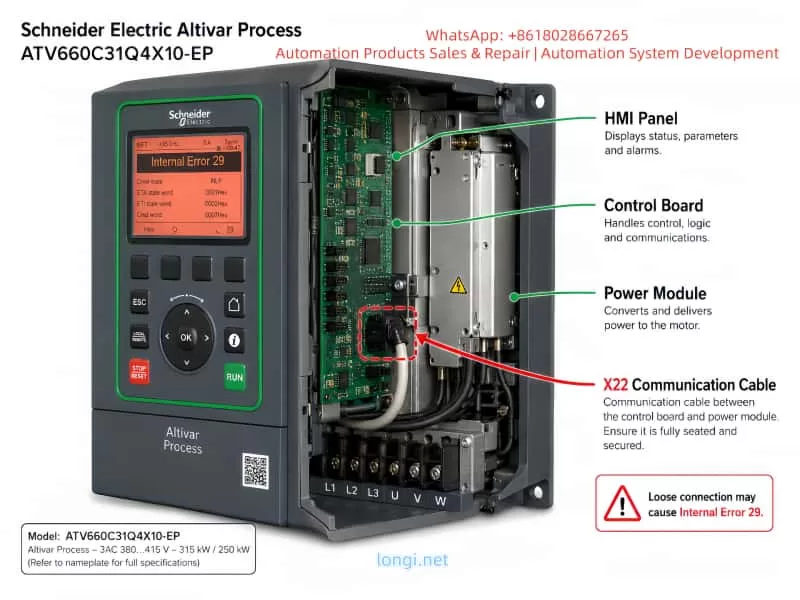
- Power Module (PM): Handles the conversion from AC input to controlled AC output for the motor. Includes IGBT bridges, DC bus capacitors, and output filters.
- Control Board (CB): Implements drive logic, motor control algorithms, and communication with other modules and supervisory systems.
- Interface and Communication Modules: Facilitate connectivity to process automation networks and higher-level SCADA systems. The X22 cable is one of the internal communication links connecting the control board to the power module.
- Input/Output Terminals: Accepts field signals for start/stop, speed commands, and feedback.
- HMI Panel: Provides status, parameter configuration, and fault reporting to operators.
The X22 cable specifically transmits critical synchronization and monitoring signals between the control board and power module. Any disruption in this link can cause the drive’s self-diagnostic routine to report Internal Error 29, as the control board detects a lack of expected communication.
3. Internal Error 29: Typical Causes
The drive’s self-diagnostics categorize Internal Error 29 as a critical internal communication or control failure. Common triggers include:
- Faulty control board components (logic IC, FPGA, or EEPROM)
- Power module faults affecting control signals
- Firmware corruption or mismatch
- Poor connections in internal communication cables (e.g., X22, X21)
- Intermittent or loose wiring between modules
- Environmental factors (vibration, dust, or moisture)
Historically, many engineers default to assuming the error indicates a board failure, leading to unnecessary control board replacements. While hardware faults can cause this error, as demonstrated in this case study, cable issues may produce identical symptoms without damaging the main boards.
4. Case Study: X22 Communication Cable Issue
4.1 Fault Description
A client in Nigeria reported an ATV660C31Q4X10-EP drive displaying Internal Error 29. Initial assessment assumed a control board malfunction, given the error’s reputation. The drive was rated at 315 kW / 250 kW, connected to a 3-phase 380–415V input, and used in a heavy industrial process.
4.2 Initial Diagnostic Approach
- Power cycle and reset via the HMI panel
- Verified input and output voltages
- Inspected motor connections for short circuits
- Checked drive parameters and firmware version using SoMove
Despite these steps, the error persisted. No visible damage was found on the control board or power module.
4.3 Root Cause Identification
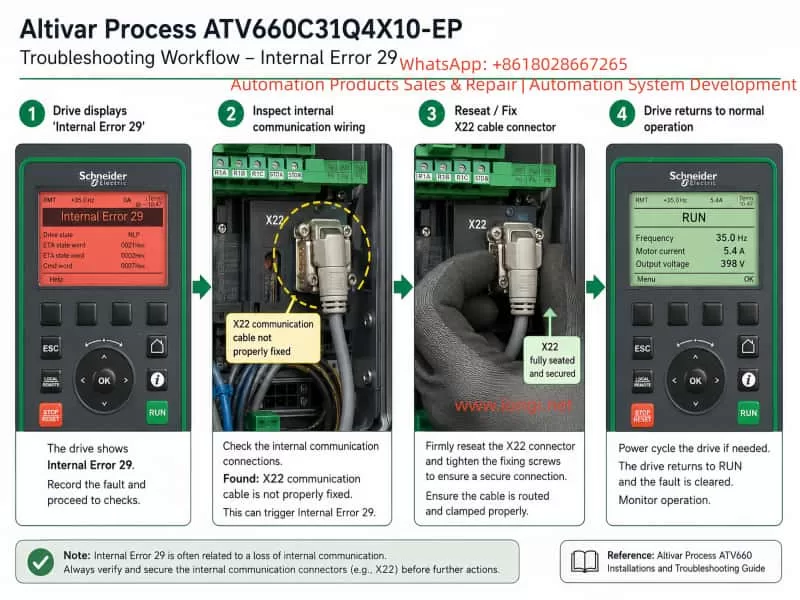
A detailed visual inspection revealed the X22 communication cable was not properly fixed. The connector had a slight displacement, leading to intermittent loss of signal between the control board and power module. This misalignment caused the drive’s internal logic to detect a failure in communication, thus triggering Internal Error 29.
After securely reconnecting the X22 cable:
- Internal Error 29 cleared immediately
- Drive returned to normal operation without replacing any hardware
- No additional faults or error codes appeared
This case highlights the importance of inspecting all internal communication links, especially following maintenance or transport.
5. Diagnostic Strategy for Internal Error 29
To troubleshoot Internal Error 29 effectively, engineers should follow a structured approach:
- Document Drive Status
- Note error codes, operating conditions, and drive parameters.
- Perform Controlled Restart
- Power down the drive for 5–10 minutes.
- Power it back on and attempt a reset.
- Verify External Connections
- Ensure motor cables, field wiring, and grounding are correct.
- Inspect X22 and other internal communication cables for proper seating.
- Examine Internal Modules
- Check the control board, power module, and interface connections.
- Look for loose connectors, dust, or mechanical stress on boards.
- Software and Firmware Verification
- Backup parameters via SoMove or Drive Composer.
- Confirm firmware versions and compatibility.
- Controlled Test Operation
- Run the drive without a load, monitor for error recurrence.
- If errors persist after cable inspection, consider module replacement.
By following this approach, unnecessary control board replacements can be avoided, reducing downtime and repair costs.
6. Maintenance Best Practices
- Cable Management
- Ensure all internal connectors are securely fastened.
- Label cables and document connections for future reference.
- Periodic Inspection
- Schedule visual inspections of connectors, especially after maintenance or shipping.
- Use retention clips or cable ties to prevent loosening due to vibration.
- Environmental Control
- Keep drive compartments clean and dry.
- Limit exposure to dust, moisture, and extreme temperatures.
- Operator Training
- Train personnel on proper handling of internal connectors.
- Emphasize the importance of checking communication cables when errors occur.
- Parameter Backup
- Regularly backup drive parameters and firmware.
- Maintain logs of firmware updates and maintenance activities.
7. Preventing Recurrence
Internal Error 29 caused by communication cable issues is entirely preventable:
- Ensure proper mechanical fixation of X22 and other critical cables.
- Verify connectors after any maintenance, transport, or vibration exposure.
- Document all maintenance and inspections to provide traceability.
Implementing these preventive measures ensures higher operational reliability, minimizes unnecessary hardware replacements, and maintains consistent production uptime.
8. Conclusion
The Schneider ATV660 series is robust, but like all industrial drives, it is vulnerable to internal errors triggered by minor issues such as improperly fixed communication cables. The case study presented here demonstrates that:
- Internal Error 29 is not always indicative of control board failure.
- Loose or poorly connected X22 cables can produce identical error conditions.
- Systematic diagnostics, careful inspection, and preventive maintenance can resolve errors efficiently without hardware replacement.
By adopting structured troubleshooting and preventive strategies, industrial engineers can enhance drive reliability, reduce repair costs, and prevent unnecessary downtime.
9. References
- Schneider Electric, Altivar Process ATV660 User Guide, 2021.
- SoMove / Drive Composer Software Manuals, Schneider Electric.
- Industrial VFD Maintenance Best Practices, ISA (International Society of Automation), 2020.