Posted on

Understanding and Resolving the E-15 Fault Code on the SQ1000 Inverter

Introduction

The SQ1000 series inverter, manufactured by Suqu, is a robust and versatile piece of industrial equipment designed to deliver high torque, precision, and a wide range of speed adjustments for various mechanical applications. Its advanced control technology and adaptability to harsh environmental conditions—such as fluctuating power grids, extreme temperatures, humidity, and dust—make it a popular choice in industrial settings. However, like any sophisticated machinery, it can encounter operational issues, one of which is the E-15 fault code. According to the SQ1000 Series Inverter Detailed Manual, the E-15 code signifies “undervoltage during operation.” This article provides an in-depth exploration of what this fault code means, its potential causes, and a comprehensive guide to troubleshooting and preventing it, based on the user-provided image and manual references.

What is the E-15 Fault Code?

Definition and Significance

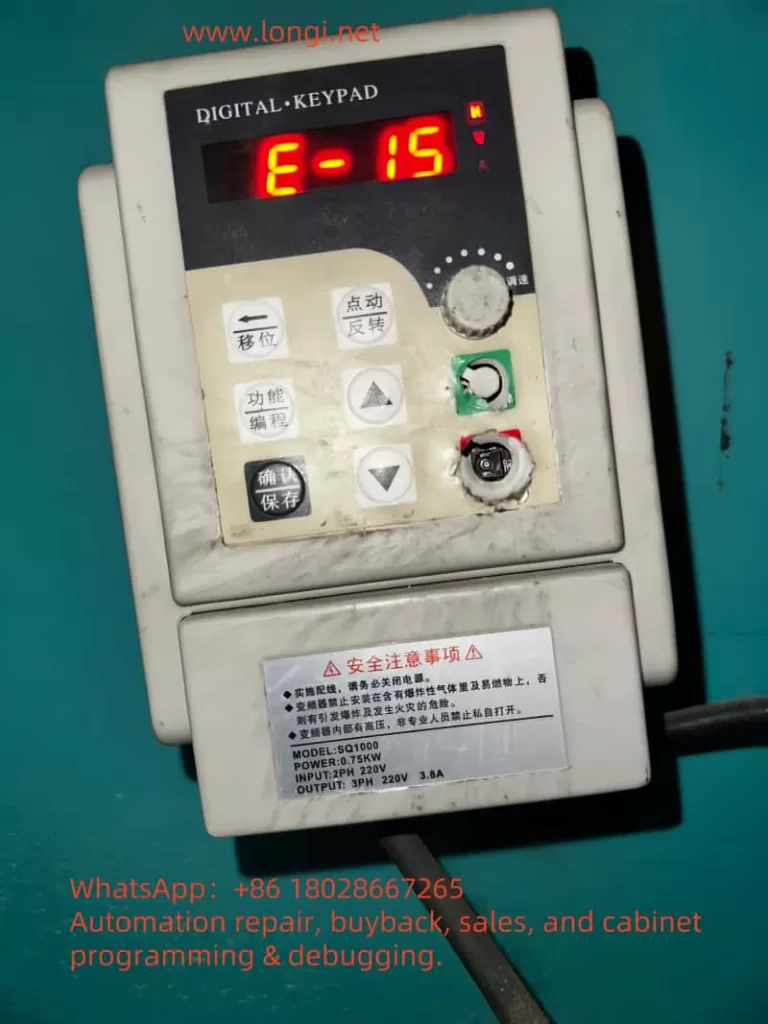
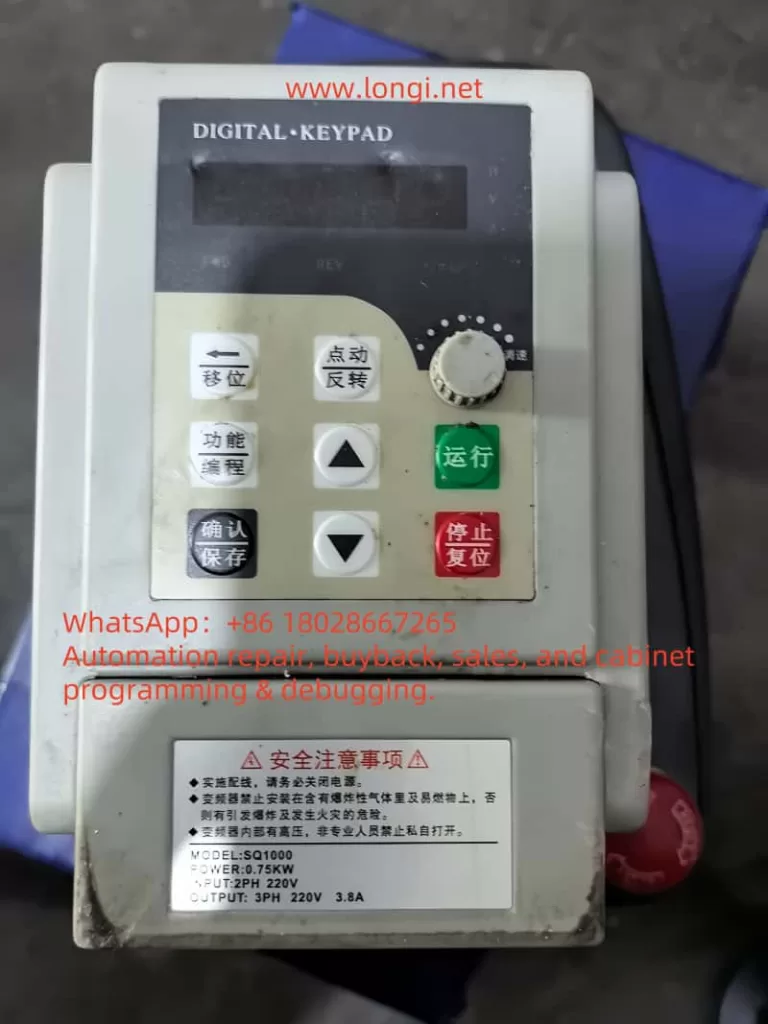
The E-15 fault code on the SQU1000 inverter indicates that the device has detected an input voltage below the acceptable threshold while it is actively running. This undervoltage condition triggers a protective mechanism to halt operation, preventing potential damage to the inverter or the connected motor. The manual (page 66) lists E-15 under the fault code table, explicitly associating it with “undervoltage during operation.” The undervoltage protection threshold is typically governed by parameter F8.02, which defines the voltage level below which the inverter will trip. For instance, if F8.02 is set to 160V, the inverter will display E-15 and stop if the input voltage drops below this value during operation.

This fault is significant because it not only interrupts the inverter’s functionality but also signals an underlying issue that could affect the entire system. Ignoring or repeatedly encountering this fault without resolution may lead to reduced equipment lifespan, motor instability, or production downtime.

Insights from the Image

Th image shows an SQ1000 inverter with a power rating of 0.75 kW, configured for single-phase 220V input and three-phase 220V output, with a rated current of 3.8A. The operation panel displays “E-15” on its five-digit LED screen, accompanied by a flashing red display, indicating an active fault state. The “V” indicator light is illuminated, suggesting that the fault pertains to voltage. The panel includes control buttons such as “Shift,” “Function/Program,” “Confirm,” “Up/Down,” and “Stop/Reset,” which are essential for troubleshooting and parameter adjustments. The inverter’s surface shows signs of dust and wear, hinting at operation in a challenging industrial environment, which may contribute to the fault’s occurrence.

Potential Causes of the E-15 Fault

The E-15 fault can stem from various sources, ranging from external power supply issues to internal inverter malfunctions. Based on the manual and practical considerations, the following are the primary causes:

  1. Unstable Input Power Supply
    The manual (page 7) specifies that the SQ1000 inverter operates within an input voltage range of 220V ± 20% (176V–264V for single-phase models) or 380V ± 15% (323V–437V for three-phase models). Voltage fluctuations beyond these limits, common in industrial settings during peak load times, can trigger the E-15 fault.
  2. Power Line Issues
    Excessive line length or undersized wire gauge can cause significant voltage drops. The manual (page 11, Chapter 3: Installation and Wiring) emphasizes the importance of reliable power connections to minimize such drops, recommending that voltage loss remain below 5%.
  3. Insufficient Power Supply Capacity
    If the power transformer or supply source cannot handle the combined load of the inverter and other equipment, the voltage may sag, leading to undervoltage conditions.
  4. Internal Inverter Faults
    A malfunction in the inverter’s power detection circuit or drive board could falsely detect low voltage. The manual (page 67) suggests that persistent fault displays despite normal voltage may indicate drive board or output module issues.
  5. External Electromagnetic Interference
    While the SQU1000 boasts good electromagnetic compatibility (page 3), strong interference from nearby equipment, such as large motor startups, could disrupt voltage sensing, causing erroneous fault triggers.

Troubleshooting the E-15 Fault

Resolving the E-15 fault requires a systematic approach to identify and address the root cause. Below is a step-by-step guide:

Step 1: Verify Input Power Supply

  • Action: Measure the voltage at the inverter’s input terminals (R, S, T) using a multimeter.
  • Expected Range: For the 0.75 kW single-phase model shown in the image, the voltage should be between 176V and 264V.
  • Solution: If the voltage is below 176V, consult the local power utility to address grid instability or install a voltage stabilizer (e.g., UPS) upstream of the inverter.

Step 2: Inspect Power Lines and Connections

  • Action: Check the power cable length, wire gauge, and terminal connections for adequacy and security.
  • Guideline: Ensure the voltage drop across the line is less than 5% of the supply voltage.
  • Solution: Replace undersized or overly long cables with appropriately rated ones and tighten any loose connections at the input terminals.

Step 3: Assess Power Supply Capacity

  • Action: Evaluate the transformer or power source capacity relative to the total load.
  • Solution: If insufficient, upgrade the transformer or reduce concurrent loads on the same circuit.

Step 4: Review Parameter Settings

  • Action: Access parameter F8.02 via the operation panel (page 62, manual):
    1. Press “Function” to enter the main menu.
    2. Use “Up/Down” keys to navigate to F8 group.
    3. Press “Confirm” to select F8.02 and check the undervoltage threshold (default may be 160V).
  • Solution: If the threshold is set too high for the local grid (e.g., above typical voltage levels), lower it to a safe value like 150V, ensuring the inverter is stopped during adjustment.

Step 5: Check Inverter Hardware

  • Action: If the power supply and parameters are normal, inspect internal components:
    • Open the inverter (after disconnecting power and waiting five minutes, per safety guidelines on page 5) and check input terminal connections.
    • Test the drive board and power detection circuit with professional tools (e.g., oscilloscope), as suggested on page 67.
  • Solution: Tighten loose connections or replace faulty components (e.g., drive board) with assistance from the manufacturer.

Step 6: Mitigate External Interference

  • Action: Assess the environment for electromagnetic interference sources (e.g., large motors).
  • Solution: Install an EMI filter at the input or relocate the inverter away from interference sources. Ensure proper grounding (page 15, manual).

Step 7: Reset and Test

  • Action: Press “Stop/Reset” on the panel (page 24) to clear the fault, then restart the inverter.
  • Solution: If E-15 persists, repeat the steps or seek professional service, as persistent faults may indicate deeper hardware issues.
SQ1000

Preventive Measures

To minimize future E-15 faults, consider these proactive steps:

  • Regular Voltage Monitoring: Use a voltmeter to check input voltage during peak operation periods, ensuring stability within the 176V–264V range.
  • Optimized Wiring: Adhere to the manual’s wiring recommendations (Chapter 3), using adequately sized cables and minimizing line lengths.
  • Protective Equipment: Install a voltage stabilizer or UPS to buffer grid fluctuations.
  • Routine Maintenance: Clean the inverter periodically to remove dust (page 3) and inspect connections for wear, enhancing reliability.
  • Parameter Tuning: Adjust F8.02 based on local grid conditions to avoid overly sensitive tripping, balancing safety and functionality.

Conclusion

The E-15 fault code on the SQ1000 inverter, indicating undervoltage during operation, is a critical alert that demands prompt attention to maintain operational efficiency and equipment longevity. By understanding its causes—ranging from power supply instability to internal faults—and following a structured troubleshooting process, users can effectively resolve the issue. The provided image and manual serve as valuable references, confirming the fault’s nature and guiding precise interventions. Implementing preventive measures further ensures the inverter’s robust performance, minimizing downtime and enhancing productivity in industrial applications. With this comprehensive approach, users can confidently manage and mitigate the E-15 fault, leveraging the SQ1000’s advanced capabilities to their fullest potential.

Posted on

Troubleshooting and Resolving the A.43 Fault in ZSMC K-Series Servo Drives

Introduction

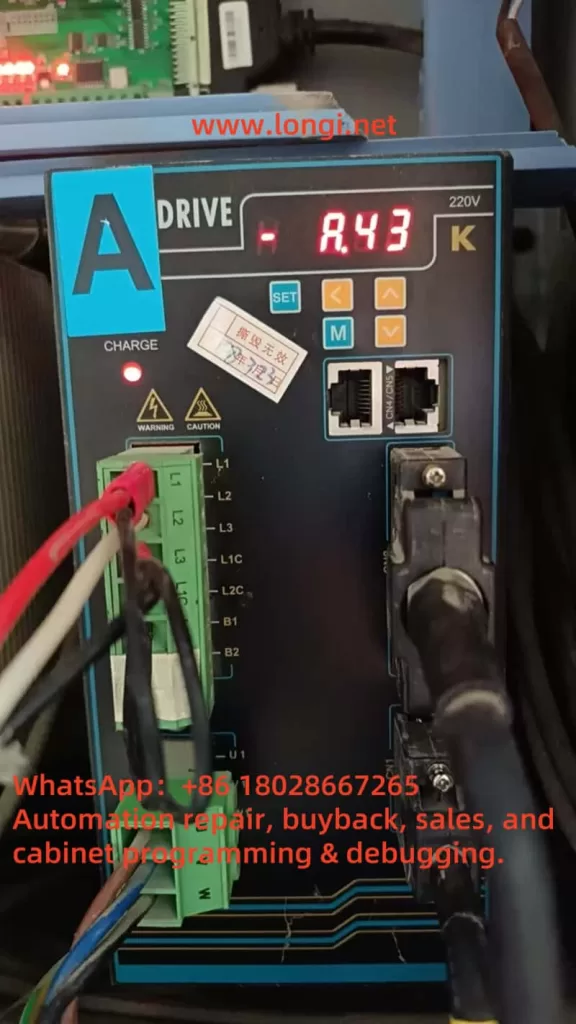
Servo drives are the backbone of precision control in industrial automation, powering applications ranging from CNC machining to robotic assembly lines. The ZSMC K-Series servo drive, renowned for its reliability and efficiency, is no exception. However, even the most robust systems can encounter faults that disrupt operations. One such issue, the A.43 fault, has been reported by a user, with a screenshot showing the fault code displayed on the servo drive. This article delves into the A.43 fault—identified as a “Bus-type encoder cumulative count error”—to provide a comprehensive, step-by-step guide for troubleshooting and resolving it. Drawing from the official user manual (“ZSMC Servo K-Series User Manual Complete Version.pdf,” 2017 Engineering Version V3.0), this guide aims to equip technicians and engineers with the knowledge to address this fault effectively, minimizing downtime and ensuring system reliability.

A.43

Understanding the A.43 Fault

The A.43 fault is explicitly defined in the ZSMC K-Series servo drive manual under “Appendix C: Alarm Display List” (Page 191). It is described as “Bus-type encoder cumulative count error.” The accompanying note states, “Encoder cumulative count or encoder motor cumulative circuit connection is damaged.” This fault is classified as a high-priority (H-level) alarm, indicating its potential to significantly impact system performance, yet it is resettable, suggesting that it can often be cleared once the underlying issue is resolved.

At its core, the A.43 fault points to an issue with the bus-type encoder, a critical component that provides feedback on the motor’s position and speed. The “cumulative count” refers to the aggregated position data transmitted over a bus communication protocol (likely RS-485, as hinted in the manual’s communication sections). When this count becomes erroneous—due to hardware failure, wiring issues, or communication disruptions—the servo drive loses its ability to accurately track the motor’s position. This can result in erratic motor behavior, loss of precision, or complete system shutdown, making swift resolution essential.

Possible Causes of the A.43 Fault

To address the A.43 fault, we must first identify its root cause. The manual’s troubleshooting section (Chapter 7, “Fault Diagnosis and Troubleshooting,” Page 135) and practical engineering insights suggest several potential culprits:

  1. Encoder Hardware Failure
    The encoder itself may be faulty due to physical damage, wear from prolonged use, or internal component failure. A damaged encoder can send incorrect or no data, leading to cumulative count errors.
  2. Wiring Issues
    Faulty connections between the encoder and the servo drive—such as loose terminals, broken cables, or improper grounding—can interrupt signal transmission, triggering the A.43 fault.
  3. Communication Interference
    Since the encoder operates over a bus system, electromagnetic interference (EMI) from nearby equipment (e.g., motors or inverters) or inadequate shielding can corrupt the data, causing count discrepancies.
  4. Power Supply Instability
    An unstable or insufficient power supply to the encoder can impair its operation, resulting in erratic count data. The manual hints at power-related considerations in its wiring sections (Chapter 3, Page 17).
  5. Configuration Errors
    Incorrect parameter settings in the servo drive, particularly those related to the encoder (e.g., resolution or communication protocol), may lead to misinterpretation of the encoder’s output, as noted in Chapter 5 (Page 54).

Each of these causes requires a distinct approach to diagnosis and resolution, which we will explore in the following sections.

Troubleshooting the A.43 Fault

A systematic troubleshooting process is key to isolating the cause of the A.43 fault. Below is a detailed, step-by-step guide based on the manual and standard servo system practices.

Step 1: Inspect Encoder Wiring

  • Action: Refer to Section 3.4, “Encoder Operation Guide Wiring” (Page 27), to verify the encoder cable connections.
  • Procedure:
    • Check that all connections to the encoder port (e.g., CN1 or CN2) are secure and free of corrosion or damage.
    • Ensure the cable shield is properly grounded, as recommended in Section 3.5 (Page 34), to minimize interference.
    • Use a multimeter to test the continuity of each wire in the encoder cable, identifying any breaks or shorts.
  • Outcome: If wiring issues are found, they must be corrected before proceeding.

Step 2: Test the Encoder Hardware

  • Action: Assess the encoder’s functionality, as suggested in Section 7.2, “Servo Drive Maintenance and Inspection” (Page 139).
  • Procedure:
    • Visually inspect the encoder for physical damage (e.g., cracked housing or burnt components).
    • If possible, swap the suspect encoder with a known working unit of the same model to see if the fault persists.
    • For advanced diagnostics, use an oscilloscope to monitor the encoder’s output signals, checking for irregularities in the waveform.
  • Outcome: A faulty encoder will require replacement.

Step 3: Evaluate Communication Environment

  • Action: Investigate potential interference, referencing Section 6.3, “MODBUS Communication Protocol” (Page 107).
  • Procedure:
    • Ensure the communication cable length complies with RS-485 standards (typically under 1200 meters).
    • Identify and mitigate EMI sources near the servo system, such as high-power machinery, by relocating them or adding shielding.
    • Verify that the cable routing avoids parallel runs with power lines, as advised in Section 3.8 (Page 36).
  • Outcome: Improved shielding or rerouting may resolve communication-related errors.

Step 4: Verify Power Supply Stability

  • Action: Check the power supply to the encoder and drive, per Section 3.2, “Typical Main Circuit Wiring Example” (Page 20).
  • Procedure:
    • Measure the input voltage to the servo drive (typically 220V ±10%) using a multimeter to ensure it’s within spec.
    • Monitor the encoder’s power supply voltage (often 5V or 24V) for stability, using an oscilloscope if available to detect fluctuations.
  • Outcome: Power instability may necessitate a regulated power source or additional filtering.

Step 5: Review Parameter Settings

  • Action: Validate encoder-related parameters, as outlined in Section 5.4.5, “Absolute Encoder Settings” (Page 69).
  • Procedure:
    • Access the servo drive’s parameter menu via the panel (Section 4.1, Page 38) and check settings like F[009] and F[010], which define encoder data formats.
    • Compare these settings against the encoder’s specifications and the manual’s recommendations.
    • If uncertain, reset to factory defaults (Section 4.2.6, Page 43) and reconfigure carefully.
  • Outcome: Corrected settings should eliminate configuration-induced errors.

Resolving the A.43 Fault

Once the cause is pinpointed, apply the appropriate fix:

  • Faulty Encoder: Replace it with a compatible unit, ensuring proper installation per Section 1.2, “Motor Model Naming” (Page 9).
  • Wiring Issues: Repair or replace damaged cables, secure connections, and enhance grounding as needed.
  • Communication Interference: Install noise filters (Section 4, Page 34), use ferrite cores, or adjust cable paths to reduce EMI.
  • Power Supply Problems: Add a voltage stabilizer or filter to ensure consistent power delivery.
  • Configuration Errors: Adjust parameters to match the encoder, save changes, and restart the drive.

After resolution, reset the fault via the panel (Section 4.1, Page 38) and test the system under normal operating conditions to confirm the fix.

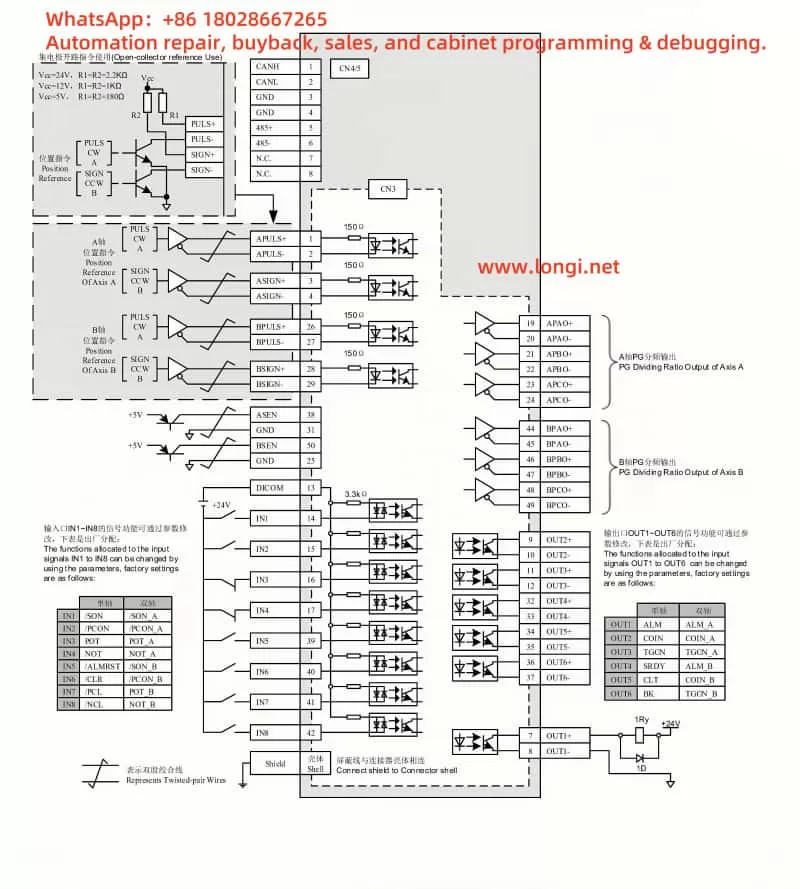
ZSMC servo K standard wiring diagram

Preventive Measures

Preventing future A.43 faults requires proactive maintenance and optimization:

  • Routine Inspections: Regularly check the encoder, wiring, and connections for wear or damage (Section 7.2, Page 139).
  • Environmental Optimization: Maintain an operating environment within 0–40°C and <90% humidity, avoiding EMI sources.
  • Parameter Management: Document correct settings and verify them after any system changes.
  • Staff Training: Educate operators on proper handling and maintenance to avoid accidental damage.

Conclusion

The A.43 fault in the ZSMC K-Series servo drive, while disruptive, is manageable with a structured approach. By understanding its meaning—a bus-type encoder cumulative count error—and systematically addressing potential causes like hardware failure, wiring issues, or interference, users can restore functionality efficiently. The detailed manual provides a solid foundation for this process, supplemented by practical troubleshooting steps and preventive strategies. With diligent maintenance and adherence to best practices, the reliability of the ZSMC K-Series servo system can be upheld, ensuring seamless performance in demanding industrial applications.

Posted on

In-depth Analysis and Solutions for ERR14 Error in INDVS Y300 Series Variable Frequency Drive


Introduction

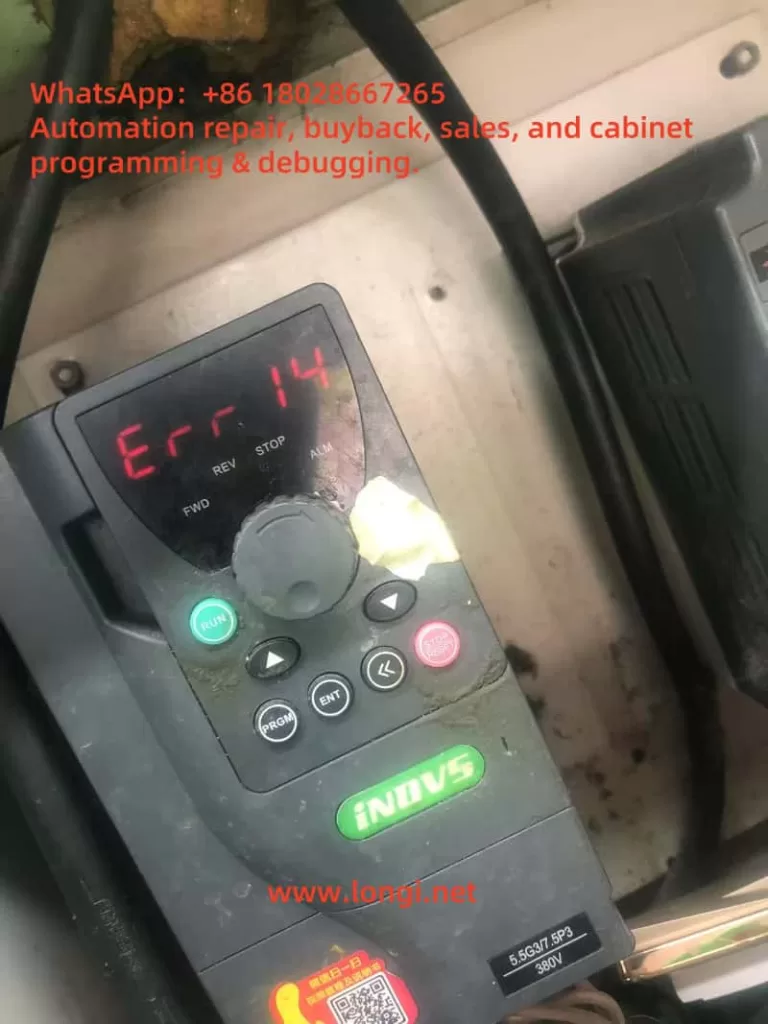
In modern industrial automation, variable frequency drives (VFDs) are pivotal for motor control, widely utilized across industries such as manufacturing, energy, and transportation. The INDVS Y300 series VFD stands out for its exceptional performance and reliability, making it a preferred choice for many businesses. However, users may occasionally encounter the ERR14 error, which indicates module overheating. This error can interrupt production and potentially damage equipment if not addressed promptly. This article offers an in-depth exploration of the ERR14 error, covering its technical basis, causes, solutions, and preventive strategies to help users maintain stable and efficient operations.

ERR14

Definition and Impact of ERR14 Error

According to the INDVS Y300 series VFD user manual, the ERR14 error is a safety feature triggered when the power module’s temperature exceeds a predetermined safe limit. The power module, a vital component, converts input power into the specific frequency and voltage needed to drive the motor. Overheating prompts the VFD to shut down automatically, protecting the system from further harm. While this protective mechanism is effective, repeated incidents can lower production efficiency and, in extreme cases, destabilize entire production lines. Addressing the ERR14 error is thus critical for operational continuity.

The consequences of overheating are far-reaching. Sustained high temperatures can accelerate the degradation of the power module, reducing its lifespan. Moreover, the downtime caused by such errors can lead to significant economic losses, especially in continuous-operation settings. Identifying and resolving the underlying issues quickly is therefore a key priority for users.

Potential Causes of ERR14 Error

Understanding the root causes of the ERR14 error is the first step toward effective resolution. Based on the user manual and practical insights, the following factors are commonly responsible:

1. Excessive Ambient Temperature

The VFD operates optimally within a temperature range of -10°C to 40°C, as specified in the manual. When ambient temperatures exceed this limit—such as during hot seasons or in confined spaces—heat dissipation becomes less efficient, resulting in module overheating.

2. Poor Ventilation

The VFD depends on internal fans and heat sinks to manage heat. Dust and debris buildup can block airflow, impairing the cooling system’s performance. The manual emphasizes regular cleaning to ensure effective ventilation.

3. Overloading

Prolonged operation under heavy loads causes the power module to generate excessive heat. Incorrect parameter settings, such as insufficient current limits, can worsen this problem. The manual links load levels to heat output, urging users to configure settings carefully.

4. Improper Installation

The VFD’s installation site and surrounding space affect heat dissipation. The manual advises maintaining adequate clearance around the unit and avoiding proximity to heat sources or stacked equipment. Non-compliance with these guidelines can lead to heat buildup.

Y300

Diagnosis and Solutions for ERR14 Error

When the ERR14 error occurs, immediate action is necessary. Below is a step-by-step guide to diagnose and resolve the issue:

1. Safe Power-Down and Cooling

Upon receiving the overheating alert, disconnect the power supply and let the VFD cool down to a safe temperature. The manual suggests using a soft brush or compressed air to clean the cooling system, cautioning against liquids to avoid damaging components.

2. Inspect the Cooling System

Open the VFD casing to check the fans for proper operation and the heat sinks for dust accumulation. Replace faulty fans and ensure clear airflow paths.

3. Parameter Adjustment

Access the control panel to confirm that current limits and thermal protection settings are appropriate. The manual provides guidance on adjusting these parameters, recommending that users save the original settings beforehand.

4. Motor and Wiring Inspection

Use an insulation tester to detect short circuits or insulation issues in the motor and wiring. Such faults can cause abnormal currents, indirectly contributing to overheating.

Preventive Measures and Long-Term Solutions

Fixing the ERR14 error is only part of the solution; preventing its recurrence is equally vital. Here are some proactive steps:

1. Regular Maintenance

Set up a routine maintenance plan, including monthly cleaning of the cooling system and quarterly reviews of fans and settings. The manual’s suggested intervals can guide this schedule.

2. Environmental Optimization

Install the VFD in a well-ventilated, temperature-regulated area. In hot environments, consider adding external cooling solutions like fans or air conditioning.

3. Operator Training

Provide thorough training on the manual’s operational guidelines, ensuring staff can adjust parameters and perform inspections competently, thus improving equipment oversight.

4. Smart Monitoring

Utilize the Modbus communication protocol outlined in the manual to implement a temperature monitoring system. This allows real-time observation of module conditions and early warnings of potential issues.

Technical Principles and Application Scenario Analysis

To fully grasp the ERR14 error, it helps to examine its technical origins. The power modules in VFDs typically employ Insulated Gate Bipolar Transistors (IGBTs), which produce heat during operation. This heat is proportional to the square of the current and the switching frequency. High loads or overly permissive parameter settings increase heat buildup. If the cooling system cannot dissipate this heat effectively, the temperature exceeds the safety threshold, activating the ERR14 error.

In real-world scenarios—like pump control in petrochemical plants or spindle drives in textile production—VFDs often face sustained high loads. These applications demand robust cooling designs and precise parameter tuning. During selection and setup, users must evaluate operational needs carefully to prevent problems arising from poor planning.

Conclusion

The ERR14 error in the INDVS Y300 series VFD, though a frequent challenge, can be managed systematically. By understanding its causes, applying targeted fixes, and adopting preventive measures, users can minimize overheating risks, ensuring the equipment’s long-term reliability and performance. This article has offered a detailed roadmap—from technical details to actionable steps—to empower users in mastering industrial automation challenges with confidence.

Posted on

Analysis and Solutions for ERR10 Fault in CANWORLD CDE300 Series Inverter

Introduction

The CANWORLD CDE300 series inverter is a high-performance variable frequency drive (VFD) designed for three-phase motor control, widely used in industrial automation. Its primary functions include adjusting motor speed, improving energy efficiency, and ensuring smooth equipment operation. However, in practical applications, inverters may encounter faults due to various reasons. Among these, the ERR10 fault—indicating module overheating—is a common alarm that requires prompt attention to prevent equipment damage or downtime.

This article is based on the “CDE300 CANWORLD Three-Phase User Manual V1.10.pdf” and the provided fault screenshot. It provides an in-depth discussion of the ERR10 fault, including its meaning, potential causes, troubleshooting steps, and preventive measures. Through a clear structure and logical analysis, this article aims to offer practical guidance to help users quickly resolve module overheating issues and ensure long-term stable operation of the equipment.

ERR10

Meaning of ERR10 Fault

The ERR10 fault in the CANWORLD CDE300 series inverter specifically indicates “module overheating.” The power module of the inverter, typically composed of core components such as Insulated Gate Bipolar Transistors (IGBTs), is responsible for converting the input power into the appropriate output voltage and frequency for motor operation. During operation, these components generate significant heat due to energy losses. To protect the equipment, the inverter is equipped with temperature sensors that monitor the power module’s temperature in real time. When the temperature exceeds a safe threshold, the system triggers the ERR10 fault alarm and may automatically shut down to prevent further thermal damage.

The consequences of module overheating should not be underestimated. Prolonged high temperatures can lead to IGBT aging, performance degradation, and even permanent damage to the power module. Therefore, accurately understanding the ERR10 fault and taking effective measures are crucial.

Possible Causes of ERR10 Fault

Module overheating is usually caused by a combination of factors. Based on the design features of the CDE300 series inverter, the user manual, and common issues in industrial applications, the following are the main potential causes of the ERR10 fault:

  1. High Ambient Temperature
    According to the “Installation Site” section in Chapter 3 (PAGE22) of the user manual, the operating ambient temperature for the CDE300 series inverter should typically be between -10°C and 40°C. If the installation environment exceeds this range, the inverter’s cooling system may be unable to effectively reduce the module temperature, triggering the ERR10 fault.
  2. Poor Ventilation
    The inverter requires adequate airflow for heat dissipation. The manual mentions the need for sufficient space around the inverter during installation (PAGE13, Section 2.5.1 “Product Installation Dimensions”). If the installation location is too confined or near other heat sources, heat accumulation may occur, affecting cooling efficiency.
  3. Cooling System Failure or Blockage
    The CDE300 series inverter relies on built-in fans and heat sinks for thermal management. If the fan stops working, operates at reduced speed, or if the heat sink is clogged with dust or grease, cooling efficiency will significantly decrease. This is particularly common in industrial environments where the air may contain a high concentration of particulates.
  4. Overloaded Condition
    When the load driven by the inverter exceeds its rated capacity, the power module will bear higher current and thermal stress. The manual’s Section 2.3 “CDE300 Series Inverter Models” (PAGE9) lists the rated power for each model, such as CDE300-4T7R5G/011P. If the actual load exceeds the specifications, it may lead to module overheating.
  5. Wiring Issues
    Incorrect electrical installation (such as loose or poor connections) can increase resistance, generating additional heat. Section 3.2 “Electrical Installation” (PAGE25) and the “Main Contents of the Distribution Room” on PAGE30 emphasize the importance of proper wiring and grounding. Wiring errors may indirectly cause the ERR10 fault.
  6. High Switching Frequency
    A higher switching frequency in IGBTs results in increased heat generation. If the switching frequency is set too high in the inverter’s parameters, it may exacerbate the thermal load on the module, leading to overheating.
  7. Hardware Failure
    If all external factors are normal, the issue may lie with the power module or temperature sensor itself, such as a damaged IGBT or a malfunctioning sensor reporting false high temperatures.
CDE300

Troubleshooting and Solutions for ERR10 Fault

To resolve the ERR10 fault and restore the inverter to normal operation, users can follow these step-by-step troubleshooting procedures:

1. Power Off and Cool Down the Equipment

Upon detecting the ERR10 fault, immediately turn off the inverter’s power and allow the equipment to cool naturally. The “Safety Markings” section in Chapter 1.1 (PAGE4) recommends waiting at least 10 minutes after powering off to ensure internal components have cooled and to avoid safety risks.

2. Check Ambient Temperature

Use a thermometer to measure the temperature around the inverter, ensuring it is within the -10°C to 40°C range. If the temperature is too high, improve environmental conditions by adding ventilation equipment (such as fans or air conditioning) or relocating the inverter.

3. Assess Ventilation and Installation

Refer to Section 2.5 “Product Type Diagram and Installation Hole Dimensions” (PAGE11-13) in the manual to check if there is sufficient space around the inverter (e.g., clearances in front, back, left, and right). Remove any objects that may obstruct airflow and ensure the inverter is not near other heat sources.

4. Clean the Cooling System

Inspect whether the fan is operating normally and clean any dust or debris from the fan blades and heat sink. Use compressed air or a soft brush for cleaning to ensure unobstructed airflow. If the fan is faulty, test its electrical connections and consider replacement.

5. Verify Load Matching

Check if the load parameters match the inverter’s rated capacity (see PAGE9). If the load is too high, reduce the operating load or upgrade to a higher power model. Additionally, inspect the motor for abnormalities (such as short circuits or mechanical jams) that could cause excessive current.

6. Inspect Electrical Connections

Follow the requirements in Section 3.2 “Electrical Installation” (PAGE25) to check the main circuit connections (R, S, T, U, V, W) and grounding (P, P+, P-) for secure and intact connections without looseness or aging. Ensure the input voltage is within the specified range to avoid overcurrent.

7. Adjust Switching Frequency

Using the keypad operation (Chapter 4, PAGE37), access the parameter settings interface to check and reduce the switching frequency (if the application allows). This can decrease the heat generated by the IGBTs, but be cautious not to affect motor performance.

8. Monitor Operation and Test

After completing the above adjustments, restart the inverter and observe its operating status. If the equipment provides temperature display functionality, monitor the module temperature in real time. If the ERR10 fault persists, it may indicate a hardware issue, and it is recommended to contact CANWORLD technical support for further inspection.

Preventive Measures for ERR10 Fault

To prevent the recurrence of the ERR10 fault, users can implement the following preventive measures:

  1. Regular Maintenance
    Conduct a comprehensive inspection of the inverter every 3-6 months, cleaning the fan and heat sink to ensure the cooling system functions properly. In industrial environments, maintenance intervals may need to be shortened.
  2. Optimize Installation Environment
    Choose a well-ventilated installation location away from heat sources, avoiding direct sunlight or high-temperature areas, in accordance with Section 3.1 of the manual.
  3. Proper Load Management
    Monitor load conditions in real time to avoid prolonged overload operation. Utilize the inverter’s built-in diagnostic functions or external devices to track current and temperature.
  4. Parameter Optimization
    Adjust operating parameters based on actual application needs, such as switching frequency and acceleration/deceleration times, to minimize unnecessary heat generation.
  5. Personnel Training
    Train operators to familiarize them with the safety and installation guidelines in the manual and to equip them with basic troubleshooting skills.
  6. Enhanced Cooling Measures
    In high-temperature environments, install additional external fans or air conditioning to further improve heat dissipation.

Conclusion

The ERR10 fault (module overheating) in the CANWORLD CDE300 series inverter is a critical protective alarm that may be triggered by high ambient temperatures, poor ventilation, cooling system failures, overloaded conditions, wiring issues, or hardware malfunctions. Through systematic troubleshooting—from checking the environment to adjusting parameters and performing maintenance—users can typically identify and resolve the issue quickly. Additionally, by implementing regular maintenance and optimizing the operating environment, the likelihood of ERR10 faults can be significantly reduced.

The CDE300 series inverter is renowned for its reliability, but its performance depends on proper installation and maintenance. By following the guidelines in the user manual and the solutions and preventive suggestions provided in this article, users can not only address current module overheating issues but also enhance the overall lifespan and efficiency of the equipment, ensuring stability and safety in industrial applications. For complex issues, it is advisable to contact CANWORLD’s official technical support for professional assistance.

Posted on

AnyHz FST-650 Inverter Err13 Output Phase Loss Fault Analysis and Troubleshooting

1. Introduction

In industrial applications, inverters play a crucial role in motor speed control. Their performance directly affects system efficiency and reliability. The AnyHz (Anyi) FST-650 series inverter is widely used in fans, pumps, and compressors. Among its common faults, “Err13” is frequently encountered, indicating output phase loss. This article provides a comprehensive analysis of Err13, including its causes, diagnosis steps, parameter tuning, and long-term solutions.


ERR13

2. Meaning of Err13

According to the official user manual and display panel codes:

Fault Code: Err13
Fault Description: Power output phase loss

“Output phase loss” means that the inverter detects one of the output phases (U, V, or W) is missing or the current is significantly abnormal, triggering a protective shutdown.


3. Common Causes of Err13

1. Loose or poor motor terminal connections

Caused by vibrations, poor tightening, corrosion, or wear, leading to poor contact on U/V/W terminals.

2. Damaged output cables

Aging insulation, rodents, mechanical stress, or improper bending could break one phase of the cable.

3. Motor winding failure

One phase of the stator coil is open due to burnout or manufacturing defects.

4. Inverter output module failure

The internal IGBT or current sensing circuit of the FST-650 is damaged, causing abnormal or missing output.

5. Output fuse blown (if used externally)

Some systems use fuses on each output phase. A blown fuse on one phase can cause Err13.


4. On-Site Troubleshooting Steps

Step 1: Confirm if it’s a false alarm

  • Use a clamp meter to measure U, V, W phase currents.
  • Use a multimeter to check motor winding resistance symmetry.

Step 2: Inspect output cables

  • Check all wiring terminals for secure connection and signs of overheating.
  • Inspect cable routing for physical damage or moisture ingress.

Step 3: Test motor condition

  • Use a megohmmeter to check insulation.
  • If possible, replace with another working motor to isolate the issue.

Step 4: Inspect inverter internals

  • Check IGBT module, driver board, and current sensors.
  • Observe for damaged components or abnormal heating.

5. Relevant Parameter Settings

The FST-650 inverter detects output phase loss via current monitoring and software logic. The following parameters affect phase loss detection:

Parameter No.NameRecommended SettingDescription
F9.10Phase loss detection enable1 (Enable)Turns on the function
F9.11Detection delay time0.2–2.0sAvoids false alarms
F2.10Torque/current limit≥110%Avoids misjudgment as overcurrent
F0.17 / F0.18Acceleration / deceleration time10–30sPrevents current overshoot

6. Repair Actions

1. Re-tighten U/V/W terminal screws

Ensure all output terminals are properly secured.

2. Replace or test output cable

Swap suspected cables with known good ones to isolate faults.

3. Test or replace the motor

If the motor is suspected, test with a known good motor and observe for recurrence.

4. Repair or replace inverter output module

If all external components are normal, the inverter’s power module or current sensor may need replacement.


7. Prevention and Maintenance Tips

  1. Regular tightening of output terminals, especially in vibrating machinery.
  2. Quarterly insulation testing of cables and motor windings.
  3. Install output phase monitoring relay to detect early signs of failure.
  4. Ensure proper cooling and dust protection for the inverter panel.
  5. For critical systems, consider motor + encoder + phase monitor redundancy setup.

AnyHz FST-650L

8. Conclusion

The Err13 “Output Phase Loss” fault on AnyHz FST-650 inverters is a critical protection mechanism that prevents motor damage. While often caused by external wiring or motor faults, internal inverter failures can also trigger this alarm. Systematic diagnosis and parameter adjustments, along with preventive maintenance, will greatly improve system uptime. If issues persist, consult with qualified service professionals or the manufacturer.

Posted on

Detailed Guide to A.83 Fault (Resolver Signal Failure) in Saice SES800III Servo Drive

Introduction

The Saice SES800III servo drive is a high-performance device widely used in industrial automation, delivering precise control in various applications. Despite its reliability, users may encounter fault codes during prolonged operation or under challenging conditions, with the A.83 fault code being a notable issue. This code specifically indicates a resolver signal failure, pointing to an anomaly in the feedback signal from the resolver, a critical sensor for monitoring motor rotor position. A resolver failure can compromise motor control accuracy and potentially halt system operations, causing significant production disruptions.

This article provides a comprehensive analysis of the A.83 fault, including its causes, detailed troubleshooting steps, and preventive measures. The goal is to equip users with practical, systematic guidance to resolve the issue efficiently and ensure long-term equipment stability.

A.83

Definition of the A.83 Fault

In the Saice SES800III servo drive, the A.83 fault code is designated to indicate a resolver signal failure. A resolver is a robust electromagnetic sensor mounted within the motor, designed to detect the rotor’s angular position and transmit this data to the drive for precise speed and position control. Compared to optical encoders, resolvers are preferred in industrial settings due to their resilience to high temperatures, vibrations, and contaminants.

When the resolver signal is interrupted, distorted, or otherwise abnormal, the drive detects the issue and triggers the A.83 fault code. This typically prompts the system to enter a protective mode, stopping the motor and displaying an alarm on the control panel or monitoring software.

Possible Causes of the A.83 Fault

The A.83 fault is typically linked to the resolver or its signal transmission path. Below are the common causes, spanning hardware, environmental, and installation factors:

1. Wiring Issues

  • Poor Contact: Loose connections between the resolver and drive due to prolonged vibration or improper installation can destabilize signal transmission.
  • Wiring Errors: Incorrect connections of signal lines (e.g., SIN, COS, EXC) to the wrong terminals during initial setup or maintenance can disrupt normal operation.

2. Damaged Signal Cables

  • Physical Damage: Cables may break, short-circuit, or lose insulation due to mechanical friction, compression, or external impacts.
  • Aging: In high-temperature, humid, or corrosive environments, cable insulation may degrade, reducing signal quality over time.

3. Resolver Failure

  • Internal Damage: Defects in the resolver’s coils, magnetic core, or other components, whether from manufacturing or wear, can lead to signal loss.
  • Misalignment: Improper alignment between the resolver and motor shaft can result in distorted position signals.

4. Environmental Factors

  • Temperature Extremes: Operating beyond the recommended temperature range (typically 0-40°C) can impair resolver performance.
  • Vibration Interference: Excessive mechanical vibration may loosen internal components or connections within the resolver.
  • Humidity Effects: High humidity (>90% RH) can cause short circuits or signal interference in electrical components.

5. Electromagnetic Interference (EMI)

  • Poor Grounding: Inadequate grounding of the drive or resolver can expose signals to external electromagnetic noise.
  • External Sources: Nearby high-power devices (e.g., inverters, motors, or radio equipment) may generate electromagnetic radiation that interferes with resolver signals.

Troubleshooting Steps

To quickly identify and resolve the A.83 fault, users should follow these systematic troubleshooting steps:

1. Inspect Wiring Integrity

  • Visual Check: Examine all connections between the resolver and drive, ensuring plugs are secure and free of looseness or detachment.
  • Electrical Testing: Use a multimeter to test the continuity of signal lines (SIN, COS, EXC) for open circuits or shorts.
  • Terminal Verification: Cross-check all connections against the equipment manual to rule out wiring errors.

2. Assess Signal Cable Condition

  • Visual Inspection: Look for signs of wear, breaks, or excessive bending in the signal cables, replacing damaged sections as needed.
  • Cable Routing: Ensure signal lines are routed away from power cables or interference sources, preferably using shielded cables.

3. Test Resolver Performance

  • Signal Analysis: Use an oscilloscope to check the SIN and COS signal waveforms, verifying amplitude, phase, and frequency against standards.
  • Replacement Test: Swap the suspected faulty resolver with a known good unit to determine if the issue lies with the resolver itself.
  • Alignment Adjustment: Check the resolver’s alignment with the motor shaft; recalibrate if misalignment is detected.

4. Improve Operating Environment

  • Temperature Control: Maintain the environment within the recommended temperature range, adding ventilation or cooling if necessary.
  • Vibration Reduction: Install vibration dampers on the equipment base or adjust the layout to minimize vibration.
  • Humidity Management: Use dehumidifiers in high-humidity settings to protect electrical components.

5. Mitigate Electromagnetic Interference

  • Grounding Optimization: Verify that the drive and resolver are properly grounded, with resistance meeting specifications.
  • Shielding: Add shielding to signal lines or use ferrite cores to suppress high-frequency interference.

6. Reset and Test the System

  • Fault Clearance: After repairs, reset the drive according to the manual (e.g., press the RST key) to clear the fault code.
  • Operational Verification: Run the motor in low-speed mode (e.g., set parameter Pr0.26=0) to confirm normal operation.

7. Seek Professional Support

  • If the issue persists after the above steps, it may indicate a complex internal fault in the drive or resolver. Contact Saice technical support or an authorized service center for advanced diagnosis.
SES8000Ⅲ

Preventive Measures

To prevent the A.83 fault and enhance equipment reliability, consider the following proactive steps:

  • Regular Inspections: Conduct comprehensive checks of wiring, signal cables, and the resolver every 3-6 months to catch potential issues early.
  • Environmental Optimization: Keep the operating environment clean, dry, and at a stable temperature to avoid extreme conditions affecting the equipment.
  • Proper Installation: Adhere strictly to manual guidelines during installation and commissioning to ensure correct configuration of the resolver and drive.
  • Staff Training: Train operators and maintenance personnel on troubleshooting procedures and equipment care to improve response capabilities.

Conclusion

The A.83 fault (resolver signal failure) in the Saice SES800III servo drive is a critical issue requiring prompt attention. This guide offers a thorough breakdown of its causes, troubleshooting methods, and preventive strategies, enabling users to address the problem effectively and minimize downtime. Whether the fault stems from wiring issues, cable damage, or environmental factors, a systematic approach can resolve most cases. For complex scenarios, professional assistance from Saice is recommended. This resource aims to support users in maintaining stable, efficient operations over the long term.


Posted on

Analysis and Solutions for E-30 Fault Code of Andap VCD-2000 Series VFD

Introduction

In the field of modern industrial automation, Variable Frequency Drives (VFDs) are core devices for controlling the speed of AC motors and are widely used in industries such as fans, pumps, packaging machinery, and textile machinery. The Andap VCD-2000 series VFD is favored by users for its high efficiency, stability, and ease of use. However, during operation, the VFD may trigger various fault codes due to different reasons, with E-30 being a common one. This article will delve into the meaning of the E-30 fault code, explore its possible causes, and provide detailed troubleshooting and solutions to help users quickly restore the normal operation of the equipment.

E-30
_cuva

Overview of Andap VCD-2000 Series VFD

The Andap VCD-2000 series VFD is a high-performance vector control VFD launched by Andap. It employs highly intelligent IGBT modules and a 32-bit CPU dual-core processor, supporting current vector control technology to achieve precise torque and frequency regulation. This series of VFDs has the following characteristics:

  • High Efficiency and Energy Saving: By optimizing the Space Vector Pulse Width Modulation (SVPWM) modulation technology, it achieves efficient energy conversion and significant energy-saving effects.
  • Stable and Reliable: It supports sensorless vector control with a starting frequency range of 0.40Hz to 20.00Hz, adapting to various load requirements.
  • Versatile: It offers multiple control methods such as constant torque V/F curves and automatic torque boost, suitable for applications like fans, pumps, and textile machinery.
  • User-Friendly: Equipped with a simple operation panel, it supports various parameter settings and real-time monitoring, facilitating user operation and maintenance.

The VCD-2000 series is widely used in industrial scenarios such as constant pressure water supply, wire-cutting machines, and central air conditioning systems. However, even high-performance equipment may trigger fault codes due to external or internal factors, such as E-30.

The Role of VFD Fault Codes

VFD fault codes are an internal diagnostic system of the device, used to issue warnings to users when abnormal conditions are detected. These codes usually correspond to specific fault types, such as overcurrent, overvoltage, overheating, or module failure. By displaying fault codes, the VFD can:

  • Quickly Locate Problems: Help users or technicians identify the cause of the fault promptly.
  • Reduce Downtime: Shorten the troubleshooting and repair time through clear error prompts.
  • Protect Equipment: Trigger protection mechanisms to prevent the fault from escalating and protect the VFD and connected equipment.

For the Andap VCD-2000 series VFD, the E-30 fault code is closely related to the protection mechanism of the power module, indicating that the device has detected an abnormality that may cause serious damage.

Meaning of the E-30 Fault Code

The E-30 fault code represents “Module Drive Protection”. According to the provided documentation, E-30 is triggered when the VFD detects a possible short circuit during the power module drive process. The power module is the core component of the VFD, responsible for converting DC power to AC power to drive the motor. If a short circuit occurs within the module or in the external circuit, it may cause the module to overheat or be damaged. Therefore, the VFD will immediately stop operating and display the E-30 code.

Possible causes of “Module Drive Protection” triggering include:

  • Internal Short Circuit in the Power Module: Damage to IGBTs or other components within the module, leading to a short circuit.
  • External Circuit Short Circuit: Short circuits in the motor coil, connecting cables, or connectors.
  • Abnormal Drive Circuit: Signal abnormalities in the module drive circuit, leading to a false short circuit detection.

Troubleshooting and Solutions for E-30 Fault

When the Andap VCD-2000 series VFD displays the E-30 fault, users can follow these steps for troubleshooting and resolution:

Step 1: Check for Output Short Circuit

  • Operation: Disconnect the VFD from the load (motor) to ensure the VFD is in a no-load state.
  • Test: Attempt to start the VFD and observe if the E-30 fault still appears.
  • Judgment:
    • If the fault disappears, the problem may lie with the motor or the connecting circuit.
    • If the fault persists, the problem may be inside the VFD.
  • Note: Check the motor coil, cables, and connectors for signs of burning, damage, or poor insulation.

Step 2: Check the External Circuit

  • Operation: If the fault disappears in the no-load state, further check the external circuit.
  • Method:
    • Use a multimeter to measure the resistance of the motor coil to confirm if there is a short circuit.
    • Check the connecting cables for damage, aging, or insulation layer peeling.
    • Ensure the connectors are secure, with no looseness or corrosion.
  • Judgment:
    • If a short circuit is found, repair or replace the damaged components.
    • If the external circuit is normal, proceed to the next step.

Step 3: Test and Replace the Motor

  • Operation: Connect a known normal motor to the VFD.
  • Test: Start the VFD and observe if the E-30 fault still occurs.
  • Judgment:
    • If the fault disappears, the original motor may have problems and requires further inspection or replacement.
    • If the fault persists, the problem may be inside the VFD.

Step 4: Check the Internal Module of the VFD

  • Operation: If the above steps cannot solve the problem, check the power module inside the VFD.
  • Method:
    • Contact professional technicians or the Andap official service center to use professional equipment to detect the power module.
    • If the module is damaged, it may need to be replaced or the entire VFD may need to be replaced.
  • Note: The power module involves high-voltage circuits. Non-professional personnel should not attempt to disassemble or repair it to avoid electric shock or further damage to the equipment.

Step 5: Refer to the User Manual

  • Operation: Consult the user manual of the Andap VCD-2000 series VFD to find detailed descriptions of the E-30 fault.
  • Suggestion: The manual usually contains a fault code table and model-specific troubleshooting steps, which may provide additional parameter adjustment suggestions.

Step 6: Contact Technical Support

  • Operation: If the above steps cannot solve the problem, contact the company’s technical support or authorized service provider.
  • Provide Information:
    • VFD model (e.g., VCD2000-A2S0007B).
    • Fault code (E-30).
    • Operating conditions when the fault occurred (e.g., load type, ambient temperature).
    • Troubleshooting steps already attempted.
  • Reference: You can contact us for support.
vcd2000
_cuva

Preventive Measures for E-30 Fault

To reduce the occurrence of the E-30 fault, users can take the following preventive measures:

  • Regular Connection Checks: Inspect the motor and VFD connecting cables monthly to ensure no looseness, damage, or corrosion.
  • Maintain a Good Environment: Install the VFD in a dry, well-ventilated area, avoiding high temperatures (>40℃) or dusty environments.
  • Load Management: Ensure the motor power matches the VFD’s rated power to avoid overloading.
  • Regular Maintenance: Clean the heat sink, check the insulation performance, and update the firmware version according to the manufacturer’s recommendations.
  • Firmware Updates: Check for new firmware versions and upgrade to optimize protection mechanisms and performance.

Conclusion

The E-30 fault code of the Andap VCD-2000 series VFD indicates that the power module drive protection has been triggered, usually caused by internal or external short circuits. Through systematic troubleshooting, including checking for output short circuits, testing the motor, and inspecting the internal module, users can effectively locate the problem and take appropriate measures. Regular maintenance and proper use are key to preventing such faults and ensuring the long-term stable operation of the VFD. If the problem is complex, it is recommended to contact professional technical support promptly to avoid further damage to the equipment.

Fault Troubleshooting Flow Chart

StepOperationJudgmentNext Action
1. Check OutputDisconnect the load and start the VFDFault disappears: External problem; Fault persists: Internal problemCheck the motor and cables
2. Check External CircuitUse a multimeter to check the motor and cablesShort circuit found: Repair; No short circuit: ContinueReplace and test the motor
3. Replace MotorConnect a normal motor and startFault disappears: Original motor problem; Fault persists: VFD problemCheck the power module
4. Check ModuleContact professionals to detect the moduleModule damaged: Replace; Module normal: Check the drive circuitContact technical support
5. Refer to ManualView the user manualSpecific instructions found: Follow the suggestionsContact technical support
6. Contact SupportProvide fault detailsObtain professional guidanceRepair according to the guidance
Posted on

Understanding and Resolving the Er.OLL Fault in Hope-130 Variable Frequency Drives

Introduction

Variable Frequency Drives (VFDs), such as the Hope-130 series manufactured by Senlan, are critical components in modern industrial automation, enabling precise control of motor speed and energy efficiency. However, like any sophisticated equipment, VFDs are prone to faults that can disrupt operations if not addressed promptly. One such fault is the “Er.OLL” error code, which signals an overcurrent or overload condition. This article delves into the meaning of the Er.OLL fault, its potential causes, diagnostic methods, and step-by-step solutions to restore normal operation. By understanding this fault, operators can minimize downtime and maintain productivity in their facilities.

ER.OLL

What Does the Er.OLL Fault Mean?

The “Er.OLL” fault code, as indicated on the Hope-130 VFD display, is an alarm triggered by the device’s protective mechanisms when it detects an overcurrent or overload situation. According to the technical manual for the Hope-130 series (referenced on Page 111), this fault, denoted as code 15, is associated with excessive current draw that exceeds the VFD’s rated capacity. Overcurrent can occur when the motor is subjected to a load beyond its design limits, or when electrical issues such as short circuits or insulation failures are present. The fault is designed to protect the VFD and connected motor from damage, but it requires immediate attention to identify and resolve the underlying issue.

Common Causes of the Er.OLL Fault

Several factors can contribute to the Er.OLL fault, ranging from mechanical to electrical and configuration-related issues. Understanding these causes is the first step toward effective troubleshooting:

  1. Excessive Mechanical Load: If the motor is driving a machine with an unusually high load—such as a jammed conveyor belt or a pump handling blocked fluid—the current demand may spike, triggering the fault.
  2. Short Circuit or Ground Fault: Damaged wiring, faulty insulation, or a short circuit between phases can cause an abrupt increase in current, leading to the Er.OLL alarm.
  3. Incorrect VFD Parameter Settings: Misconfigured parameters, such as an improperly set current limit or acceleration/deceleration time, can cause the VFD to misinterpret normal operation as an overload.
  4. Motor Issues: A motor with worn bearings, internal short circuits, or phase imbalances can draw excessive current, prompting the fault.
  5. Power Supply Problems: Voltage fluctuations or an unstable power supply can lead to irregular current flows, potentially triggering the protective mechanism.

Diagnostic Approach

Diagnosing the Er.OLL fault requires a systematic approach to pinpoint the root cause. Here are the steps to follow:

  • Visual Inspection: Begin by checking the motor, wiring, and connected machinery for obvious signs of damage, such as burnt cables, loose connections, or mechanical blockages.
  • Review VFD Display and Logs: The Hope-130 VFD provides fault details on its display. Use the “MENU” and “ENTER” buttons to access fault history and current readings (e.g., A for amperage) to confirm the overcurrent condition.
  • Measure Electrical Parameters: Use a multimeter to check the input voltage and current drawn by the motor. Compare these values against the VFD’s rated specifications.
  • Inspect Motor Operation: Run the motor manually (if safe) to listen for unusual noises or vibrations that might indicate mechanical issues.
  • Check Parameter Settings: Access the VFD’s parameter menu to verify settings such as current limit, overload protection thresholds, and acceleration profiles.

Step-by-Step Solutions

Once the cause is identified, the following solutions can be applied to resolve the Er.OLL fault:

  1. Address Mechanical Overload:
    • If a mechanical blockage is found (e.g., a jammed conveyor), stop the system, clear the obstruction, and restart the VFD.
    • Ensure the load matches the motor’s rated capacity. If the load is consistently high, consider upgrading to a more powerful motor or VFD.
  2. Fix Electrical Faults:
    • Inspect all wiring for signs of damage or short circuits. Replace any faulty cables or connectors.
    • Test for ground faults using an insulation resistance tester. Repair or replace any components with compromised insulation.
  3. Adjust VFD Parameters:
    • Access the VFD’s parameter settings via the control panel. Increase the acceleration/deceleration time to reduce the current spike during startup.
    • Adjust the current limit parameter to align with the motor’s rated current, ensuring it does not exceed the VFD’s capacity.
  4. Service the Motor:
    • If the motor is faulty, disassemble it to check for worn bearings or internal short circuits. Lubricate or replace bearings as needed, and rewind or replace the motor if damage is extensive.
    • Balance the motor phases by checking the resistance of each winding with a multimeter.
  5. Stabilize Power Supply:
    • Install a voltage stabilizer or UPS if power fluctuations are detected. Ensure the power source meets the VFD’s voltage requirements.

After implementing these fixes, reset the fault by pressing the “RESET” button on the VFD panel and attempt to restart the system. Monitor the operation to ensure the fault does not recur.

senlan hope130 iverter

Preventive Measures

To avoid future Er.OLL faults, consider the following preventive strategies:

  • Regular Maintenance: Schedule routine inspections of the VFD, motor, and connected machinery to detect wear or damage early.
  • Proper Installation: Ensure the VFD and motor are installed according to the manufacturer’s guidelines, with adequate ventilation and secure wiring.
  • Training: Train operators to recognize early signs of overload or electrical issues and to use the VFD’s diagnostic features effectively.
  • Load Management: Avoid sudden load changes by implementing gradual startup procedures and ensuring machinery operates within design limits.

Conclusion

The Er.OLL fault in a Hope-130 VFD is a critical alert that demands prompt action to protect equipment and maintain operational efficiency. By understanding its meaning as an overcurrent or overload condition and systematically diagnosing its causes—whether mechanical, electrical, or configurational—operators can apply targeted solutions to resolve the issue. From clearing mechanical blockages to adjusting VFD parameters and servicing the motor, each step contributes to a robust resolution process. Moreover, adopting preventive measures can significantly reduce the likelihood of recurrence, ensuring long-term reliability. With proper care and attention, the Hope-130 VFD can continue to serve as a dependable asset in industrial applications, minimizing downtime and maximizing productivity.

Posted on

Guide to Solving ERR24 Fault on SUNYE CM530/CM530H Inverters

Introduction

Variable Frequency Drives (VFDs), commonly known as inverters, are essential components in modern industrial control systems. They regulate motor speed and performance to achieve energy efficiency and precise control. However, their complexity can lead to faults, which are often indicated by error codes on the inverter’s display. In the SUNYE CM530 and CM530H series inverters, ERR24 is a frequently encountered fault code, typically associated with an “output side phase error” or “output phase loss.” This article provides a comprehensive guide to understanding ERR24, identifying its causes, troubleshooting the issue, and implementing preventive measures to ensure reliable operation.

err24 fault

Understanding ERR24

The ERR24 fault code likely indicates that the inverter has detected an issue with the output side, specifically a phase sequence error or a missing phase in the three-phase output (U, V, W) to the motor. This disruption can prevent the motor from operating correctly, potentially causing equipment downtime or damage. The error suggests an imbalance in the current or voltage output, which is critical for maintaining stable motor performance. Addressing ERR24 promptly is vital to minimizing disruptions in industrial processes.

Possible Causes of ERR24

Several factors may trigger the ERR24 fault code. Based on common inverter issues and general electrical engineering principles, the following are the most likely causes:

  1. Output Cable Issues
    • Cables connecting the inverter to the motor may become loose, damaged, or disconnected due to vibration, aging, or external factors, resulting in phase loss.
    • Insulation damage in cables can cause short circuits between phases or to ground, disrupting the phase sequence.
  2. Motor-Related Problems
    • Internal motor windings may develop open circuits or short circuits due to overheating, aging, or voltage imbalances, leading to unbalanced phases.
    • Loose or disconnected motor terminal connections can also trigger ERR24.
  3. Inverter Internal Faults
    • Internal components, such as Insulated Gate Bipolar Transistors (IGBTs) in the inverter’s output module, may fail due to overload or wear, causing phase sequence errors.
    • Faults in the control circuit or power board can also contribute to ERR24.
  4. Environmental Factors
    • High dV/dt (voltage change rate) from Pulse Width Modulation (PWM) outputs can stress cable or motor insulation, leading to phase loss.
    • Long cable runs (over 50 meters) may require dV/dt or sine wave filters to mitigate voltage spikes.
  5. System Configuration Issues
    • A mismatch between the inverter’s output capacity and the motor’s rated power can destabilize the phase sequence.
    • Excessive motor load or frequent start/stop cycles may also induce ERR24.

Troubleshooting ERR24

To resolve the ERR24 fault, follow these systematic steps to identify and address the root cause:

  1. Inspect Output Cables
    • Verify that the U, V, W three-phase cables are securely connected, free from wear, breaks, or burn marks.
    • Use a multimeter to test cable continuity and check for open circuits or short circuits.
    • For cable runs exceeding 50 meters, consider installing dV/dt or sine wave filters to reduce voltage spikes.
  2. Examine Motor Connections
    • Check that motor terminal connections are tight and secure, tightening them if necessary.
    • Measure the resistance of the motor’s three-phase windings (U1-V1, V1-W1, W1-U1) with a multimeter to ensure consistent values. Inconsistent readings may indicate a need for motor repair or replacement.
  3. Check Inverter Internals
    • If cables and motor are intact, the issue may lie within the inverter, such as a faulty IGBT module or control circuit.
    • Contact SUNYE’s official after-sales service or a qualified technician to inspect internal components using specialized diagnostic tools.
  4. Verify System Configuration
    • Ensure the inverter’s output capacity matches the motor’s rated power to prevent phase sequence issues.
    • Check for excessive motor load and adjust operating parameters or reduce start/stop frequency as needed.
  5. Assess Environmental Factors
    • Confirm that cables meet VFD standards, such as XLPE insulation, and are properly grounded in metal conduits.
    • Evaluate the operating environment for high temperatures, humidity, or corrosive gases that could degrade cable or motor insulation.

Troubleshooting Steps Table

StepActionTools/Notes
Inspect Output CablesCheck U, V, W cables for secure connections and damageMultimeter for continuity and insulation
Examine MotorVerify terminal connections; measure winding resistanceMultimeter; ensure balanced resistance
Check Inverter InternalsContact professionals for internal module inspectionRequires specialized equipment; safety first
Verify ConfigurationMatch inverter capacity to motor; adjust load and parametersRefer to user manual for settings
Assess EnvironmentEnsure VFD-standard cables and proper grounding; check environmental conditionsUse XLPE cables; avoid harsh environments

Preventive Measures

To minimize the occurrence of ERR24 faults, implement the following preventive strategies:

  1. Regular Maintenance
    • Conduct routine inspections of output cables and motor connections to detect and address wear or looseness.
    • Perform preventive motor maintenance, including insulation testing, to identify potential issues early.
  2. Proper Equipment Selection
    • Select an inverter with a capacity that matches the motor’s rated power to avoid compatibility issues.
    • Install dV/dt or sine wave filters for long cable runs to protect against voltage spikes.
  3. Environmental Protection
    • Shield cables and motors from high temperatures, humidity, or corrosive environments.
    • Use VFD-compliant cables, such as XLPE-insulated cables, and ensure proper grounding.
  4. Operational Monitoring
    • Leverage the inverter’s monitoring features to regularly check output current and voltage balance.
    • Address any detected anomalies promptly by adjusting parameters or seeking technical support.
CM530H_CM530 VFD

Case Studies

The following real-world examples illustrate how ERR24 faults were diagnosed and resolved:

  1. Case Study: Cable Insulation Failure
    In a manufacturing facility, a CM530H inverter displayed ERR24, and the motor failed to start. Technicians discovered that the cables connecting the inverter to the motor had deteriorated insulation due to prolonged use, causing a short circuit in one phase. Replacing the cables with new, properly grounded ones resolved the ERR24 fault, and the system resumed normal operation.
  2. Case Study: Inverter Component Failure
    Another user reported persistent ERR24 errors despite normal cable and motor checks. A professional technician used diagnostic tools to identify a damaged IGBT module in the inverter, caused by overloading. Replacing the module and optimizing the load configuration eliminated the fault.

Conclusion

The ERR24 fault code on SUNYE CM530 and CM530H inverters likely indicates an output side phase sequence error or phase loss, potentially caused by issues with cables, motor windings, internal inverter components, or improper system configuration. By systematically inspecting cables, motor connections, inverter internals, and system settings, users can effectively diagnose and resolve the issue. Preventive measures, including regular maintenance, proper equipment selection, environmental protection, and operational monitoring, are essential to reducing ERR24 occurrences. For complex issues, refer to the SUNYE user manual, particularly Chapter 7, “Fault Diagnosis and Countermeasures,” or contact SUNYE’s official after-sales service for professional assistance. Addressing ERR24 promptly ensures equipment reliability and enhances industrial production efficiency.

Posted on

Shihlin SS2 Inverter “ou0” Fault: Analysis and Solutions

Introduction

In the field of industrial automation, Variable Frequency Drives (VFDs) are essential for controlling motor speed and torque. The Shihlin SS2 series inverter is widely recognized for its efficiency and reliability across various industrial applications. However, like any electronic device, it may encounter faults, one of which is the “ou0” fault—a common issue that can lead to downtime and affect productivity. This article provides an in-depth analysis of the “ou0” fault, its causes, and detailed solutions to help users restore normal operation swiftly.

What Is the “ou0” Fault?

The “ou0” fault code typically indicates that the inverter has detected an excessively high DC bus voltage, a condition known as overvoltage. The DC bus is a critical component in the inverter that converts AC input into DC before inversion. When the DC bus voltage exceeds the safety threshold, the inverter triggers a protective mechanism, displaying “ou0” and halting operation to prevent damage to internal components like the IGBT module. On the Shihlin SS2 inverter’s control panel, “ou0” is usually shown in red, accompanied by an abnormal status of the operation indicator light.

OU0

Common Causes of the “ou0” Fault

Overvoltage faults can stem from multiple factors, with the following being the most prevalent:

  1. High Input Voltage
    If the AC input voltage exceeds the inverter’s rated range (typically 380V ±15%), the DC bus voltage rises accordingly. Grid fluctuations, poor power quality, or external disturbances like lightning strikes can contribute to this issue.
  2. Regenerative Energy Feedback
    During motor deceleration, especially with high-inertia loads (e.g., CNC machines or heavy machinery), the motor can act as a generator, feeding energy back to the inverter. If the deceleration time is too short or there is no mechanism to dissipate this energy, the DC bus voltage spikes.
  3. Component Aging or Failure
    DC bus capacitors play a vital role in absorbing and stabilizing voltage. Aging or damaged capacitors may fail to perform, leading to voltage fluctuations. Additionally, faults in the rectifier or inverter modules can also cause overvoltage.
  4. Improper Parameter Settings
    A deceleration time set too short is a frequent misconfiguration, causing regenerative energy to accumulate rapidly. Other parameters, such as voltage regulation settings, may also impact voltage stability.
  5. External Factors
    • Excessively long cables or degraded insulation can introduce voltage interference or leakage.
    • Environmental conditions like high temperatures or dust accumulation may affect the inverter’s cooling and performance.
ss2

Diagnosing the “ou0” Fault

To accurately identify the cause of the “ou0” fault, a systematic diagnostic approach is recommended:

  1. Check Input Voltage
    Use a multimeter to measure the three-phase input voltage of the inverter, ensuring it falls within the Shihlin SS2 series’ rated range (typically 380V ±15%). If the voltage is too high or fluctuates significantly, investigate grid stability or external interference.
  2. Review Deceleration Time Settings
    Access the inverter’s parameter settings through the control panel and check the deceleration time parameter (possibly P.02, as per the manual). If the deceleration time is too short (e.g., 2 seconds), consider extending it to 5 seconds or more to reduce regenerative energy buildup.
  3. Inspect DC Bus Capacitors
    If possible, use a capacitance tester to measure the DC bus capacitors’ capacitance and equivalent series resistance (ESR). Aging capacitors may show reduced capacitance or physical damage (e.g., bulging or leakage). Replace them if necessary.
  4. Evaluate Load Characteristics
    Determine if the load is high-inertia (e.g., heavy machinery or fans). High-inertia loads generate significant regenerative energy during deceleration, potentially requiring additional braking equipment.
  5. Inspect Cables and Grounding
    Ensure the output cable length does not exceed the recommended limit (typically 50 meters) and check the cable insulation for integrity. Verify that the inverter is properly grounded to avoid electrical noise or static interference.
  6. Use Diagnostic Tools
    If the inverter supports communication features, connect diagnostic software to view detailed fault logs. Record the operating condition during the fault (e.g., acceleration, deceleration, or constant speed) for further analysis.

Solutions

Based on the diagnosis, the following measures can resolve the “ou0” fault:

  1. Adjust Deceleration Time
    Extending the deceleration time is a simple and effective way to address regenerative energy issues. Access the parameter settings via the control panel and adjust the deceleration time (e.g., P.02) from a short duration (like 2 seconds) to 5 seconds or longer, depending on the load characteristics.
  2. Install a Braking System
    For high-inertia loads, installing a braking resistor and braking unit is highly recommended. The braking resistor dissipates excess regenerative energy as heat, preventing the DC bus voltage from rising beyond the protection threshold. Ensure the resistor matches the inverter model, as specified in the Shihlin SS2 manual.
  3. Stabilize Input Voltage
    If the grid voltage is unstable, consider installing a voltage regulator or reactive power compensation device. A line reactor can also help filter high-order harmonics, improving power quality.
  4. Replace Faulty Components
    If the capacitors or other internal components are damaged, they should be replaced by a qualified technician. Ensure the power is disconnected and safety protocols are followed during replacement.
  5. Optimize Environmental Conditions
    Ensure the inverter is installed in a well-ventilated, temperature-controlled environment. Regularly clean the heat sink and fan to prevent dust buildup that could impair cooling.
  6. Reset Parameters
    If parameter settings may be incorrect, reset the inverter to factory defaults (often by holding the “STOP/RESET” key while powering on, as per the manual). Reconfigure the necessary parameters afterward.

Preventive Measures

To prevent the recurrence of the “ou0” fault, consider the following:

  • Regular Maintenance: Inspect the inverter’s capacitors, connectors, and cooling system every 6-12 months to ensure optimal condition.
  • Monitor Power Quality: Use a power quality analyzer to periodically check the input voltage stability and address potential issues early.
  • Optimize Parameter Settings: Adjust acceleration and deceleration times to match the load characteristics, ensuring compatibility with the application.
  • Install Protective Equipment: In lightning-prone areas, install surge protection devices to safeguard the inverter from transient overvoltage.

Case Study

In a manufacturing plant, a Shihlin SS2 inverter controlling a CNC machine frequently reported the “ou0” fault during rapid deceleration. Technicians first measured the input voltage, confirming it was within 380V ±10%, ruling out power supply issues. They then reviewed the parameters and found the deceleration time set to 2 seconds, which was too short. After extending it to 5 seconds, the fault ceased. To further enhance reliability, the plant installed a braking resistor, effectively managing the regenerative energy from the high-inertia load. This case highlights the importance of proper parameter adjustments and hardware upgrades in resolving the “ou0” fault.

Conclusion

The “ou0” fault in the Shihlin SS2 inverter is typically an overvoltage issue caused by factors like input voltage anomalies, regenerative energy buildup, or component failure. Through systematic diagnosis (e.g., checking voltage, adjusting parameters, installing braking systems), users can effectively address the issue. Regular maintenance and optimized settings are key to preventing future faults. If the problem persists, professional technical support is advised to ensure safe and reliable operation.

Common Overvoltage Fault Codes and Solutions

Below is a summary of typical overvoltage faults in inverters for reference:

Fault CodeDescriptionPossible CausesSolutions
OV1Overvoltage during accelerationHigh input voltage, short acceleration timeExtend acceleration time, check input voltage
OV2Overvoltage at constant speedRegenerative energy buildup, capacitor failureCheck capacitors, install braking unit
OV3Overvoltage during decelerationShort deceleration time, high-inertia loadExtend deceleration time, install braking resistor
OUGeneral overvoltage alarmHigh DC bus voltage, external interferenceCheck voltage, address cable issues, install lightning protection

Note: The Shihlin SS2 may use “ou0” to denote overvoltage, which should be confirmed with the specific manual.