
— From Application Error to Power Management Failure**
1. Background: Mastersizer Software Fails with an Application Exception
The Malvern Mastersizer series (including Mastersizer 2000 and Mastersizer 3000) is widely used in laboratories for laser diffraction particle size analysis. The system combines high-precision optics, detectors, embedded electronics, and complex software layers running on a Windows platform.
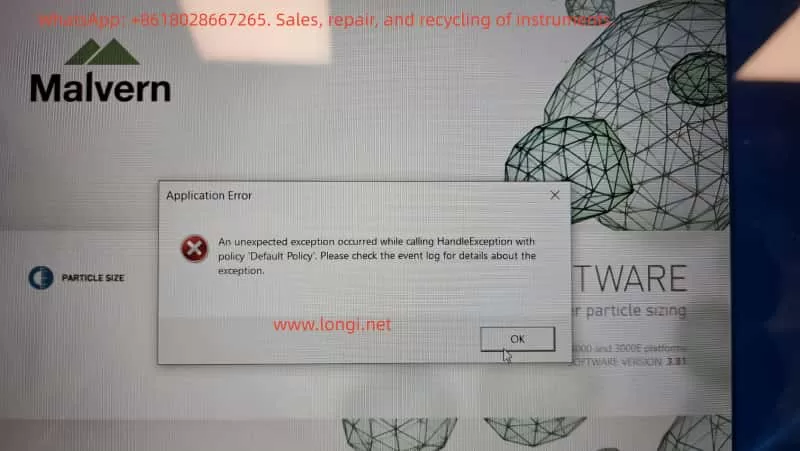
In this case, the customer reported that the Mastersizer software fails to start and displays the following message:
Application Error
An unexpected exception occurred while calling HandleException with policy “Default Policy”. Please check the event log for details about the exception.
Key characteristics of the issue include:
- The software does not enter the main operating interface
- The error is generic and non-descriptive
- The message explicitly refers to Windows Event Logs
- Reinstalling Windows does not resolve the problem
This type of error is frequently misdiagnosed as a corrupted installation or a simple software incompatibility. However, as shown in this case, the true cause lies deeper.
2. A Common Misconception: “Reinstalling Windows Fixes Everything”
From an engineering perspective, the statement:
“The operating system has been reinstalled, but the error remains”
is extremely important.
A clean OS installation normally eliminates:
- Damaged system files
- Registry corruption
- Malware or residual software conflicts
- User-level configuration issues
When a problem persists after a full OS reinstall, it strongly indicates that:
The fault is not at the Windows installation layer.
This observation immediately shifts the diagnostic focus toward:
- Hardware state
- Power management
- Low-level system services
- Firmware or driver–hardware interactions
3. Event Viewer Analysis: Useful Evidence or a Red Herring?
3.1 Logs Provided by the Customer
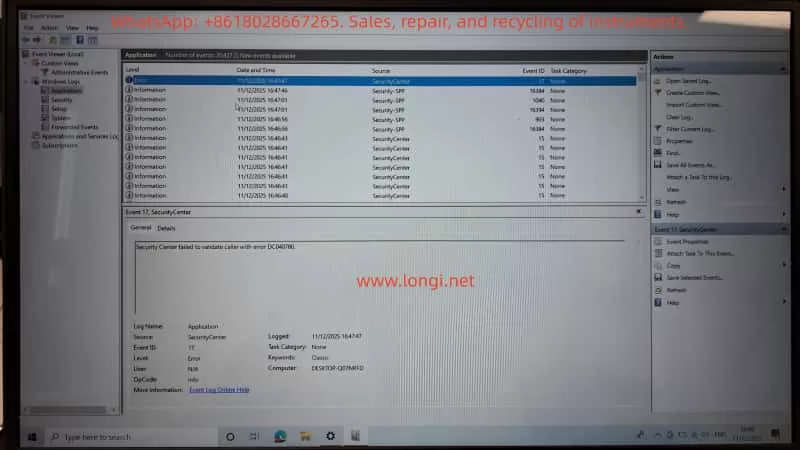
The customer followed instructions and provided multiple screenshots from Windows Event Viewer, specifically:
- Windows Logs → Application
- Sources observed:
SecurityCenterSecurity-SPP(Software Protection Platform)
Notable entries included:
- Event ID 17 – SecurityCenter
Security Center failed to validate caller with error DC040780 - Event ID 903 – Security-SPP
The Software Protection service has stopped - Multiple informational events regarding:
- Defender / McAfee status changes
- Software Protection service restarts
3.2 Do These Logs Explain the Mastersizer Crash?
From a professional diagnostic standpoint, the answer is:
No — not directly.
Reasons:
- Source mismatch
Mastersizer-related crashes usually appear under:.NET RuntimeApplication Error- Vendor-specific modules
- Severity mismatch
Most entries are Information level events.
A software crash severe enough to block startup typically produces a clear Error or Critical event tied to the executable or runtime. - Causal mismatch
Windows Security Center or Software Protection state changes alone do not cause a specialized instrument control application to fail consistently on a fresh OS.
Conclusion:
These logs indicate system instability, but they are symptoms, not the root cause.
4. The Critical Clue: Laptop Battery Stuck at 1% Charge
During troubleshooting, the customer added an apparently unrelated detail:
“The laptop is stuck on 1% charge.”
From an engineering perspective, this is not a minor issue.
It is a high-value diagnostic signal.
5. Power Engineering Perspective: Why 1% Battery Matters
5.1 What “Stuck at 1%” Usually Means
A laptop permanently stuck at 1% charge typically indicates one or more of the following:
- Severely degraded battery
- High internal resistance
- Battery Management System (BMS) limiting output
- Battery effectively unusable as a power buffer
- Power management or EC firmware issues
- Embedded Controller (EC) in protection mode
- Incorrect power state reporting
- System forced into extreme low-power operation
- CPU frequency throttled
- USB power current limited
- Peripheral initialization restricted
This is not just a battery indicator problem — it represents a global system power constraint.
5.2 Why This Directly Affects Malvern Mastersizer
The Mastersizer software is not a lightweight application. During startup, it performs:
- Laser source initialization
- Detector and photodiode communication
- USB / PCIe hardware enumeration
- License and security module validation
- High-resolution timing and buffer allocation
All of these processes require:
- Stable voltage rails
- Predictable timing
- Reliable peripheral power delivery
When a laptop operates in a forced low-power state:
- Hardware initialization may time out
- .NET runtime calls may fail unexpectedly
- Driver-level calls may return invalid states
- Exception handlers may be triggered without clear diagnostic messages
This combination often results in exactly the type of error observed:
“An unexpected exception occurred…”
6. Why Reinstalling Windows Cannot Fix This
This is the key engineering insight of the case.
A Windows reinstall cannot repair:
- A failed battery
- Power management IC faults
- Embedded controller firmware states
- Hardware-enforced power throttling
Even on a completely fresh OS, the system remains constrained by its physical power condition.
As a result:
Any hardware-intensive scientific instrument software may fail unpredictably, even on a clean system.
7. Correct Diagnostic and Recovery Procedure
Step 1: Eliminate Power as a Variable (Highest Priority)
- Remove or bypass the faulty battery
- Operate the laptop on a verified, original AC adapter
- Or replace the battery with a known-good unit
- Confirm stable charging above 80%
No further software troubleshooting should be performed until this step is completed.
Step 2: Retest Mastersizer Under Stable Power Conditions
- Launch the Mastersizer software
- Observe startup behavior
- If the error disappears, the root cause is confirmed as power management failure
Step 3 (If Needed): Collect Relevant Application Logs
Only if the error persists should further logs be collected:
- Windows Logs → Application
- Look specifically for:
.NET RuntimeApplication Error- Mastersizer-related modules
These logs provide actionable information at the software layer.
8. Practical Recommendations for Laboratories
For laboratories operating high-precision instruments:
- Do not use laptops with degraded batteries as instrument controllers
- Treat abnormal power behavior as a system-level fault, not a cosmetic issue
- System stability is more critical than OS cleanliness
- Instrument software errors are often hardware-condition dependent
9. Final Conclusion
This case demonstrates that:
- The Mastersizer error is not a simple software bug
- Event Viewer logs related to Security Center are secondary indicators
- A laptop stuck at 1% battery is a strong and plausible root cause
- Power instability can directly trigger non-descriptive application exceptions
- Reinstalling Windows alone cannot resolve hardware-level constraints
True fault isolation requires understanding the full causal chain:
Power → Hardware → OS Services → Drivers → Application.
10. Closing Remarks
Scientific instrument troubleshooting must go beyond surface-level symptoms.
Only by integrating hardware engineering, power management, operating system behavior, and application architecture can accurate conclusions be reached.
In this case, the Mastersizer software did not “fail randomly” — it failed predictably under abnormal power conditions.