
1. Introduction: Background of the Communication Error
The Malvern Mastersizer 2000 is one of the most widely deployed laser diffraction particle size analyzers worldwide. Its reputation is built on a stable optical system, mature algorithms, and long-term repeatability. However, as the instrument ages, a specific class of failures becomes increasingly common in field applications: loss of communication between the instrument and the host computer.
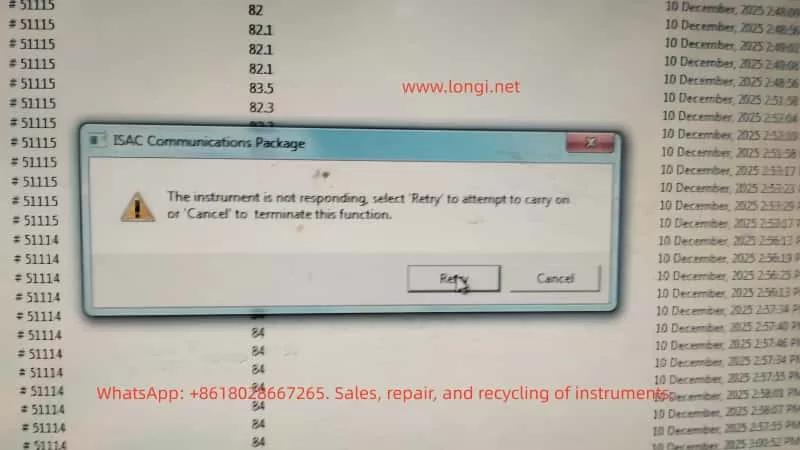
A typical software warning appears as:
ISAC Communications Package
The instrument is not responding
From the user’s perspective, this message is often interpreted as a software crash or a temporary computer issue. From an engineering and maintenance standpoint, however, this error is a clear indicator of a system-level communication failure, involving hardware, power stability, and embedded control reliability rather than measurement parameters or optics.
This article provides a structured, engineering-level analysis of this failure mode in the Mastersizer 2000, focusing on root causes, diagnostic logic, and realistic repair considerations.

2. System Architecture Overview of Mastersizer 2000
Understanding this error requires a clear understanding of how the Mastersizer 2000 is architected at a system level.
The instrument can be divided into four major functional subsystems:
- Host PC and Malvern control software
- Communication layer (ISAC Communications Package)
- Internal controller system (embedded control board)
- Optical and fluid handling subsystems
The ISAC Communications Package is not merely an application layer component. It is responsible for:
- Establishing and maintaining the communication session between PC and instrument
- Periodic polling of instrument status (heartbeat mechanism)
- Transmission of operational commands (start, stop, align, clean, measure)
- Receiving and decoding status responses and operational data
When the software reports “Instrument is not responding”, the real meaning is:
The instrument failed to return a valid response within the defined communication timeout window
This indicates a failure somewhere along the communication and control chain, not a measurement error.
3. What This Error Is NOT
Before diagnosing the real cause, it is critical to eliminate several common misconceptions.
3.1 Not a Simple Software Crash
In many cases, background data logging continues even after the warning appears. This confirms that:
- The Windows operating system is still running
- The Malvern application itself has not crashed
- The failure occurs at the communication interface or embedded control level
3.2 Not an Optical or Laser Failure
Failures related to lasers, detectors, or alignment typically result in:
- Light intensity errors
- Background measurement failures
- Optical calibration errors
They do not directly cause a total communication timeout.
3.3 Not a Sample or Method Issue
Sample concentration, dispersion settings, pump speed, or measurement SOPs may affect results, but they do not cause the instrument controller to stop responding at the protocol level.
4. Engineering Interpretation of the Communication Failure
From a system engineering perspective, the error can be summarized as follows:
The host PC cannot complete a communication transaction with the instrument controller within the allowed time
The communication path is a serial chain:
PC software → OS USB stack → PC USB controller → USB cable → instrument USB interface → internal communication module → controller board MCU → response returned
Any instability along this chain will result in the same final symptom: Instrument not responding.
5. Root Causes in Mastersizer 2000 (Ranked by Probability)
5.1 Unstable USB Communication Path (Highest Probability)
This is the most common cause in aging Mastersizer 2000 units.
Typical symptoms:
- Instrument is detected, but disconnects during operation
- Retry sometimes works, sometimes fails
- Behavior differs between computers
- Connection drops after several minutes of runtime
Engineering causes:
- Aging or poorly shielded USB cables
- Use of USB extension cables or hubs
- Fatigue or micro-cracks in the instrument USB connector solder joints
- Degraded internal USB-to-serial communication module
If replacing the USB cable and connecting directly to a motherboard USB port improves stability, the issue is hardware-level communication reliability, not software.
5.2 Controller Board Marginal Operation
After long service life (typically >8–10 years), the controller board often enters a marginal operating state.
Typical symptoms:
- Cold start works normally
- Communication fails after warm-up
- Power cycling temporarily restores operation
Underlying causes:
- MCU operating near voltage tolerance limits
- Increased ESR in electrolytic capacitors
- Power rail ripple exceeding acceptable margins
- Temperature-related timing instability
This class of failure is often misdiagnosed as intermittent software behavior but is fundamentally a hardware aging issue.
5.3 Internal Power Supply Degradation or Poor Mains Quality
This factor is especially common in regions with unstable mains power.
Contributing conditions:
- Line voltage fluctuations
- Lack of voltage regulation
- Aging internal switching power supplies
Resulting behavior:
- Momentary drops in 5 V or 3.3 V rails
- Internal controller or communication module resets
- PC reports communication timeout
The instrument may appear powered and operational while internally experiencing repeated micro-resets.
5.4 Operating System or Driver Environment (Low Probability)
This factor should only be prioritized when:
- A new PC has been introduced
- The operating system was recently reinstalled
- Non-standard or unofficial software versions are used
In stable legacy systems, OS-level causes are relatively rare.
6. Structured Diagnostic Procedure (Field-Applicable)
A professional diagnostic approach must be systematic and repeatable.
Step 1: Full Cold Reset
- Shut down software
- Power off instrument
- Disconnect power for at least 5 minutes
Step 2: Minimize Communication Path
- Replace USB cable
- Eliminate USB hubs or extensions
- Use rear motherboard USB ports
Step 3: Test with an Alternate Computer
- Clean OS environment
- No additional instrument drivers
Step 4: Idle Stability Test
- Do not perform measurements
- Maintain connection for at least 10 minutes
If communication still fails under these conditions, the fault can be confidently attributed to instrument-side hardware.
7. Repair and Commercial Considerations
From a third-party service and repair perspective, this fault class has clear implications:
- It is not a user operation issue
- Reinstalling software is rarely a true solution
- In many cases, the instrument is repairable
- Risk and cost must be evaluated at board level
Viable repair directions:
- USB connector and communication module repair
- Controller board power conditioning (capacitors, regulators)
- Internal power supply refurbishment
Cases where repair is not recommended:
- Severe multi-board corrosion
- Controller MCU failure without replacement options
8. Conclusion
The error message “ISAC Communications Package – Instrument not responding” is not vague or generic. In the Mastersizer 2000, it represents a classic aging-related system-level failure involving communication stability and embedded control reliability.
The correct solution is not repeated retries or blind software reinstallation, but:
- Understanding the communication architecture
- Differentiating software symptoms from hardware causes
- Making informed engineering and commercial repair decisions